|
001 |
This chapter describes tablespaces, the primary logical database
structures of any Oracle database, and the physical datafiles that
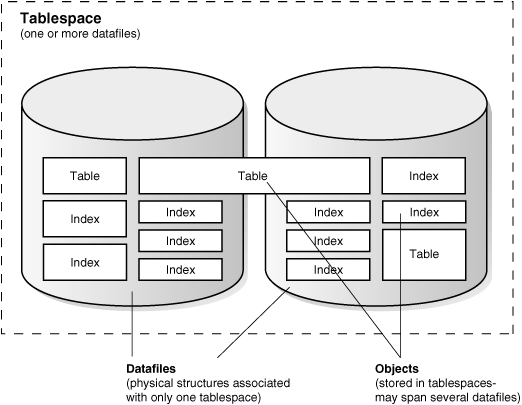
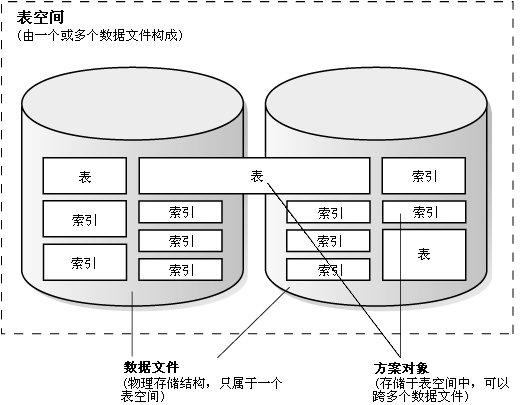
correspond to each tablespace.
|
本章讲解Oracle数据库中重要的逻辑数据库结构--表空间(tablespace),以及组成表空间的物理数据文件(physical
datafile)。 |
|
002 |
This chapter contains the following topics:
|
本章包含以下主题:
|
|
003 |
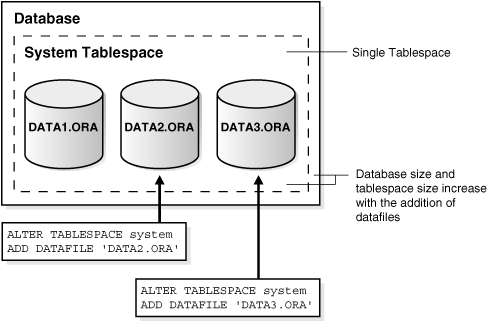
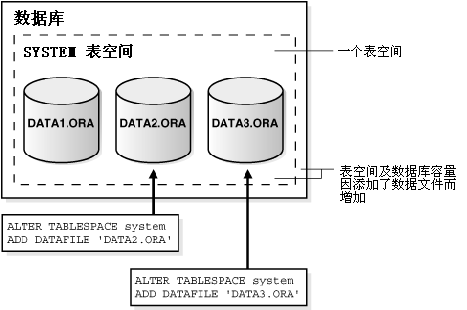
Introduction to
Tablespaces, Datafiles, and Control Files
|
3.1
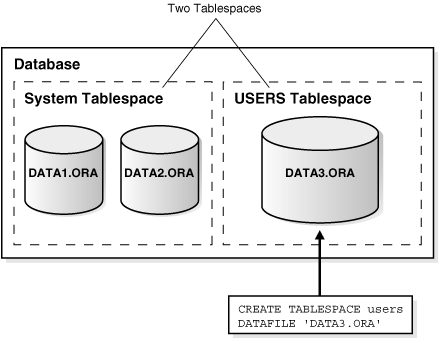
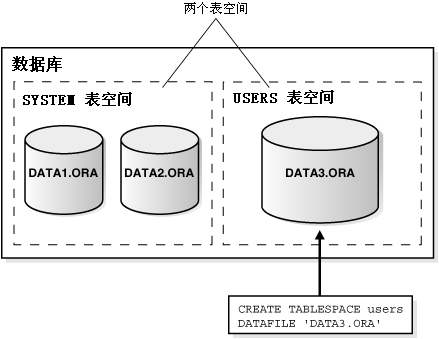
表空间,数据文件,控制文件简介
|
|
004 |
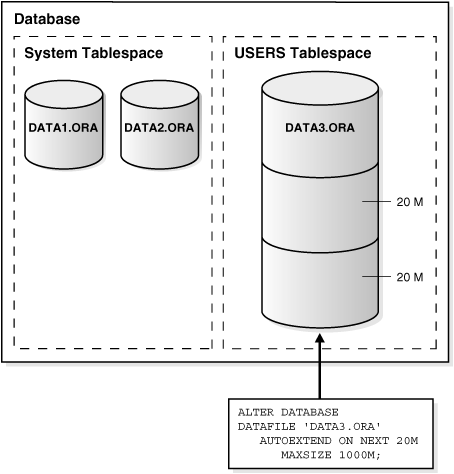
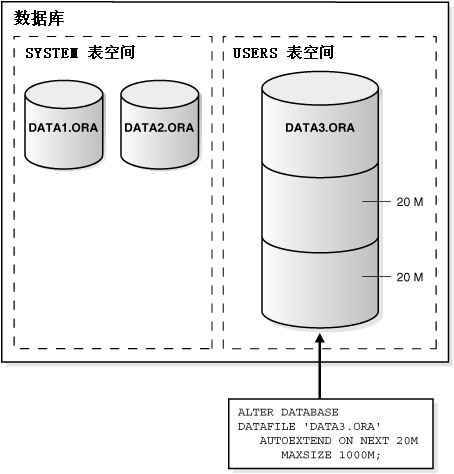
Oracle stores data logically in tablespaces and physically
in datafiles associated with the corresponding tablespace.
Figure 3-1 illustrates this relationship.
|
Oracle中的数据逻辑上存储于表空间(tablespace)中,而物理上则存储于属于表空间的数据文件(datafile)中。图3-1
说明了二者的关系。 |
|
005 |
Figure 3-1 Datafiles and
Tablespaces
|
图3-1 数据文件和表空间 |
|
006 |
|
 |
|
007 |
Figure 3-1 shows one tablespace that contains two
datafiles. The datafiles are the physical structures associated
with only one tablespace. Inside the datafiles are objects, like
tables and indexes. Objects stored in tablespaces can span several
datafiles.
|
图3-1
显示一个由两个数据文件(datafile)组成的表空间(tablespace)。数据文件是一种物理存储结构,由唯一一个表空间拥有。表、索引等方案对象(schema
objects)就存储在数据文件中。属于一个表空间的方案对象可以跨多个数据文件。
|
|
008 |
Databases, tablespaces, and datafiles are closely related, but they have
important differences:
- An Oracle database consists of one or
more logical storage units called tablespaces, which collectively
store all of the database's data.
- Each tablespace in an Oracle database
consists of one or more files called datafiles, which are physical
structures that conform to the operating system in which Oracle is
running.
- A database's data is collectively
stored in the datafiles that constitute each tablespace of the
database. For example, the simplest Oracle database would have one
tablespace and one datafile. Another database can have three
tablespaces, each consisting of two datafiles (for a total of six
datafiles).
|
数据库(database),表空间(tablespace),及数据文件(datafile)关系密切,但是她们又具有以下重要区别:
-
一个Oracle数据库是由一个或多个被称为表空间(tablespace)的逻辑存储单位构成的,这些表空间共同用于存储数据库的数据
-
Oracle数据库的每个表空间由一个或多个被称为数据文件(datafile)的物理文件构成,这些文件由Oracle所在的操作系统管理。
-
数据库的数据实际存储在构成各个表空间的数据文件中。例如,一个最简单的Oracle数据库至少包含一个表空间及一个数据文件。再例如,一个数据库可能含有三个表空间,每个表空间由两个数据文件构成(即总共有六个数据文件)。
|
|
009 |
Oracle-Managed Files
|
3.1.1 由Oracle管理数据库文件
|
|
010 |
Oracle-managed files eliminate the need for you, the DBA, to directly
manage the operating system files comprising an Oracle database. You
specify operations in terms of database objects rather than filenames.
Oracle internally uses standard file system interfaces to create and
delete files as needed for the following database structures:
- Tablespaces
- Redo log files
- Control files
|
由Oracle管理数据库文件(Oracle-managed
files)避免了由DBA直接管理组成Oracle数据库的操作系统文件(operating system
file)。管理员不必了解数据库中各个文件的文件名,而是以数据库对象的形式对文件进行管理操作。而Oracle在内部则使用标准的文件系统(file
system)接口来创建,删除以下各种数据库结构所需的文件:
- 表空间(tablespace)
- 重做日志文件(redo log file)
- 控制文件(control file)
|
|
011 |
Through initialization parameters, you specify the file system directory
to be used for a particular type of file. Oracle then ensures that a
unique file, an Oracle-managed file, is created and deleted when no
longer needed.
|
管理员可以在初始化参数(initialization parameter)中设定保存各类数据库文件的文件系统目录(file system
directory)。而Oracle就可以据此自动地创建由Oracle管理的唯一的文件,并在不需要时将其删除。 |
|
012 |
See Also:
|
另见:
|
|
013 |
Allocate More Space for a Database
|
3.1.2 为数据库分配更多空间
|
|
014 |
The size of a tablespace is the size of the datafiles that constitute
the tablespace. The size of a database is the collective size of the
tablespaces that constitute the database.
|
表空间(tablespace)的容量等于构成此表空间的各个数据文件(datafile)的容量。而数据库(database)的容量则等于构成此数据库的各个表空间的容量之和。 |
|
015 |
You can enlarge a database in three ways:
- Add a datafile to a tablespace
- Add a new tablespace
- Increase the size of a datafile
|
管理员可以通过以下三种方式为数据库扩容:
- 为表空间(tablespace)添加数据文件(datafile)
- 添加新的表空间
- 增大数据文件的容量
|
|
016 |
When you add another datafile to an existing tablespace, you increase
the amount of disk space allocated for the corresponding tablespace.
Figure 3-2 illustrates this kind of space
increase.
|
当用户向已有表空间(tablespace)添加数据文件(datafile)时,相当于为此表空间分配了更多的磁盘空间(disk space)。图3-12
显示了这种情况。 |
|
017 |
Figure 3-2 Enlarging a
Database by Adding a Datafile to a Tablespace
|
图3-2 通过向表空间添加数据文件而为数据库扩容 |
|
018 |
|
|
|
019 |
Figure 3-2 shows the SQL statement for adding a
datafile to a tablespace.
ALTER TABLESPACE system
ADD DATAFILE 'DATA2.ORA'
Database size and tablespace size increase with the addition of
datafiles.
|
图3-2 显示了使用一个SQL语句向表空间中添加数据文件。
ALTER TABLESPACE system
ADD DATAFILE 'DATA2.ORA'
表空间及数据库容量因添加的数据文件而增加
|
|
020 |
Alternatively, you can create a new tablespace (which contains at least
one additional datafile) to increase the size of a database.
Figure 3-3 illustrates this.
|
此外,用户还可以通过创建新的表空间(tablespace
)(想当于至少向数据库中添加了一个数据文件(datafile))来扩大数据库容量。见
图3-3
所示。 |
|
021 |
Figure 3-3 Enlarging a
Database by Adding a New Tablespace
|
图3-3 通过添加新的表空间而为数据库扩容 |
|
022 |
|
|
|
023 |
Figure 3-3 shows the SQL statement for adding a new
tablespace:
CREATE TABLESPACE users
DATAFILE 'DATA3.ORA'
|
图3-3 显示了使用SQL语句添加一个新的表空间:
CREATE TABLESPACE users
DATAFILE 'DATA3.ORA'
|
|
024 |
The third option for enlarging a database is to change a datafile's size
or let datafiles in existing tablespaces grow dynamically as more space
is needed. You accomplish this by altering existing files or by adding
files with dynamic extension properties.
Figure 3-4
illustrates this.
|
扩大数据库的第三种方法是手工增大数据文件(datafile)的容量或使表空间(tablespace)内的数据文件容量可以随需动态地增长。用户可以为已有或新建的数据文件设置动态扩展属性(dynamic
extension properties)。见 图3-4 所示。 |
|
025 |
Figure 3-4 Enlarging a
Database by Dynamically Sizing Datafiles
|
图3-4 通过动态增大数据文件而为数据库扩容 |
|
026 |
|
|
|
027 |
Figure 3-4 shows the SQL statement for dynamically
sizing datafiles:
ALTER DATABASE
DATAFILE 'DATA3.ORA
AUTOEXTEND ON NEXT 20M
MAXSIZE 1000M;
|
图3-4 显示了使用SQL语句动态地增大数据库文件:
ALTER DATABASE
DATAFILE 'DATA3.ORA
AUTOEXTEND ON NEXT 20M
MAXSIZE 1000M;
|
|
028 |
See Also:
Oracle Database Administrator's Guide for more
information about increasing the amount of space in your database
|
另见:
Oracle 数据库管理员指南 了解关于增大数据库容量的信息
|
|
029 |
Overview of
Tablespaces
|
3.2 表空间概述
|
|
030 |
A database is divided into one or more logical storage units called
tablespaces. Tablespaces are divided into logical units of storage
called segments, which are further divided into extents.
Extents are a collection of contiguous blocks.
|
数据库是由一个或多个被称为表空间(tablespace)的逻辑存储单位构成。表空间内的逻辑存储单位为段(segment),段又可以继续划分为数据扩展(extent)。而数据扩展是由一组连续的数据块(data
block)构成。 |
|
031 |
This section includes the following topics about tablespaces:
|
本节包含以下与表空间(tablespace)相关的主题: |
|
032 |
See Also:
|
另见:
|
|
033 |
Bigfile Tablespaces
|
3.2.1
大文件表空间
|
|
034 |
Oracle lets you create bigfile tablespaces. This allows Oracle
Database to contain tablespaces made up of single large files rather
than numerous smaller ones. This lets Oracle Database utilize the
ability of 64-bit systems to create and manage ultralarge files. The
consequence of this is that Oracle Database can now scale up to 8
exabytes in size.
|
在Oracle中用户可以创建大文件表空间(bigfile
tablespace)。这样Oracle数据库使用的表空间(tablespace)可以由一个单一的大文件构成,而不是若干个小数据文件。这使Oracle可以发挥64位系统的能力,创建、管理超大的文件。在64位系统中,Oracle数据库的存储能力被扩展到了8
EB(1EB = 1024PB,1PB = 1024TB,1TB=1024GB)。 |
|
035 |
With Oracle-managed files, bigfile tablespaces make datafiles completely
transparent for users. In other words, you can perform operations on
tablespaces, rather than the underlying datafile. Bigfile tablespaces
make the tablespace the main unit of the disk space administration,
backup and recovery, and so on. Bigfile tablespaces also simplify
datafile management with Oracle-managed files and Automatic Storage
Management by eliminating the need for adding new datafiles and dealing
with multiple files.
|
当数据库文件由Oracle管理(Oracle-managed files),且使用大文件表空间(bigfile
tablespace)时,数据文件对用户完全透明。换句话说,用户只须针对表空间(tablespace)执行管理操作,而无须关心处于底层的数据文件(datafile)。使用大文件表空间,使表空间成为磁盘空间管理,备份,和恢复等操作的主要对象。使用大文件表空间,并与由Oracle管理数据库文件(Oracle-managed
files)技术以及自动存储管理(Automatic Storage
Management)技术相结合,就不再需要管理员手工创建新的数据文件(datafile)并维护众多数据库文件,因此简化了数据库文件管理工作。
|
|
036 |
The system default is to create a smallfile tablespace, which is the
traditional type of Oracle tablespace. The SYSTEM
and SYSAUX tablespace types are always
created using the system default type.
|
数据库默认创建的是小文件表空间(smallfile tablespace),即Oracle中传统的表空间(tablespace)类型。数据库中 SYSTEM
和 SYSAUX 表空间在创建时总是使用传统类型。 |
|
037 |
Bigfile tablespaces are supported only for locally managed tablespaces
with automatic segment-space management. There are two exceptions:
locally managed undo and temporary tablespaces can be bigfile
tablespaces, even though their segments are manually managed.
|
只有本地管理的(locally
managed),且段空间自动管理(automatic segment-space
management)的表空间(tablespace)才能使用大文件表空间(bigfile
tablespace)。但是有两个例外:本地管理的撤销表空间(undo tablespace)和临时表空间(temporary
tablespace),即使其段(segment)为手工管理(manually managed),也可以使用大文件表空间。
|
|
038 |
An Oracle database can contain both bigfile and smallfile tablespaces.
Tablespaces of different types are indistinguishable in terms of
execution of SQL statements that do not explicitly refer to datafiles.
|
一个Oracle数据库可以同时包含大文件/小文件表空间(bigfile/smallfile
tablespace)。SQL语句执行时无需考虑表空间(tablespace)的类型,除非语句中显式地引用了数据文件(datafile)名。 |
|
039 |
You can create a group of temporary tablespaces that let a user consume
temporary space from multiple tablespaces. A tablespace group can also
be specified as the default temporary tablespace for the database. This
is useful with bigfile tablespaces, where you could need a lot of
temporary tablespace for sorts.
|
管理员可以创建一组临时表空间(temporary
tablespace),用户在需要时可以利用组内各个表空间(tablespace)提供的临时空间。管理员还可以指定表空间组(tablespace
group)为数据库默认的临时表空间。当用户需要大量临时空间进行排序操作时,就可以利用大文件表空间及表空间组。 |
|
040 |
Benefits of Bigfile Tablespaces
|
3.2.1.1 使用大文件表空间的优势
|
|
041 |
- Bigfile tablespaces can significantly
increase the storage capacity of an Oracle database. Smallfile
tablespaces can contain up to 1024 files, but bigfile tablespaces
contain only one file that can be 1024 times larger than a smallfile
tablespace. The total tablespace capacity is the same for smallfile
tablespaces and bigfile tablespaces. However, because there is limit
of 64K datafiles for each database, a database can contain 1024
times more bigfile tablespaces than smallfile tablespaces, so
bigfile tablespaces increase the total database capacity by 3 orders
of magnitude. In other words, 8 exabytes is the maximum size of the
Oracle database when bigfile tablespaces are used with the maximum
block size (32 k).
- Bigfile tablespaces simplify
management of datafiles in ultra large databases by reducing the
number of datafiles needed. You can also adjust parameters to reduce
the SGA space required for datafile information and the size of the
control file.
- They simplify database management by
providing datafile transparency.
|
- 使用大文件表空间(bigfile
tablespace)可以显著地增强Oracle数据库的存储能力。一个小文件表空间(smallfile
tablespace)最多可以包含1024个数据文件(datafile),而一个大文件表空间中只包含一个文件,这个数据文件的最大容量是小数据文件的1024倍。这样看来,大文件表空间和小文件表空间的最大容量是相同的。但是由于每个数据库最多使用64K个数据文件,因此使用大文件表空间时数据库中表空间的极限个数是使用小文件表空间时的1024倍,使用大文件表空间时的总数据库容量比使用小文件表空间时高出三个数量级。换言之,当一个Oracle数据库使用大文件表空间,且使用最大的数据块容量时(32K),其总容量可以达到8EB。
-
在超大型数据库中使用大文件表空间减少了数据文件的数量,因此也简化了对数据文件的管理工作。由于数据文件的减少,SGA中关于数据文件的信息,以及控制文件(control
file)的容量也得以减小。
- 由于数据文件对用户透明,由此简化了数据库管理工作。
|
|
042 |
Considerations with Bigfile Tablespaces
|
3.2.1.2 使用大文件表空间时需要考虑的因素
|
|
043 |
- Bigfile tablespaces are intended to be
used with Automatic Storage Management or other logical volume
managers that support dynamically extensible logical volumes and
striping or RAID.
- Avoid creating bigfile tablespaces on
a system that does not support striping because of negative
implications for parallel execution and RMAN backup parallelization.
- Avoid using bigfile tablespaces if
there could possibly be no free space available on a disk group, and
the only way to extend a tablespace is to add a new datafile on a
different disk group.
- Using bigfile tablespaces on platforms
that do not support large file sizes is not recommended and can
limit tablespace capacity. Refer to your operating system specific
documentation for information about maximum supported file sizes.
- Performance of database opens,
checkpoints, and DBWR processes should improve if data is stored in
bigfile tablespaces instead of traditional tablespaces. However,
increasing the datafile size might increase time to restore a
corrupted file or create a new datafile.
|
- 大文件表空间(bigfile tablespace)应该和自动存储管理(Automatic Storage Management)或其他逻辑卷管理工具(logical volume
manager)配合使用,这些工具应该能够支持动态扩展逻辑卷,也能支持striping(数据跨磁盘分布)或RAID。
- 应该避免在不支持striping的系统上使用大文件表空间,因为这将不利于并行执行(parallel execution)及 RMAN
的并行备份(backup parallelization)。
- 当表空间正在使用的磁盘组(disk
group)可能没有足够的空间,且扩展表空间的唯一办法是向另一个磁盘组加入数据文件时,应避免使用大文件表空间。
-
不建议在不支持大文件的平台上使用大文件表空间,这会限制表空间(tablespace)的容量。参考相关的操作系统文档了解其支持的最大文件容量。
-
如果使用大文件表空间替代传统的表空间,数据库开启(open),checkpoints,以及 DBWR
进程的性能会得到提高。但是增大数据文件(datafile)容量可能会增加备份与恢复的时间。
|
|
044 |
See Also:
Oracle Database Administrator's Guide for details on
creating, altering, and administering bigfile tablespaces
|
另见:
Oracle 数据库管理员指南
了解关于创建、修改、管理大文件表空间的详细信息。
|
|
045 |
The SYSTEM Tablespace
|
3.2.2 SYSTEM 表空间
|
|
046 |
Every Oracle database contains a tablespace named
SYSTEM, which Oracle creates automatically when the database is
created. The SYSTEM tablespace is always
online when the database is open.
|
每个Oracle数据库都包含一个名为
SYSTEM 的表空间(tablespace),她在数据库创建时由Oracle自动创建。只要数据库处于开启(open)状态,SYSTEM
表空间就一定是联机(online)的。 |
|
047 |
To take advantage of the benefits of locally managed tablespaces, you
can create a locally managed SYSTEM
tablespace, or you can migrate an existing dictionary managed
SYSTEM tablespace to a locally managed
format.
|
管理员可以创建本地管理的(locally managed)SYSTEM
表空间(tablespace),或将已有的数据字典管理的(dictionary managed)SYSTEM
表空间转换为本地管理,以便发挥本地管理的表空间的优势。 |
|
048 |
In a database with a locally managed SYSTEM
tablespace, dictionary managed tablespaces cannot be created. It is
possible to plug in a dictionary managed tablespace using the
transportable feature, but it cannot be made writable.
|
如果数据库中的 SYSTEM
表空间(tablespace)为本地管理的(locally managed),那么此数据库中就不能创建数据字典管理的(dictionary
managed)表空间。虽然用户可以通过可移动表空间(transportable
tablespace)功能向其中添加数据字典管理的表空间,但这个表空间只能是只读的。
|
|
049 |
Note:
If a tablespace is locally managed, then it cannot be reverted back
to being dictionary managed.
|
提示:
如果一个表空间(tablespace)为本地管理的(locally
managed),则不能将她转换为数据字典管理的(dictionary managed)。
|
|
050 |
The Data Dictionary
|
3.2.2.1 数据字典
|
|
051 |
The SYSTEM tablespace always contains the
data dictionary tables for the entire database.
The data dictionary
tables are stored in
datafile 1.
|
SYSTEM
表空间(tablespace)总是用于存储整个数据库的数据字典表(data dictionary table)。数据字典表存储在编号为 1
的数据文件(datafile)中。 |
|
052 |
PL/SQL Program Units Description
|
3.2.2.2 PL/SQL 程序结构描述
|
|
053 |
All data stored on behalf of stored PL/SQL program units (that is,
procedures, functions, packages, and triggers) resides in the
SYSTEM tablespace. If the database contains
many of these program units, then the database administrator must
provide the space the units need in the SYSTEM
tablespace.
|
所有和 PL/SQL
程序结构(包括过程(procedure),函数(function),包(package),及触发器(trigger))有关的数据都被保存在 SYSTEM
表空间(tablespace)中。如果数据库中用户定义的程序结构很多,那么管理员必须为之在
SYSTEM 表空间中提供足够的空间。 |
|
054 |
See Also:
|
另见:
|
|
055 |
The SYSAUX Tablespace
|
3.2.3 SYSAUX 表空间
|
|
056 |
The SYSAUX tablespace is an auxiliary
tablespace to the SYSTEM tablespace. Many
database components use the SYSAUX
tablespace as their default location to store data. Therefore, the
SYSAUX tablespace is always created during
database creation or database upgrade.
|
SYSAUX 表空间(tablespace)是 SYSTEM
表空间的一个辅助性表空间。Oracle中很多组件使用 SYSAUX
表空间作为默认的数据存储位置。因此在 10g 数据库创建,或从低版本升级到 10g 时,一定会创建 SYSAUX
表空间。 |
|
057 |
The SYSAUX tablespace provides a
centralized location for database metadata that does not reside in the
SYSTEM tablespace. It reduces the number of
tablespaces created by default, both in the seed database and in
user-defined databases.
|
此外,SYSAUX
表空间(tablespace)还被用来集中存储所有不应放在 SYSTEM
表空间的数据库元数据。不论是依据模版建立的数据库(seed database),还是用户定义的数据库(user-defined
database),使用 SYSAUX 表空间可以减少默认创建的表空间数量。 |
|
058 |
During normal database operation, the Oracle database server does not
allow the SYSAUX tablespace to be dropped
or renamed. Transportable tablespaces for SYSAUX
is not supported.
|
在正常的数据库操作中,不允许移除(drop)或重命名(rename)SYSAUX
表空间(tablespace)。SYSAUX
表空间也不支持可移动表空间(transportable tablespace)功能。 |
|
059 |
Note:
If the SYSAUX tablespace is
unavailable, such as due to a media failure, then some database
features might fail.
|
提示:
如果 SYSAUX
表空间实效,例如发生介质故障(media failure),那么有些数据库功能可能会随之失效。
|
|
060 |
Undo Tablespaces
|
3.2.4 撤销表空间
|
|
061 |
Undo tablespaces are special tablespaces used solely for storing undo
information. You cannot create any other segment types (for example,
tables or indexes) in undo tablespaces. Each database contains zero or
more undo tablespaces. In automatic undo management mode, each Oracle
instance is assigned one (and only one) undo tablespace. Undo data is
managed within an undo tablespace using undo segments that are
automatically created and maintained by Oracle.
|
撤销表空间(undo
tablespace)是一个特殊的表空间(tablespace),只用于存储撤销信息(undo
information)。用户不能在其中创建段(segment)(例如表或索引)。一个数据库中可以没有撤销表空间,也可以包含多个。在自动撤销管理模式(automatic
undo management
mode)下,每个Oracle实例(instance)有(且仅有)一个撤销表空间。Oracle在撤销表空间内自动地创建和维护撤销段(undo
segment),对撤销数据(undo data)进行管理。 |
|
062 |
When the first DML operation is run within a transaction, the
transaction is bound (assigned) to an undo segment (and therefore to a
transaction table) in the current undo tablespace. In rare
circumstances, if the instance does not have a designated undo
tablespace, the transaction binds to the system undo segment.
|
当事务(transaction)内第一条 DML 语句运行时,系统就为期其在当前撤销表空间(undo
tablespace)中分配一个撤销段(undo segment),同时也分配一个事务表(transaction
table)。在极少数情况下,如果实例(instance)中没有指定撤销表空间,那么事务将使用系统的撤销段。 |
|
063 |
Caution:
Do not run any user transactions before creating the first undo
tablespace and taking it online.
|
警告:
在创建撤销表空间(undo tablespace),并使之联机(online)之前,不要运行任何用户事务
(transaction)。
|
|
064 |
Each undo tablespace is composed of a set of undo files and is locally
managed. Like other types of tablespaces, undo blocks are grouped in
extents and the status of each extent is represented in the bitmap. At
any point in time, an extent is either allocated to (and used by) a
transaction table, or it is free.
|
撤销表空间(undo
tablespace)由一组撤销文件(undo file)构成,且为本地管理的(locally
managed)。与其他表空间(tablespace)的结构类似,撤销表空间中也存在由撤销数据块(undo
block)构成的数据扩展(extent),这些数据扩展的状态由位图(bitmap)表示。在任何时间点上,一个数据扩展或者被分配给一个事务表(transaction
table)(被使用状态),或者处于可用状态。
|
|
065 |
You can create a bigfile undo tablespace.
|
用户可以创建大文件撤销表空间(bigfile undo tablespace)。 |
|
066 |
See Also:
"Bigfile Tablespaces"
|
另见:
“大文件表空间”
|
|
067 |
Creation of Undo Tablespaces
|
3.2.4.1 创建撤销表空间
|
|
068 |
A database administrator creates undo tablespaces individually, using
the CREATE UNDO TABLESPACE statement. It
can also be created when the database is created, using the
CREATE DATABASE statement. A set of files
is assigned to each newly created undo tablespace. Like regular
tablespaces, attributes of undo tablespaces can be modified with the
ALTER TABLESPACE statement and dropped with
the DROP TABLESPACE statement.
|
数据库管理员可以使用 CREATE UNDO TABLESPACE
语句单独创建撤销表空间(undo tablespace),也可以在使用
CREATE DATABASE
语句创建数据库的同时创建撤销表空间。撤销表空间也使用一组数据文件存储数据。与常规的表空间一样,撤销表空间既可以用 DROP TABLESPACE
语句移除,其属性也可以通过
ALTER TABLESPACE 语句修改。
|
|
069 |
Note:
An undo tablespace cannot be dropped if it is being used by any
instance or contains any undo information needed to recover
transactions.
|
提示:
当撤销表空间(undo
tablespace)正在被实例(instance)使用,或者包含了事务恢复所需的撤销信息(undo
information)时,不能将其移除(drop)。
|
|
070 |
Assignment of Undo Tablespaces
|
3.2.4.2 分配撤销表空间
|
|
071 |
You assign an undo tablespace to an instance in one of two ways:
- At instance startup. You can specify
the undo tablespace in the initialization file or let the system
choose an available undo tablespace.
- While the instance is running. Use
ALTER SYSTEM SET UNDO_TABLESPACE to
replace the active undo tablespace with another undo tablespace.
This method is rarely used.
|
用户可以使用以下两种方法将撤销表空间(undo
tablespace)分配给一个实例(instance):
- 在实例启动时。用户可以在实例的初始化文件(initialization
file)中指定一个撤销表空间,或指定由系统自动选择一个可用的撤销表空间。
- 当实例运行时。使用
ALTER SYSTEM SET UNDO_TABLESPACE
将当前活动的撤销表空间替换为另一个。这种方式很少使用。
|
|
072 |
You can add more space to an undo tablespace by adding more datafiles to
the undo tablespace with the ALTER TABLESPACE
statement.
|
用户可以使用 ALTER TABLESPACE
语句向撤销表空间(undo tablespace)添加数据文件(datafile),以扩展撤销表空间的容量。 |
|
073 |
You can have more than one undo tablespace and switch between them. Use
the Database Resource Manager to establish user quotas for undo
tablespaces. You can specify the retention period for undo information.
|
用户可以创建多个撤销表空间(undo
tablespace),以便切换使用。用户还可以设定撤销信息(undo information)的保存周期(retention
period)。用户也可以使用数据库资源管理器(Database Resource
Manager)为用户规定撤销表空间的使用配额(quota)。
|
|
074 |
See Also:
Oracle Database Administrator's Guide for detailed
information about creating and managing undo tablespaces
|
另见:
Oracle 数据库管理员指南 了解创建和管理撤销表空间的详细信息
|
|
075 |
Default Temporary Tablespace
|
3.2.5 默认的临时表空间
|
|
076 |
When the SYSTEM tablespace is locally
managed, you must define at least one default temporary tablespace when
creating a database. A locally managed SYSTEM
tablespace cannot be used for default temporary storage.
|
如果 SYSTEM 表空间(tablespace)是本地管理的(locally
managed),用户必须在创建数据库时定义一个默认的临时表空间(temporary tablespace)。本地管理的 SYSTEM
表空间不能作为默认的临时存储空间。 |
|
077 |
If SYSTEM is dictionary managed and if you
do not define a default temporary tablespace when creating the database,
then SYSTEM is still used for default
temporary storage. However, you will receive a warning in
ALERT.LOG saying that a default temporary
tablespace is recommended and will be necessary in future releases.
|
如果 SYSTEM
表空间(tablespace)是数据字典管理的(dictionary
managed),且创建数据库时没有定义默认的临时表空间(temporary tablespace),那么Oracle将 SYSTEM
表空间作为默认的临时存储空间使用。此时用户在
ALERT.LOG
文件中会发现一条警告:建议创建默认的临时表空间,以后的Oracle版本将会需要。 |
|
078 |
How to Specify a Default Temporary Tablespace
|
3.2.5.1 如何指定默认的临时表空间
|
|
079 |
Specify default temporary tablespaces when you create a database, using
the DEFAULT TEMPORARY TABLESPACE extension
to the CREATE DATABASE statement.
|
用户在使用 CREATE DATABASE
语句创建数据库时,可以通过 DEFAULT TEMPORARY TABLESPACE
子句指定默认的临时表空间(temporary tablespace)。 |
|
080 |
If you drop all default temporary tablespaces, then the
SYSTEM tablespace is used as the default
temporary tablespace.
|
如果用户移除(drop)了所有默认的临时表空间(temporary tablespace),Oracle将使用
SYSTEM 表空间(tablespace)作为默认的临时表空间。 |
|
081 |
You can create bigfile temporary tablespaces. A bigfile temporary
tablespaces uses tempfiles instead of datafiles.
|
用户可以创建大文件临时表空间(bigfile temporary
tablespace)。大文件临时表空间使用临时文件(tempfile),而不是数据文件(datafile)。
|
|
082 |
Note:
You cannot make a default temporary tablespace permanent or take it
offline.
|
提示:
用户不能将默认的临时表空间(default temporary tablespace)转为永久表空间(permanent),或将其置为脱机状态(offline)。
|
|
083 |
See Also:
|
另见:
|
|
084 |
Using Multiple Tablespaces
|
3.2.6 在数据库中使用多个表空间
|
|
085 |
A very small database may need only the SYSTEM
tablespace; however, Oracle recommends that you create at least one
additional tablespace to store user data separate from data dictionary
information. This gives you more flexibility in various database
administration operations and reduces contention among dictionary
objects and schema objects for the same datafiles.
|
一个小型数据库可能只需要使用
SYSTEM
表空间(tablespace);但是Oracle建议用户至少创建一个额外的表空间来存储用户数据,使之与系统的数据字典信息(data
dictionary information)分离。这使用户在进行数据库管理操作时更灵活,并减少了由于数据字典对象(dictionary
object)与用户方案对象(schema object)处于同一数据文件(datafile)而导致的竞争。 |
|
086 |
You can use multiple tablespaces to perform the following tasks:
- Control disk space allocation for
database data
- Assign specific space quotas for
database users
- Control availability of data by taking
individual tablespaces online or offline
- Perform partial database backup or
recovery operations
- Allocate data storage across devices
to improve performance
|
用户可以利用多个表空间(multiple tablespace)完成以下任务:
- 控制数据库内的磁盘空间分配
- 为数据库用户设定空间使用配额(quota)
-
通过将某个表空间置于联机/脱机(online/offline)状态来控制数据的可访问性(availability)
- 执行对数据库的某部分的备份与恢复
- 使数据存储可以跨多个设备,提升系统性能
|
|
087 |
A database administrator can use tablespaces to do the following
actions:
- Create new tablespaces
- Add datafiles to tablespaces
- Set and alter default segment storage
settings for segments created in a tablespace
- Make a tablespace read only or
read/write
- Make a tablespace temporary or
permanent
- Rename tablespaces
- Drop tablespaces
|
数据库管理员可以对表空间(tablespace)进行以下操作:
- 创建一个新的表空间
- 为一个表空间添加数据文件(datafile)
- 设置或修改表空间内某段(segment)的默认段存储参数(default
segment storage setting)
- 使一个表空间为只读(read only)或可读写(read/write)
- 将表空间设置为临时(temporary)或永久(permanent)
- 重命名表空间
- 移除(drop)表空间
|
|
088 |
Managing Space in Tablespaces
|
3.2.7 表空间内的空间管理
|
|
089 |
Tablespaces allocate space in extents. Tablespaces can use two different
methods to keep track of their free and used space:
- Locally managed tablespaces:
Extent management by the tablespace
- Dictionary managed tablespaces:
Extent management by the data dictionary
|
表空间(tablespace)内(为各个方案对象)分配空间的单位是数据扩展(extent)。Oracle采用两种方式监控表空间内的空间的已用/可用情况:
- 本地管理的表空间(Locally managed tablespaces):
通过位图(bitmap)管理数据扩展
- 数据字典管理的表空间(Dictionary managed tablespaces):通过数据字典管理数据扩展
|
|
090 |
When you create a tablespace, you choose one of these methods of space
management. Later, you can change the management method with the
DBMS_SPACE_ADMIN PL/SQL package.
|
当用户创建表空间(tablespace)时,需要选择空间管理方式。在此之后,用户还可以通过 DBMS_SPACE_ADMIN
PL/SQL 包(package)改变管理方式。 |
|
091 |
Note:
If you do not specify extent management when you create a
tablespace, then the default is locally managed.
|
提示:
当用户在创建表空间(tablespace)时没有指定数据扩展(extent)的管理方式,默认使用本地管理(locally
managed)。
|
|
092 |
See Also:
"Overview
of Extents"
|
另见:
“数据扩展概述”
|
|
093 |
Locally Managed Tablespaces
|
3.2.7.1 本地管理的表空间
|
|
094 |
A tablespace that manages its own extents maintains a bitmap in each
datafile to keep track of the free or used status of blocks in that
datafile. Each bit in the bitmap corresponds to a block or a group of
blocks. When an extent is allocated or freed for reuse, Oracle changes
the bitmap values to show the new status of the blocks. These changes do
not generate rollback information because they do not update tables in
the data dictionary (except for special cases such as tablespace quota
information).
|
本地管理的表空间(locally managed
tablespace)在每个数据文件(datafile)中维护一个位图(bitmap),记录此数据文件内数据块(block)的状态(可用/占用),并据此管理表空间内的数据扩展(extent)。位图中的每一位代表一个或一组数据块(block)。当一个数据扩展被分配或者被释放,Oracle负责改变位图中相应的数据块的状态。这些修改不会产生回滚信息(rollback
information),因为她们不会更新数据字典(data
dictionary)中的表(一些特殊的情况除外,例如改变表空间的配额(quota)信息)。 |
|
095 |
Locally managed tablespaces have the following advantages over
dictionary managed tablespaces:
- Local management of extents
automatically tracks adjacent free space, eliminating the need to
coalesce free extents.
- Local management of extents avoids
recursive space management operations. Such recursive operations can
occur in dictionary managed tablespaces if consuming or releasing
space in an extent results in another operation that consumes or
releases space in a data dictionary table or rollback segment.
|
本地管理的表空间(locally managed tablespace)与数据字典管理的表空间(dictionary managed tablespace)相比有如下优势:
- 在本地管理数据扩展(extent)的分配,易于查找连续的可用空间[此处指数据块],避免了数据扩展合并(coalesce
free extents)。
-
在本地管理数据扩展的分配,能够避免产生递归(recursive)的空间管理操作。在使用数据字典管理的表空间时,分配或回收方案对象(schema
object)的数据扩展可能会导致数据字典表(data dictionary table)或回滚段(rollback
segment)中也产生分配或回收空间的操作,即称为递归的空间管理操作。
|
|
096 |
The sizes of extents that are managed locally can be determined
automatically by the system. Alternatively, all extents can have the
same size in a locally managed tablespace and override object storage
options.
|
在本地管理(locally
managed)状态下,每次分配的数据扩展(extent)的容量可以由系统自动地决定。此外,用户也可以覆盖方案对象默认的存储参数,每次分配相同容量的数据扩展。 |
|
097 |
The LOCAL clause of the
CREATE TABLESPACE or
CREATE TEMPORARY TABLESPACE statement is specified to create
locally managed permanent or temporary tablespaces, respectively.
|
在
CREATE TABLESPACE 或
CREATE TEMPORARY TABLESPACE 语句中使用 LOCAL
子句可以创建本地管理的(locally managed)永久表空间(permanent tablespace)或临时表空间(temporary
tablespace)。
|
|
098 |
Segment Space Management in Locally Managed Tablespaces
|
3.2.7.2 本地管理的表空间中的段空间管理
|
|
099 |
When you create a locally managed tablespace using the
CREATE TABLESPACE statement, the
SEGMENT SPACE MANAGEMENT clause lets you
specify how free and used space within a segment is to be managed. Your
choices are:
- AUTO
This keyword tells Oracle that you want to use bitmaps to manage the
free space within segments. A bitmap, in this case, is a map that
describes the status of each data block within a segment with
respect to the amount of space in the block available for inserting
rows. As more or less space becomes available in a data block, its
new state is reflected in the bitmap. Bitmaps enable Oracle to
manage free space more automatically; thus, this form of space
management is called automatic segment-space management.
Locally managed tablespaces using automatic segment-space management
can be created as smallfile (traditional) or bigfile tablespaces.
AUTO is the default.
- MANUAL
This keyword tells Oracle that you want to use free lists for
managing free space within segments. Free lists are lists of data
blocks that have space available for inserting rows.
|
用户使用 CREATE TABLESPACE
语句创建一个本地管理的表空间(locally managed tablespace)时,可以使用
SEGMENT SPACE MANAGEMENT
子句来设定段(segment)内的可用/已用空间如何管理。可选的方式有:
- AUTO
在这种设置下,Oracle使用位图(bitmap)管理段内的可用空间。[注意此处的位图与本地管理的表空间使用的位图不一样]此处的位图用于描述段内每个数据块(data
block)是否有足够的可用空间来插入(insert)新数据。随着一个数据块中可用空间的变化,她的状态也被及时地反映到位图中。Oracle使用位图可以更自动化地管理段内的可用空间。这种空间管理形式被称为自动段空间管理(automatic
segment-space management)。
一个本地管理的(locally managed),且使用自动段空间管理的表空间,既可以被创建为小文件表空间(传统的)(smallfile
tablespace),也可以被创建为大文件表空间(bigfile tablespaces)。在创建本地管理的表空间时,自动段空间管理是默认值。
- MANUAL
在这种设置下,Oracle使用可用块列表(free list)来管理段内的可用空间。可用块列表记录了所有可以被用于插入新数据的数据块。
|
|
100 |
See Also:
|
另见:
|
|
101 |
Dictionary Managed Tablespaces
|
3.2.7.3 数据字典管理的表空间
|
|
102 |
If you created your database with an earlier version of Oracle, then you
could be using dictionary managed tablespaces. For a tablespace that
uses the data dictionary to manage its extents, Oracle updates the
appropriate tables in the data dictionary whenever an extent is
allocated or freed for reuse. Oracle also stores rollback information
about each update of the dictionary tables. Because dictionary tables
and rollback segments are part of the database, the space that they
occupy is subject to the same space management operations as all other
data.
|
如果用户的数据库是使用Oracle的早期版本创建的,有可能还在使用数据字典管理的表空间(dictionary managed
tablespace)。如果表空间(tablespace)使用数据字典(data
dictionary)管理其数据扩展(extent),当发生数据扩展的分配与回收时,Oracle会更新数据字典内相应的表。Oracle也会在更新数据字典表时存储相应的回滚信息(rollback
information)。因为数据字典表与回滚段(rollback
segment)都是数据库的一部分,她们使用的空间如同其他数据库对象一样也必须进行空间管理操作。 |
|
103 |
Multiple Block Sizes
|
3.2.8 多种数据块容量
|
|
104 |
Oracle supports multiple block sizes in a database. The standard
block size is used for the SYSTEM
tablespace. This is set when the database is created and can be any
valid size. You specify the standard block size by setting the
initialization parameter DB_BLOCK_SIZE.
Legitimate values are from 2K to 32K.
|
Oracle支持在数据库中使用多种数据块容量(multiple block size)。SYSTEM
表空间(tablespace)使用标准数据块容量(standard block size)。这个容量在数据库创建时被设定,可以为任何有效值。用户可以使用 DB_BLOCK_SIZE
初始化参数(initialization parameter)设定标准数据块容量。数据块容量的合法值(legitimate value)范围是2K到32K。 |
|
105 |
In the initialization parameter file or server parameter, you can
configure subcaches within the buffer cache for each of these block
sizes. Subcaches can also be configured while an instance is running.
You can create tablespaces having any of these block sizes. The standard
block size is used for the system tablespace and most other tablespaces.
|
在初始化参数文件(initialization parameter file)或服务器参数文件(server parameter
file)中,用户可以为数据缓存(buffer cache)内的不同子缓存区(subcache)设定不同的数据块容量(block
size)。子缓存区也可以在实例(instance)运行时配置。此外用户还可以创建使用不同数据块容量的表空间(tablespace)。但是 SYSTEM
表空间及绝大多数表空间还是使用标准数据块容量(standard block size)。
|
|
106 |
Note:
All partitions of a partitioned object must reside in tablespaces of
a single block size.
|
提示:
一个分区对象(partitioned
object)的所有分区(partition)所在的表空间(tablespace)必须使用相同的数据块容量(block size)。
|
|
107 |
Multiple block sizes are useful primarily when transporting a tablespace
from an OLTP database to an enterprise data warehouse. This facilitates
transport between databases of different block sizes.
|
多种数据块容量(multiple block
size)功能主要用于从 OLTP 数据库向企业级数据仓库(enterprise data
warehouse)迁移(transporting)表空间时使用。这有助于在拥有不同数据块容量(block size)的数据库间迁移数据。 |
|
108 |
See Also:
|
另见:
|
|
109 |
Online and Offline Tablespaces
|
3.2.9 联机/脱机表空间
|
|
110 |
A database administrator can bring any tablespace other than the
SYSTEM tablespace online
(accessible) or offline (not accessible) whenever the database is
open. The SYSTEM tablespace is always
online when the database is open because the data dictionary must always
be available to Oracle.
|
数据库管理员可以在数据库处于开启(open)状态时令除
SYSTEM 表空间(tablespace)之外的任何表空间联机(online)(可访问)或脱机(offline)(不可访问)。SYSTEM
表空间在数据库处于开启(open)状态时总是处于联机状态,因为Oracle需要使用其中的数据字典(data dictionary)。 |
|
111 |
A tablespace is usually online so that the data contained within it is
available to database users. However, the database administrator can
take a tablespace offline for maintenance or backup and recovery
purposes.
|
表空间(tablespace)通常处于联机(online)状态,以便数据库用户访问其中的数据。但是数据库管理员可以在对表空间进行维护,备份或恢复操作时,令表空间脱机(offline)。 |
|
112 |
Bringing Tablespaces Offline
|
3.2.9.1 令表空间脱机
|
|
113 |
When a tablespace goes offline, Oracle does not permit any subsequent
SQL statements to reference objects contained in that tablespace. Active
transactions with completed statements that refer to data in that
tablespace are not affected at the transaction level. Oracle saves
rollback data corresponding to those completed statements in a
deferred
rollback segment in the SYSTEM tablespace.
When the tablespace is brought back online, Oracle applies the rollback
data to the tablespace, if needed.
|
当一个表空间(tablespace)脱机(offline)后,Oracle不允许任何SQL语句继续引用此表空间内的对象(schema
object)。如果一个活动事务(active transaction)中的 SQL
语句正好在使用被置为脱机状态的表空间内的对象,其事务性也不会被破坏。Oracle使用 SYSTEM
表空间内的延迟回滚段(deferred rollback segment)为此事务中已完成的 SQL 语句保存回滚信息(rollback
data)。当脱机表空间被重新置位联机(online)状态后,Oracle会在需要时应用这些回滚信息。 |
|
114 |
When a tablespace goes offline or comes back online, this is recorded in
the data dictionary in the SYSTEM
tablespace. If a tablespace is offline when you shut down a database,
the tablespace remains offline when the database is subsequently mounted
and reopened.
|
表空间(tablespace)联机(online)或脱机(offline)时,SYSTEM
表空间内的数据字典(data dictionary)会进行记录。如果用户关闭(shut
down)一个数据库时某个表空间处于脱机状态,那么这个表空间在数据库下次被装载(mount)、打开(open)后依旧保持脱机状态。 |
|
115 |
You can bring a tablespace online only in the database in which it was
created because the necessary data dictionary information is maintained
in the SYSTEM tablespace of that database.
An offline tablespace cannot be read or edited by any utility other than
Oracle. Thus, offline tablespaces cannot be transposed to other
databases.
|
用户只能将一个表空间(tablespace)联机(online)到创建她的数据库中,因为只有这个数据库的
SYSTEM
表空间中才保存着与此表空间相关的必要的数据字典(data
dictionary)信息。一个脱机(offline)的表空间不能被Oracle之外的工具打开或编辑。因此脱机表空间不能被移动到其他数据库中。 |
|
116 |
Oracle automatically switches a tablespace from online to offline when
certain errors are encountered. For example, Oracle switches a
tablespace from online to offline when the database writer process,
DBWn, fails in several attempts to write to a datafile of the
tablespace. Users trying to access tables in the offline tablespace
receive an error. If the problem that causes this disk I/O to fail is
media failure, you must recover the tablespace after you correct the
problem.
|
当某些错误发生时,Oracle会自动地将相关的联机表空间(online
tablespace)切换到脱机(offline)状态。例如,当数据库写入进程(database writer
process,DBWn)多次尝试向表空间的数据文件(datafile)写入失败后,Oracle就会将此表空间切换到脱机状态。此时尝试访问脱机表空间内数据表的用户将会得到错误信息。如果是介质故障(media
failure)导致此次磁盘 I/O 失败,用户必须在处理故障后恢复(recover)受影响的表空间。 |
|
117 |
See Also:
|
另见:
|
|
118 |
Use of Tablespaces for Special Procedures
|
3.2.9.2 特殊情况下的表空间使用
|
|
119 |
If you create multiple tablespaces to separate different types of data,
you take specific tablespaces offline for various procedures. Other
tablespaces remain online, and the information in them is still
available for use. However, special circumstances can occur when
tablespaces are taken offline. For example, if two tablespaces are used
to separate table data from index data, the following is true:
- If the tablespace containing the
indexes is offline, then queries can still access table data because
queries do not require an index to access the table data.
- If the tablespace containing the
tables is offline, then the table data in the database is not
accessible because the tables are required to access the data.
|
用户可以将不同类型的数据分开存储在不同的表空间(tablespace)中。当用户因为某些任务而令某个表空间脱机(offline)后,其余表空间仍保持联机(online)状态,其中的数据对用户依然可用。但是表空间脱机后也会导致特殊情况发生。例如,有两个表空间分别用于存储表及此表对应的索引,将出现以下问题:
-
如果包含索引的表空间脱机,那么查询依旧可以访问表数据,因为对表数据的访问并不一定需要索引数据。
-
如果包含表的表空间脱机,那么查询将无法访问表数据,因为脱机表空间内的对象无法被引用。
|
|
120 |
If Oracle has enough information in the online tablespaces to run a
statement, it does so. If it needs data in an offline tablespace, then
it causes the statement to fail.
|
如果Oracle能够从联机(online)表空间(tablespace)中获得执行一个SQL语句的足够的信息,那么语句就将被执行。如果相关信息必须从脱机(offline)的表空间中获得,那么语句将失败。 |
|
121 |
Read-Only Tablespaces
|
3.2.10 只读表空间
|
|
122 |
The primary purpose of read-only tablespaces is to eliminate the need to
perform backup and recovery of large, static portions of a database.
Oracle never updates the files of a read-only tablespace, and therefore
the files can reside on read-only media such as CD-ROMs or WORM drives.
|
使用只读表空间(read-only
tablespace)的主要目的是为了避免对静态、且容量大的数据库内容进行备份和恢复操作。Oracle不会更新只读表空间内的数据,因此这类表空间的数据文件(datafile)可以放置在
CD-ROM 或 WORM 之类的只读介质(read-only media)上。 |
|
123 |
Note:
Because you can only bring a tablespace online in the database in
which it was created, read-only tablespaces are not meant to satisfy
archiving requirements.
|
提示:
用户只能将一个表空间(tablespace)联机(online)到创建她的数据库,因此只读表空间(read-only
tablespace)技术不适用于存档工作(archiving)。
|
|
124 |
Read-only tablespaces cannot be modified. To update a read-only
tablespace, first make the tablespace read/write. After updating the
tablespace, you can then reset it to be read only.
|
只读表空间(read-only
tablespace)不能被修改。如需更新一个只读表空间,首先要使表空间可读写。在更新后,还可以将表空间恢复到只读状态。 |
|
125 |
Because read-only tablespaces cannot be modified, and as long as they
have not been made read/write at any point, they do not need repeated
backup. Also, if you need to recover your database, you do not need to
recover any read-only tablespaces, because they could not have been
modified.
|
因为只读表空间(read-only
tablespace)不能被修改,只要没有将只读表空间置于可读写状态,就无需对其进行重复的备份操作。当用户需要恢复数据库时,也没必要恢复只读表空间,原因同前所述。 |
|
126 |
See Also:
|
另见:
|
|
127 |
Temporary Tablespaces for Sort Operations
|
3.2.11 排序操作使用的临时表空间
|
|
128 |
You can manage space for sort operations more efficiently by designating
one or more temporary tablespaces exclusively for sorts. Doing so
effectively eliminates serialization of space management operations
involved in the allocation and deallocation of sort space. A single SQL
operation can use more than one temporary tablespace for sorting. For
example, you can create indexes on very large tables, and the sort
operation during index creation can be distributed across multiple
tablespaces.
|
用户可以为排序操作(sort operation)指定一个或多个专用的临时表空间(temporary
tablespace),这可使排序操作所需的空间管理工作更高效。使用专用的临时表空间进行排序,可以有效地避免频繁的排序空间分配与回收而造成的空间管理操作
(space management operation)。一个
SQL 语句可以同时使用多个临时表空间(temporary
tablespace)进行排序。例如当用户为一个大表创建索引时所需的排序操作就可以在多个临时表空间上进行。 |
|
129 |
All operations that use sorts, including joins, index builds, ordering,
computing aggregates (GROUP BY), and
collecting optimizer statistics, benefit from temporary tablespaces. The
performance gains are significant with Real Application Clusters.
|
所有会用到排序(sort)的数据库操作,例如连接(join),创建索引,排序(ORDER BY),计算汇总(GROUP BY),及收集优化器(optimizer)所需的统计信息,都可以利用临时表空间(temporary
tablespace)。在 RAC 环境中使用临时表空间带来的性能提升更加显著。 |
|
130 |
Sort Segments
|
3.2.11.1 排序段
|
|
131 |
One or more temporary tablespaces can be used only for sort segments. A
temporary tablespace is not the same as a tablespace that a user
designates for temporary segments, which can be any tablespace available
to the user. No permanent schema objects can reside in a temporary
tablespace.
|
一个数据库中可以有多个临时表空间(temporary
tablespace)专用于存储排序段(sort segment)。临时表空间与用户用于创建临时段(temporary
segment)的表空间(tablespace)不同,后者可以是用户可用的任何表空间。而临时表空间中不能存储永久方案对象(permanent
schema object)。 |
|
132 |
Sort segments are used when a segment is shared by multiple sort
operations. One sort segment exists for every instance that performs a
sort operation in a given tablespace.
|
排序段(sort segment)是一种可以由多个排序操作共享的段(segment)。每个执行排序操作(sort
operation)的实例(instance)都会在指定的表空间(tablespace)内存储一个排序段。
|
|
133 |
Temporary tablespaces provide performance improvements when you have
multiple sorts that are too large to fit into memory. The sort segment
of a given temporary tablespace is created at the time of the first sort
operation. The sort segment expands by allocating extents until the
segment size is equal to or greater than the total storage demands of
all of the active sorts running on that instance.
|
当用户进行多重排序(multiple
sort)且其所需空间超过可用内存时,使用临时表空间(temporary
tablespace)有助于提升性能。当首个排序操作发生时,Oracle会在指定的临时表空间中创建排序段(sort
segment)。排序段的容量可以通过分配数据扩展(extent)而增长,直到满足当前实例(instance)中所有活动的排序操作(active
sort)所需的存储空间为止。 |
|
134 |
See Also:
Chapter 2, "Data
Blocks, Extents, and Segments" for more information about
segments
|
另见:
第二章,“数据块,数据扩展,
段”了解关于段的信息
|
|
135 |
Creation of Temporary Tablespaces
|
3.2.11.2 创建临时表空间
|
|
136 |
Create temporary tablespaces by using the CREATE
TABLESPACE or CREATE TEMPORARY TABLESPACE
statement.
|
用户可以使用 CREATE
TABLESPACE 或 CREATE TEMPORARY TABLESPACE
语句创建临时表空间(temporary tablespace)。 |
|
137 |
See Also:
|
另见:
|
|
138 |
Transport of Tablespaces Between Databases
|
3.2.12 在数据库之间移动表空间
|
|
139 |
A transportable tablespace lets you move a subset of an Oracle
database from one Oracle database to another, even across different
platforms. You can clone a tablespace and plug it into another database,
copying the tablespace between databases, or you can unplug a tablespace
from one Oracle database and plug it into another Oracle database,
moving the tablespace between databases.
|
用户可以利用可移动表空间(transportable tablespace)将Oracle数据库的一部分移动到另一个数据库中,这种操作
还可以跨平台。用户可以在数据库间复制表空间(tablespace),即首先克隆一个表空间再加入到另一个数据库;用户也可以在数据库间移动表空间,即从一个Oracle数据库移出一个表空间,并放入另一
个数据库。 |
|
140 |
Moving data by transporting tablespaces can be orders of magnitude
faster than either export/import or unload/load of the same data,
because transporting a tablespace involves only copying datafiles and
integrating the tablespace metadata. When you transport tablespaces you
can also move index data, so you do not have to rebuild the indexes
after importing or loading the table data.
|
通过可移动表空间(transportable tablespace)迁移数据与使用export/import相比,速度可提高几个数量级。因为使用可移动表空间技术只需复制数据文件(datafile),
并整合表空间元数据(tablespace
metadata)即可。用户在使用可移动表空间时还可以同时迁移索引数据,因此数据被移动后无需重建索引。 |
|
141 |
You can transport tablespaces across platforms. (Many, but not all,
platforms are supported for cross-platform tablespace transport.) This
can be used for the following:
- Provide an easier and more efficient
means for content providers to publish structured data and
distribute it to customers running Oracle on a different platform
- Simplify the distribution of data from
a data warehouse environment to data marts which are often running
on smaller platforms
- Enable the sharing of read only
tablespaces across a heterogeneous cluster
- Allow a database to be migrated from
one platform to another
|
用户可以跨平台移动表空间(tablespace)(跨平台移动表空间并不支持所有平台,但支持大多数平台)。跨平台移动表空间的用途有:
- 使内容提供者(content
provider)向其在不同平台上使用Oracle的客户发布结构化数据(structured data)变得更简单,更高效。
- 简化了从数据仓库环境(data warehouse
environment)向数据集市环境(data mart environment)发布数据的工作。数据集市通常运行在更小的平台上。
- 在异构的集群(heterogeneous
cluster)中共享只读表空间(read only tablespace)
- 在不同平台间迁移数据库
|
|
142 |
Tablespace Repository
|
3.2.12.1 表空间资料库
|
|
143 |
A tablespace repository is a collection of tablespace sets. Tablespace
repositories are built on file group repositories, but tablespace
repositories only contain the files required to move or copy tablespaces
between databases. Different tablespace sets may be stored in a
tablespace repository, and different versions of a particular tablespace
set also may be stored. A version of a tablespace set in a tablespace
repository consists of the following files:
- The Data Pump export dump file for the
tablespace set
- The Data Pump log file for the export
- The datafiles that comprise the
tablespace set
|
表空间资料库(tablespace repository)是一个表空间的集合。表空间资料库基于文件组资料库(file
group repository),但其中只包含在数据库间复制或移动表空间(tablespace)所需的文件。多个表空间集(tablespace
set)可以存储在同一个表空间资料库中,同一个表空间集的不同版本也可以存储在同一个表空间资料库中。在一个表空间资料库中,同一版本的表空间集由以下文件组成:
- 由 Data Pump 为表空间集导出的文件
- Data Pump 的导出日志文件
- 组成表空间集的数据文件(datafile)
|
|
144 |
See Also:
Oracle Streams Concepts and Administration
|
另见:
Oracle 数据流概念与管理
|
|
145 |
How to Move or Copy a Tablespace to Another Database
|
3.2.12.2 如何在数据库间移动或复制表空间
|
|
146 |
To move or copy a set of tablespaces, you must make the tablespaces read
only, copy the datafiles of these tablespaces, and use export/import to
move the database information (metadata) stored in the data dictionary.
Both the datafiles and the metadata export file must be copied to the
target database. The transport of these files can be done using any
facility for copying flat files, such as the operating system copying
facility, ftp, or publishing on CDs.
|
在复制或移动表空间前,用户首先将表空间置于只读状态,再复制表空间的数据文件(datafile),最后使用export/import工具迁移位于数据字典(data
dictionary)中的数据库元数据信息(database metadata
information)。数据文件以及元数据导出文件必须全部复制到目标数据库上。移动这些文件时可以使用任何用于文件复制的工具,例如操作系统的复制功能,FTP,或者发布到CD中。 |
|
147 |
After copying the datafiles and importing the metadata, you can
optionally put the tablespaces in read/write mode.
|
复制数据文件(datafile)并导入元数据(metadata)之后,用户可以选择是否将表空间(tablespace)置为可读写状态。 |
|
148 |
The first time a tablespace's datafiles are opened under Oracle Database
with the COMPATIBLE initialization
parameter set to 10 or higher, each file identifies the platform to
which it belongs. These files have identical on disk formats for file
header blocks, which are used for file identification and verification.
Read only and offline files get the compatibility advanced after they
are made read/write or are brought online. This implies that tablespaces
that are read only prior to Oracle Database 10g must be made read/write
at least once before they can use the cross platform transportable
feature.
|
在一个将 COMPATIBLE 初始化参数(initialization
parameter)设置为10或更高的Oracle数据库中首次打开一个表空间(tablespace)的各个数据文件(datafile)时,每个文件将识别她所处的平台,之后将识别出的磁盘格式(disk
format)记录在文件头区域(file header
block),用于以后的文件格式识别(identification)与验证(verification)。只读(read
only)的文件在被置为可读写,或脱机(offline)文件被联机(online)后,Oracle都会将其兼容性提升到与当前数据库相同。这意味着
Oracle 10g 之前版本的只读表空间如果想使用跨平台移动特性(cross platform transportable
feature),至少要在10g数据库中置为可读写状态一次。 |
|
149 |
Note:
In a database with a locally managed SYSTEM
tablespace, dictionary tablespaces cannot be created. It is possible
to plug in a dictionary managed tablespace using the transportable
feature, but it cannot be made writable.
|
提示:
如果一个数据库的 SYSTEM
表空间为本地管理的(locally managed),那么在此数据库中不能创建数据字典管理的(dictionary
managed)表空间。但是用户可以使用可移动表空间(transportable
tablespace)功能向此数据库中加入一个数据字典管理的表空间,此表空间只能置为只读状态。
|
|
150 |
See Also:
|
另见:
|
|
151 |
Overview of
Datafiles
|
3.3 数据文件概述
|
|
152 |
A tablespace in an Oracle database consists of one or more physical
datafiles. A datafile can be associated with only one tablespace and
only one database.
|
Oracle数据库中每个表空间(tablespace)都是由一个或多个物理数据文件(datafile)构成的。一个数据文件只能由一个数据库的一个表空间使用。 |
|
153 |
Oracle creates a datafile for a tablespace by allocating the specified
amount of disk space plus the overhead required for the file header.
When a datafile is created, the operating system under which Oracle runs
is responsible for clearing old information and authorizations from a
file before allocating it to Oracle. If the file is large, this process
can take a significant amount of time. The first tablespace in any
database is always the SYSTEM tablespace,
so Oracle automatically allocates the first datafiles of any database
for the SYSTEM tablespace during database
creation.
|
Oracle为表空间(tablespace)创建数据文件时(datafile),分配的磁盘空间总和为用户指定的存储容量加管理开销所需的文件头空间。当数据文件被创建后,Oracle所在的操作系统负责清除文件的数据及授权信息,并将她分配给Oracle使用。如果文件很大,这个过程将会消耗较长时间。Oracle数据库中的第一个表空间总是
SYSTEM 表空间,因此Oracle在创建数据库时总是将第一个数据文件分配给
SYSTEM 表空间。 |
|
154 |
See Also:
Your Oracle operating system-specific documentation for information
about the amount of space required for the file header of datafiles
on your operating system
|
另见:
相关的操作系统文档了解特定操作系统中数据文件的文件头所需的磁盘空间
|
|
155 |
Datafile Contents
|
3.3.1 数据文件的内容
|
|
156 |
When a datafile is first created, the allocated disk space is formatted
but does not contain any user data. However, Oracle reserves the space
to hold the data for future segments of the associated tablespace—it is
used exclusively by Oracle. As the data grows in a tablespace, Oracle
uses the free space in the associated datafiles to allocate extents for
the segment.
|
当一个数据文件(datafile)首次被创建时,为其分配的磁盘空间被格式化为Oracle格式,此时其中尚不包含任何用户数据。Oracle将使用这些空间存储属于(
与此数据文件对应的)表空间的段(segment),这些空间专为Oracle使用。随着表空间内的数据增长,Oracle使用数据文件中的可用空间为段分配新的数据扩展(extent)。 |
|
157 |
The data associated with schema objects in a tablespace is physically
stored in one or more of the datafiles that constitute the tablespace.
Note that a schema object does not correspond to a specific datafile;
rather, a datafile is a repository for the data of any schema object
within a specific tablespace. Oracle allocates space for the data
associated with a schema object in one or more datafiles of a
tablespace. Therefore, a schema object can span one or more datafiles.
Unless table striping is used (where data is spread across more
than one disk), the database administrator and end users cannot control
which datafile stores a schema object.
|
属于一个表空间(tablespace)的各个方案对象(schema
object)的数据物理上存储于构成此表空间的一个或多个数据文件(datafile)中。需要注意的是,并不是一种类型的方案对象需要存储在特定类型的数据文件中,相反,一个数据文件可以存储表空间内各种类型的方案对象。Oracle为表空间内的方案对象分配空间时可以使用一个或多个数据文件。也就是说,方案对象是可以跨数据文件的。除非使用表分布(striping)技术(数据可以被分布存储在多个磁盘上),数据库管理员和用户都不能控制方案对象使用哪个数据文件。 |
|
158 |
See Also:
Chapter 2, "Data
Blocks, Extents, and Segments" for more information about use of
space
|
另见:
第2章,“数据块、数据扩展、与段”了解关于空间使用的信息
|
|
159 |
Size of Datafiles
|
3.3.2 数据文件的容量
|
|
160 |
You can alter the size of a datafile after its creation or you can
specify that a datafile should dynamically grow as schema objects in the
tablespace grow. This functionality enables you to have fewer datafiles
for each tablespace and can simplify administration of datafiles.
|
用户可以在数据文件(datafile)被创建后改变其容量,也可以在创建时设定数据文件随着表空间(tablespace)内方案对象(schema
object)的增长而动态地增长。这个功能可以减少表空间内数据文件的数量,从而简化数据文件的管理操作。 |
|
161 |
Note:
You need sufficient space on the operating system for expansion.
|
提示:
用户使用的操作系统中需要有足够的空间供数据文件(datafile)扩展。
|
|
162 |
See Also:
Oracle Database Administrator's Guide for more
information about resizing datafiles
|
另见:
Oracle 数据库管理员指南 了解如何改变数据文件容量
|
|
163 |
Offline Datafiles
|
3.3.3 脱机数据文件
|
|
164 |
You can take tablespaces offline or bring them online at any time,
except for the SYSTEM tablespace. All of
the datafiles of a tablespace are taken offline or brought online as a
unit when you take the tablespace offline or bring it online,
respectively.
|
除了 SYSTEM
表空间(tablespace)之外,用户可随时以将任何表空间置为联机(online)或脱机(offline)状态。此时一个表空间的所有数据文件(datafile)也被作为一个整体同时地被置为联机或脱机状态。 |
|
165 |
You can take individual datafiles offline. However, this is usually done
only during some database recovery procedures.
|
用户也可以令一个数据文件(datafile)单独地脱机(offline)。但是这种操作主要用于数据库恢复工作中, |
|
166 |
Temporary Datafiles
|
3.3.4 临时数据文件
|
|
167 |
Locally managed temporary tablespaces have temporary datafiles (tempfiles),
which are similar to ordinary datafiles, with the following exceptions:
- Tempfiles are always set to
NOLOGGING mode.
- You cannot make a tempfile read only.
- You cannot create a tempfile with the
ALTER DATABASE statement.
- Media recovery does not recognize tempfiles:
- BACKUP
CONTROLFILE does not generate any information for
tempfiles.
- CREATE
CONTROLFILE cannot specify any information about
tempfiles.
- When you create or resize tempfiles, they are not always
guaranteed allocation of disk space for the file size specified. On
certain file systems (for example, UNIX) disk blocks are allocated
not at file creation or resizing, but before the blocks are
accessed.
|
本地管理的(locally managed)临时表空间(temporary tablespace)使用临时的数据文件(datafile)(临时文件),这样的文件与普通数据文件类似,但有以下区别:
- 临时文件总是被设置为
NOLOGGING 模式。
- 用户不能将临时文件设为之读
- 用户不能使用
ALTER DATABASE 语句创建临时文件
- 介质恢复(media recovery)不能识别临时文件:
- BACKUP
CONTROLFILE 不会产生与临时文件有关的信息
- CREATE
CONTROLFILE 不能设定与临时文件有关的信息
- 当用户创建临时文件或改变其容量时,Oracle并不保证按照用户指定的文件容量为其分配磁盘空间。在某些文件系统(file systems)中(例如UNIX)磁盘块(disk block)并不会在文件创建或改变容量时分配,而是在其被使用之前
才分配。
|
|
168 |
Caution:
This enables fast tempfile creation and resizing; however, the disk
could run of space later when the tempfiles are accessed.
|
警告:
这可令临时文件(tempfile)创建与改变容量操作执行的更快。但是随着临时文件的使用可能会导致磁盘空间不足。
|
|
169 |
- Tempfile information is shown in the dictionary view
DBA_TEMP_FILES and the dynamic
performance view V$TEMPFILE, but not in
DBA_DATA_FILES or the
V$DATAFILE view.
|
- 临时文件(tempfile)信息可以从 DBA_TEMP_FILES
数据字典表及 V$TEMPFILE 动态性能视图(dynamic
performance view)中查询,但是不存在于
DBA_DATA_FILES 或 V$DATAFILE
视图中。
|
|
170 |
See Also:
"Managing Space in Tablespaces" for more
information about locally managed tablespaces
|
另见:
“表空间内的空间管理”了解本地管理的表空间(locally managed tablespace)
|
|
171 |
Overview of
Control Files
|
3.4 控制文件概述
|
|
172 |
The database control file is a small binary file necessary for the
database to start and operate successfully. A control file is updated
continuously by Oracle during database use, so it must be available for
writing whenever the database is open. If for some reason the control
file is not accessible, then the database cannot function properly.
|
数据库控制文件(control
file)是一个二进制文件,供数据库启动及正常工作时使用。在数据库运行过程中,控制文件会频繁地被Oracle修改,因此数据库处于开启(open)状态时控制文件必须可写。如果控制文件因故不能访问,数据库
也将无法正常工作。 |
|
173 |
Each control file is associated with only one Oracle database.
|
每个控制文件(control file)只能供一个Oracle数据库使用。 |
|
174 |
Control File Contents
|
3.4.1 控制文件的内容
|
|
175 |
A control file contains information about the associated database that
is required for access by an instance, both at startup and during normal
operation. Control file information can be modified only by Oracle; no
database administrator or user can edit a control file.
|
控制文件(control
file)中包含了其所属数据库的信息,实例(instance)在启动,及正常工作期间都需要存取这些信息。控制文件的内容只能由Oracle修改,数据库管理员或用户都不应编辑控制文件。 |
|
176 |
Among other things, a control file contains information such as:
- The database name
- The timestamp of database creation
- The names and locations of associated
datafiles and redo log files
- Tablespace information
- Datafile offline ranges
- The log history
- Archived log information
- Backup set and
backup piece
information
- Backup datafile and redo log
information
- Datafile copy information
- The current log sequence number
- Checkpoint information
|
控制文件(control file)中主要包含以下内容:
- 数据库名(database name)
- 数据库创建时的时间戳(timestamp)
- 属于此数据库的数据文件(datafile)及重做日志文件(redo log
file)的名称与存储位置
- 表空间(tablespace)信息
- 脱机(offline)的数据文件
- 日志历史信息
- 归档日志(archived log)信息
- 备份集(backup set)与备份块(backup piece)信息
- 数据文件与重做日志的备份信息
- 数据文件复制信息
- 当前的日志序列号(log sequence number)
- 检查点(checkpoint)信息
|
|
177 |
The database name and timestamp originate at database creation. The
database name is taken from either the name specified by the
DB_NAME initialization parameter or the
name used in the CREATE DATABASE statement.
|
数据库名(database name)和数据库创建时间戳(timestamp)都来源于数据库创建过程。数据库名既可以来自
DB_NAME 初始化参数中的设定值,也可以来自 CREATE DATABASE
语句中的指定值。 |
|
178 |
Each time that a datafile or a redo log file is added to, renamed in, or
dropped from the database, the control file is updated to reflect this
physical structure change. These changes are recorded so that:
- Oracle can identify the datafiles and
redo log files to open during database startup
- Oracle can identify files that are
required or available in case database recovery is necessary
|
每当添加,重命名,或移除数据库中的数据文件(datafile)及重做日志文件(redo log file)时,控制文件(control
file)就会被更新以反映这些数据库物理结构变化。进行这些记录的目的是:
-
Oracle可以籍此在数据库启动(startup)时识别打开的数据文件和重做日志文件
- Oracle可以籍此在恢复数据库时识别当前可用及需要恢复的文件
|
|
179 |
Therefore, if you make a change to the physical structure of your
database (using ALTER DATABASE statements),
then you should immediately make a backup of your control file.
|
因此,用户每次更改数据库的物理结构后(使用 ALTER DATABASE
语句),一定要及时备份控制文件(control file)。 |
|
180 |
Control files also record information about checkpoints. Every three
seconds, the checkpoint process (CKPT) records information in the
control file about the checkpoint position in the redo log. This
information is used during database recovery to tell Oracle that all
redo entries recorded before this point in the redo log group are not
necessary for database recovery; they were already written to the
datafiles.
|
控制文件(control file)还被用于保存检查点(checkpoint)信息。每隔三秒钟,检查点进程(checkpoint
process,CKPT)将会在控制文件中记录重做日志(redo log)检查点位置(checkpoint
position)信息。当数据库恢复时,重做日志中此点之前的重做条目(redo
entry)都无需恢复,因为这些数据已经被写入数据文件(datafile)中了。 |
|
181 |
See Also:
Oracle Database Backup and Recovery Advanced User's
Guide for information about backing up a database's control file
|
另见:
Oracle 数据库备份与恢复高级用户指南
了解如何备份数据库的控制文件(control file)
|
|
182 |
Multiplexed Control Files
|
3.4.2 多重控制文件
|
|
183 |
As with redo log files, Oracle enables multiple, identical control files
to be open concurrently and written for the same database. By storing
multiple control files for a single database on different disks, you can
safeguard against a single point of failure with respect to control
files. If a single disk that contained a control file crashes, then the
current instance fails when Oracle attempts to access the damaged
control file. However, when other copies of the current control file are
available on different disks, an instance can be restarted without the
need for database recovery.
|
如同重做日志文件(redo log file)一样,Oracle也可以为一个数据库同时维护多个完全相同的控制文件(control
file)。通过在不同磁盘上为一个数据库存储多重控制文件(multiple control
file),可以有效地避免控制文件的单点脆弱性(single point of
failure)。当一个包含控制文件的磁盘发生故障时,如果Oracle试图访问这个控制文件就会导致当前的实例(instance)出现故障。但如果其他磁盘中存在此控制文件的备份,实例可以被立即重新启动而无需进行数据库恢复。 |
|
184 |
If all control files of a database are permanently lost during
operation, then the instance is aborted and media recovery is required.
Media recovery is not straightforward if an older backup of a control
file must be used because a current copy is not available. It is
strongly recommended that you adhere to the following:
- Use multiplexed control files with
each database
- Store each copy on a different
physical disk
- Use operating system mirroring
- Monitor backups
|
如果一个数据库的所有控制文件永久丢失了,那么实例将中止且需要进行介质恢复(media recovery)。如果没有当前控制文件(control
file)的副本而必须使用较早的备份,那么介质恢复过程将会比较复杂。因此Oracle强烈建议用户遵循以下规则:
- 在每个数据库中使用多重控制文件(multiple control file)
- 将控制文件的副本存储在不同的物理磁盘上
- 使用操作系统的镜像功能(operating system
mirroring)
- 监控备份工作
|