|
001 |
This chapter discusses the different types of database objects contained
in a user's schema.
|
本章讨论存储在用户方案(schema)内的各类数据库对象。
|
|
002 |
This chapter contains the following topics:
|
本章包含以下主题:
|
|
003 |
Introduction to
Schema Objects
|
5.1 方案对象简介
|
|
004 |
A schema is a collection of logical structures of data, or schema
objects. A schema is owned by a database user and has the same name as
that user. Each user owns a single schema. Schema objects can be created
and manipulated with SQL and include the following types of objects:
-
Clusters
- Database links
- Database triggers
- Dimensions
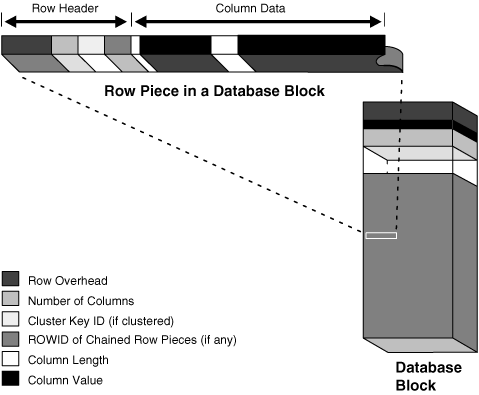
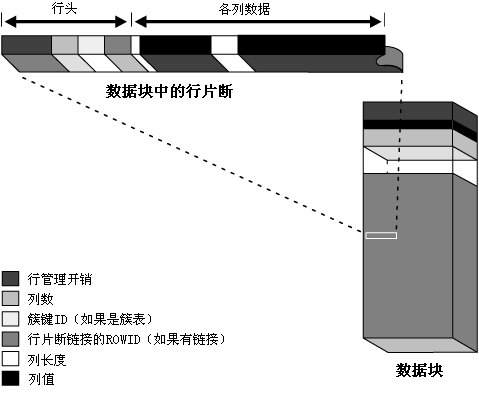
- External procedure libraries
- Indexes and index types
- Java classes, Java resources, and Java
sources
- Materialized views and materialized
view logs
- Object tables, object types, and
object views
-
Operators
- Sequences
- Stored functions, procedures, and
packages
- Synonyms
- Tables and
index-organized tables
- Views
|
方案(schema)是一个逻辑数据结构(logical structures of data)(或称为方案对象(schema
object))的集合。每个数据库用户拥有一个与之同名的方案,且只有这一个方案。方案对象可以通过 SQL
语句创建和操作。可以包含于方案的对象类型有:
- 簇(cluster)
- 数据库链接(database link)
- 数据库触发器(database trigger)
- 维度(dimension)
- 外部过程库(external procedure library)
- 索引(index)和索引类型(index type)
- Java 类(Java class),Java 资源(Java resource),及Java
源程序(Java source)
- 物化视图(materialized view)及物化视图日志(materialized
view log)
- 对象表(object table),对象类型(object type),及对象视图(object
view)
- 操作符(operator)
- 序列(sequence)
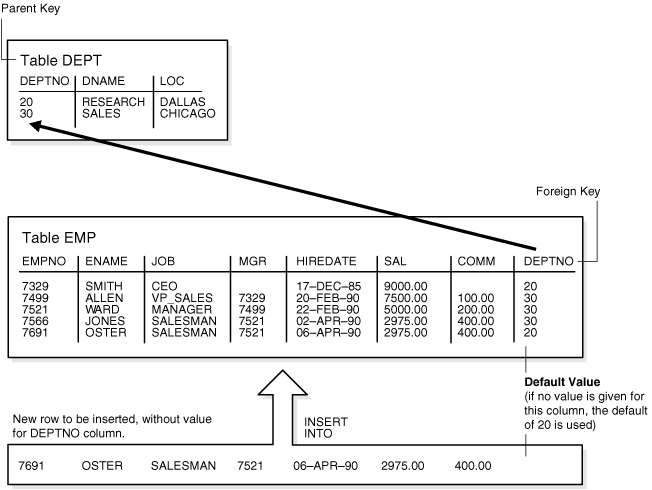
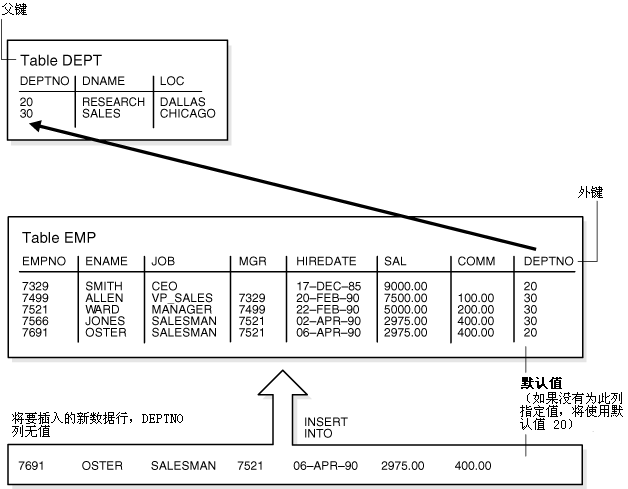
- 存储(在服务器端)的(stored)函数(function),过程(procedure),及包(package)
- 同义词(synonym)
- 表(table)及 index-organized table
- 视图(view)
|
|
005 |
Other types of objects are also stored in the database and can be
created and manipulated with SQL but are not contained in a schema:
-
Contexts
- Directories
-
Profiles
- Roles
- Tablespaces
- Users
|
还有一些类型的对象也存储于数据库中,且可由 SQL
语句创建或操作,但是他们并不属于任何方案(schema):
- 上下文(context)
- 目录(directory)
- 用户配置(profile)
- 角色(role)
- 表空间(tablespace)
- 用户(user)
|
|
006 |
Schema objects are logical data storage structures. Schema objects do
not have a one-to-one correspondence to physical files on disk that
store their information. However, Oracle stores a schema object
logically within a tablespace of the database. The data of each object
is physically contained in one or more of the tablespace's datafiles.
For some objects, such as tables, indexes, and clusters, you can specify
how much disk space Oracle allocates for the object within the
tablespace's datafiles.
|
方案对象(schema object)是一种逻辑数据存储结构(logical data storage structure)。Oracle
在逻辑上将方案对象存储于数据库的表空间(tablespace)中,而方案对象的数据在物理上存储于此表空间的一个或多个数据文件(datafile)中。因此方案对象不一定与磁盘上存储其数据的物理文件(physical
file)一一对应。用户可以对表(table),索引(index),及簇(cluster)等对象的磁盘空间分配进行设定。
|
|
007 |
There is no relationship between schemas and tablespaces: a tablespace
can contain objects from different schemas, and the objects for a schema
can be contained in different tablespaces.
|
方案(schema)与表空间(tablespace)之间没有必然联系:同一表空间可以包含属于不同方案的对象,而同一方案内的对象也可以存储在不同表空间中。
|
|
008 |
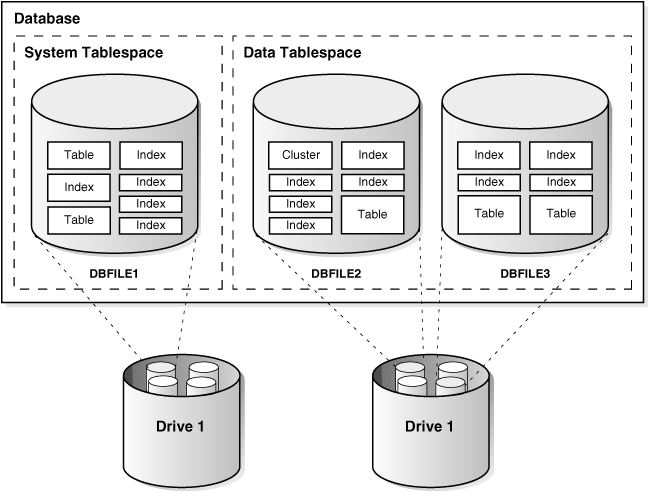
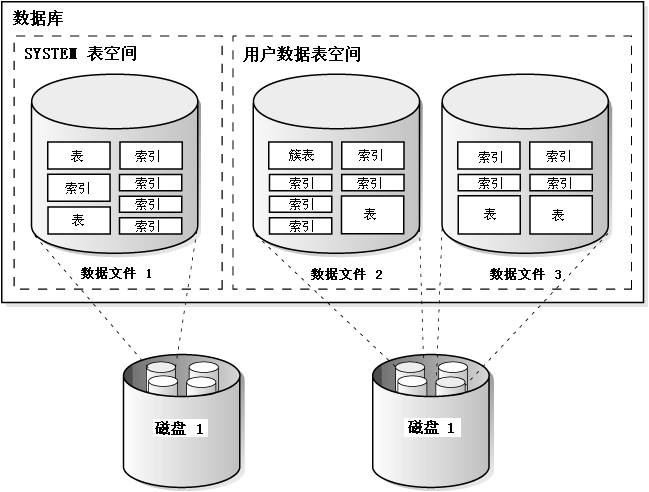
Figure 5-1 illustrates the relationship among
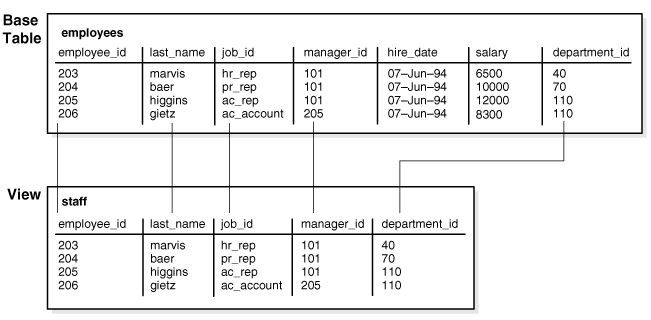
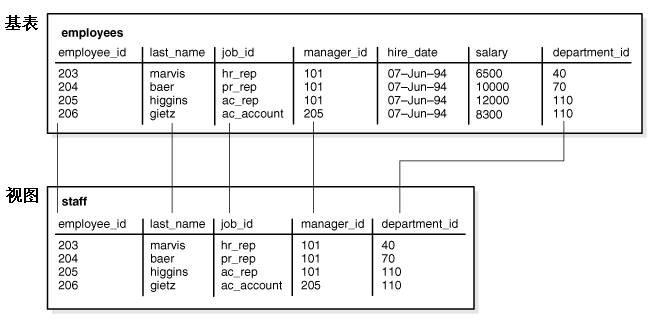
objects, tablespaces, and datafiles.
|
图5-1
展示了方案对象(schema object),表空间(tablespace),及数据文件(datafile)之间的关系。
|
|
009 |
Figure 5-1 Schema Objects,
Tablespaces, and Datafiles
|
图5-1 方案对象(schema
object),表空间(tablespace),及数据文件(datafile)
|
|
010 |
|
|
|
011 |
Figure 5-1 shows a system tablespace and a data
tablespace. The system tablespace contains several objects (tables
and indexes). The data tablespace also contains several objects
(tables, indexes, and clusters).
The system tablespace is stored in the DBFILE1 datafile. It is
physically stored on one of the disks of Disk Drive 1. The data
tablespace is stored in the DBFILE2 and DBFILE3 datafiles. The
datafiles are stored on two of the disks of Disk Drive 1, including
the disk that the system tablespace is stored on.
|
图5-1 展示了一个 SYSTEM 表空间及一个用户数据表空间。SYSTEM
表空间内包含了数个表及索引对象,而用户数据表空间内则包含了表,索引,及簇等对象。
SYSTEM
表空间存储在数据文件(datafile)DBFILE1 中,这个文件物理上存储于磁盘组 Disk Drive 1
的一个磁盘中。用户数据表空间存储在数据文件 DBFILE2 和 DBFILE3 中,这些数据文件存储在磁盘组 Disk Drive 1
的两个磁盘内,其中包括了 SYSTEM 表空间使用的磁盘。
|
|
012 |
See Also:
Oracle Database Administrator's Guide
|
另见:
Oracle 数据库管理员指南
|
|
013 |
Overview of Tables
|
5.2 表概述
|
|
014 |
Tables are the basic unit of data storage in an Oracle database.
Data is stored in rows and columns. You define a table
with a table name (such as employees)
and set of columns. You give each column a column name (such as
employee_id,
last_name, and job_id), a
datatype (such as VARCHAR2,
DATE, or NUMBER),
and a width. The width can be predetermined by the datatype, as
in DATE. If columns are of the
NUMBER datatype, define precision
and scale instead of width. A row is a collection of column
information corresponding to a single record.
|
表(table)是 Oracle 数据库中最基本的数据存储结构。数据在表中以行(row)和列(column)的形式存储。用户在定义表时,需要设定表名(table
name)(例如 employees 表),还要设定表内各列的列名(column name)(例如 employee_id,last_name,及 job_id
列),数据类型(datatype)(例如VARCHAR2,DATE,或 NUMBER),及宽度(width)。有些数据类型的宽度是固定的,例如 DATE
类型。而对于
NUMBER 类型的列来说,则需要定义精度(precision)及数值范围(scale)。
数据行是一条记录(single
record)各列信息的集合。
|
|
015 |
You can specify rules for each column of a table. These rules are called
integrity constraints. One example is a NOT
NULL integrity constraint. This constraint forces the column to
contain a value in every row.
|
用户可以为一个表的各列数据的值设定规则。这些规则被称为完整性约束(integrity constraint)。例如 NOT
NULL 完整性约束,她要求各行的此列必须包含数据值。
|
|
016 |
You can also specify table columns for which data is encrypted before
being stored in the datafile. Encryption prevents users from
circumventing database access control mechanisms by looking inside
datafiles directly with operating system tools.
|
用户可以设定表内某些列(column)的数据在存储到数据文件(datafile)之前首先进行加密(encryption)。加密可以防止未经授权的用户绕过数据库访问控制机制,使用操作系统工具直接察看数据文件的内容。
|
|
017 |
After you create a table, insert rows of data using SQL statements.
Table data can then be queried, deleted, or updated using SQL.
|
用户创建(create)表后,就可以使用 SQL 语句向其中插入(insert)数据,或使用 SQL
语句查询(query),删除(delete),或更新(update)表内的数据。
|
|
018 |
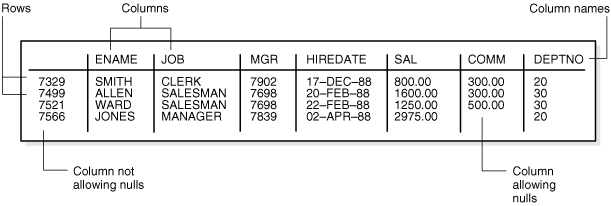
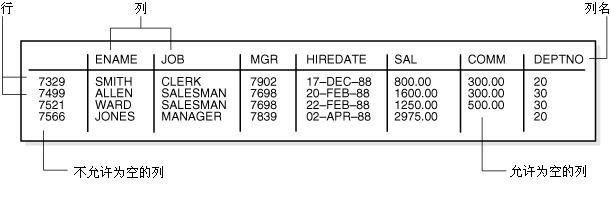
Figure 5-2 shows a sample table.
|
图5-2
展示了一个简单的表。
|
|
019 |
Figure 5-2 The EMP Table
|
图5-2 EMP 表 |
|
020 |
|
|
|
021 |
Figure 5-2 shows part of the emp table.
It shows 4
rows in the first column on the left. The other columns are named
ENAME, JOB, MGR, HIREDATE, SAL, COMM, and DEPTNO.
|
图5-2 显示了 emp 表的一部分,包括列名及四行数据。各列的名称为 ENAME,JOB,MGR,HIREDATE,SAL,COMM,及 DEPTNO。
|
|
022 |
See Also:
|
另见:
|
|
023 |
How Table Data Is Stored
|
5.2.1 表数据如何存储
|
|
024 |
When you create a table, Oracle automatically allocates a data segment
in a tablespace to hold the table's future data. You can control the
allocation and use of space for a table's data segment in the following
ways:
- You can control the amount of space
allocated to the data segment by setting the storage parameters for
the data segment.
- You can control the use of the free
space in the data blocks that constitute the data segment's extents
by setting the PCTFREE and
PCTUSED parameters for the data
segment.
|
当用户创建一个表时,Oracle 会自动地在相应的表空间内(tablespace)为此表分配数据段(data
segment)以容纳其数据。用户可以采用以下方式分别控制数据段的空间分配与使用:
- 通过设定数据段的存储参数(storage
parameter)来控制其空间分配方式
- 通过设定数据段的 PCTFREE
和
PCTUSED
参数,来控制如何使用此数据段中各个数据扩展内(extent)的数据块(data block)的可用空间(free space)。
|
|
025 |
Oracle stores data for a clustered table in the data segment created for
the cluster instead of in a data segment in a tablespace. Storage
parameters cannot be specified when a clustered table is created or
altered. The storage parameters set for the cluster always control the
storage of all tables in the cluster.
|
Oracle 在存储簇表(clustered table)的数据时统一使用为其所属簇(cluster)创建的数据段(data
segment),而不是为每个簇表单独创建数据段。创建或修改簇表时不能为其设定存储参数(storage
parameter)。一个簇内的所有簇表都使用此簇的存储参数来控制其空间分配。
|
|
026 |
A table's data segment (or cluster data segment, when dealing with a
clustered table) is created in either the table owner's default
tablespace or in a tablespace specifically named in the
CREATE TABLE statement.
|
表使用的数据段(data segment)(或簇表(clustered table)使用的簇数据段(cluster data
segment))既可以创建在该表所有者(owner)的默认表空间(tablespace)里,也可以创建在
CREATE TABLE 语句中指定的表空间里。
|
|
027 |
See Also:
"PCTFREE,
PCTUSED, and Row Chaining"
|
另见:
“PCTFREE,PCTUSED,及行链接”
|
|
028 |
Row Format and Size
|
5.2.1.1 行的格式及容量
|
|
029 |
Oracle stores each row of a database table containing data for less than
256 columns as one or more row pieces. If an entire row can be inserted
into a single data block, then Oracle stores the row as one row piece.
However, if all of a row's data cannot be inserted into a single data
block or if an update to an existing row causes the row to outgrow its
data block, then Oracle stores the row using multiple row pieces. A data
block usually contains only one row piece for each row. When Oracle must
store a row in more than one row piece, it is chained across
multiple blocks.
|
Oracle 使用一个或多个行片断(row piece)来存储表的每一行数据的前255列。当一个数据块(data
block)可以容纳一个完整的数据行时(且表的列数小于等于 256),那么此行就可以使用一个行片断来存储。当插入(insert)一个数据行,或更新(update)已有数据行时,数据行容量大于数据块容量,那么
Oracle 将使用多个行片断来存储此行。大多数情况下,每个数据行只存储于一个行片断中,且在同一数据块内。当 Oracle
必须使用多个行片断来存储同一数据行时(且每个行片断位于不同的数据块内),此行将在多个数据块间构成行链接(Row Chaining)。
|
|
030 |
When a table has more than 255 columns, rows that have data after the
255th column are likely to be chained within the same block. This is
called intra-block chaining. A chained row's pieces are chained
together using the rowids of the pieces. With intra-block chaining,
users receive all the data in the same block. If the row fits in the
block, users do not see an effect in I/O performance, because no extra
I/O operation is required to retrieve the rest of the row.
|
当一个表超过 255 列时,每行第255列之后的数据将作为一个新的行片断(row piece)存储在相同的数据块(data
block)中,这被称为块内链接(intra-block chaining)。由多个行片断组成的行进行块内链接时,使用各行片断的 rowid
进行链接。当一个行为块内链接时,用户可以从同一数据块中访问此行的全部数据。如果一个数据行位于同一数据块内,那么访问此行不会影响 I/O
性能,因为访问此行不会带来额外的 I/O 开销。
|
|
031 |
Each row piece, chained or unchained, contains a row header and
data for all or some of the row's columns. Individual columns can also
span row pieces and, consequently, data blocks.
Figure 5-3 shows the format of a row piece:
|
无论链接(chained)或非链接(unchained)的行片断,都包含一个行头(row header),及此行部分或全部的数据。
一行内某一列的数据也有可能跨多个行片断(row
piece),甚至跨多个数据块(data block)。图5-3
显示了行片断的格式。
|
|
032 |
Figure 5-3 The Format of a
Row Piece
|
图5-3 行片断的格式 |
|
033 |
|
|
|
034 |
Figure 5-3 shows a row piece in a database block.
The row piece consists of the row header and column data. The column
data section contains the column length and column value. The row
header contains the following: row overhead, number of columns,
cluster key ID (if clustered), ROWID of chained row pieces (if any).
|
图5-3 显示了数据块(data block)中的一个行片断(row
piece)。一个行片断由行头(row header)及列数据(column data)构成。列数据部分包含了各列的列长(column
length)及列值(column value)。而行头内包含以下内容:行管理开销(row
overhead),列数,簇键ID(cluster key ID)(如果是簇表),行片断链接(chained row
pieces)的ROWID(如果有链接)。
|
|
035 |
The row header precedes the data and contains information about:
- Row pieces
- Chaining (for chained row pieces only)
- Columns in the row piece
- Cluster keys (for clustered data only)
|
行头(row header)位于行数据之前,包含以下信息:
- 行管理开销(row overhead)
- 行片断链接(chained row pieces)的ROWID(如果有链接)
- 列数
- 簇键ID(cluster key ID)(如果是簇表)
|
|
036 |
A row fully contained in one block has at least 3 bytes of row header.
After the row header information, each row contains column length and
data. The column length requires 1 byte for columns that store 250 bytes
or less, or 3 bytes for columns that store more than 250 bytes, and
precedes the column data. Space required for column data depends on the
datatype. If the datatype of a column is variable length, then the space
required to hold a value can grow and shrink with updates to the data.
|
如果一行能被存储于一个数据块(data block)中,那么其行头(row header)所需容量将不少于 3
字节(byte)。在行头信息之后依次储存的是各列的列长(column length)及列值(column
value)。列长存储于列值之前,如列值不超过 250 字节,那么 Oracle 使用 1 字节存储其列长;如列值超过 250 字节,则使用 3
字节存储其列长。列数据(column
data)所需的存储空间取决于此列的数据类型(datatype)。如果某列的数据类型为变长(variable
length)的,那么存储此列值所需的空间可能会随着数据更新而增长或缩小。
|
|
037 |
To conserve space, a null in a column only stores the column length
(zero). Oracle does not store data for the null column. Also, for
trailing null columns, Oracle does not even store the column length.
|
为了节约存储空间,如果某列值为空(null),那么数据库中只存储其列长(column length)(值为
0),而不存储任何数据。对位于一行末尾的空列值(trailing null column),数据库中将列长也忽略不予存储。
|
|
038 |
Note:
Each row also uses 2 bytes in the data block header's row directory.
|
提示:
每行还要占用数据块头(data block header)中行目录区(row directory)的
2 字节(byte)空间。
|
|
039 |
Clustered rows contain the same information as nonclustered rows. In
addition, they contain information that references the cluster key to
which they belong.
|
簇表(clustered)内的行需要存储与非簇表(nonclustered)行相同的信息。除此之外,簇表内各行还需要存储其所属的簇键(cluster
key)。 |
|
040 |
See Also:
|
另见:
|
|
041 |
Rowids of Row Pieces
|
5.2.1.2 行片断的 rowid
|
|
042 |
The rowid identifies each row piece by its location or address.
After they are assigned, a given row piece retains its rowid until the
corresponding row is deleted or exported and imported using Oracle
utilities. For clustered tables, if the cluster key values of a row
change, then the row keeps the same rowid but also gets an additional
pointer rowid for the new values.
|
Oracle 使用 rowid 记录每个行片断(row piece)的存储位置和地址。每个行片断得到一个 rowid
之后,这个值将会保持不变,直到其所属行被删除(delete)或经过 Oracle 工具导出并再次导入。对于簇表(clustered
table)来说,如果某行的簇键值(cluster key value)发生改变,那么此行除了保存原有的 rowid
之外,还将为新簇键值存储一个额外的 rowid 指针(pointer)。 |
|
043 |
Because rowids are constant for the lifetime of a row piece, it is
useful to reference rowids in SQL statements such as
SELECT, UPDATE,
and DELETE.
|
由于行片断(row piece)在其生命周期内拥有固定的 rowid,因此在
SELECT,UPDATE,及 DELETE
等 SQL 语句中可以充分利用 rowid 的这个特性。 |
|
044 |
See Also:
"Physical Rowids"
|
另见:
“物理 rowid”
|
|
045 |
Column Order
|
5.2.1.3 列顺序
|
|
046 |
The column order is the same for all rows in a given table. Columns are
usually stored in the order in which they were listed in the
CREATE TABLE statement, but this is not
guaranteed. For example, if a table has a column of datatype
LONG, then Oracle always stores this column
last. Also, if a table is altered so that a new column is added, then
the new column becomes the last column stored.
|
一个表内所有行的列顺序(column order)都是一致的。列的存储顺序通常和
CREATE TABLE
语句中定义的列顺序是一致的,但是也有例外情况。例如,如果一个表含有数据类型(datatype)为
LONG 的列,那么 Oracle
会将此列存储在行的末尾。当用户修改了表定义向其中添加了新的列,这些列也将存储在行的末尾。 |
|
047 |
In general, try to place columns that frequently contain nulls last so
that rows take less space. Note, though, that if the table you are
creating includes a LONG column as well,
then the benefits of placing frequently null columns last are lost.
|
一般来说,应该将出现空值(null)几率较大的列放在最后,以便节约空间。但是当用户创建的表中包含数据类型为
LONG 的列时,上述方法将无法发挥节约空间的作用。 |
|
048 |
Table Compression
|
5.2.2 表压缩
|
|
049 |
Oracle's table compression feature compresses data by eliminating
duplicate values in a database block. Compressed data stored in a
database block (also known as disk page) is self-contained. That is, all
the information needed to re-create the uncompressed data in a block is
available within that block. Duplicate values in all the rows and
columns in a block are stored once at the beginning of the block, in
what is called a symbol table for that block. All occurrences of such
values are replaced with a short reference to the symbol table.
|
Oracle 的表压缩(table compression)功能可以压缩数据块(data block)内的重复值(duplicate
value)。一个包含压缩数据的数据块内同时也存储了用于解压缩(uncompress)信息。[这避免了解压缩带来额外的
I/O 开销]数据块内的每个重复值被存储在在块头(data block header)的符号表(symbol
table)内。而在该重复值实际发生的位置,只需存储一个指向符号表内对应位置的指针。 |
|
050 |
With the exception of a symbol table at the beginning, compressed
database blocks look very much like regular database blocks. All
database features and functions that work on regular database blocks
also work on compressed database blocks.
|
除了使用符号表(symbol table)之外,压缩的数据块(data
block)与普通数据块非常相似。普通数据块可以使用的所有数据库功能和函数,同样也适用于压缩的数据块。 |
|
051 |
Database objects that can be compressed include tables and materialized
views. For partitioned tables, you can choose to compress some or all
partitions. Compression attributes can be declared for a tablespace, a
table, or a partition of a table. If declared at the tablespace level,
then all tables created in that tablespace are compressed by default.
You can alter the compression attribute for a table (or a partition or
tablespace), and the change only applies to new data going into that
table. As a result, a single table or partition may contain some
compressed blocks and some regular blocks.
This guarantees that data
size will not increase as a result of compression; in cases where
compression could increase the size of a block, it is not applied to
that block.
|
可以被压缩的数据库对象有表和物化视图(materialized view)。对于分区表(partitioned
table),用户可以选择压缩部分或全部分区(partition)。表空间(tablespace),表,及分区表都可以被设定为压缩模式。如果在表空间级作了设定,那么在此表空间内创建的表默认都以压缩模式存储。用户也可以修改一个表(表空间,或分区)的压缩属性,在修改后插入的数据将按照新的模式存储。这样,一个表或分区可以同时包含压缩及常规的数据块(data
block)。有时使用表压缩反而会导致数据块内数据容量增长,因此利用上述特性能避免这种压缩带来的容量增长。 |
|
052 |
Using Table Compression
|
5.2.2.1 使用表压缩
|
|
053 |
Compression occurs while data is being bulk inserted or bulk loaded.
These operations include:
-
Direct path SQL*Loader
- CREATE TABLE
and AS SELECT statements
- Parallel INSERT
(or serial INSERT with an
APPEND hint) statements
|
压缩发生在数据批量插入(bulk insert)或批量加载(bulk load)时。具体的操作有:
- Direct path SQL*Loader
- CREATE TABLE ... AS SELECT
语句
- 并行(parallel)INSERT(或使用了 APPEND
提示(hint)的 INSERT)语句
|
|
054 |
Existing data in the database can also be compressed by moving it into
compressed form through ALTER TABLE and
MOVE statements. This operation takes an
exclusive lock on the table, and therefore prevents any updates and
loads until it completes. If this is not acceptable, then Oracle's
online redefinition utility (DBMS_REDEFINITION
PL/SQL package) can be used.
|
使用 ALTER TABLE ... MOVE
语句可以将数据库内已有的数据转换为压缩模式。这个操作将对表使用一个排他锁(exclusive
lock),以阻止转换期间对此表的更新(update)和插入(insert)操作。如果用户不希望使用排他锁,还可以使用 Oracle
提供的联机重定义工具(online redefinition utility)(DBMS_REDEFINITION
PL/SQL 包)。 |
|
055 |
Data compression works for all datatypes except for all variants of LOBs
and datatypes derived from LOBs, such as
VARRAYs
stored out of line or the XML datatype stored in a
CLOB.
|
数据压缩(data compression)适用于各种数据类型,但对于 LOB 及基于 LOB 的数据类型无效。例如以 LOB 形式存储的
VARRAY 对象,或存储于 CLOB
中的 XML 数据都无法进行数据压缩。 |
|
056 |
Table compression is done as part of bulk loading data into the
database. The overhead associated with compression is most visible at
that time. This is the primary trade-off that needs to be taken into
account when considering compression.
|
表压缩的工作主要在数据被批量加载(bulk
load)到数据库时进行。表压缩带来的开销(overhead)在此时最为显著。因此批量加载的效率在是考虑是否使用表压缩时最需要权衡的问题。 |
|
057 |
Compressed tables or partitions can be modified the same as other Oracle
tables or partitions. For example, data can be modified using
INSERT, UPDATE,
and DELETE statements. However, data
modified without using bulk insertion or bulk loading techniques is not
compressed. Deleting compressed data is as fast as deleting uncompressed
data. Inserting new data is also as fast, because data is not compressed
in the case of conventional INSERT; it is
compressed only doing bulk load. Updating compressed data can be slower
in some cases. For these reasons, compression is more suitable for data
warehousing applications than OLTP applications. Data should be
organized such that read only or infrequently changing portions of the
data (for example, historical data) is kept compressed.
|
压缩表(compressed
table)或压缩分区(compressed partition)中的数据也可以如同普通的 Oracle 表或分区一样被修改。用户可以使用 INSERT,UPDATE,及
DELETE 语句对压缩的数据进行修改。但是没有使用批量插入(bulk
insertion)或批量加载(bulk
loading)的数据是不会被压缩的。对压缩数据的删除(delete)操作与删除非压缩数据的所需的时间基本相同。向压缩表中插入(insert)新数据的速度也与平常无异,因为常规的
INSERT
语句并不会压缩数据。而更新(update)操作相对非压缩表要慢一些。基于压缩表的这些特性,数据仓库(data warehousing)比 OLTP
系统更适于使用压缩模式。只读数据及不会经常改变的数据(例如历史数据(historical data))适合以压缩模式存储。 |
|
058 |
Nulls Indicate Absence of Value
|
5.2.3 空值的含义
|
|
059 |
A null is the absence of a value in a column of a row. Nulls
indicate missing, unknown, or inapplicable data. A null should not be
used to imply any other value, such as zero. A column allows nulls
unless a NOT NULL or
PRIMARY KEY integrity constraint has been defined for the column,
in which case no row can be inserted without a value for that column.
|
空值(null)表示一行的某列无值。空值的含义是数据缺失(missing),未知(unknown),或不适用(inapplicable)。空值不等同于其他任何值,例如
空值不等同于零值(zero)。当某列上定义了 NOT NULL
或
PRIMARY KEY 完整性约束时,此列就不允许为空值,即插入(insert)此列的数据必须有值。
|
|
060 |
Nulls are stored in the database if they fall between columns with data
values. In these cases they require 1 byte to store the length of the
column (zero).
|
当一个空值(null)在一行中位于有数据值的两列之间时,此列在数据库中需要占用 1 字节(byte)的空间来存储其列长(值为0)。
|
|
061 |
Trailing nulls in a row require no storage because a new row header
signals that the remaining columns in the previous row are null. For
example, if the last three columns of a table are null, no information
is stored for those columns. In tables with many columns, the columns
more likely to contain nulls should be defined last to conserve disk
space.
|
而当一个空值(null)位于行尾时无需占用存储空间,因为新一行的行头(row header)就标志着前一行未存储的字段均为空。例如,一个表的最后
3 列均为空,则数据库中不会存储这 3 列的任何信息。在一个包含多列的表中,包含空值几率较大的列因该被定义在表的最后,以便节约存储空间。
|
|
062 |
Most comparisons between nulls and other values are by definition
neither true nor false, but unknown. To identify nulls in SQL, use the
IS NULL predicate. Use the SQL function
NVL to convert nulls to non-null values.
|
Oracle 中规定空值(null)和其他任何值得比较(comparison)结果既非真也非假,而是未知(unknown)。如需在 SQL
中判断空值,应该使用谓词(predicate)IS NULL。用户可以使用 SQL
函数 NVL 将空值转换为非空值。
|
|
063 |
Nulls are not indexed, except when the cluster key column value is null
or the index is a bitmap index.
|
空值不会被加入索引(index),但有两种情况例外:其一是为空值的列属于簇键(cluster key),其二是索引为位图索引(bitmap
index)。
|
|
064 |
See Also:
|
另见:
|
|
065 |
Default Values for Columns
|
5.2.4 列的默认值
|
|
066 |
You can assign a default value to a column of a table so that when a new
row is inserted and a value for the column is omitted or keyword
DEFAULT is supplied, a default value is
supplied automatically. Default column values work as though an
INSERT statement actually specifies the
default value.
|
用户可以为表的某列设定默认值(default value),当插入(insert)新的数据行时如果没有指定此列的值,或在此列使用了
DEFAULT
关键字(keyword),Oracle 将自动地为此列加入默认值。定义了默认列值(default column value)后,就如同在
INSERT 语句的相应位置中添加了一个默认值。
|
|
067 |
The datatype of the default literal or expression must match or be
convertible to the column datatype.
|
默认值或默认表达式的数据类型应与相应列的数据类型相同,或能够进行数据转换(convertible)。
|
|
068 |
If a default value is not explicitly defined for a column, then the
default for the column is implicitly set to NULL.
|
如果没有为某列显示地定义默认值(default
value),那么此列的默认值被隐式地定义为 NULL。
|
|
069 |
Default Value Insertion and Integrity Constraint Checking
|
5.2.4.1 插入默认值及完整性约束检查
|
|
070 |
Integrity constraint checking occurs after the row with a default value
is inserted. For example, in Figure 5-4, a row is
inserted into the emp table that does not
include a value for the employee's department number. Because no value
is supplied for the department number, Oracle inserts the
deptno column's default value of 20. After
inserting the default value, Oracle checks the
FOREIGN KEY integrity constraint defined on the
deptno column.
|
当一个包含默认值(default value)的行被插入(insert)之后将发生完整性约束检查(integrity constraint
checking)。例如 图5-4 所示,在插入
emp 表的一行数据中员工部门编号字段没有指定值。因此 Oracle 将使用
deptno 列的默认值 20。插入默认值后,Oracle 将对定义在
deptno 列上的
FOREIGN KEY 进行完整性约束检查。
|
|
071 |
Figure 5-4 DEFAULT Column
Values
|
图 5-4 DEFAULT 列值 |
|
072 |
|
|
|
073 |
See Also:
Chapter 21, "Data Integrity" for more information
about integrity constraints
|
另见:
第 21 章,“数据完整性” 了解关于完整性约束(integrity
constraint)的详细信息
|
|
074 |
Partitioned Tables
|
5.2.5 分区表
|
|
075 |
Partitioned tables allow your data to be broken down into smaller, more
manageable pieces called partitions, or even subpartitions. Indexes can
be partitioned in similar fashion. Each partition can be managed
individually, and can operate independently of the other partitions,
thus providing a structure that can be better tuned for availability and
performance.
|
用户可以使用分区表(partitioned
table)将数据划分为更小,更易管理的单位,这种单位被称为分区(partition),分区还可以被继续划分为子分区(subpartition)。索引也可以采取类似方式进行分区。每个分区可以独立操作,独立管理,采用这种存储结构有利于提高系统的可用性和性能。
|
|
076 |
Note:
To reduce disk use and memory use (specifically, the buffer cache),
you can store tables and partitioned tables in a compressed format
inside the database. This often leads to a better scaleup for
read-only operations. Table compression can also speed up query
execution. There is, however, a slight cost in CPU overhead.
|
提示:
为了减少磁盘和内存的使用(尤其是各种缓存(buffer
cache)),用户可以将数据库中的表和分区表以压缩的形式存储。这可以显著提高只读操作(read-only)的性能。表压缩(able compression)还能提高查询的执行速度。但是操作压缩形式的数据会造成轻微的
CPU 负担。
|
|
077 |
See Also:
|
另见:
|
|
078 |
Nested Tables
|
5.2.6 嵌套表
|
|
079 |
You can create a table with a column whose datatype is another table.
That is, tables can be nested within other tables as values in a column.
The Oracle database server stores nested table data out of line from the
rows of the parent table, using a
store table that is associated with
the nested table column. The parent row contains a unique set identifier
value associated with a nested table instance.
|
一个表的某列的数据类型(datatype)可以为另一个表。即一个表可以作为一个列值嵌套(nest)到另一个表中。Oracle
数据库将嵌套表(nested table)的数据存储在其父表(parent table)的数据行之外(out of line)的存储表(store table)内,并将其与对应的嵌套列(nested
table column)相关联。父表中的每行包含一个指向嵌套表对象(nested table instance)的标识。
|
|
080 |
See Also:
|
另见:
|
|
081 |
Temporary Tables
|
5.2.7 临时表
|
|
082 |
In addition to permanent tables, Oracle can create
temporary tables
to hold session-private data that exists only for the duration of a
transaction or session.
|
除了永久表(permanent table)之外,Oracle
还可以在事务(session)或会话(transaction)期间创建保存会话私有数据的临时表(temporary table)。
|
|
083 |
The CREATE GLOBAL TEMPORARY TABLE statement
creates a temporary table that can be transaction-specific or
session-specific. For transaction-specific temporary tables, data exists
for the duration of the transaction. For session-specific temporary
tables, data exists for the duration of the session. Data in a temporary
table is private to the session. Each session can only see and modify
its own data. DML locks are not acquired on the data of the temporary
tables. The LOCK statement has no effect on
a temporary table, because each session has its own private data.
|
使用 CREATE GLOBAL TEMPORARY TABLE
语句可以创建与事务相关的(transaction-specific)或与会话相关的(session-specific)临时表(temporary
table)。在与事务相关的临时表中,数据只存在于事务期间。而在与会话相关的临时表中,数据只存在于会话期间。临时表中的数据为一个会话所私有。每个会话只能查询与修改属于此会话的数据。对临时表数据进行
DML 操作时无需加锁(Lock)。LOCK
语句对临时表无效,因为每个会话只能操作其私有数据。
|
|
084 |
A TRUNCATE statement issued on a
session-specific temporary table truncates data in its own session. It
does not truncate the data of other sessions that are using the same
table.
|
针对与会话相关的临时表(session-specific temporary table)执行的 TRUNCATE
语句只会清除(truncate)属于此会话的数据,而不会清除此临时表中属于其他会话的数据。
|
|
085 |
DML statements on temporary tables do not generate redo logs for the
data changes. However, undo logs for the data and redo logs for the undo
logs are generated. Data from the temporary table is automatically
dropped in the case of session termination, either when the user logs
off or when the session terminates abnormally such as during a session
or instance failure.
|
对临时表(temporary table)的 DML
操作不会产生数据修改的重做日志(redo log),但是将产生被修改数据的撤销记录(undo log),及撤销记录的重做日志(redo
log)。会话结束(terminate)后其存储于临时表中的数据将被自动地清除。上述的会话结束既包括用户退出系统(log
off),也包括由于会话或实例故障导致的会话异常终止。
|
|
086 |
You can create indexes for temporary tables using the
CREATE INDEX statement. Indexes created on
temporary tables are also temporary, and the data in the index has the
same session or transaction scope as the data in the temporary table.
|
用户可以使用 CREATE INDEX 语句为临时表(temporary
table)创建索引。创建在临时表上的索引也是临时的,索引数据的生存周期与临时表内数据的生存周期相同。
|
|
087 |
You can create views that access both temporary and permanent tables.
You can also create triggers on temporary tables.
|
用户可以创建同时访问永久表(permanent table)与临时表(temporary
table)的视图。用户还可以在临时表上创建触发器(trigger)。
|
|
088 |
Oracle utilities can export and import the definition of a temporary
table. However, no data rows are exported even if you use the
ROWS clause. Similarly, you can replicate
the definition of a temporary table, but you cannot replicate its data.
|
Oracle 提供的工具可以导出/导入(export/import)临时表的定义,但是无法导出其中的数据,在工具中使用
ROWS
子句也是无效的。同样用户可以复制(replicate)临时表的定义,但不能复制其数据。
|
|
089 |
Segment Allocation
|
5.2.7.1 临时表的段分配
|
|
090 |
Temporary tables use temporary segments. Unlike permanent tables,
temporary tables and their indexes do not automatically allocate a
segment when they are created. Instead, segments are allocated when the
first INSERT (or
CREATE TABLE AS SELECT) is performed. This means that if a
SELECT, UPDATE,
or DELETE is performed before the first
INSERT, then the table appears to be empty.
|
临时表(temporary table)使用临时段(temporary segment)存储数据。与永久表(permanent
table)不同,Oracle 在创建临时表及临时索引时并不会为其分配段(segment),段是在第一次执行
INSERT(或
CREATE TABLE AS SELECT)语句时进行分配。在发生首次 INSERT
之前执行的 SELECT,UPDATE,或 DELETE
语句操作的是一个空表。
|
|
091 |
You can perform DDL statements (ALTER TABLE,
DROP TABLE, CREATE
INDEX, and so on) on a temporary table only when no session is
currently bound to it. A session gets bound to a temporary table when an
INSERT is performed on it. The session gets
unbound by a TRUNCATE, at session
termination, or by doing a COMMIT or
ROLLBACK for a transaction-specific
temporary table.
|
当没有会话(session)与临时表(temporary table)绑定(bound)的时候,用户才能够对其执行 DDL 操作(ALTER TABLE,DROP TABLE,CREATE
INDEX 等)。对临时表执行 INSERT
语句时,会话将和此临时表绑定。在会话结束时对临时表执行的 TRUNCATE
语句将解除(unbound)会话与此临时表的绑定。对于与事务相关的(transaction-specific)临时表,执行 COMMIT
或
ROLLBACK 将解除会话与此临时表的绑定。
|
|
092 |
Temporary segments are deallocated at the end of the transaction for
transaction-specific temporary tables and at the end of the session for
session-specific temporary tables.
|
在事务(transaction)结束时与事务相关的(transaction-specific)临时表(temporary
table)所使用的临时段(temporary
segment)将被回收。同样的,在会话(session)结束时与会话相关的(session-specific)临时表所使用的临时段也将被回收。
|
|
093 |
See Also:
"Extents
in Temporary Segments"
|
另见:
“Extents
in Temporary Segments”
|
|
094 |
Parent and Child Transactions
|
5.2.7.2 父事务与子事务
|
|
095 |
Transaction-specific temporary tables are accessible by user
transactions and their child transactions. However, a given
transaction-specific temporary table cannot be used concurrently by two
transactions in the same session, although it can be used by
transactions in different sessions.
|
与事务相关的(transaction-specific)临时表(temporary
table)中的数据可以被用户的事务(transaction)及子事务(child
transaction)访问。但是这些数据不能被同一会话(session)里的两个事务同时访问。不同会话中的事务可以同时使用同一个事务相关的临时表。
|
|
096 |
If a user transaction does an INSERT into
the temporary table, then none of its child transactions can use the
temporary table afterward.
|
如果用户事务(user transaction)对临时表(temporary table)执行了
INSERT 操作,在此之后此事务的子事务(child transaction)将不能使用这个临时表。
|
|
097 |
If a child transaction does an INSERT into
the temporary table, then at the end of the child transaction, the data
associated with the temporary table goes away. After that, either the
user transaction or any other child transaction can access the temporary
table.
|
如果在子事务(child transaction)中对临时表(temporary table)执行了
INSERT 操作,临时表中已有的数据将被清除。子事务结束后,父事务(parent
transaction)及其他子事务对此临时表访问权利将被恢复。
|
|
098 |
External Tables
|
5.2.8 外部表
|
|
099 |
External tables access data in external sources as if it were in a table
in the database. You can connect to the database and create metadata for
the external table using DDL. The DDL for an external table consists of
two parts: one part that describes the Oracle column types, and another
part (the access parameters) that describes the mapping of the external
data to the Oracle data columns.
|
用户可以使用外部表(external
table)技术,将位于数据库外部的数据源(external source)作为一个数据库表,以便访问其中的数据。用户连接到数据库后可以使用 DDL
语句创建外部表的元数据(metadata)。这种 DDL 语句由两部分构成:一部分描述外部表各列的数据类型,另一部分(数据访问参数(access parameter))描述外部数据与 Oracle 数据列的映射方式(mapping)。
|
|
100 |
An external table does not describe any data that is stored in the
database. Nor does it describe how data is stored in the external
source. Instead, it describes how the external table layer needs to
present the data to the server. It is the responsibility of the access
driver and the external table layer to do the necessary transformations
required on the data in the datafile so that it matches the external
table definition.
|
外部表(external table)不会用来描述存储于数据库内的数据,也不会描述数据是如何在外部数据源(external
source)中存储的。她的作用是规定了外部表层(external table
layer)将外部数据展现给数据库服务器(server)的格式。而外部表层和数据访问驱动(access
driver)的职责是将外部数据文件(datafile)内的数据进行适当转换(transformation),使之符合外部表的定义。
|
|
101 |
External tables are read only; therefore, no DML operations are
possible, and no index can be created on them.
|
外部表(external table)是只读的,因此不能对外部表进行增删改等操作。外部表上也不能建立索引。
|
|
102 |
The Access Driver
|
5.2.8.1 数据访问驱动
|
|
103 |
When you create an external table, you specify its type. Each type of
external table has its own access driver that provides access parameters
unique to that type of external table. The access driver ensures that
data from the data source is processed so that it matches the definition
of the external table.
|
当用户创建外部表(external table)时,需要指定她的类型(type)。每种类型的外部表都有专用的数据访问驱动(access
driver)及针对此驱动的数据访问参数(access parameter)。数据访问驱动将对外部数据源(external data
source)的数据进行处理使之符合外部表的定义。
|
|
104 |
In the context of external tables, loading data refers to the act of
reading data from an external table and loading it into a table in the
database. Unloading data refers to the act of reading data from a table
in the database and inserting it into an external table.
|
外部表(external
table)的数据加载(loading data)是指从外部表中读取数据并加载到数据库表中。而反向数据加载(unloading
data)是指从数据库表中读取数据并存储到外部表中。
|
|
105 |
The default type for external tables is
ORACLE_LOADER, which lets you read table data from an external
table and load it into a database.
Oracle also provides the
ORACLE_DATAPUMP type, which lets you unload
data (that is, read data from a table in the database and insert it into
an external table) and then reload it into an Oracle database.
|
外部表(external table)的默认类型是
ORACLE_LOADER,用户可以使用这种类型从外部表中读取数据并加载到数据库中。Oracle 还提供了
ORACLE_DATAPUMP
类型,用户可以使用这种类型先对外部表进行反向加载(unload data),再将其中的数据加载到另一个数据库中。
|
|
106 |
The definition of an external table is kept separately from the
description of the data in the data source. This means that:
- The source file can contain more or
fewer fields than there are columns in the external table
- The datatypes for fields in the data
source can be different from the columns in the external table
|
创建外部表(external table)时,外部表的定义(definition)与外部数据源中(external data
source)数据的描述是分开的。这样做的目的是:
-
外部数据源文件中包含的字段(field)不需要与外部表中的列(column)一一对应
- 外部数据源文件中各字段的数据类型可以与外部表中相应的数据列的类型不同
|
|
107 |
Data Loading with External Tables
|
5.2.8.2 使用外部表进行数据加载
|
|
108 |
The main use for external tables is to use them as a row source for
loading data into an actual table in the database. After you create an
external table, you can then use a CREATE TABLE AS
SELECT or INSERT INTO ... AS SELECT
statement, using the external table as the source of the
SELECT clause.
|
外部表(external table)的主要用途是作为数据源,以便将其中的数据加载到实际的数据表中。当用户创建了外部表后,就可以在 CREATE TABLE AS
SELECT 或 INSERT INTO ... AS SELECT
的
SELECT 子句中使用此外部表了。
|
|
109 |
Note:
You cannot insert data into external tables or update records in
them; external tables are read only.
|
提示:
用户不能对外部表(external
table)进行插入(insert)或更新(update)操作。外部表是只读的。
|
|
110 |
When you access the external table through a SQL statement, the fields
of the external table can be used just like any other field in a regular
table. In particular, you can use the fields as arguments for any SQL
built-in function, PL/SQL function, or Java function. This lets you
manipulate data from the external source. For data warehousing, you can
do more sophisticated transformations in this way than you can with
simple datatype conversions. You can also use this mechanism in data
warehousing to do data cleansing.
|
当用户通过 SQL
语句访问外部表时,表内的各字段(field)可以像普通表内的字段一样使用。用户也可以将外部表内的字段作为 SQL 内置函数,PL/SQL
函数,及 Java
函数的参数使用。在数据仓库环境中,用户可以使用函数对数据进行更为复杂的转换(transformation),而不仅仅是数据类型转换(datatype
conversion);用户还可以利用函数进行数据清洗(data cleansing)。
|
|
111 |
While external tables cannot contain a column object, constructor
functions can be used to build a column object from attributes in the
external table.
|
外部表(external table)中无法包含列对象(column
object),但是可以使用外部表中的字段(field)作为属性(attribute)以供构造函数(constructor
function)创建列对象。
|
|
112 |
Parallel Access to External Tables
|
5.2.8.3 外部表的并行访问
|
|
113 |
After the metadata for an external table is created, you can query the
external data directly and in parallel, using SQL. As a result, the
external table acts as a view, which lets you run any SQL query against
external data without loading the external data into the database.
|
当外部表(external table)的元数据(metadata)被定义后,用户就能够以直接(directly)或并行(parallel)的
SQL 查询(query)其中的数据。因此,外部表和视图(view)类似,用户无需将外部数据(external data)引入数据库就能使用
SQL 对其进行查询。
|
|
114 |
The degree of parallel access to an external table is specified using
standard parallel hints and with the PARALLEL clause. Using parallelism
on an external table allows for concurrent access to the datafiles that
comprise an external table. Whether a single file is accessed
concurrently is dependent upon the access driver implementation, and
attributes of the datafile(s) being accessed (for example, record
formats).
|
对外部表(external table)访问的并行度(degree of parallel)可以在
PARALLEL 子句中使用标准的并行提示(parallel
hint)来设定。对外部表进行并行访问是指并发地(concurrently)访问构成外部表的数据文件(datafile)。是否对单一文件(single
file)进行并行访问取决于数据访问驱动(access
driver)的实现方式(implementation),及被访问数据文件(datafile)的属性(attribute)(例如,数据文件中的记录格式(record
format))。
|
|
115 |
See Also:
|
另见:
|
|
116 |
Overview of Views
|
5.3 视图概述
|
|
117 |
A view is a tailored presentation of the data contained in one or more
tables or other views. A view takes the output of a query and treats it
as a table. Therefore, a view can be thought of as a stored query or a
virtual table. You can use views in most places where a table can be
used.
|
视图(view)用于展现整理后(tailored)的一个或多个表或其他视图中的数据。视图将一个查询的结果作为一个表来使用。因此视图可以被看作是存储的查询(stored
query)或一个虚拟表(virtual table)。大多数情况下,能够使用表就能使用视图。 |
|
118 |
For example, the employees table has
several columns and numerous rows of information. If you want users to
see only five of these columns or only specific rows, then you can
create a view of that table for other users to access.
|
例如,employees
表由数列(column)构成,且存储了数行(row)数据。如果管理员希望用户只能查询其中的 5
列及特定的数据行,就可以创建此表的视图供用户访问。 |
|
119 |
Figure 5-5 shows an example of a view called
staff derived from the
base table
employees. Notice that the view shows only
five of the columns in the base table.
|
图5-5 显示了一个来源于(derived from)employees
基表(base table)的视图
staff。注意此视图只显示了基表中的 5 列。 |
|
120 |
Figure 5-5 An Example of a
View
|
图 5-5
视图的例子 |
|
121 |
|
|
|
122 |
Figure 5-5 shows the base table,
employees, with 7
columns. A view, called staff, is created from the base table, with
only 5 of the columns.
|
图 5-5 显示了一个具有 7 列的基表(base table)employees。一个来源于基表,但只有
5 列的视图 staff。
|
|
123 |
Because views are derived from tables, they have many similarities. For
example, you can define views with up to 1000 columns, just like a
table. You can query views, and with some restrictions you can update,
insert into, and delete from views. All operations performed on a view
actually affect data in some base table of the view and are subject to
the integrity constraints and triggers of the base tables.
|
由于视图来源于表,因此二者有许多相似之处。例如,用户定义的视图和表一样最多包含 1000
列。用户可以查询(query)视图,遵从某些限制(restriction)时还可以对视图进行更新(update),插入(insert),删除(delete)等操作。所有对视图数据的修改最终都会被反映到视图的基表(base
table)中,这些修改必须服从基表的完整性约束(integrity
constraint),并同样会触发定义在基表上的触发器(trigger)。
|
|
124 |
You cannot explicitly define triggers on views, but you can define them
for the underlying base tables referenced by the view. Oracle does
support definition of logical constraints on views.
|
用户既可以在视图上显式地定义触发器(trigger),也可以在视图所引用的基表(base table)上定义触发器。Oracle
还支持在视图上定义逻辑约束(logical constraint)。
|
|
125 |
See Also:
Oracle Database SQL Reference
|
另见:
Oracle 数据库 SQL 参考
|
|
126 |
How Views are Stored
|
5.3.1 视图的存储
|
|
127 |
Unlike a table, a view is not allocated any storage space, nor does a
view actually contain data. Rather, a view is defined by a query that
extracts or derives data from the tables that the view references. These
tables are called base tables. Base tables can in turn be actual
tables or can be views themselves (including materialized views).
Because a view is based on other objects, a view requires no storage
other than storage for the definition of the view (the stored query) in
the data dictionary.
|
与表不同,视图不会要求分配存储空间,视图中也不会包含实际的数据。视图只是定义了一个查询,从她所引用的表中获取数据。这些表被称为基表(base
table)。基表既可以是数据库表,也可以是视图(包括物化视图(materialized
views))。由于视图基于数据库中的其他对象,因此一个视图只需要占用数据字典(data
dictionary)中保存其定义(即视图的查询)的空间,而无需额外的存储空间。
|
|
128 |
How Views Are Used
|
5.3.2 视图的用途
|
|
129 |
Views provide a means to present a different representation of the data
that resides within the base tables. Views are very powerful because
they let you tailor the presentation of data to different types of
users. Views are often used to:
- Provide an additional level of table security by restricting
access to a predetermined set of rows or columns of a table
For example, Figure 5-5 shows how the
STAFF view does not show the
salary or
commission_pct columns of the base table
employees.
- Hide data complexity
For example, a single view can be defined with a join, which
is a collection of related columns or rows in multiple tables.
However, the view hides the fact that this information actually
originates from several tables.
- Simplify statements for the user
For example, views allow users to select information from multiple
tables without actually knowing how to perform a join.
- Present the data in a different perspective from that of the
base table
For example, the columns of a view can be renamed without affecting
the tables on which the view is based.
- Isolate applications from changes in definitions of base tables
For example, if a view's defining query references three columns of
a four column table, and a fifth column is added to the table, then
the view's definition is not affected, and all applications using
the view are not affected.
- Express a query that cannot be expressed without using a view
For example, a view can be defined that joins a
GROUP BY view with a table, or a view
can be defined that joins a
UNION view
with a table.
- Save complex queries
For example, a query can perform extensive calculations with table
information. By saving this query as a view, you can perform the
calculations each time the view is queried.
|
用户可以通过视图以不同形式展现基表(base table)中的数据。视图的强大之处在于,她可以根据不同用户的需要对基表中的数据进行整理(tailor)。视图常见的用途如下:
- 通过视图可以设定允许用户访问的列和数据行,从而为表提供了额外的安全控制
例如,图5-5 中的视图
STAFF 并不包括基表
employees 的
salary 和
commission_pct 两列。
- 隐藏数据复杂性(data complexity)
例如,视图中可以使用连接(join),用多个表中相关的列构成一个新的数据集。此视图就对用户隐藏了数据来源于多个表的事实。
- 简化用户的 SQL 语句
例如,用户使用视图就可从多个表中查询信息,而无需了解这些表是如何连接的。
- 以不同的角度(different perspective)展示基表中的数据
例如,视图的列名可以被任意改变,而不会影响此视图的基表
- 使应用程序不会受基表定义改变的影响
例如,在一个视图的定义中查询了一个包含 4 个数据列的基表中的 3
列。当基表中添加了新的列后,由于视图的定义并没有被影响,因此使用此视图的应用程序也不会被影响。
- 有些查询(query)必须使用视图才能正确表达
例如,在查询中可以将一个表和另一个使用了
GROUP BY 子句的视图进行关联(join),还可以将一个表和另一个使用了 UNION
子句的视图进行关联(join),
- 保存复杂查询
例如,一个查询可能会对表数据进行复杂的计算。用户将这个查询保存为视图之后,每次进行类似计算只需查询此视图即可。
|
|
130 |
See Also:
Oracle Database SQL Reference for information about
the GROUP BY or
UNION views
|
另见:
Oracle 数据库 SQL 参考 了解
GROUP BY 视图及 UNION
视图
|
|
131 |
Mechanics of Views
|
5.3.3 视图的工作机制
|
|
132 |
Oracle stores a view's definition in the data dictionary as the text of
the query that defines the view. When you reference a view in a SQL
statement, Oracle:
- Merges the statement that references
the view with the query that defines the view
- Parses the merged statement in a
shared SQL area
- Executes the statement
|
视图的定义就是其使用的查询语句,Oracle 将这个定义以文本形式存储在数据字典中。当用户在 SQL 语句中引用了视图时,Oracle
将进行以下工作:
- 将引用了视图的语句与视图的定义语句整合为(merge)一个语句
- 在共享 SQL 区(shared SQL area)解析(parse)整合后的语句
- 执行(execute)此语句
|
|
133 |
Oracle parses a statement that references a view in a new shared SQL
area only if no existing shared SQL area contains a similar statement.
Therefore, you get the benefit of reduced memory use associated with
shared SQL when you use views.
|
当现有的共享 SQL 区(shared SQL area)中没有与整合后的语句相似的语句时,Oracle
才会为此语句创建新的共享 SQL 区。因此,引用了视图的 SQL 语句也能够利用已有的共享 SQL 区以达到节约内存的目的。
|
|
134 |
Globalization Support Parameters in Views
|
5.3.3.1 视图中的国际化支持参数
|
|
135 |
When Oracle evaluates views containing string literals or SQL functions
that have globalization support parameters as arguments (such as
TO_CHAR, TO_DATE,
and TO_NUMBER), Oracle takes default values
for these parameters from the globalization support parameters for the
session. You can override these default values by specifying
globalization support parameters explicitly in the view definition.
|
当 Oracle 发现视图中存在使用国际化支持参数(globalization support parameter)的 SQL
函数(function)((例如 TO_CHAR,TO_DATE,和
TO_NUMBER))或字符串型符号(string
literal)时,Oracle将使用当前会话(session)的国际化支持参数作为其默认参数。用户也可以在视图的定义中显式地设定国际化支持参数,从而覆盖(override)默认参数。
|
|
136 |
See Also:
Oracle Database Globalization Support Guide for
information about globalization support
|
另见:
Oracle 数据库国际化支持指南 了解关于国际化支持的信息
|
|
137 |
Use of Indexes Against Views
|
5.3.3.2 在查询视图时使用索引
|
|
138 |
Oracle determines whether to use indexes for a query against a view by
transforming the original query when merging it with the view's defining
query.
|
当 Oracle
整合(merge)用户提交的查询语句与其中所引用视图的定义语句并对整合结果进行转化(transform)时,将决定此查询如何使用索引。
|
|
139 |
Consider the following view:
CREATE VIEW employees_view AS
SELECT employee_id, last_name, salary, location_id
FROM employees JOIN departments USING (department_id)
WHERE departments.department_id = 10;
|
例如有以下视图:
CREATE VIEW employees_view AS
SELECT employee_id, last_name, salary, location_id
FROM employees JOIN departments USING (department_id)
WHERE departments.department_id = 10;
|
|
140 |
Now consider the following user-issued query:
SELECT last_name
FROM employees_view
WHERE employee_id = 9876;
|
用户提交了以下查询:
SELECT last_name
FROM employees_view
WHERE employee_id = 9876;
|
|
141 |
The final query constructed by Oracle is:
SELECT last_name
FROM employees, departments
WHERE employees.department_id = departments.department_id AND
departments.department_id = 10 AND
employees.employee_id = 9876;
|
用户提交的查询经 Oracle 整合(merge),转化(transform)后的最终结果为:
SELECT last_name
FROM employees, departments
WHERE employees.department_id = departments.department_id AND
departments.department_id = 10 AND
employees.employee_id = 9876;
|
|
142 |
In all possible cases, Oracle merges a query against a view with the
view's defining query and those of any underlying views. Oracle
optimizes the merged query as if you issued the query without
referencing the views.
Therefore, Oracle can use indexes on any
referenced base table columns, whether the columns are referenced in the
view definition or in the user query against the view.
|
Oracle 会尽可能地将用户查询及其中所引用视图的定义查询(可能还包括视图所引用的其他视图)进行整合。Oracle
将优化整合后的语句,就如同用户提交的语句中没有引用视图一样。因此,无论一列是被视图的定义引用,还是被用户提交的查询引用,Oracle
都可以使用建于基表列(base table column)上的索引。
|
|
143 |
In some cases, Oracle cannot merge the view definition with the
user-issued query.
In such cases, Oracle may not use all indexes on
referenced columns.
|
有些情况下,Oracle
无法将用户查询与其中所引用视图的定义查询进行整合。此时 Oracle 可能无法使用全部被引用列上的索引。
|
|
144 |
See Also:
Oracle Database Performance Tuning Guide for more
information about query optimization
|
另见:
Oracle 数据库性能调优指南 了解关于查询优化的更多信息
|
|
145 |
Dependencies and Views
|
5.3.4 视图的依赖性
|
|
146 |
Because a view is defined by a query that references other objects
(tables, materialized views, or other views), a view depends on the
referenced objects. Oracle automatically handles the dependencies for
views. For example, if you drop a base table of a view and then create
it again, Oracle determines whether the new base table is acceptable to
the existing definition of the view.
|
由于视图的定义是一个引用了其他对象(包括表,物化视图,及其他视图)的查询,因此视图依赖于其所引用的对象。Oracle
会自动地处理视图的依赖性(dependency for view)。例如,当用户移除(drop)了一个视图的基表(base
table)后再重建此表,Oracle 将检查新的基表是否符合视图的定义[并判断视图的有效性]。
|
|
147 |
See Also:
Chapter 6, "Dependencies Among Schema Objects"
|
另见:
第 6 章,“方案对象间的依赖性”
|
|
148 |
Updatable Join Views
|
5.3.5 可更新的连接视图
|
|
149 |
A join view is defined as a view that has more than one table or
view in its FROM clause (a join) and
that does not use any of these clauses: DISTINCT,
aggregation, GROUP BY,
START WITH, CONNECT
BY, ROWNUM, and set operations (UNION
ALL, INTERSECT, and so on).
|
连接视图(join view)指在一个视图的定义查询的 FROM
字句中引用了多个表或视图(即存在连接(join)),且查询中没有使用以下子句:DISTINCT,聚合函数(aggregation),GROUP BY,START WITH,CONNECT
BY,ROWNUM,以及集合操作(set operation)(UNION
ALL,INTERSECT 等等)。
|
|
150 |
An updatable join view is a join view that involves two or more
base tables or views, where UPDATE,
INSERT, and DELETE
operations are permitted. The data dictionary views
ALL_UPDATABLE_COLUMNS,
DBA_UPDATABLE_COLUMNS, and
USER_UPDATABLE_COLUMNS contain information
that indicates which of the view columns are updatable. In order to be
inherently updatable, a view cannot contain any of the following
constructs:
- A set operator
- A DISTINCT
operator
- An aggregate or analytic function
- A GROUP BY,
ORDER BY, CONNECT
BY, or START WITH clause
- A
collection expression in a
SELECT list
- A subquery in a
SELECT list
- Joins (with some exceptions)
|
而可更新的连接视图(updatable join view )是指能够执行 UPDATE,INSERT,和 DELETE
操作的连接视图(join view)。ALL_UPDATABLE_COLUMNS,DBA_UPDATABLE_COLUMNS,及
USER_UPDATABLE_COLUMNS 数据字典视图(data
dictionary
view)中的信息描述了视图中那些列是可更新的。为了保证视图是可更新的,其定义中不能包含以下语法结构(construct):
- 集合操作符(set operator)
- DISTINCT
操作符
- 聚合函数(aggregate function)或分析型函数(analytic
function)
- GROUP BY,ORDER BY,CONNECT
BY,或 START WITH 字句
- 在 SELECT
之后的列表中使用collection expression
- 在
SELECT 之后的列表中使用子查询(subquery)
- 连接(join)(但是有例外情况)
|
|
151 |
Views that are not updatable can be modified using
INSTEAD OF triggers.
|
对于不可更新的视图,可以利用
INSTEAD OF 触发器(trigger)对其数据进行修改。
|
|
152 |
See Also:
|
另见:
|
|
153 |
Object Views
|
5.3.6 对象视图
|
|
154 |
In the Oracle object-relational database, an object view let you
retrieve, update, insert, and delete relational data as if it was stored
as an object type. You can also define views with columns that are
object datatypes, such as objects, REFs,
and collections (nested tables and VARRAYs).
|
在 Oracle 的对象-关系型数据库(object-relational database)中,利用对象视图(object view)就可以像操作对象类型(object
type)一样对关系型数据进行查询,更新,插入,及删除等操作。用户定义的视图中也可以包含对象数据类型(object
datatype)的列,常用的对象数据类型有对象(object),REF,及
collection(嵌套表(nested table)和 VARRAY)。
|
|
155 |
See Also:
|
另见:
|
|
156 |
Inline Views
|
5.3.7 内嵌视图
|
|
157 |
An inline view is not a schema object. It is a subquery with an
alias (correlation name) that you can use like a view within a SQL
statement.
|
内嵌视图(inline view)并不是方案对象(schema
object),而是一个拥有别名(alias)的子查询(subquery)。用户可以在 SQL 语句中将她作为一个视图来使用。
|
|
158 |
See Also:
|
另见:
|
|
159 |
Overview of
Materialized Views
|
5.4 物化视图概述
|
|
160 |
Materialized views are schema objects that can be used to
summarize, compute, replicate, and distribute data. They are suitable in
various computing environments such as data warehousing, decision
support, and distributed or mobile computing:
- In data warehouses, materialized views
are used to compute and store aggregated data such as sums and
averages. Materialized views in these environments are typically
referred to as summaries because they store summarized data.
They can also be used to compute joins with or without aggregations. If compatibility is set to Oracle9i or higher, then materialized
views can be used for queries that include filter selections
- The optimizer can use materialized
views to improve query performance by automatically recognizing when
a materialized view can and should be used to satisfy a request. The
optimizer transparently rewrites the request to use the materialized
view. Queries are then directed to the materialized view and not to
the underlying detail tables or views.
In distributed environments, materialized views are used to
replicate data at distributed sites and synchronize updates done at
several sites with conflict resolution methods. The materialized
views as replicas provide local access to data that otherwise has to
be accessed from remote sites.
- In mobile computing environments,
materialized views are used to download a subset of data from
central servers to mobile clients, with periodic refreshes from the
central servers and propagation of updates by clients back to the
central servers.
|
物化视图(materialized
view)是一种可以用于汇总(summarize),计算(compute),复制(replicate),及发布(distribute
)数据的方案对象(schema object)。她适用于数据仓库(data warehouse),决策支持(decision
support),分布式计算(distributed),及移动(mobile)计算等多种环境:
- 在数据仓库中,物化视图常被用于计算和存储聚合数据(aggregated
data),例如汇总(sum),平均(averages)等。在数据仓库环境中,物化视图也被称为概要(summaries),因为
其中通常存储的是汇总数据(summarized
data)。用户也可以使用物化视图存储多个表连接后的结果集(compute join)。如果数据库的兼容性参数被设为 Oracle9i
或更高,物化视图的查询中可以包含过滤选择(filter selection)
优化器(optimizer)可以利用物化视图来提升查询性能。优化器能够自动地判断一个存储汇总数据的物化视图是否能满足用户的查询要求,以及使用此物化视图是否能提高查询性能。之后优化器能够重写(rewrite)用户提交的查询以便使用相应的物化视图,而这个重写过程对用户是透明的。此时查询直接使用物化视图,而非用户提交的
SQL 语句中指定的明细数据表或视图。
-
在分布式环境中,用户可以使用物化视图提供的功能在各个分布的节点(distributed site)间复制数据,
同步(synchronize)各个节点的数据修改,并在发生冲突时进行处理。利用物化视图的复制能力,用户可以将原本必须从远程节点(remote
site)访问的数据移动到本地节点(local site),实现本地访问。
- 在移动计算环境中,移动客户端(mobile
client)可以使用物化视图从中央服务器(central
server)下载一个数据的子集(subset),还可以定期地从中央服务器取得最新数据,并将移动客户端的数据修改发送回中央服务器。
|
|
161 |
Materialized views are similar to indexes in several ways:
- They consume storage space.
- They must be refreshed when the data
in their master tables changes.
- They improve the performance of SQL
execution when they are used for query rewrites.
- Their existence is transparent to SQL
applications and users.
|
物化视图(materialized view)与索引(index)有以下相似之处:
- 物化视图需要占用存储空间。
- 当其主表(master table)内的数据发生变化时,物化视图需要刷新
- 当查询重写(query rewrite)使用物化视图时,能够提升 SQL
语句的执行效率
- 物化视图对提交 SQL 的用户和应用程序是透明的
|
|
162 |
Unlike indexes, materialized views can be accessed directly using a
SELECT statement. Depending on the types of
refresh that are required, they can also be accessed directly in an
INSERT, UPDATE,
or DELETE statement.
|
而与索引不同的是,物化视图(materialized view)可以使用 SELECT
语句直接访问。依据刷新方式的不同,在有些物化视图上还能够使用
INSERT,UPDATE,或
DELETE 语句。
|
|
163 |
A materialized view can be partitioned. You can define a materialized
view on a partitioned table and one or more indexes on the materialized
view.
|
用户可以将物化视图(materialized
view)分区(partitioned)存储,也可以在其上定义一个或多个索引。分区表(partitioned
table)也能够作为物化视图的主表。
|
|
164 |
See Also:
|
另见:
|
|
165 |
Define Constraints on Views
|
5.4.1 在视图上定义约束
|
|
166 |
Data warehousing applications recognize multidimensional data in the
Oracle database by identifying Referential Integrity (RI) constraints in
the relational schema. RI constraints represent primary and foreign key
relationships among tables. By querying the Oracle data dictionary,
applications can recognize RI constraints and therefore recognize the
multidimensional data in the database. In some environments, database
administrators, for schema complexity or security reasons, define views
on fact and dimension tables. Oracle provides the ability to constrain
views. By allowing constraint definitions between views, database
administrators can propagate base table constraints to the views,
thereby allowing applications to recognize multidimensional data even in
a restricted environment.
|
数据仓库环境(data warehousing)下的应用程序,可以通过定义在关系模型(relational
schema)中的引用完整性(Referential Integrity,RI)约束(constraint)来识别 Oracle
数据库中的多维(multidimensional)数据。引用完整性约束表现的是数据表之间主键(primary key)和外键(foreign
key)的关系。应用程序查询可以 Oracle 的数据字典(data
dictionary),找出引用完整性约束并识别出数据库内的多维数据。但是在有些系统中,由于关系模型的复杂性或安全原因,数据库管理员会在事实表(fact
table)和维表(dimension table)之上定义视图,限制用户直接访问数据表。因此,Oracle
还提供了在视图上定义约束的功能。数据库管理员可以将基表(base
table)上的约束同样地定义在视图上。这样一来,在对访问进行了限制的系统中,应用程序可以根据定义在视图上约束来识别多维数据。
|
|
167 |
Only logical constraints, that is, constraints that are declarative and
not enforced by Oracle, can be defined on views. The purpose of these
constraints is not to enforce any business rules but to identify
multidimensional data. The following constraints can be defined on
views:
- Primary key constraint
- Unique constraint
- Referential Integrity constraint
|
只有逻辑约束(logical
constraint)(即由用户声明而非 Oracle
强制的约束)可以在视图上定义。定义在视图上的约束不是为了保证业务规则的正确,而是为了识别多维数据(multidimensional
data)。以下约束可以定义在视图上:
- 主键约束(Primary Key constraint)
- 唯一约束(Unique constraint)
- 引用完整性约束(Referential Integrity constraint)
|
|
168 |
Given that view constraints are declarative,
DISABLE,
NOVALIDATE is the only
valid state for a view constraint. However, the
RELY or
NORELY state is also
allowed, because constraints on views may be used to enable more
sophisticated query rewrites; a view constraint in the
RELY state allows query rewrites to occur
when the rewrite integrity level is set to trusted mode.
|
由于定义在视图上的约束只是声明性质的(declarative),因此视图约束(view constraint)的状态(valid
state)只能被设为
DISABLE,或 NOVALIDATE。由于基于视图的约束还可能被用来控制复杂的查询重写(query
rewrite),因此
RELY 或 NORELY
状态也是可用的。当重写完整性级别(rewrite integrity level)被设为信任模式(trusted mode)时,将视图约束设置为
RELY 状态将允许使用查询重写。
|
|
169 |
Note:
Although view constraint definitions are declarative in nature,
operations on views are subject to the integrity constraints defined
on the underlying base tables, and constraints on views can be
enforced through constraints on base tables.
|
提示:
尽管定义在视图上的约束只是声明性质的,但是对视图的数据修改还需要遵从定义在视图基表(base
table)上的完整性约束(integrity constraint),因此视图的完整性可以由基表上的完整性约束强制执行。
|
|
170 |
Refresh Materialized Views
|
5.4.2 刷新物化视图
|
|
171 |
Oracle maintains the data in materialized views by refreshing them after
changes are made to their master tables. The refresh method can be
incremental (fast refresh) or complete. For materialized views
that use the fast refresh method, a materialized view log or
direct loader log keeps a record of changes to the master tables.
|
当物化视图(materialized view)的主表(master table)内的数据发生变化后,Oracle
需要进行刷新操作(refreshing)来保证物化视图与主表同步。刷新方式可以是增量的(快速刷新(fast refresh))或完全的。采用快速刷新方式的物化视图,会使用物化视图日志(materialized view log)或直接加载日志(direct loader log)来记录其主表的数据修改情况。
|
|
172 |
Materialized views can be refreshed either on demand or at regular time
intervals. Alternatively, materialized views in the same database as
their master tables can be refreshed whenever a transaction commits its
changes to the master tables.
|
物化视图(materialized view)可以依据用户的请求(on
demand)刷新,也可以按照预定的时间间隔刷新。此外,如果物化视图和其主表(master
table)处于同一个数据库,那么此物化视图可以在一个修改其主表的事务(transaction)进行提交(commit)的同时被刷新。
|
|
173 |
Materialized View Logs
|
5.4.3 物化视图日志
|
|
174 |
A materialized view log is a schema object that records changes
to a master table's data so that a materialized view defined on the
master table can be refreshed incrementally.
|
物化视图日志(materialized view log)是一种记录物化视图(materialized view)主表(master
table)数据修改情况的方案对象(schema object )。使用物化视图日志后,物化视图就可以进行增量刷新。
|
|
175 |
Each materialized view log is associated with a single master table. The
materialized view log resides in the same database and schema as its
master table.
|
每个物化视图日志(materialized view log)都与一个主表(master
table)相关。物化视图日志与主表位于同一数据库的同一方案(schema)。
|
|
176 |
See Also:
|
另见:
|
|
177 |
Overview of
Dimensions
|
5.5 维度概述
|
|
178 |
A dimension defines hierarchical (parent/child) relationships between
pairs of columns or column sets. Each value at the child level is
associated with one and only one value at the parent level. A
hierarchical relationship is a functional dependency from one
level of a hierarchy to the next level in the hierarchy. A dimension is
a container of logical relationships between columns, and it does not
have any data storage assigned to it.
|
维度(dimension)用于定义两个列(column)或两个列集合(column set)之间的层次关系(hierarchical
relationship)(即父/子(parent/child)关系)。位于子级(child
level)的一个值与且仅与唯一一个父级(parent level)的值相关。层次关系表现的是一个层次结构内一级与另一级之间的函数依赖关系(functional dependency)。一个维度对象
只是定义了数据列之间的逻辑关系,其中并不实际存储任何数据。
|
|
179 |
The CREATE DIMENSION statement specifies:
- Multiple LEVEL
clauses, each of which identifies a column or column set in the
dimension
- One or more
HIERARCHY clauses that specify the parent/child relationships
between adjacent levels
- Optional
ATTRIBUTE clauses, each of which identifies an additional
column or column set associated with an individual level
|
在 CREATE DIMENSION 语句中包含了:
- 多个 LEVEL
子句,每个子句指定了维度(dimension)中某一层(level)对应的数据列(column)或列集(column set)
- 一个或多个
HIERARCHY 字句,用于指定相邻层之间的父/子关系(parent/child relationship)
- 可选的
ATTRIBUTE 字句,每个子句指定了与一个层次相关的附加属性(additional
attribute)所对应的数据列或列集
|
|
180 |
The columns in a dimension can come either from the same table (denormalized)
or from multiple tables (fully or partially normalized).
To define a dimension over columns from multiple tables, connect the
tables using the JOIN clause of the
HIERARCHY clause.
|
一个维度(dimension)中使用的数据列(column)可以来自同一个表(数据模型是反规范化(denormalized)的),也可以来自多个表(数据模型是完全规范化(fully
normalized)或部分规范化(partially
normalized)的)。如果一个维度需要使用来自多个表的数据列,可以使用
HIERARCHY 子句的 JOIN
子句来设定表之间的连接关系。
|
|
181 |
For example, a normalized time dimension can include a date table, a
month table, and a year table, with join conditions that connect each
date row to a month row, and each month row to a year row. In a fully
denormalized time dimension, the date, month, and year columns are all
in the same table. Whether normalized or denormalized, the hierarchical
relationships among the columns need to be specified in the
CREATE DIMENSION statement.
|
例如,一个建立在规范化(normalized)数据模型之上的时间维度(time
dimension)需要使用一个日期(date)表,一个月度(month)表,和一个年度(year)表。在维度中还要定义三个表之间的连接关系,将每个日期行与一个月度行相关联,将每个月度行与一个年度行相关联。而一个建立在完全反规范化(fully denormalized)数据模型之上的时间维度只需使用一个数据表,此表中同时包含了年,月,日期三列。无论使用规范化还是反规范化的数据模型,都需要在
CREATE DIMENSION
语句中指定数据列之间的层次关系(hierarchical relationship)。
|
|
182 |
See Also:
|
另见:
|
|
183 |
Overview of the
Sequence Generator
|
5.6 序列生成器概述
|
|
184 |
The sequence generator provides a sequential series of numbers. The
sequence generator is especially useful in multiuser environments for
generating unique sequential numbers without the overhead of disk I/O or
transaction locking. For example, assume two users are simultaneously
inserting new employee rows into the employees
table. By using a sequence to generate unique employee numbers for the
employee_id column, neither user has to
wait for the other to enter the next available employee number. The
sequence automatically generates the correct values for each user.
|
序列生成器(sequence generator)能够产生数字的序列(sequential series of
numbers)。序列生成器的主要用途是在多用户环境下产生唯一的(unique)数字序列,且不会造成额外的磁盘 I/O
或事务锁(transaction locking)。例如,两个用户同时向 employees
表插入(insert)一条新的员工数据。如果使用序列(sequence)来生成 employee_id
列的员工编号,用户无需相互等待就能得到下一个可用的员工号。序列能够自动地为各个用户产生正确的编号。
|
|
185 |
Therefore, the sequence generator reduces
serialization where the
statements of two transactions must generate sequential numbers at the
same time. By avoiding the serialization that results when multiple
users wait for each other to generate and use a sequence number, the
sequence generator improves transaction throughput, and a user's wait is
considerably shorter.
|
因此,序列生成器(sequence
generator)减少了因为两个事务中的语句同时需要产生序列号而造成的事务串行执行(serialization)。通过避免多用户相互等待产生序列号而造成的事务串行执行,序列生成器提高了系统的事务处理能力,并显著地减少了用户等待时间。
|
|
186 |
Sequence numbers are Oracle integers of up to 38 digits defined in the
database. A sequence definition indicates general information, such as
the following:
- The name of the sequence
- Whether the sequence ascends or
descends
- The interval between numbers
- Whether Oracle should cache sets of
generated sequence numbers in memory
|
序列值(sequence number)的数据类型是在 Oracle 数据库中定义的整型数值(integer),最大可达 38
位。一个序列对象的定义中包含了以下主要信息:
- 序列的名称
- 序列是递增(ascend)或递减(descend)
- 序列号之间的间隔
- Oracle 是否需要在内存中对已产生的序列号进行缓存
|
|
187 |
Oracle stores the definitions of all sequences for a particular database
as rows in a single data dictionary table in the
SYSTEM tablespace. Therefore, all sequence definitions are always
available, because the SYSTEM tablespace is
always online.
|
Oracle 将一个数据库中所有序列(sequence)的定义存储在
SYSTEM 表空间内的一个数据字典表中。由于
SYSTEM 表空间总是联机的(online),因此所有序列的定义也总是可用的。
|
|
188 |
Sequence numbers are used by SQL statements that reference the sequence.
You can issue a statement to generate a new sequence number or use the
current sequence number. After a statement in a user's session generates
a sequence number, the particular sequence number is available only to
that session. Each user that references a sequence has access to the
current sequence number.
|
在 SQL 语句中引用序列对象(sequence)就可以使用其产生的序列号(sequence
number)。用户语句可以使用当前的序列号,也可以产生一个新的序列号。当一个用户会话(session)中的语句产生了一个序列号,这个值只在当前会话有效。当用户直接引用一个序列对象时,使用的是此序列当前的序列号。
|
|
189 |
Sequence numbers are generated independently of tables. Therefore, the
same sequence generator can be used for more than one table. Sequence
number generation is useful to generate unique primary keys for your
data automatically and to coordinate keys across multiple rows or
tables. Individual sequence numbers can be skipped if they were
generated and used in a transaction that was ultimately rolled back.
Applications can make provisions to catch and reuse these sequence
numbers, if desired.
|
同一个序列对象(sequence)为不同的表产生的序列号(sequence
number)是相互独立的。因此,同一个序列对象可以供多个表使用。序列可以用于产生唯一的主键(primary
key),也可以用来在多行或多个表间协调键值。如果一个事务(transaction)中产生了序列号,但最终此事务又被回滚,就会造成序列中存在序列号的缺失。用户可以在应用程序中进行处理,捕获(catch)并重用(reuse)这些序列号。
|
|
190 |
Caution:
If your application can never lose sequence numbers, then you cannot
use Oracle sequences, and you may choose to store sequence numbers
in database tables. Be careful when implementing sequence generators
using database tables. Even in a single instance configuration, for
a high rate of sequence values generation, a performance overhead is
associated with the cost of locking the row that stores the sequence
value.
|
警告:
如果用户的应用程序不允许序列号(sequence number)缺失,就不应使用 Oracle
序列。这种情况下,应将序列号保存在数据库表中,但要谨慎处理。因为即使系统中只有一个实例(instance),如果序列号生成量较大的话,为生成序列号而进行的锁操作会带来较大的性能开销。
|
|
191 |
See Also:
|
另见:
|
|
192 |
Overview of
Synonyms
|
5.7 同义词概述
|
|
193 |
A synonym is an alias for any table, view, materialized view,
sequence, procedure, function, package, type, Java class schema object,
user-defined object type, or another synonym. Because a synonym is
simply an alias, it requires no storage other than its definition in the
data dictionary.
|
表,视图,物化视图,序列,过程,函数,包,类型(type),Java 类对象(Java class schema
object),用户定义对象类型(user-defined object type)都可以使用同义词(synonym)作为别名。而同义词之上也可以定义同义词。因为同一词只是一个别名,因此她只需在数据字典(data
dictionary)种存储自身的定义,而无需额外的存储空间。
|
|
194 |
Synonyms are often used for security and convenience. For example, they
can do the following:
- Mask the name and owner of an object
- Provide location transparency for
remote objects of a distributed database
- Simplify SQL statements for database
users
- Enable restricted access similar to
specialized views when exercising fine-grained access control
|
使用同义词(synonym)是出于方便或安全上的考虑。例如,可以使用同义词进行以下工作:
- 隐藏一个数据库对象的名字和拥有者(owner)
- 隐藏分布式环境(distributed
database)中远程对象(remote object)的位置
- 简化数据库用户的 SQL 语句
- 和视图类似能够限制访问,用于实现更精细的访问控制(fine-grained
access control)
|
|
195 |
You can create both public and private synonyms. A public synonym
is owned by the special user group named PUBLIC
and every user in a database can access it. A private synonym is
in the schema of a specific user who has control over its availability
to others.
|
用户可以创建公共(public)或私有(private)的同义词(synonym)。公共同义词由特殊的用户组(user group) PUBLIC
所拥有,数据库中的每个用户都能够访问。而私有同义词属于某个用户,此用户能够控制那些用户可以使用属于她的私有同义词。
|
|
196 |
Synonyms are very useful in both distributed and nondistributed database
environments because they hide the identity of the underlying object,
including its location in a distributed system. This is advantageous
because if the underlying object must be renamed or moved, then only the
synonym needs to be redefined. Applications based on the synonym
continue to function without modification.
|
同义词(synonym)在分布式和非分布式环境中都有很大用处,因为同义词隐藏了相关对象的具体信息,包括对象在分布式环境中的位置信息。这样做的好处是,如果相关对象必须重命名或移动位置的话,只需重新定义同义词,而使用同义词的应用程序不会受这
类数据库修改的影响。
|
|
197 |
Synonyms can also simplify SQL statements for users in a distributed
database system. The following example shows how and why public synonyms
are often created by a database administrator to hide the identity of a
base table and reduce the complexity of SQL statements. Assume the
following:
- A table called
SALES_DATA is in the schema owned by the user
JWARD.
- The SELECT
privilege for the SALES_DATA table is
granted to PUBLIC.
|
同义词(synonym)还可以简化分布式数据库环境中用户的 SQL 语句。以下例子显示了数据库管理员为什么以及如何使用公共同义词(public
synonym)来隐藏数据库对象的信息,从而减少 SQL 语句的复杂性。假使情况如下:
-
SALES_DATA 表位于
JWARD 用户的方案中。
- 授予(grant)PUBLIC
用户组对 SALES_DATA 表的 SELECT
权限(privilege)。
|
|
198 |
At this point, you have to query the table
SALES_DATA with a SQL
statement similar to the following:
SELECT * FROM jward.sales_data;
|
此时,用户可以使用以下 SQL 语句查询
SALES_DATA 表:
SELECT * FROM jward.sales_data;
|
|
199 |
Notice how you must include both the schema that contains the table
along with the table name to perform the query.
|
注意用户必须在语句中指定表名,及此表所属的方案(schema)。
|
|
200 |
Assume that the database administrator creates a public synonym with
the following SQL statement:
CREATE PUBLIC SYNONYM sales FOR jward.sales_data;
|
如果数据库管理员使用如下 SQL 语句创建了公共同义词(public synonym):
CREATE PUBLIC SYNONYM sales FOR jward.sales_data;
|
|
201 |
After the public synonym is created, you can query the table
SALES_DATA with a simple SQL statement:
SELECT * FROM sales;
|
创建了公共同义词(public synonym)后,用户可以使用更简单的 SQL 语句来查询
SALES_DATA 表:
SELECT * FROM sales;
|
|
202 |
Notice that the public synonym SALES hides
the name of the table SALES_DATA and the
name of the schema that contains the table.
|
注意公共同义词(public synonym)SALES 隐藏了SALES_DATA
表的名称,及其所属的方案(schema)。
|
|
203 |
Overview of
Indexes
|
5.8 索引概述
|
|
204 |
Indexes are optional structures associated with tables and clusters. You
can create indexes on one or more columns of a table to speed SQL
statement execution on that table. Just as the index in this manual
helps you locate information faster than if there were no index, an
Oracle index provides a faster access path to table data. Indexes are
the primary means of reducing disk I/O when properly used.
|
索引是数据库中一种可选的数据结构,她通常与表或簇相关。用户可以在表的一列或数列上建立索引,以提高在此表上执行 SQL
语句的性能。就像本文档的索引可以帮助读者快速定位所需信息一样,Oracle
的索引提供了更为迅速地访问表数据的方式。正确地使用索引能够显著的减少磁盘 I/O。 |
|
205 |
You can create many indexes for a table as long as the combination
of columns differs for each index. You can create more than one
index using the same columns if you specify distinctly different
combinations of the columns. For example, the following statements
specify valid combinations:
CREATE INDEX employees_idx1 ON employees (last_name, job_id);
CREATE INDEX employees_idx2 ON employees (job_id, last_name);
|
用户可以为一个表创建多个索引,只要不同索引使用的列或列的组合(combination of
columns)不同即可。例如,下列语句中指定的列组合是有效的:
CREATE INDEX employees_idx1 ON employees (last_name, job_id);
CREATE INDEX employees_idx2 ON employees (job_id, last_name);
|
|
206 |
Oracle provides several indexing schemes, which provide complementary
performance functionality:
-
B-tree indexes
-
B-tree cluster indexes
- Hash cluster indexes
-
Reverse key indexes
- Bitmap indexes
- Bitmap join indexes
|
Oracle 提供了各种类型的索引,她们能够互为补充地提升查询性能:
- 平衡树索引(B-tree index)
- 平衡树簇索引(B-tree cluster index)
- 哈希簇索引(hash cluster index)
- 反向键索引(reverse key indexes)
- 位图索引(bitmap index)
- 位图连接索引(bitmap join index)
|
|
207 |
Oracle also provides support for function-based indexes and
domain
indexes specific to an application or
cartridge.
|
Oracle 还支持函数索引(function-based
index),以及针对特定应用程序或程序模块(cartridge)的域索引(domain index)。 |
|
208 |
The absence or presence of an index does not require a change in the
wording of any SQL statement. An index is merely a fast access path to
the data. It affects only the speed of execution. Given a data value
that has been indexed, the index points directly to the location of the
rows containing that value.
|
无论索引是否存在都无需对已有的 SQL
语句进行修改。索引只是提供了一种快速访问数据的路径,因此她只会影响查询的执行速度。当给出一个已经被索引的数据值后,就可以通过索引直接地定位到包含此值的所有数据行。 |
|
209 |
Indexes are logically and physically independent of the data in the
associated table. You can create or drop an index at any time without
affecting the base tables or other indexes. If you drop an index, all
applications continue to work. However, access of previously indexed
data can be slower. Indexes, as independent structures, require storage
space.
|
索引在逻辑上和物理上都与其基表(base
table)是相互独立的。用户可以随时创建(create)或移除(drop)一个索引,而不会影响其基表或基表上的其他索引。当用户移除一个索引时,所有的应用程序仍然能够继续工作,但是数据访问速度有可能会降低。作为一种独立的数据结构,索引需要占用存储空间。 |
|
210 |
Oracle automatically maintains and uses indexes after they are created.
Oracle automatically reflects changes to data, such as adding new rows,
updating rows, or deleting rows, in all relevant indexes with no
additional action by users.
|
当索引被创建后,对其的维护与使用都是 Oracle 自动完成的。当索引所依赖的数据发生插入,更新,删除等操作时,Oracle
会自动地将这些数据变化反映到相关的索引中,无需用户的额外操作。 |
|
211 |
Retrieval performance of indexed data remains almost constant, even as
new rows are inserted. However, the presence of many indexes on a table
decreases the performance of updates, deletes, and inserts, because
Oracle must also update the indexes associated with the table.
|
即便索引的基表中插入新的数据,对被索引数据的查询性能基本上能够保持稳定不变。但是,如果在一个表上建立了过多的索引,将降低其插入,更新,及删除的性能。因为
Oracle 必须同时修改与此表相关的索引信息。 |
|
212 |
The optimizer can use an existing index to build another index. This
results in a much faster index build.
|
优化器可以使用已有的索引来建立(build)新的索引。这将加快新索引的建立速度。 |
|
213 |
Unique and Nonunique Indexes
|
5.8.1 唯一索引和非唯一索引
|
|
214 |
Indexes can be unique or nonunique. Unique indexes guarantee that
no two rows of a table have duplicate values in the key column (or
columns). Nonunique indexes do not impose this restriction on the column
values.
|
索引(index)可以是唯一(unique)的或非唯一(nonunique)的。在一个表上建立唯一索引(unique
index)能够保证此表的索引列(一列或多列)不存在重复值。而非唯一索引(nonunique index)并不对索引列值进行这样的限制。
|
|
215 |
Oracle recommends that unique indexes be created explicitly, using
CREATE UNIQUE INDEX.
Creating unique
indexes through a primary key or unique constraint is not guaranteed to
create a new index, and the index they create is not guaranteed to be a
unique index.
|
Oracle 建议使用
CREATE UNIQUE INDEX 语句显式地创建唯一索引(unique
index)。通过主键(primary key)或唯一约束(unique
constraint)来创建唯一索引不能保证创建新的索引,而且用这些方式创建的索引不能保证为唯一索引。 |
|
216 |
See Also:
Oracle Database Administrator's Guide for
information about creating unique indexes explicitly
|
另见:
Oracle 数据库管理员指南 了解如何显式地创建唯一索引
|
|
217 |
Composite Indexes
|
5.8.2 复合索引
|
|
218 |
A composite index (also called a concatenated index) is an
index that you create on multiple columns in a table. Columns in a
composite index can appear in any order and need not be adjacent in the
table.
|
复合索引(composite index)(也被称为连结索引(concatenated index))是指创建在一个表的多列上的索引。复合索引内的列可以任意排列,她们在数据表中也无需相邻。 |
|
219 |
Composite indexes can speed retrieval of data for
SELECT statements in which the WHERE
clause references all or the leading portion of the columns in the
composite index. Therefore, the order of the columns used in the
definition is important. Generally, the most commonly accessed or
most
selective columns go first.
|
如果一个 SELECT 语句的 WHERE 子句中引用了复合索引(composite index)的全部列(all of the
column)或自首列开始且连续的部分列(leading portion of the
column),将有助于提高此查询的性能。因此,索引定义中列的顺序是很重要的。大体上说,经常访问的列(most commonly
accessed)或选择性较大的列(most selective)应该放在前面。
|
|
220 |
Figure 5-6 illustrates the
VENDOR_PARTS table that has a composite
index on the VENDOR_ID and
PART_NO columns.
|
图5-6 显示了
VENDOR_PARTS 表有一个建立在 VENDOR_ID
和
PART_NO 列上的复合索引(composite index)。 |
|
221 |
Figure 5-6 Composite Index
Example
|
图5-6
复合索引示例 |
|
222 |
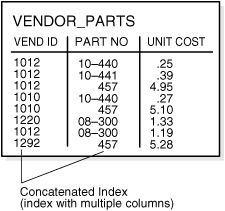
|
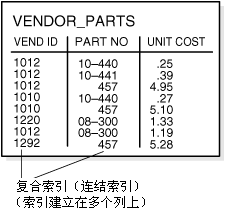
|
|
223 |
No more than 32 columns can form a regular composite index. For a bitmap
index, the maximum number columns is 30.
A key value cannot exceed
roughly half (minus some overhead) the available data space in a data
block.
|
一个常规的(regular)复合索引(composite index)不能超过 32 列,而位图索引(bitmap index)不能超过 30
列。索引中一个键值(key value)的总长度大致上不应超过一个数据块(data block)总可用空间的一半。 |
|
224 |
See Also:
Oracle Database Performance Tuning Guide for more
information about using composite indexes
|
另见:
Oracle 数据库性能调优指南 了解如何使用复合索引
|
|
225 |
Indexes and Keys
|
5.8.3 索引和健
|
|
226 |
Although the terms are often used interchangeably, indexes and keys are
different. Indexes are structures actually stored in the
database, which users create, alter, and drop using SQL statements. You
create an index to provide a fast access path to table data. Keys
are strictly a logical concept. Keys correspond to another feature of
Oracle called integrity constraints, which enforce the business rules of
a database.
|
索引(index)与键(key)是连个不同的概念,但是这两个术语经常被混用。索引是在数据库中实际存储的数据结构,用户可以使用
SQL 语句对其进行创建(create),修改(alter),或移除(drop)。索引提供了一种快速访问表数据的途径。而键只是一个逻辑概念。键的概念主要在
Oracle 的完整性约束(integrity constraint)功能中使用,完整性约束用于保证数据库中的业务规则(business
rule)。 |
|
227 |
Because Oracle uses indexes to enforce some integrity constraints, the
terms key and index are often are used interchangeably. However, do not
confuse them with each other.
|
因为 Oracle 也会使用索引(index)来实现某些完整性约束(integrity
constraint),因此索引与键(key)这两个术语经常被混用。注意不要将二者混淆。 |
|
228 |
See Also:
Chapter 21, "Data Integrity"
|
另见:
第 21 章,“数据完整性”
|
|
229 |
Indexes and Nulls
|
5.8.4 索引和空值
|
|
230 |
NULL values in indexes are considered to be
distinct except when all the non-NULL
values in two or more rows of an index are identical, in which case the
rows are considered to be identical. Therefore,
UNIQUE indexes prevent rows containing
NULL
values from being treated as identical. This does not apply if there are
no non-NULL values—in other words, if the
rows are entirely
NULL.
|
对于一个数据表的两行或多行,如果其索引列(key column)中全部非空(non-NULL)的值完全相同(identical),那么在索引中这些行将被认为是相同的;反之,在索引中这些行将被认为是不同的。因此使用
UNIQUE 索引可以避免将包含 NULL 的行视为相同的。以上讨论并不包括索引列的列值(column value)全部为
NULL 的情况。 |
|
231 |
Oracle does not index table rows in which all key columns are
NULL, except in the case of bitmap indexes
or when the cluster key column value is NULL.
|
Oracle 不会将索引列(key column)全部为
NULL 的数据行加入到索引中。不过位图索引(bitmap
index)是个例外,簇键(cluster key)的列值(column value)全部为
NULL 时也是例外。 |
|
232 |
See Also:
"Bitmap Indexes and Nulls"
|
另见:
“位图索引和空值”
|
|
233 |
Function-Based Indexes
|
5.8.5 函数索引
|
|
234 |
You can create indexes on functions and expressions that involve one or
more columns in the table being indexed. A function-based index
computes the value of the function or expression and stores it in the
index. You can create a function-based index as either a B-tree or a
bitmap index.
|
如果一个函数(function)或表达式(expression)使用了一个表的一列或多列,则用户可以依据这些函数或表达式为表建立索引,这样的索引被称为函数索引(Function-Based
Index)。函数索引能够计算出函数或表达式的值,并将其保存在索引中。用户创建的函数索引既可以是平衡树类型(B-tree
index)的,也可以是位图类型(bitmap index)的。
|
|
235 |
The function used for building the index can be an arithmetic expression
or an expression that contains a PL/SQL function, package function, C
callout, or SQL function. The expression cannot contain any aggregate
functions, and it must be DETERMINISTIC.
For building an index on a column containing an object type, the
function can be a method of that object, such as a map method. However,
you cannot build a function-based index on a LOB
column, REF, or nested table column, nor
can you build a function-based index if the object type contains a
LOB, REF, or
nested table.
|
用于创建索引的函数可以是一个数学表达式(arithmetic expression),也可以是使用了 PL/SQL 函数(PL/SQL
function),包函数(package function),C 外部调用(C callout),或 SQL 函数(SQL
function)的表达式。用于创建索引的函数不能包含任何聚合函数(ggregate
function),如果为用户自定义函数,则在声明中必须使用 DETERMINISTIC
关键字。如果在一个使用对象类型(object type)的列上建立函数索引,则可以使用此对象的方法(method)作为函数,例如此对象的 map
方法。用户不能在数据类型为 LOB,REF,或嵌套表(nested
table)的列上建立函数索引,也不能在包含 LOB,REF,或嵌套表等数据类型的对象类型列上建立函数索引。
|
|
236 |
See Also:
|
另见:
|
|
237 |
Uses of Function-Based Indexes
|
5.8.5.1 使用函数索引
|
|
238 |
Function-based indexes provide an efficient mechanism for evaluating
statements that contain functions in their WHERE
clauses. The value of the expression is computed and stored in the
index. When it processes INSERT and
UPDATE statements, however, Oracle must
still evaluate the function to process the statement.
|
如果一个 SQL 语句的 WHERE 子句中使用了函数,那么建立相应的函数索引(function-based
index)是提高数据访问性能的有效机制。表达式(expression)的结果经过计算后将被存储在索引中。但是当执行 INSERT
和
UPDATE 语句时,Oracle 需要进行函数运算以便维护索引。 |
|
239 |
For example, if you create the following index:
CREATE INDEX idx ON table_1 (a + b * (c - 1), a, b);
|
例如,如果用户创建了以下函数索引:
CREATE INDEX idx ON table_1 (a + b * (c - 1), a, b);
|
|
240 |
then Oracle can use it when processing queries such as this:
SELECT a FROM table_1 WHERE a + b * (c - 1) < 100;
|
当 Oracle 处理如下查询时就可以使用之前建立的索引:
SELECT a FROM table_1 WHERE a + b * (c - 1) < 100;
|
|
241 |
Function-based indexes defined on UPPER(column_name) or
LOWER(column_name) can facilitate case-insensitive searches. For
example, the following index:
CREATE INDEX uppercase_idx ON employees (UPPER(first_name));
|
使用 UPPER(column_name) 或
LOWER(column_name)
函数建立函数索引(function-based index)有助于与大小写无关(case-insensitive)的查询。例如创建以下函数索引:
CREATE INDEX uppercase_idx ON employees (UPPER(first_name));
|
|
242 |
can facilitate processing queries such as this:
SELECT * FROM employees WHERE UPPER(first_name) = 'RICHARD';
|
有助于提高以下查询的性能:
SELECT * FROM employees WHERE UPPER(first_name) = 'RICHARD';
|
|
243 |
A function-based index can also be used for a globalization support sort
index that provides efficient linguistic collation in SQL statements.
|
|
|
244 |
See Also:
Oracle Database Globalization Support Guide for
information about linguistic indexes
|
另见:
Oracle 数据库国际化支持指南
了解语言索引(linguistic index)
|
|
245 |
Optimization with Function-Based Indexes
|
5.8.5.2 函数索引的优化
|
|
246 |
You must gather statistics about function-based indexes for the
optimizer. Otherwise, the indexes cannot be used to process SQL
statements.
|
用户必须为优化器(optimizer)收集关于函数索引(unction-based index)的统计信息(statistic)。否则处理
SQL 语句时将不会使用此索引。 |
|
247 |
The optimizer can use an index range scan on a function-based index
for queries with expressions in WHERE clause. For example, in this
query:
SELECT * FROM t WHERE a + b < 10;
|
当一个查询的 WHERE 子句中含有表达式(expression)时,优化器可以对函数索引(function-based
index)进行索引区间扫描(index range scan)。例如以下查询:
SELECT * FROM t WHERE a + b < 10;
|
|
248 |
the optimizer can use index range scan if an index is built on
a+b. The range scan access path is
especially beneficial when the predicate (WHERE
clause) has low selectivity. In addition, the optimizer can estimate the
selectivity of predicates involving expressions more accurately if the
expressions are materialized in a function-based index.
|
如果使用表达式(expression)
a+b 建立的索引,优化器(optimizer)就能够进行索引区间扫描(index
range scan)。如果谓词(predicate,即 WHERE
子句)产生的选择性(selectivity)较低,则对区间扫描极为有利。此外,如果表达式的结果物化在函数索引内(function-based
index),优化器将能更准确地估计使用此表达式的谓词的选择性。 |
|
249 |
The optimizer performs expression matching by parsing the expression in
a SQL statement and then comparing the expression trees of the statement
and the function-based index. This comparison is case-insensitive and
ignores blank spaces.
|
优化器(optimizer)能够将 SQL 语句及函数索引(function-based
index)中的表达式解析为表达式树(expression
tree)并进行比较,从而实现表达式匹配。这个比较过程是大小写无关的(case-insensitive),并将忽略所有空格(blank
space)。 |
|
250 |
See Also:
Oracle Database Performance Tuning Guide for more
information about gathering statistics
|
另见:
Oracle 数据库性能调优指南 了解如何收集统计信息
|
|
251 |
Dependencies of Function-Based Indexes
|
5.8.5.3 函数索引的依赖性
|
|
252 |
Function-based indexes depend on the function used in the expression
that defines the index. If the function is a PL/SQL function or package
function, the index is disabled by any changes to the function
specification.
|
函数索引(function-based index)依赖于索引定义表达式中使用的函数。如果此函数为 PL/SQL 函数(PL/SQL
function)或包函数(package function),当函数声明(function
specification)发生变化时,索引将失效(disabled)。 |
|
253 |
To create a function-based index, the user must be granted
CREATE INDEX or
CREATE ANY INDEX.
|
用户需要被授予(grant)CREATE INDEX 或
CREATE ANY INDEX 权限才能创建函数索引(function-based index)。 |
|
254 |
To use a function-based index:
- The table must be analyzed after the
index is created.
- The query must be guaranteed not to
need any NULL values from the indexed
expression, because NULL values are not
stored in indexes.
|
要想使用函数索引(function-based index):
- 建立索引后,表必须经过分析(analyze)。
- 必须保证查询的条件表达式不是 NULL
值, 因为 NULL 值不会被存储到索引中。
|
|
255 |
The following sections describe additional requirements.
|
以下各节将讲述使用函数索引的其他需求。 |
|
256 |
DETERMINISTIC Functions
|
5.8.5.3.1 DETERMINISTIC 函数
|
|
257 |
Any user-written function used in a function-based index must have been
declared with the DETERMINISTIC keyword to
indicate that the function will always return the same output return
value for any given set of input argument values, now and in the future.
|
函数索引(function-based index)使用的用户自定义函数(user-written function)必须声明为 DETERMINISTIC,此关键字表明对于一定的输入参数,此函数总会得到相同的输出结果。 |
|
258 |
See Also:
Oracle Database Performance Tuning Guide
|
另见:
Oracle 数据库性能调优指南
|
|
259 |
Privileges on the Defining Function
|
5.8.5.3.2 定义函数的权限
|
|
260 |
The index owner needs the EXECUTE privilege
on the function used to define a function-based index. If the
EXECUTE privilege is revoked, Oracle marks
the index DISABLED.
The index owner does
not need the
EXECUTE WITH GRANT OPTION
privilege on this function to grant
SELECT
privileges on the underlying table.
|
函数索引(function-based index)的所有者(owner)必须具备此索引定义中使用的函数的 EXECUTE
权限。当 EXECUTE 权限被收回(revoke)后,Oracle 则将索引标识为 DISABLED。索引的所有者无须具备此函数的 EXECUTE WITH GRANT OPTION
权限,即可将索引所在表的 SELECT
权限授予(grant)其他用户。 |
|
261 |
Resolve Dependencies of Function-Based Indexes
|
5.8.5.3.3 解决函数索引的依赖性问题
|
|
262 |
A function-based index depends on any function that it is using. If the
function or the specification of a package containing the function is
redefined (or if the index owner's EXECUTE
privilege is revoked), then the following conditions hold:
- The index is marked as
DISABLED.
- Queries on a
DISABLED index fail if the optimizer chooses to use the
index.
- DML operations on a
DISABLED index fail unless the index is
also marked UNUSABLE and the
initialization parameter SKIP_UNUSABLE_INDEXES
is set to true.
|
函数索引(function-based
index)依赖于她使用的所有函数。如果函数或函数所在包的声明(specification)被修改过(或索引所有者对函数的 EXECUTE
权限被收回),将会出现以下情况:
- 索引被标记为
DISABLED。
- 如果优化器(optimizer)选择了在标记为
DISABLED 的索引上执行查询,那么此查询将失败
- 使用标记为
DISABLED 的索引而执行的 DML 操作将失败,除非此索引同时被标记为 UNUSABLE
且初始化参数(initialization parameter) SKIP_UNUSABLE_INDEXES
被设为 TRUE。
|
|
263 |
To re-enable the index after a change to the function, use the
ALTER INDEX ... ENABLE statement.
|
函数被修改之后,用户可以使用
ALTER INDEX ... ENABLE 语句将索引重新置为
ENABLE 状态。 |
|
264 |
How Indexes Are Stored
|
5.8.6 索引是如何存储的
|
|
265 |
When you create an index, Oracle automatically allocates an index
segment to hold the index's data in a tablespace. You can control
allocation of space for an index's segment and use of this reserved
space in the following ways:
- Set the storage parameters for the
index segment to control the allocation of the index segment's
extents.
- Set the PCTFREE
parameter for the index segment to control the free space in the
data blocks that constitute the index segment's extents.
|
当用户创建索引时,Oracle 会自动地在表空间(tablespace)中创建索引段(index
segment)来存储索引的数据。用户可以通过以下方式控制索引段的空间分配和使用:
- 设置索引段的存储参数(storage
parameter)来控制如何为此索引段分配数据扩展(extent)
- 为索引段设置 PCTFREE
参数,来控制组成数据扩展的各个数据块(data block)的可用空间情况。
|
|
266 |
The tablespace of an index's segment is either the owner's default
tablespace or a tablespace specifically named in the
CREATE INDEX statement. You do not have to
place an index in the same tablespace as its associated table.
Furthermore, you can improve performance of queries that use an index by
storing an index and its table in different tablespaces located on
different disk drives, because Oracle can retrieve both index and table
data in parallel.
|
索引段(index segment)使用的表空间(tablespace)既可以是索引所有者(owner)的默认表空间,也可以是在
CREATE INDEX
语句中指定的表空间。索引无需和其相关的表位于同一表空间中。相反,如果将索引与其相关表存储在不同磁盘上能够提升使用此索引的查询性能,因为此时
Oracle 能够并行地(parallel)访问索引及表数据。 |
|
267 |
See Also:
"PCTFREE,
PCTUSED, and Row Chaining"
|
另见:
“PCTFREE,PCTUSED,及行链接”
|
|
268 |
Format of Index Blocks
|
5.8.6.1 索引块的格式
|
|
269 |
Space available for index data is the Oracle block size minus block
overhead, entry overhead, rowid, and one length byte for each value
indexed.
|
一个数据块(data block)内可用于存储索引数据的空间等于数据块容量减去数据块管理开销(overhead),索引条目管理开销(entry
overhead),rowid,及记录每个索引值长度的 1 字节(byte)。
|
|
270 |
When you create an index, Oracle fetches and sorts the columns to be
indexed and stores the rowid along with the index value for each
row. Then Oracle loads the index
from the bottom up. For example,
consider the statement:
CREATE INDEX employees_last_name ON employees(last_name);
|
当用户创建索引时,Oracle 取得所有被索引列的数据并进行排序,之后将排序后索引值和与此值相对应的 rowid
按照从下到上的顺序加载到索引中。例如,以下语句:
CREATE INDEX employees_last_name ON employees(last_name);
|
|
271 |
Oracle sorts the employees table on the
last_name column. It then loads the index
with the last_name and corresponding rowid
values in this sorted order. When it uses the index, Oracle does a quick
search through the sorted last_name values
and then uses the associated rowid values to locate the rows having the
sought last_name value.
|
Oracle 先将 employees 表按
last_name 列排序,再将排序后的 列及相应的 rowid
按从下到上的顺序加载到索引中。使用此索引时,Oracle 可以快速地搜索已排序的
last_name 值,并使用相应的 rowid 去定位包含用户所查找的 last_name
值的数据行。 |
|
272 |
The Internal Structure of Indexes
|
5.8.6.2 索引的内部结构
|
|
273 |
Oracle uses B-trees to store indexes to speed up data access. With no
indexes, you have to do a sequential scan on the data to find a value.
For n rows, the average number of rows searched is n/2. This does not
scale very well as data volumes increase.
|
Oracle 使用平衡树(B-tree)存储索引以便提升数据访问速度。当不使用索引时,用户必须对数据进行顺序扫描(sequential
scan)来查找指定的值。如果有 n 行数据,那么平均需要扫描的行为 n/2。因此当数据量增长时,这种方法的开销将显著增长。 |
|
274 |
Consider an ordered list of the values divided into block-wide ranges
(leaf blocks). The end points of the ranges along with pointers to the
blocks can be stored in a search tree and a value in log(n) time for n
entries could be found. This is the basic principle behind Oracle
indexes.
|
如果将一个已排序的值列(list of the
values)划分为多个区间(range),每个区间的末尾包含指向下个区间的指针(pointer),而搜索树(search
tree)中则保存指向每个区间的指针。此时在 n 行数据中查询一个值所需的时间为 log(n)。这就是 Oracle 索引的基本原理。 |
|
275 |
Figure 5-7 illustrates the
structure of a B-tree index.
|
图5-7
显示了平衡树索引(B-tree index)的结构。 |
|
276 |
Figure 5-7 illustrates the
structure of a B-tree index.
|
图5-7 显示了平衡树索引(B-tree
index)的结构。 |
|
277 |
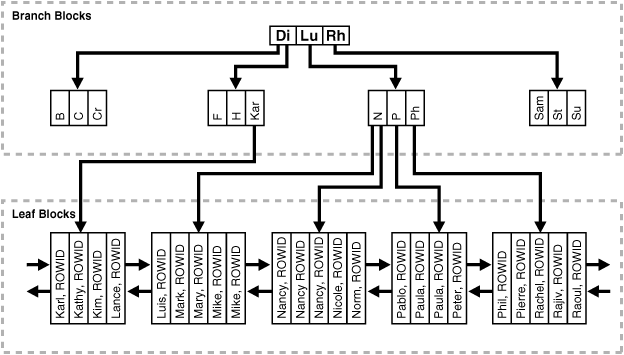
|
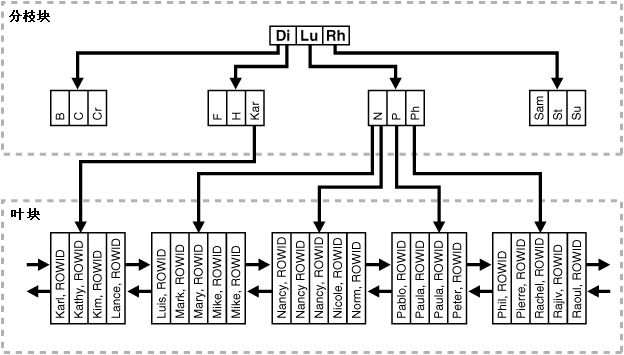 |
|
278 |
The upper blocks (branch blocks) of a B-tree index contain index
data that points to lower-level index blocks. The lowest level index
blocks (leaf blocks) contain every indexed data value and a
corresponding rowid used to locate the actual row. The leaf blocks are
doubly linked. Indexes in columns containing character data are based on
the binary values of the characters in the database character set.
|
在一个平衡树索引(B-tree index)中,最底层的索引块(叶块(leaf
block))存储了被索引的数据值,以及对应的 rowid。叶块之间以双向链表的形式相互连接。位于叶块之上的索引块被称为分支块(branch
block),分枝块中包含了指向下层索引块的指针。如果被索引的列存储的是字符数据(character
data),那么索引值为这些字符数据在当前数据库字符集(database character set)中的二进制值(binary value)。 |
|
279 |
For a unique index, one rowid exists for each data value. For a
nonunique index, the rowid is included in the key in sorted order, so
nonunique indexes are sorted by the index key and rowid. Key values
containing all nulls are not indexed, except for cluster indexes. Two
rows can both contain all nulls without violating a unique index.
|
对于唯一索引(unique index),每个索引值对应着唯一的一个 rowid。对于非唯一索引(nonunique
index),每个索引值对应着多个已排序的 rowid。因此在非唯一索引中,索引数据是按照索引键(index key)及 rowid
共同排序的。键值(key value)全部为 NULL
的行不会被索引,只有簇索引(cluster index)例外。在数据表中,如果两个数据行的全部键值都为 NULL,也不会与唯一索引相冲突。
|
|
280 |
Index Properties
|
5.8.6.3 索引的属性
|
|
281 |
The two kinds of blocks:
- Branch blocks for searching
- Leaf blocks that store the values
|
有两种类型的索引块:
- 用于搜索的分支块(branch block)
- 用于存储索引数据的叶块(leaf block)
|
|
282 |
Branch Blocks
|
5.8.6.3.1 分支块
|
|
283 |
Branch blocks store the following:
- The minimum key prefix needed to make
a branching decision between two keys
- The pointer to the child block
containing the key
|
分支块(branch block)中存储以下信息:
- 最小的键值前缀(minimum key prefix),用于在(本块的)两个键值之间做出分支选择
- 指向包含所查找键值的子块(child block)的指针()
|
|
284 |
If the blocks have n keys then they have n+1 pointers. The number of
keys and pointers is limited by the block size.
|
包含 n 个键值的分支块(branch block)含有 n+1 个指针。键值及指针的数量同时还受索引块(index block)容量的限制。 |
|
285 |
Leaf Blocks
|
5.8.6.3.2 叶块
|
|
286 |
All leaf blocks are at the same depth from the root branch block. Leaf
blocks store the following:
- The complete key value for every row
- ROWIDs of
the table rows
|
所有叶块(leaf block)相对于其根分支块(root branch block)的深度(depth)是相同的。叶块用于存储以下信息:
- 数据行的键值(key value)
- 键值对应数据行的 ROWID
|
|
287 |
All key and ROWID pairs are linked to their
left and right siblings. They are sorted by (key,
ROWID).
|
所有的 键值-ROWID 对(key and ROWID
pair)都与其左右的兄弟节点(sibling)向链接(link),并按照(key,ROWID)的顺序排序。
|
|
288 |
Advantages of B-tree Structure
|
5.8.6.4 平衡树结构的优势
|
|
289 |
The B-tree structure has the following advantages:
- All leaf blocks of the tree are at the
same depth, so retrieval of any record from anywhere in the index
takes approximately the same amount of time.
-
B-tree indexes automatically stay
balanced.
-
All blocks of the B-tree are
three-quarters full on the average.
- B-trees provide excellent retrieval
performance for a wide range of queries, including exact match and
range searches.
- Inserts, updates, and deletes are
efficient, maintaining key order for fast retrieval.
- B-tree performance is good for both
small and large tables and does not degrade as the size of a table
grows.
|
平衡树数据结构(B-tree structure)具有以下优势:
- 平衡树(B-tree)内所有叶块(leaf
block)的深度相同,因此获取索引内任何位置的数据所需的时间大致相同。
- 平衡树索引(B-tree index)能够自动保持平。
- 平衡树内的所有块容量平均在总容量的 3/4 左右。
- 在大区间(wide range)范围内进行查询时,无论匹配个别值(exact
match)还是搜索一个区间(range search),平衡树都能提供较好的查询性能。
-
数据插入(insert),更新(update),及删除(delete)的效率较高,且易于维护键值的顺序(key order)
-
大型表,小型表利用平衡树进行搜索的效率都较好,且搜索效率不会因数据增长而降低。
|
|
290 |
See Also:
Computer science texts for more information about B-tree indexes
|
另见:
计算机理论教材了解平衡树索引(B-tree index)
|
|
291 |
Index Unique Scan
|
5.8.7 索引唯一扫描
|
|
292 |
Index unique scan is one of the most efficient ways of accessing data.
This access method is used for returning the data from B-tree indexes.
The optimizer chooses a unique scan when all columns of a unique
(B-tree) index are specified with equality conditions.
|
索引唯一扫描(index unique scan)是效率最高的数据访问方式之一。从平衡树索引(B-tree
index)中获取数据时将采用此种方式。当一个唯一索引(采用平衡树结构)的全部列都包含在查询条件中,且查询体条件表达式均为等号(equality)时,优化器将选择使用索引唯一扫描。 |
|
293 |
Index Range Scan
|
5.8.8 索引区间扫描
|
|
294 |
Index range scan is a common operation for accessing
selective data. It
can be bounded (bounded on both sides) or unbounded (on one or both
sides). Data is returned in the ascending order of index columns.
Multiple rows with identical values are sorted (in ascending order) by
the ROWIDs.
|
当访问选择性较大的数据(selective data)时 Oracle 常进行索引区间扫描(index range scan)。扫描区间可以是封闭的(bounded)(两端均封闭),也可以是不封闭的(unbounded)(一端或两端均不封闭)。扫描所返回的数据按照索引列的升序进行排列,对于索引值相同的行将按
ROWID 的升序排列。 |
|
295 |
Key Compression
|
5.8.9 键压缩
|
|
296 |
Key compression lets you compress portions of the primary key column
values in an index or index-organized table, which reduces the storage
overhead of repeated values.
|
用户利用键压缩(key compression)可以将索引或索引表(index-organized table)中键值(column
value)的部分内容进行压缩,以便减少重复值带来的存储开销。 |
|
297 |
Generally, keys in an index have two pieces, a
grouping piece and a
unique piece. If the key is not defined to have a unique piece, Oracle
provides one in the form of a rowid appended to the grouping piece. Key
compression is a method of breaking off the grouping piece and storing
it so it can be shared by multiple unique pieces.
|
一般来说,索引的一个键(key)通常由两个片段(piece)构成:分组片段(grouping piece)及唯一片段(unique
piece)。如果定义索引的键中不存在唯一片段,Oracle 会以 ROWID 的形式在此键的分组片段后添加一个唯一片段。键压缩(key compression)就是将键的分组片段从键中拆分出来单独存储,供多个唯一片段使用。 |
|
298 |
Prefix and Suffix Entries
|
5.8.9.1 索引键的前缀和后缀
|
|
299 |
Key compression breaks the index key into a
prefix entry (the grouping
piece) and a suffix entry (the unique piece). Compression is achieved by
sharing the prefix entries among the suffix entries in an index block.
Only keys in the leaf blocks of a B-tree index are compressed. In the
branch blocks the key suffix can be truncated, but the key is not
compressed.
|
键压缩(key compression)将一个索引键拆分为前缀(prefix entry)(即分组片段(grouping
piece))和后缀(suffix entry)(即唯一片段(unique piece))。压缩是通过一个索引块(index
block)中的多个后缀共享一个前缀来实现的。在平衡树索引(B-tree index)中只有位于叶块(leaf
block)的键会被压缩。在分支块(branch block)内不必存储键的后缀,因此其中的键也无需压缩。
|
|
300 |
Key compression is done within an index block but not across multiple
index blocks. Suffix entries form the compressed version of index rows.
Each suffix entry references a prefix entry, which is stored in the same
index block as the suffix entry.
|
键压缩(key compression)只能在每个索引块(index block)内分别实现,而不能跨多个索引块。压缩后每个索引行(index
row)只保存后缀(suffix entry),而每个后缀将引用一个共享的前缀(prefix
entry),后缀与其共享的前缀必须位于同一索引块内。 |
|
301 |
By default, the prefix consists of all key columns excluding the last
one. For example, in a key made up of three columns (column1, column2,
column3) the default prefix is (column1, column2). For a list of values
(1,2,3), (1,2,4), (1,2,7), (1,3,5), (1,3,4), (1,4,4) the repeated
occurrences of (1,2), (1,3) in the prefix are compressed.
|
默认情况下,前缀(prefix entry)由除去最后一列之外的其他键列(key column)构成。例如,一个索引键(index
key)由(column1,column2,column3)3 列构成,则默认的前缀为(column1,
column2)。如一组索引值为(1,2,3),(1,2,4),(1,2,7),(1,3,5),(1,3,4),(1,4,4),则其中重复出现的前缀
(1,2),(1,3) 将被压缩。
|
|
302 |
Alternatively, you can specify the prefix length, which is the number of
columns in the prefix. For example, if you specify prefix length 1, then
the prefix is column1 and the suffix is (column2, column3). For the list
of values (1,2,3), (1,2,4), (1,2,7), (1,3,5), (1,3,4), (1,4,4) the
repeated occurrences of 1 in the prefix are compressed.
|
用户也可以手工设定前缀长度(prefix length),即前缀所包含的列数。例如,如果用户设定前缀长度为 1,则在上述例子中,column1
为前缀,(column2,column3)为后缀,其中重复出现的前缀 1 将被压缩。 |
|
303 |
The maximum prefix length for a nonunique index is the number of key
columns, and the maximum prefix length for a unique index is the number
of key columns minus one.
|
非唯一索引(nonunique index)的最大前缀长度(prefix length)为键列的个数,而唯一索引(unique
index)的最大前缀长度为键列的个数减 1。 |
|
304 |
Prefix entries are written to the index block only if the index block
does not already contain a prefix entry whose value is equal to the
present prefix entry. Prefix entries are available for sharing
immediately after being written to the index block and remain available
until the last deleted referencing suffix entry is cleaned out of the
index block.
|
应用键压缩(key compression)后,生成索引时,如果一个键值(key value)的前缀(prefix
entry)在索引块(index block)中不存在,此前缀才会被写入索引块中。一个前缀被写入后立即就可以被此索引块内的后缀(suffix
entry)共享,直到所有引用此前缀的后缀都被删除为止。 |
|
305 |
Performance and Storage Considerations
|
5.8.9.2 性能上及存储上的考虑
|
|
306 |
Key compression can lead to a huge saving in space, letting you store
more keys in each index block, which can lead to less I/O and better
performance.
|
键压缩(key compression)能够节约大量存储空间,因此用户可以在一个索引块(index block)内存储更多的索引键(index
key),从而减少 I/O,提高性能。 |
|
307 |
Although key compression reduces the storage requirements of an index,
it can increase the CPU time required to reconstruct the key column
values during an index scan. It also incurs some additional storage
overhead, because every prefix entry has an overhead of 4 bytes
associated with it.
|
键压缩(key compression)能够减少索引所需的存储空间,但索引扫描时需要重构(reconstruct)键值(key
value),因此增加了 CPU 的负担。此外键压缩也会带来一些存储开销,每个前缀(prefix entry)需要 4
字节(byte)的管理开销。 |
|
308 |
Uses of Key Compression
|
5.8.9.3 使用键压缩
|
|
309 |
Key compression is useful in many different scenarios, such as:
- In a nonunique regular index, Oracle
stores duplicate keys with the rowid appended to the key to break
the duplicate rows. If key compression is used, Oracle stores the
duplicate key as a prefix entry on the index block without the
rowid. The rest of the rows are suffix entries that consist of only
the rowid.
- This same behavior can be seen in a
unique index that has a key of the form (item, time stamp),
for example (stock_ticker,
transaction_time). Thousands of rows
can have the same stock_ticker value,
with transaction_time preserving
uniqueness. On a particular index block a
stock_ticker value is stored only once as a prefix entry.
Other entries on the index block are
transaction_time values stored as suffix entries that
reference the common stock_ticker
prefix entry.
- In an index-organized table that
contains a VARRAY or
NESTED TABLE datatype, the object
identifier is repeated for each element of the
collection datatype.
Key compression lets you compress the repeating object identifier
values.
|
键压缩(key compression)在多种情况下都能够发挥作用,例如:
- 对于非唯一索引(nonunique index),Oracle
会在每个重复的索引键(index key)之后添加 rowid 以便区分。如果使用了键压缩,在一个索引块(index
block)内,Oracle 只需将重复的索引键作为前缀((prefix entry))存储一次,并用各行的 rowid
作为后缀(suffix entry)。
- 唯一索引(nonunique index)中也存在相同的情况。例如唯一索引(stock_ticker,transaction_time)的含义是(项目,时间戳),通常数千条记录中 stock_ticker
的值是相同的,但她们对应的 transaction_time
值各不相同。使用了键压缩后,一个索引块中每个
stock_ticker 值作为前缀只需存储一次,而各个
transaction_time 值则作为后缀存储,并引用一个共享的 stock_ticker
前缀。
- 在一个包含 VARRAY
或
NESTED TABLE
数据类型(datatype)的索引表(index-organized table)中,这些collection
类型中各个元素(element)的对象标识符(object
identifier)是重复的。用户可以使用键压缩以避免重复存储这些对象标识符。
|
|
310 |
In some cases, however, key compression cannot be used. For example, in
a unique index with a single attribute key, key compression is not
possible, because even though there is a unique piece, there are no
grouping pieces to share.
|
有些情况无法使用键压缩(key compression)。例如,一个只有一个索引键(index key)的唯一索引(unique
index)就无法使用键压缩,因为索引键中不存在可供共享的分组片段(grouping piece)。 |
|
311 |
See Also:
"Overview of Index-Organized Tables"
|
另见:
“索引表概述”
|
|
312 |
Reverse Key Indexes
|
5.8.10 逆序键索引
|
|
313 |
Creating a reverse key index, compared to a standard index,
reverses the bytes of each column indexed (except the rowid) while
keeping the column order. Such an arrangement can help avoid performance
degradation with Real Application Clusters where modifications to the
index are concentrated on a small set of leaf blocks. By reversing the
keys of the index, the insertions become distributed across all leaf
keys in the index.
|
用户可以创建逆序键索引(reverse key index),此处的逆序指索引列值(index key
value)得各个字节(byte)按倒序排列,而非索引列(index key)逆序排列。在 RAC
环境中,使用这样的排列方式可以避免由于对索引的修改集中在一小部分叶块(leaf
block)上而造成的性能下降。通过使索引的键值逆序排列,可以使插入操作分布在索引的全部叶块中。 |
|
314 |
Using the reverse key arrangement eliminates the ability to run an index
range scanning query on the index. Because lexically adjacent keys are
not stored next to each other in a reverse-key index, only
fetch-by-key
or full-index (table) scans can be performed.
|
使用逆序键索引(reverse key index)后将无法对此索引进行索引区间扫描(index range scanning),因为在逆序键索引
中,词汇上(lexically)相邻的索引键(index key)在存储上未必相邻。因此在逆序键索引
上只能进行确定键扫描(fetch-by-key scan)或全索引扫描(full-index scan)。 |
|
315 |
Sometimes, using a reverse-key index can make an OLTP Real Application
Clusters application faster. For example, keeping the index of mail
messages in an e-mail application: some users keep old messages, and the
index must maintain pointers to these as well as to the most recent.
|
有些情况下,使用逆序键索引(reverse key index)可以令 RAC 环境下的 OLTP 应用效率更高。例如,为一个 e-mail
应用中的所有邮件进行索引:由于用户可能保存旧的邮件,因此索引必须做到既能快速访问最新邮件,也能快速访问旧邮件。 |
|
316 |
The REVERSE keyword provides a simple mechanism for creating a
reverse key index. You can specify the keyword REVERSE along with
the optional index specifications in a CREATE INDEX statement:
CREATE INDEX i ON t (a,b,c) REVERSE;
|
用户使用 REVERSE 就可以轻易地创建逆序键索引(reverse key index)。在 CREATE INDEX
语句中使用 REVERSE 关键字作为创建索引的选项:
CREATE INDEX i ON t (a,b,c) REVERSE;
|
|
317 |
You can specify the keyword NOREVERSE to
REBUILD a reverse-key index
into one that is not reverse keyed:
ALTER INDEX i REBUILD NOREVERSE;
|
用户也可以在 REBUILD 子句后添加 NOREVERSE
关键字将一个逆序键索引(reverse key index)转换为常规的索引:
ALTER INDEX i REBUILD NOREVERSE;
|
|
318 |
Rebuilding a reverse-key index without the
NOREVERSE keyword produces a rebuilt, reverse-key index.
|
如果 REBUILD 子句后没有使用 NOREVERSE
关键字,那么逆序键索引(reverse key index)被重建后仍将保持逆序。 |
|
319 |
Bitmap Indexes
|
5.8.11 位图索引
|
|
320 |
The purpose of an index is to provide pointers to the rows in a table
that contain a given key value. In a regular index, this is achieved by
storing a list of rowids for each key corresponding to the rows with
that key value. Oracle stores each key value repeatedly with each stored
rowid. In a bitmap index, a bitmap for each key value is used
instead of a list of rowids.
|
索引的目标是为用户提供指向包含特定键值(key value)的数据行的指针。在常规的索引中,Oracle 将各行的键值及与此键值对应的一组
ROWID 存储在一起,从而实现了上述目标。而在位图索引(bitmap index)中,只需存储每个键值的位图(bitmap),而非一组
ROWID。 |
|
321 |
Each bit in the bitmap corresponds to a possible rowid. If the bit is
set, then it means that the row with the corresponding rowid contains
the key value. A mapping function converts the bit position to an actual
rowid, so the bitmap index provides the same functionality as a regular
index even though it uses a different representation internally. If the
number of different key values is small, then bitmap indexes are very
space efficient.
|
位图(bitmap)中的每一位(bit)对应一个可能的 ROWID。如果某一位被置位(set),则表明着与此位对应的 ROWID 所指向的行中
包含此位所代表的键值(key value)。Oracle 通过一个映射函数(mapping function)将位信息转化为实际的
ROWID,因此虽然位图索引(bitmap
index)内部的存储结构与常规索引不同,但她同样能实现常规索引的功能。当不同值的索引键的数量较少时,位图索引的存储效率相当高。 |
|
322 |
Bitmap indexing efficiently merges indexes that correspond to several
conditions in a WHERE clause. Rows that
satisfy some, but not all, conditions are filtered out before the table
itself is accessed. This improves response time, often dramatically.
|
如果在 WHERE 子句内引用的多个列上都建有位图索引(bitmap
index),那么进行位图索引扫描时(bitmap
indexing)可以将各个位图索引融合在一起。不满足全部条件的行可以被预先过滤掉。因此使用位图索引能够极大地提高查询的响应时间。 |
|
323 |
Benefits for Data Warehousing Applications
|
5.8.11.1 数据仓库应用中位图索引的优势
|
|
324 |
Bitmap indexing benefits data warehousing applications which have large
amounts of data and ad hoc queries but a low level of concurrent
transactions. For such applications, bitmap indexing provides:
- Reduced response time for large
classes of ad hoc queries
- A substantial reduction of space use
compared to other indexing techniques
- Dramatic performance gains even on
very low end hardware
- Very efficient parallel DML and loads
|
数据仓库应用(data warehousing application)的特点是数据量巨大,执行的多为自定义查询(ad hoc
query),且并发事务较少。这种环境下使用位图索引(bitmap index)具备如下优势:
- 能够减少大数据量自定义查询的响应时间
- 与其他索引技术相比能够节省大量存储空间
- 即使硬件配置较低也能显著提高性能
- 有利于并行 DML 和并行加载
|
|
325 |
Fully indexing a large table with a traditional B-tree index can be
prohibitively expensive in terms of space, because the index can be
several times larger than the data in the table. Bitmap indexes are
typically only a fraction of the size of the indexed data in the table.
|
为一个大表建立传统的平衡树索引(B-tree index)可能占用极大的存储空间,索引有可能比数据表还要大数倍。而一个位图索引(bitmap
index)所占的空间比被索引数据还要小得多。 |
|
326 |
Bitmap indexes are not suitable for OLTP applications with large numbers
of concurrent transactions modifying the data. These indexes are
primarily intended for decision support in data warehousing applications
where users typically query the data rather than update it.
|
位图索引(bitmap index)不适用于 OLTP
系统,因为这样的系统中存在大量对数据进行修改的并发事务。位图索引主要用于数据仓库系统中(data
warehousing)的决策支持功能,在这种环境下用户对数据的操作主要是查询而非修改。 |
|
327 |
Bitmap indexes are also not suitable for columns that are primarily
queried with less than or greater than comparisons. For example, a
salary column that usually appears in WHERE
clauses in a comparison to a certain value is better served with a
B-tree index. Bitmapped indexes are only useful with equality queries,
especially in combination with AND,
OR, and NOT
operators.
|
主要进行大于(greater than)或小于(less than)比较的列,不适宜使用位图索引(bitmap index)。例如,WHERE
子句中常会将 salary 列和一个值进行比较,此时更适合使用平衡树索引(B-tree index)。位图索引适用于等值查询,尤其是存在 AND,OR,和 NOT
等逻辑操作符的组合时。 |
|
328 |
Bitmap indexes are integrated with the Oracle optimizer and execution
engine. They can be used seamlessly in combination with other Oracle
execution methods. For example, the optimizer can decide to perform a
hash join between two tables using a bitmap index on one table and a
regular B-tree index on the other. The optimizer considers bitmap
indexes and other available access methods, such as regular B-tree
indexes and full table scan, and chooses the most efficient method,
taking parallelism into account where appropriate.
|
位图索引(bitmap index)是集成在 Oracle 的优化器(optimizer)和执行引擎(execution
engine)之中的。位图索引也能够和 Oracle 中的其他执行方法(execution
method)无缝地组合。例如,优化器可以在利用一个表的位图索引和另一个表的平衡树索引(B-tree
index)对这两张表进行哈希连接(hash join)。优化器能够在位图索引及其他可用的访问方法(例如常规的平衡树索引,或全表扫描(full
table scan))中选择效率最高的方式,同时考虑是否适合使用并行执行。 |
|
329 |
Parallel query and parallel DML work with bitmap indexes as with
traditional indexes. Bitmap indexes on partitioned tables must be
local
indexes. Parallel create index and
concatenated indexes are also
supported.
|
位图索引(bitmap index)如同常规索引一样,可以结合并行查询(parallel query)和并行 DML(parallel
DML)一起工作。建立于分区表(partitioned table)的位图索引必须为本地索引(local index)。Oracle
还支持并行地创建位图索引,以及创建复合位图索引。
|
|
330 |
Cardinality
|
5.8.11.2 基数
|
|
331 |
The advantages of using bitmap indexes are greatest for low cardinality
columns: that is, columns in which the number of values is
small compared to the number of rows in the table. If the number of
distinct values of a column is less than 1% of the number of rows in the
table, or if the values in a column are repeated more than 100 times,
then the column is a candidate for a bitmap index. Even columns with a
lower number of repetitions and thus higher cardinality can be
candidates if they tend to be involved in complex conditions in the
WHERE clauses of queries.
|
在基数(cardinality)小的列上建立位图索引(bitmap index)效果最好。所谓某列的基数小(low
cardinality)是指此列中所有不相同的值的个数要小于总行数。如果某列中所有不相同的值的个数占总行数的比例小于
1%,或某列中值的重复数量在 100
个以上,那么就可以考虑在此列上建立位图索引。即便某列的基数较上述标准稍大,或值的重复数量较上述标准稍小,如果在一个查询的
WHERE 子句中需要引用此列定义复杂的条件,也可以考虑在此列上建立位图索引。 |
|
332 |
For example, on a table with 1 million rows, a column with 10,000
distinct values is a candidate for a bitmap index. A bitmap index on
this column can out-perform a B-tree index, particularly when this
column is often queried in conjunction with other columns.
|
例如,一个表包含一百万行数据,其中的一列包含一万个不相同的值,就可以考虑在此列上创建位图索引(bitmap
index)。此列上位图索引的查询性能将超过平衡树索引(B-tree index),当此列与其他列作为组合条件时效果尤为明显。 |
|
333 |
B-tree indexes are most effective for high-cardinality data: that is,
data with many possible values, such as
CUSTOMER_NAME or PHONE_NUMBER. In
some situations, a B-tree index can be larger than the indexed data.
Used appropriately, bitmap indexes can be significantly smaller than a
corresponding B-tree index.
|
平衡树索引(B-tree index)适用于高基数的数据,即数据的可能值很多,例如
CUSTOMER_NAME 或 PHONE_NUMBER
列。在有些情况下,平衡树索引所需的存储空间可能比被索引数据还要大。如果使用得当,位图索引将远远小于同等情况下的平衡树索引。 |
|
334 |
In ad hoc queries and similar situations, bitmap indexes can
dramatically improve query performance. AND
and OR conditions in the
WHERE clause of a query can be quickly
resolved by performing the corresponding Boolean operations directly on
the bitmaps before converting the resulting bitmap to rowids. If the
resulting number of rows is small, the query can be answered very
quickly without resorting to a full table scan of the table.
|
对于自定义查询(ad hoc query)或相似的应用,使用位图索引(bitmap index)能够显著地提高查询性能。查询的
WHERE 子句中的 AND
和 OR 条件直接对位图(bitmap)进行布尔运算(Boolean
operation)得到一个位图结果集(resulting bitmap),而无需将所有的位图转换为
ROWID。如果布尔操作后的结果集较小,那么查询就能够迅速得到结果,而无需进行全表扫描(full table scan)。 |
|
335 |
Bitmap Index Example
|
5.8.11.3 位图索引的例子
|
|
336 |
Table 5-1 shows a portion of a
company's customer data.
|
表5-1
一个公司部分的客户数据 |
|
337 |
Table 5-1 Bitmap Index
Example
|
表5-1 位图索引的例子 |
|
338 |
|
| CUSTOMER# |
MARITAL_STATUS |
REGION |
GENDER |
INCOME_LEVEL |
|
101
|
single
|
east
|
male
|
bracket_1
|
102
|
married
|
central
|
female
|
bracket_4
|
103
|
married
|
west
|
female
|
bracket_2
|
104
|
divorced
|
west
|
male
|
bracket_4
|
105
|
single
|
central
|
female
|
bracket_2
|
106
|
married
|
central
|
female
|
bracket_3
|
|
|
|
| 客户编号 |
婚姻状况 |
地区 |
性别 |
收入水平 |
|
101
|
单身
|
东部
|
男性
|
一级
|
102
|
已婚
|
中部
|
女性
|
四级
|
103
|
已婚
|
西部
|
女性
|
二级
|
104
|
离异
|
西部
|
男性
|
四级
|
105
|
单身
|
中部
|
女性
|
二级
|
106
|
已婚
|
中部
|
女性
|
三级
|
|
|
|
339 |
MARITAL_STATUS,
REGION, GENDER, and
INCOME_LEVEL are all low-cardinality
columns. There are only three possible values for marital status and
region, two possible values for gender, and four for income level.
Therefore, it is appropriate to create bitmap indexes on these columns.
A bitmap index should not be created on CUSTOMER#
because this is a high-cardinality column. Instead, use a unique B-tree
index on this column to provide the most efficient representation and
retrieval.
|
婚姻状况,地区,性别,和收入水平都是小基数(low-cardinality)的列。婚姻状况及地区有
3 种可能值,性别有两种,收入水平有
4 种。因此这 4 列上均适合创建位图索引(bitmap index)。而客户编号列上不应创建位图索引,因为此列基数很大。在此列上创建平衡树索引(B-tree
index)的存储和查询效率会较高。 |
|
340 |
Table 5-2 illustrates the bitmap
index for the REGION column in this example. It consists of three
separate bitmaps, one for each region.
|
表5-2 显示了在上表的地区列上建立的位图索引(bitmap
index)。此索引由 3 个独立的位图组成,每个位图代表一个地区。 |
|
341 |
Table 5-2 Sample Bitmap
|
表5-2 位图示例 |
|
342 |
|
| REGION='east' |
REGION='central' |
REGION='west' |
|
1
|
0
|
0
|
0
|
1
|
0
|
0
|
0
|
1
|
0
|
0
|
1
|
0
|
1
|
0
|
0
|
1
|
0
|
|
|
|
| 地区='东部' |
地区='中部' |
地区='西部' |
|
1
|
0
|
0
|
0
|
1
|
0
|
0
|
0
|
1
|
0
|
0
|
1
|
0
|
1
|
0
|
0
|
1
|
0
|
|
|
|
343 |
Each entry or bit in the bitmap corresponds to a single row of the
CUSTOMER table. The value of each bit
depends upon the values of the corresponding row in the table. For
instance, the bitmap REGION='east' contains
a one as its first bit. This is because the region is east in the first
row of the CUSTOMER table. The bitmap
REGION='east' has a zero for its other bits
because none of the other rows of the table contain
east as their value for
REGION.
|
位图(bitmap)中的每一位(bit)都对应
CUSTOMER 表中的一行。每一位的值由每行中对应字段的值决定。例如,位图
地区='东部' 的第一位为 1,这是因为 CUSTOMER 表中第一行的地区字段的值为东部。此位图其他位均为
0,因为此表其他行的地区字段的值都不为东部。 |
|
344 |
An analyst investigating demographic trends of the company's
customers can ask, "How many of our married customers live in the
central or west regions?" This corresponds to the following SQL
query:
SELECT COUNT(*) FROM CUSTOMER
WHERE MARITAL_STATUS = 'married' AND REGION IN ('central','west');
|
一个业务分析员在统计公司客户的地区分布趋势时,需要知道“住在中部或西部地区的已婚客户有多少?”。这个问题对应以下 SQL 语句:
SELECT COUNT(*) FROM CUSTOMER
WHERE MARITAL_STATUS = 'married' AND REGION IN ('central','west');
|
|
345 |
Bitmap indexes can process this query with great efficiency by counting
the number of ones in the resulting bitmap, as illustrated in
Figure 5-8. To identify the
specific customers who satisfy the criteria, the resulting bitmap can be
used to access the table.
|
使用位图索引(bitmap index)处理此查询时,通过布尔运算(Boolean
operation)很容易得到一个位图结果集(resulting bitmap),如
图5-8
所示。利用此结果集访问表,就可以得到满足查询条件的客户信息。 |
|
346 |
Figure 5-8 Running a Query
Using Bitmap Indexes
|
图5-8
利用位图索引执行查询 |
|
347 |
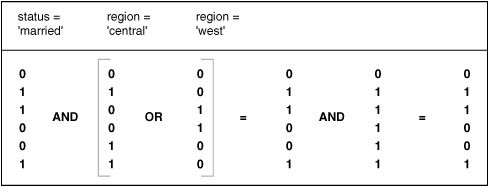
|
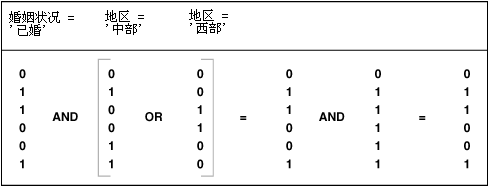 |
|
348 |
Figure 5-8 shows columns of ones and zeros. Boolean
operators are shown between the columns as follows: status=married
AND (region=central OR region=west).
|
图5-8 显示了三个位图。这三个位图之间的布尔运算如下:婚姻状况='已婚' AND (地区='中部' OR
地区='西部')。
|
|
349 |
Bitmap Indexes and Nulls
|
5.8.11.4 位图索引和空值
|
|
350 |
Bitmap indexes can include rows that have NULL
values, unlike most other types of indexes. Indexing of nulls can be
useful for some types of SQL statements, such as queries with the
aggregate function COUNT.
|
与其他大多数索引不同,位图索引(bitmap index)可以包含键值(key value)为
NULL 的行。将键值为空的行进行索引对有些 SQL 语句是有用处的,例如包含
COUNT 聚合函数的查询。 |
|
351 |
Bitmap Indexes on Partitioned Tables
|
5.8.11.5 分区表上的位图索引
|
|
352 |
Like other indexes, you can create bitmap indexes on partitioned tables.
The only restriction is that bitmap indexes must be local to the
partitioned table—they cannot be global indexes. Global bitmap indexes
are supported only on nonpartitioned tables.
|
用户可以在分区表(partitioned table)上创建位图索引(bitmap
index)。唯一的限制是位图索引对分区表来说必须是本地的(local),而不能是全局索引(global
index)。只有非分区表才能使用全局位图索引。 |
|
353 |
See Also:
|
另见:
|
|
354 |
Bitmap Join Indexes
|
5.8.12 位图连接索引
|
|
355 |
In addition to a bitmap index on a single table, you can create a bitmap
join index, which is a bitmap index for the join of two or more tables.
A bitmap join index is a space efficient way of reducing the volume of
data that must be joined by performing restrictions in advance. For each
value in a column of a table, a bitmap join index stores the rowids of
corresponding rows in one or more other tables. In a data warehousing
environment, the join condition is an equi-inner join between the
primary key column or columns of the dimension tables and the foreign
key column or columns in the fact table.
|
除了建立在单个表之上的位图索引(bitmap index),用户还可以创建位图连接索引(bitmap join
index),此种索引是为了连接(join)两个或多个数据表而建的。位图连接索引(bitmap join
index)可以预先将有连接关系的数据进行保存,且所需的存储空间较小。对于一个表的某列的每个值,位图连接索引为其保存其他表中与此值有连接关系的数据行的
rowid。在数据仓库环境中,连接关系通常是维表(dimension table)中的主键(primary key)与事实表(fact
table)中的外键(foreign key)进行等值内连接(equi-inner join)。 |
|
356 |
Bitmap join indexes are much more efficient in storage than
materialized
join views, an alternative for materializing joins in advance. This is
because the materialized join views do not compress the rowids of the
fact tables.
|
物化连接视图(materialized join view)也是一种预先将连接物化的方法,但与之相比位图连接索引(bitmap join
index)所需的存储空间更少。因为物化连接视图不会压缩事实表(fact table)中的 rowid。 |
|
357 |
See Also:
Oracle Database Data Warehousing Guide for more
information on bitmap join indexes
|
另见:
Oracle
数据仓库指南 了解关于位图连接索引的更多信息
|
|
358 |
Overview of
Index-Organized Tables
|
5.9 索引表概述
|
|
359 |
An index-organized table has a storage organization that is a
variant of a primary B-tree. Unlike an ordinary (heap-organized) table
whose data is stored as an unordered collection (heap), data for an
index-organized table is stored in a B-tree index structure in a primary
key sorted manner. Besides storing the primary key column values of an
index-organized table row, each index entry in the B-tree stores the
nonkey column values as well.
|
索引表(index-organized table)的存储组织方式是平衡树(B-tree)的一种变型。常规表(堆表(heap-organized
table))数据的存储形式是无序的堆(heap),而索引表的数据存储在依据主键(primary key)排序的平衡树索引(B-tree
index)结构中。也就是说,此平衡树索引不仅存储索引表各行的主键列值(primary key column
value),同时也存储各行的非键列值(nonkey column value)。
|
|
360 |
As shown in Figure 5-9, the
index-organized table is somewhat similar to a configuration consisting
of an ordinary table and an index on one or more of the table columns,
but instead of maintaining two separate storage structures, one for the
table and one for the B-tree index, the database system maintains only a
single B-tree index. Also, rather than having a row's rowid stored in
the index entry, the nonkey column values are stored. Thus, each B-tree
index entry contains <primary_key_value,
non_primary_key_column_values>.
|
如 图5-9 所示,索引表(index-organized
table)包含的内容可以看作由两部分构成:一个常规的表;一个建于此表一列或多列上的平衡树索引(B-tree
index)。但是数据库系统不会将组成索引表的表和索引作为两个分离的逻辑结构,而是将整个索引表存储为一个平衡树索引。在索引表中,每个索引项(index
entry)中不会存储 rowid,而是直接存储非键列值(nonkey column value)。即每个平衡树索引项中包含 <primary_key_value,
non_primary_key_column_values>.
|
|
361 |
Figure 5-9 Structure of a
Regular Table Compared with an Index-Organized Table
|
图5-9
常规表结构与索引表结构的比较
|
|
362 |
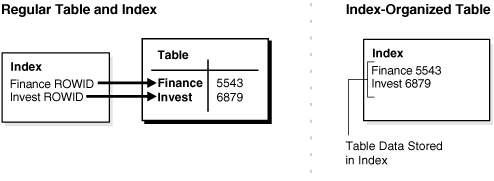
|
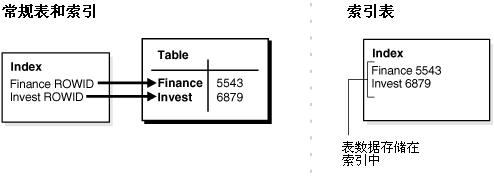
|
|
363 |
Figure 5-9 compares the structure of a regular table
to an index-organized table. It shows how a regular table requires
two storage spaces, one for the index and one for the table itself.
The index-organized table is self contained in that the index
contains the data. Only one storage space is required.
|
图5-9
对常规表结构与索引表结构进行了比较。常规表使用了两种存储结构,一个存储索引,一个存储表本身。而索引表只需使用索引一种存储结构,因为在索引内同时存储了表数据。
|
|
364 |
Applications manipulate the index-organized table just like an ordinary
table, using SQL statements. However, the database system performs all
operations by manipulating the corresponding B-tree index.
|
应用程序可以使用与操作常规表完全相同的 SQL 语句操作索引表(index-organized
table)。而在底层的数据库系统将对相应的平衡树索引(B-tree index)进行各种操作。
|
|
365 |
Table 5-3 summarizes the
differences between index-organized tables and ordinary tables.
|
表5-3 总结了常规表和索引表的区别。
|
|
366 |
Table 5-3 Comparison of
Index-Organized Tables with Ordinary Tables
|
表5-3
对常规表及索引表进行了比较
|
|
367 |
|
| Ordinary Table |
Index-Organized Table |
|
Rowid uniquely identifies a row. Primary key
can be optionally specified
|
Primary key uniquely identifies a row. Primary
key must be specified
|
Physical rowid in ROWID pseudocolumn allows
building secondary indexes
|
Logical rowid in ROWID pseudocolumn allows
building secondary indexes
|
Access is based on rowid
|
Access is based on logical rowid
|
Sequential scan returns all rows
|
Full-index scan returns all rows
|
Can be stored in a cluster with other tables
|
Cannot be stored in a cluster
|
Can contain a column of the
LONG datatype and
columns of LOB datatypes
|
Can contain LOB columns but not
LONG columns
|
|
|
|
| 常规表 |
索引表 |
|
使用 rowid 唯一地确定一行,主键(primary
key)是可选的
|
使用主键唯一地确定一行,主键是必须的
|
ROWID
虚列(pseudocolumn)中存储的是物理 rowid(physical rowid),可以使用此列建立间接索引
|
ROWID
虚列中存储的是逻辑 rowid(logical rowid),可以使用此列建立间接索引
|
对表的访问依据物理 rowid
|
对表的访问依据逻辑 rowid
|
使用全表扫描(sequential scan)可以返回所有行
|
使用全索引扫描(full-index scan)可以返回所有行
|
可以作为簇(cluster)中的表
|
不能作为簇(cluster)中的表
|
可以包含数据类型为 LOB 或
LONG 的列
|
可以包含数据类型为 LOB 的列,但不能包含数据类型为
LONG 的列
|
|
|
|
368 |
Benefits of Index-Organized Tables
|
5.9.1 索引表的优势
|
|
369 |
Index-organized tables provide faster access to table rows by the
primary key or any key that is a valid prefix of the primary key.
Presence of nonkey columns of a row in the B-tree leaf block itself
avoids an additional block access. Also, because rows are stored in
primary key order, range access by the primary key (or a valid prefix)
involves minimum block accesses.
|
利用索引表(index-organized table)的主键(primary key)或有效的主键前缀(prefix of the
primary key)访问表数据可以获得较快的速度。将非键列(nonkey column)存储在平衡树(B-tree)的叶块(leaf
block)中减少了访问数据的磁盘操作。此外,由于数据是按主键排序的,对索引表主键(或主键前缀)的一个区间进行查询时,只需访问最少的数据块。
|
|
370 |
In order to allow even faster access to frequently accessed columns, you
can use a row overflow segment (as described later) to push out
infrequently accessed nonkey columns from the B-tree leaf block to an
optional (heap-organized) overflow segment. This allows limiting the
size and content of the portion of a row that is actually stored in the
B-tree leaf block, which may lead to a higher number of rows in each
leaf block and a smaller B-tree.
|
为了进一步提高索引表(index-organized table)中常用列的访问速度,用户可以将不常用的非键列(nonkey
column)从平衡树(B-tree)叶块(leaf block)迁移到行溢出段(row overflow
segment)中。行溢出段是以堆的形式(heap-organized)组织存储的,后面的章节将进行详细描述。利用行溢出段可以减少平衡树叶块中为每行存储的数据,从而使每个叶块可以容纳更多行,并另平衡树更小。
|
|
371 |
Unlike a configuration of heap-organized table with a primary key index
where primary key columns are stored both in the table and in the index,
there is no such duplication here because primary key column values are
stored only in the B-tree index.
|
使用了主键索引的堆表(heap-organized table),其主键在表及索引中被存储了两次,而索引表(index-organized
table)不存在这种重复,主键只存在于索引表使用的平衡树索引(B-tree index)中。
|
|
372 |
Because rows are stored in primary key order, a significant amount of
additional storage space savings can be obtained through the use of key
compression.
|
由于索引表(index-organized table)中的数据是按照主键(primary key)排序的,因此有利于使用键压缩(key
compression)来节约存储空间。
|
|
373 |
Use of primary-key based logical rowids, as opposed to physical rowids,
in secondary indexes on index-organized tables allows high availability.
This is because, due to the logical nature of the rowids, secondary
indexes do not become unusable even after a table reorganization
operation that causes movement of the base table rows. At the same time,
through the use of physical guess in the logical rowid, it is possible
to get secondary index based index-organized table access performance
that is comparable to performance for secondary index based access to an
ordinary table.
|
在索引表(index-organized table)上利用基于主键的逻辑 rowid(而不是物理 rowid)创建间接索引(secondary
index)能够实现高可用性(high availability)。由于间接索引基于逻辑 rowid,即便索引基表(base table
)的重组操作(reorganization operation)导致其中的数据行发生移动,间接索引也不会失效。在提供了高可用性的同时,由于
Oracle 可以利用逻辑 rowid 进行物理推测(physical guess),利用间接索引访问索引表的性能与利用间接索引访问常规表的性能相当。
|
|
374 |
See Also:
|
另见:
|
|
375 |
Index-Organized Tables with Row Overflow Area
|
5.9.2 索引表的行溢出段
|
|
376 |
B-tree index entries are usually quite small, because they only consist
of the key value and a ROWID. In
index-organized tables, however, the B-tree index entries can be large,
because they consist of the entire row.
This may destroy the dense
clustering property of the B-tree index.
|
平衡树索引(B-tree index)的一个索引项(index entry)通常较小,因为其中只包含一个键值(key value)及对应的
ROWID。但是索引表(index-organized
table)中的索引项可能很大,因为其中包含了整个行的数据。这可能会降低索引表使用的平衡树索引的数据密度,从而影响索引表的性能。
|
|
377 |
Oracle provides the OVERFLOW clause to
handle this problem. You can specify an overflow tablespace so that, if
necessary, a row can be divided into the following two parts that are
then stored in the index and in the overflow storage area segment,
respectively:
- The index entry, containing column
values for all the primary key columns, a physical rowid that points
to the overflow part of the row, and optionally a few of the nonkey
columns
- The overflow part, containing column
values for the remaining nonkey columns
|
Oracle 提供了 OVERFLOW
子句来解决这个问题。用户可以在需要时设定一个溢出表空间(overflow
tablespace),将一个数据行分为两部分,分别存储在索引及行溢出段(overflow storage area
segment)内。一行数据可以被分为如下两部分:
- 索引项(index entry),其中包含了主键列(primary key
column)的全部列值(column value),指向此行溢出部分数据的物理 rowid(physical
rowid),以及用户选定的非键列值(nonkey column value)
- 行溢出部分(overflow part),包含了其余非键列的列值
|
|
378 |
With OVERFLOW, you can use two clauses,
PCTTHRESHOLD and
INCLUDING, to control how Oracle determines whether a row should
be stored in two parts and if so, at which nonkey column to break the
row. Using PCTTHRESHOLD, you can specify a
threshold value as a percentage of the block size. If all the nonkey
column values can be accommodated within the specified size limit, the
row will not be broken into two parts. Otherwise, starting with the
first nonkey column that cannot be accommodated, the rest of the nonkey
columns are all stored in the row overflow segment for the table.
|
用户可以使用 OVERFLOW 的两个子句 PCTTHRESHOLD
和
INCLUDING 供 Oracle 判断数据行否需要拆分为两部分存储,以及哪些非键列需要存储到行溢出段中。利用 PCTTHRESHOLD
子句,用户可以设定一个数据块容量的百分比值。如果一个数据行的非键列值(nonkey column
value)所占的容量小于设定值,此行就不必拆分为两部分。否则,从第一个超过设定值的非键列开始剩余的非键列将被存储到此索引表对应的行溢出段(row
overflow segment)中。
|
|
379 |
The INCLUDING clause lets you specify a
column name so that any nonkey column, appearing in the
CREATE TABLE statement after that specified
column, is stored in the row overflow segment. Note that additional
nonkey columns may sometimes need to be stored in the overflow due to
PCTTHRESHOLD-based limits.
|
利用 INCLUDING 子句,用户可以设定一个列名。在
CREATE TABLE 语句中在设定列名之后出现的非键列(nonkey column)将被存储到行溢出段(row
overflow segment)中。要注意的是,如果同时还设定了
PCTTHRESHOLD 参数,INCLUDING
子句设定的列名之前的非键列也可能被存储到行溢出段中。
|
|
380 |
See Also:
Oracle Database Administrator's Guide for examples
of using the OVERFLOW clause
|
另见:
Oracle
数据库管理员指南 查看使用 OVERFLOW 子句的例子
|
|
381 |
Secondary Indexes on Index-Organized Tables
|
5.9.3 索引表的间接索引
|
|
382 |
Secondary index support on index-organized tables provides efficient
access to index-organized table using columns that are not the primary
key nor a prefix of the primary key.
|
在索引表(index-organized table)上建立间接索引(secondary
index)后,访问索引表非主键列或非主键前缀列的性能将得到提高。
|
|
383 |
Oracle constructs secondary indexes on index-organized tables using
logical row identifiers (logical rowids) that are based on the
table's primary key. A logical rowid includes a physical guess,
which identifies the block location of the row. Oracle can use these
physical guesses to probe directly into the leaf block of the
index-organized table, bypassing the primary key search. Because rows in
index-organized tables do not have permanent physical addresses, the
physical guesses can become stale when rows are moved to new blocks.
|
Oracle 为索引表(index-organized table)建立间接索引(secondary index)时使用的是逻辑
rorwid(logical rowid),逻辑 rowid 是根据索引表的主键(primary key)生成的。Oracle
能够根据逻辑 rowid 进行物理推测(physical guess),以确定索引项(index entry)在索引块(index
block)中的物理位置。因此 Oracle 能够绕过主键搜索(primary key
search),通过物理推测直接访问索引表的叶块。由于索引表的数据行没有固定的物理地址,当索引项被移动到新的索引块后,物理推测的结果会出现错误,此时
Oracle 仍需要执行主键搜索。
|
|
384 |
For an ordinary table, access by a secondary index involves a scan of
the secondary index and an additional I/O to fetch the data block
containing the row. For index-organized tables, access by a secondary
index varies, depending on the use and accuracy of physical guesses:
- Without physical guesses, access
involves two index scans: a secondary index scan followed by a scan
of the primary key index.
- With accurate physical guesses, access
involves a secondary index scan and an additional I/O to fetch the
data block containing the row.
- With inaccurate physical guesses,
access involves a secondary index scan and an I/O to fetch the wrong
data block (as indicated by the physical guess), followed by a scan
of the primary key index.
|
对一个常规表来说,通过间接索引(secondary index)访问表数据意味着先扫描间接索引再获取包含所需数据行的数据块(data
block)。而对于索引表(index-organized table)来说,通过间接索引访问表数据的步骤依据是否使用物理推测(physical guess),及物理推测的准确度而有所不同:
-
如不使用物理推测,数据访问需要两次索引扫描:首先扫描间接索引,再依据其结果扫描主键索引(primary key index)。
- 如使用物理推测且推测结果准确,数据访问需要首先扫描间接索引,再进行 I/O
操作获取包含所需数据行的数据块。
-
如使用物理推测且推测结果不准确,数据访问需要首先扫描间接索引,并根据物理推测执行 I/O
操作获取了错误的数据块,之后再进行主键索引扫描。
|
|
385 |
See Also:
"Logical Rowids"
|
另见:
“逻辑 rowid”
|
|
386 |
Bitmap Indexes on Index-Organized Tables
|
5.9.4 索引表的位图索引
|
|
387 |
Oracle supports bitmap indexes on partitioned and nonpartitioned
index-organized tables. A mapping table is required for creating bitmap
indexes on an index-organized table.
|
Oracle 支持在分区的(partitioned)或非分区的(nonpartitioned)索引表(index-organized
table)上创建位图索引(bitmap index)。为索引表创建位图索引时需要使用一个映射表(mapping table)。
|
|
388 |
Mapping Table
|
5.9.4.1 映射表
|
|
389 |
The mapping table is a heap-organized table that stores logical rowids
of the index-organized table. Specifically, each mapping table row
stores one logical rowid for the corresponding index-organized table
row. Thus, the mapping table provides one-to-one mapping between logical
rowids of the index-organized table rows and physical rowids of the
mapping table rows.
|
映射表(mapping table)的存储结构是按堆组织的(heap-organized),其中保存的是索引表(index-organized
table)的逻辑 rowid(logical rowid)。具体的说,映射表在每一行中存储索引表内相应行的逻辑
rowid。这样,映射表在自身各行的物理 rowid(physical rowid)和索引表各行的逻辑 rowid 之间建立了一对一的映射关系。
|
|
390 |
A bitmap index on an index-organized table is similar to that on a
heap-organized table except that the rowids used in the bitmap index on
an index-organized table are those of the mapping table as opposed to
the base table. There is one mapping table for each index-organized
table and it is used by all the bitmap indexes created on that
index-organized table.
|
建立在索引表(index-organized table)上的位图索引(bitmap
index)与建立在堆表(heap-organized)上的位图索引类似,唯一的区别在于前者使用的 rowid 是映射表(mapping
table)中的物理 rowid(physical rowid)。每个索引表只需要一个映射表,建立在索引表上的多个位图索引可以共享同一个映射表。
|
|
391 |
In both heap-organized and index-organized base tables, a bitmap index
is accessed using a search key. If the key is found, the bitmap entry is
converted to a physical rowid. In the case of heap-organized tables,
this physical rowid is then used to access the base table. However, in
the case of index-organized tables, the physical rowid is then used to
access the mapping table. The access to the mapping table yields a
logical rowid. This logical rowid is used to access the index-organized
table.
|
无论是堆表(heap-organized)还是索引表(index-organized),都会使用搜索键(search
key)来检索位图索引(bitmap index)。如果在位图索引中找到了符合条件的记录,这个位图索引项(bitmap index
entry)将被转换为物理 rowid(physical rowid)。对于堆表,Oracle 将使用此物理 rowid 访问基表(base
table)。而对于索引表,Oracle 将使用此物理 rowid 访问映射表(mapping table)得到逻辑 rowid(logical
rowid),再通过逻辑 rowid 访问索引表。
|
|
392 |
Though a bitmap index on an index-organized table does not store logical
rowids, it is still logical in nature.
|
尽管索引表(index-organized table)的位图索引(bitmap index)存储的是物理 rowid(physical
rowid),但这个 rowid 在本质上还是逻辑 rowid(logical rowid)。
|
|
393 |
Note:
Movement of rows in an index-organized table does not leave the
bitmap indexes built on that index-organized table unusable.
Movement of rows in the index-organized table does invalidate the
physical guess in some of the mapping table's logical rowid entries.
However, the index-organized table can still be accessed using the
primary key.
|
提示:
索引表(index-organized
table)的数据行发生了移动后,不会导致建立在其上的位图索引(bitmap
index)失效。数据行移动后会导致使用映射表(mapping table)中某些逻辑 rowid(logical
rowid)进行物理推测(physical guess)时不准确。但是索引表仍旧可以通过主键(primary key)访问。
|
|
394 |
Partitioned Index-Organized Tables
|
5.9.5 分区索引表
|
|
395 |
You can partition an index-organized table by
RANGE, HASH, or
LIST on column values. The partitioning
columns must form a subset of the primary key columns.
Just like
ordinary tables, local partitioned (prefixed and non-prefixed) index as
well as global partitioned (prefixed) indexes are supported for
partitioned index-organized tables.
|
用户可以采用
RANGE,HASH,或
LIST 的方式对索引表(index-organized
table)进行分区(partition)。用于分区的列必须属于索引表的主键列(primary key
column)。与常规表一样,索引表上既能够建立本地分区索引(local partitioned
index),也能够建立全局分区索引(global partitioned index)。
|
|
396 |
B-tree Indexes on UROWID Columns for Heap- and Index-Organized
Tables
|
5.9.6 在堆表及索引表的 UROWID 列上建立平衡树索引
|
|
397 |
UROWID datatype columns can hold logical
primary key-based rowids identifying rows of index-organized tables.
Oracle supports indexes on UROWID datatypes
of a heap- or index-organized table. The index supports equality
predicates on UROWID columns. For
predicates other than equality or for ordering on
UROWID datatype columns, the index is not used.
|
数据类型为
UROWID 的列可以用于存储根据主键生成的(rimary key-based)逻辑
rowid(logical rowid)。Oracle 能够在堆表(heap-organized
table)及索引表(index-organized table)的 UROWID
列上创建索引。只有当一个查询中谓词(predicate)的条件为等于(equality)时,Oracle 才能够使用此类索引。等于之外的谓词条件及对 UROWID
列排序操作都不会使用此类索引。
|
|
398 |
Index-Organized Table Applications
|
5.9.7 索引表的应用
|
|
399 |
The superior query performance for primary key based access, high
availability aspects, and reduced storage requirements make
index-organized tables ideal for the following kinds of applications:
- Online transaction processing (OLTP)
- Internet (for example, search engines
and portals)
- E-commerce (for example, electronic
stores and catalogs)
- Data warehousing
- Analytic functions
|
索引表(ndex-organized table)能够提供优异的查询性能,高可用性,并有助于节约存储空间,因此索引表非常适合以下类型的应用:
- 联机事物处理(online transaction processing,OLTP)
- Internet(例如,搜索引擎和门户)
- 电子商务(例如电子商店及购物目录)
- 数据仓库(data warehousing)
- 分析应用(analytic function)
|
|
400 |
Overview of
Application Domain Indexes
|
5.10 应用域索引概述
|
|
401 |
Oracle provides extensible indexing to accommodate indexes on
customized complex datatypes such as documents, spatial data, images,
and video clips and to make use of specialized indexing techniques. With
extensible indexing, you can encapsulate application-specific index
management routines as an indextype schema object and define a
domain index (an application-specific index) on table columns or
attributes of an object type. Extensible indexing also provides
efficient processing of application-specific operators.
|
Oracle 提供了可扩展索引(extensible indexing)技术,用户利用此技术可以使索引适合于检索诸如文档,空间数据,图形,视频等复杂的数据类型,还可以实现自定义索引
功能。利用可扩展索引技术,用户可以将应用程序中的索引管理功能封装为 indextype
方案对象,还可以在表列上或对象类型(object type)的属性(attribute)上定义域索引(domain index)(应用程序的索引)。利用可扩展索引技术还能够高效地
使用在应用程序中定义的操作符(operator)。
|
|
402 |
The application software, called the cartridge, controls the
structure and content of a domain index. The Oracle database server
interacts with the application to build, maintain, and search the domain
index. The index structure itself can be stored in the Oracle database
as an index-organized table or externally as a file.
|
用户的应用程序(在 Oracle 中被称为模块(cartridge))实际上控制着域索引(domain
index)的结构与内容。Oracle 数据库能够和应用程序交互来创建(build),维护(maintain),检索(search
)域索引。域索引既能够以索引表(index-organized table)的形式存储在 Oracle
数据库中,也能够以文件的形式存储在数据库外。
|
|
403 |
See Also:
Oracle Database Data Cartridge Developer's Guide for
information about using data cartridges within Oracle's
extensibility architecture
|
另见:
Oracle
数据库数据模块开发者指南 了解如何在 Oracle 的可扩展体系结构中使用数据模块
|
|
404 |
Overview of
Clusters
|
5.11 簇概述
|
|
405 |
Clusters are an optional method of storing table data. A cluster
is a group of tables that share the same data blocks because they share
common columns and are often used together. For example, the
employees and
departments table share the department_id
column. When you cluster the employees and
departments tables, Oracle physically
stores all rows for each department from both the
employees and departments tables in
the same data blocks.
|
簇(cluster)是一种可选的存储表数据的方式。簇由一组拥有相同的列且经常被一起使用的数据表构成,这组表在存储时会共享一部份数据块(data
block)。例如,employees 和
departments 表中都包含 department_id
列。当用户将这两个表组合为一个簇时,Oralce 在物理上将
employees 和
departments 两表中各行的 department_id
字段存储在同一数据块(data block)里。
|
|
406 |
Figure 5-10 shows what happens
when you cluster the employees and
departments tables:
|
图5-10 显示了由 employees
和
departments 表构成的簇是如何存储的:
|
|
407 |
Figure 5-10 Clustered Table
Data
|
图5-10
簇表的数据存储
|
|
408 |
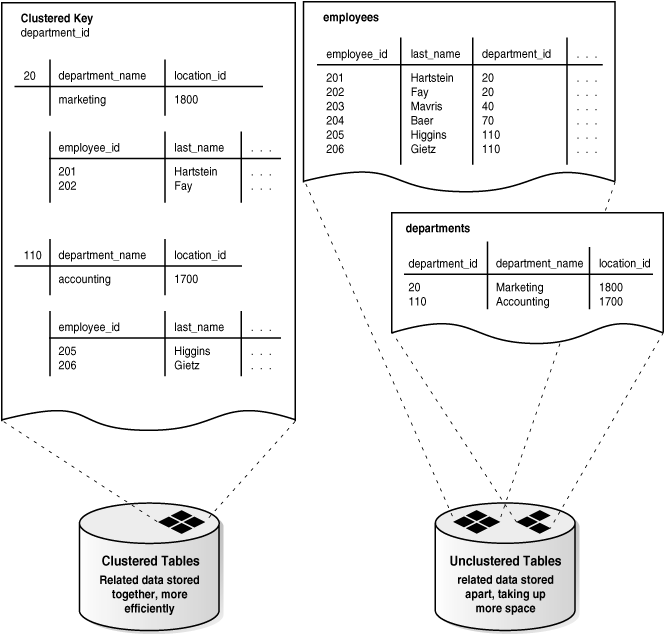
|
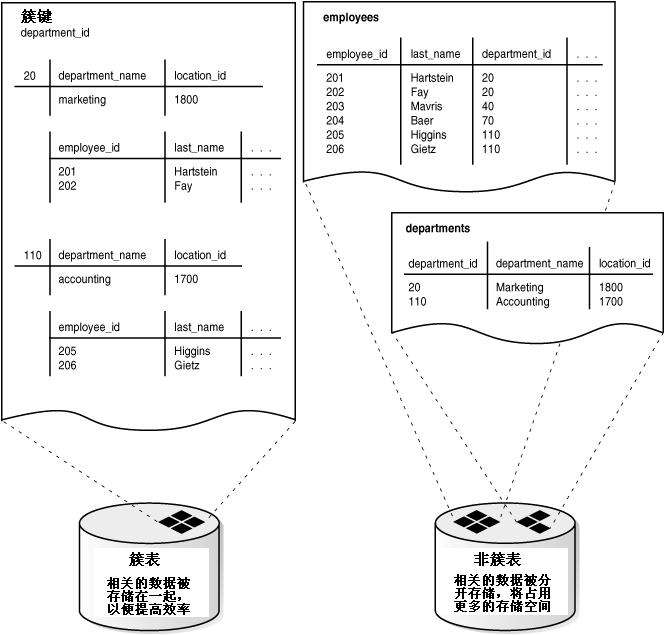 |
|
409 |
Figure 5-10 shows department_id as the clustered
key of the employees and departments tables. These clustered tables
store related data together efficiently, while unclustered tables
(employees and departments separately) store related data apart,
taking up more space.
|
图5-10 显示了 employees 和 departments 两个表使用 department_id
作为簇键构成簇表。这两个簇表将相关的数据存储在一起,以便提高效率,而非簇表(employees 和 departments)
将相关的数据分开存储,将占用更多的存储空间。
|
|
410 |
Because clusters store related rows of different tables together in the
same data blocks, properly used clusters offers these benefits:
- Disk I/O is reduced for joins of
clustered tables.
- Access time improves for joins of
clustered tables.
- In a cluster, a cluster key
value is the value of the cluster key columns for a particular row.
Each cluster key value is stored only once each in the cluster and
the cluster index, no matter how many rows of different tables
contain the value. Therefore, less storage is required to store
related table and index data in a cluster than is necessary in
nonclustered table format. For example, in
Figure 5-10, notice how each
cluster key (each department_id) is
stored just once for many rows that contain the same value in both
the employees and
departments tables.
|
在一个簇(cluster)内,不同表的相关(related)数据行会被存储到同一个数据块(data
block)中,因此适当地使用簇能够带来以下好处:
- 连接(join)簇表(clustered table)所需的磁盘 I/O
会减少。
- 连接簇表所需的时间将减少。
- 在一个簇中,簇键(cluster key)值是指各行簇键列(cluster
key column)的值。一个簇内的由多个簇表的各个数据行所使用的相同的簇键值,在簇及簇索引(cluster
index)中只会被存储一次。因此与非簇表(nonclustered table)相比,在簇中存储相关的表及索引所需的存储空间更少。例如
图5-10 所示,每个簇键(department_id)只被存储一次,而两个簇表
employees 和
departments 中包含相同簇键值的数据行共享同一个簇键。
|
|
411 |
See Also:
Oracle Database Administrator's Guide for
information about creating and managing clusters
|
另见:
Oracle
数据库管理员指南 了解如何创建和管理簇
|
|
412 |
Overview of Hash
Clusters
|
5.12 哈希簇概述
|
|
413 |
Hash clusters group table data in a manner similar to regular
index clusters (clusters keyed with an index rather than a hash
function). However, a row is stored in a hash cluster based on the
result of applying a hash function to the row's cluster key
value. All rows with the same key value are stored together on disk.
|
哈希簇(hash cluster)组织表数据的方式与常规的索引簇(index
cluster)基本类似。不同的是,在索引簇中一行数据的存储位置是由索引键(index
key)决定的。而在哈希簇中,一行数据的存储位置是依据此行的簇键值(cluster key value)经过哈希函数(hash
function)运算所得的结果而决定的。拥有相同簇键值的数据行在磁盘上的位置是相邻的。
|
|
414 |
Hash clusters are a better choice than using an indexed table or index
cluster when a table is queried frequently with equality queries (for
example, return all rows for department 10). For such queries, the
specified cluster key value is hashed. The resulting hash key value
points directly to the area on disk that stores the rows.
|
当一个表的数据经常使用等值条件(equality)进行查询时(例如,查询所有 department_id = 10
的数据行),以哈希簇(hash cluster)的形式存储这些数据比在此表上创建索引或索引簇(index cluster)更适用。Oracle
处理查询时,可以对查询条件中的簇键值(cluster key value)进行哈希运算,运算结果直接指向磁盘中存储相应数据行的位置。
|
|
415 |
Hashing is an optional way of storing table data to improve the
performance of data retrieval. To use hashing, create a hash cluster and
load tables into the cluster. Oracle physically stores the rows of a
table in a hash cluster and retrieves them according to the results of a
hash function.
|
为了提高获取数据的性能,在存储表数据时进行哈希运算(hashing)是一种可考虑的方式。用户可以创建一个哈希簇(hash
cluster),并将表数据加载到此簇中。之后 Oracle 就可以使用哈希函数(hash function)的运算结果来访问数据了。
|
|
416 |
Sorted hash clusters allow faster retrieval of data for applications
where data is consumed in the order in which it was inserted.
|
如果在一个应用中,使用数据的顺序与这些数据被插入时的顺序相同,那么使用经过排序的哈希簇(hash cluster)能够提高数据获取的速度。
|
|
417 |
Oracle uses a hash function to generate a distribution of numeric
values, called hash values, which are based on specific cluster
key values. The key of a hash cluster, like the key of an index cluster,
can be a single column or composite key (multiple column key). To find
or store a row in a hash cluster, Oracle applies the hash function to
the row's cluster key value. The resulting hash value corresponds to a
data block in the cluster, which Oracle then reads or writes on behalf
of the issued statement.
|
Oracle 使用哈希函数(hash function)根据簇键值(cluster key
value)生成一个离散(distribution)的数值,这个值被称为哈希值(hash value)。哈希簇(hash
cluster)使用的键(key)同索引簇(index cluster)的类似,既可以由一列构成,也可以是复合键(composite
key)(由多列构成)。Oracle
在存储或查找哈希簇中的一行数据时,需要使用此行的簇键值进行哈希运算。运算结果直接对应着簇中的数据块(data
block)内的物理地址,Oracle 就可以依此地址在数据块内为语句进行读或写操作。
|
|
418 |
A hash cluster is an alternative to a nonclustered table with an index
or an index cluster. With an indexed table or index cluster, Oracle
locates the rows in a table using key values that Oracle stores in a
separate index. To find or store a row in an indexed table or cluster,
at least two I/Os must be performed:
- One or more I/Os to find or store the
key value in the index
- Another I/O to read or write the row
in the table or cluster
|
利用非簇表(nonclustered table)及索引或索引簇(index cluster)存储的数据,也可以考虑使用哈希簇(hash
cluster)存储。对于使用索引或索引簇的非簇表(注意索引或索引簇与非簇表是分离的),Oracle 利用索引中的键值(key
value)来定位数据行在表中的位置,此时至少需要执行两次 I/O 操作:
- 一次或多次 I/O 操作,查找或存储索引中的键值
- 另一次 I/O 操作,读写表或簇中的数据行
|
|
419 |
See Also:
Oracle Database Administrator's Guide for
information about creating and managing hash clusters
|
另见:
Oracle
数据库管理员指南 了解如何创建和管理哈希簇
|