|
001 |
This chapter discusses the memory architecture of an Oracle instance.
|
本章讨论 Oracle 实例的内存体系结构。
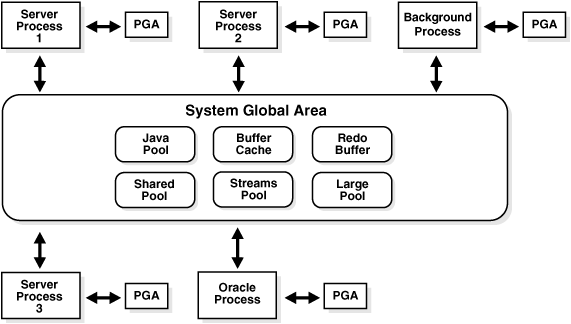
|
|
002 |
This chapter contains the following topics:
|
本章包含以下主题:
|
|
003 |
Introduction to
Oracle Memory Structures
|
8.1
Oracle 内存结构简介
|
|
004 |
Oracle uses memory to store information such as the following:
- Program code
- Information about a connected session,
even if it is not currently active
- Information needed during program
execution (for example, the current state of a query from which rows
are being fetched)
- Information that is shared and
communicated among Oracle processes (for example, locking
information)
- Cached data that is also permanently
stored on peripheral memory (for example, data blocks and redo log
entries)
|
Oracle 在内存中存储以下信息:
- 程序代码
-
已连接的会话(session)信息,包括当前活动的(active)及非活动的会话
- 程序执行过程中所需的信息(例如,某个查询的状态)
- 需要在 Oracle 进程间共享并进行通信的信息(例如,锁信息)
- 数据文件内数据的缓存(例如,数据块(data
block)及重做日志条目(redo log entry))
|
|
005 |
The basic memory structures associated with Oracle include:
- System Global Area (SGA), which is
shared by all server and background processes.
- Program Global Areas (PGA), which is
private to each server and background process;
there is one PGA for
each process.
|
Oracle 中的基本内存结构包括:
- 系统全局区(System Global Area,SGA),此区域由所有的服务进程(server
process)和后台进程(background process)共享。
- 程序全局区(Program Global Areas,PGA),此区域是每个服务进程和后台进程所私有的;即每个进程都有一个
属于自己的
PGA。
|
|
006 |
Figure 8-1 illustrates the
relationships among these memory structures.
|
图8-1 显示了各种内存结构之间的关系。
|
|
007 |
Figure 8-1 Oracle Memory
Structures
|
图8-1 Oracle 内存结构 |
|
008 |
|

|
|
009 |
Figure 8-1 shows the SGA in the middle. This
includes the Java pool, the buffer cache, the redo buffer, the
shared pool, the Streams pool, and the large pool. Outside the SGA,
with arrows going back and forth to the SGA, are server processes,
background processes, and Oracle processes. Each process also shows
an arrow going back and forth to the PGA.
|
图8-1 的中间为 SGA。其中包括 Java
池,数据缓存区,重做日志缓冲区,共享池,数据流池,及大型池。在 SGA 之外,存在服务进程,后台进程,及 Oracle 进程,她们能够和
SGA 交换信息。同时每个进程还需与其 PGA 通信。
|
|
010 |
Software code areas are another basic memory structure.
|
Oracle 的基本内存结构还包括软件代码区(software code area)。
|
|
011 |
See Also:
|
另见:
|
|
012 |
Overview of the
System Global Area
|
8.2
系统全局区概述
|
|
013 |
A system global area (SGA) is a group of shared memory structures
that contain data and control information for one Oracle database
instance. If multiple users are concurrently connected to the same
instance, then the data in the instance's SGA is shared among the users.
Consequently, the SGA is sometimes called the shared global area.
|
系统全局区(system global area,SGA)是一组包含了 Oracle
数据库数据及实例控制信息的共享的内存结构。当多个用户并发地连接到同一个实例后,这些用户将共享此实例 SGA 中的数据。因此 SGA 也被称为共享全局区(shared global area)。
|
|
014 |
An SGA and Oracle processes constitute an Oracle instance. Oracle
automatically allocates memory for an SGA when you start an instance,
and the operating system reclaims the memory when you shut down the
instance. Each instance has its own SGA.
|
Oracle 实例是由 SGA 及 Oracle 进程两部分组成的。当用户启动(start)实例时 Oracle 将自动地为 SGA
分配内存,当用户关闭(shut down)实例时由操作系统负责回收内存。每个实例都有自己的 SGA。
|
|
015 |
The SGA is read/write. All users connected to a multiple-process
database instance can read information contained within the instance's
SGA, and several processes write to the SGA during execution of Oracle.
|
SGA 是可读写的。当用户连接到一个多进程数据库实例(multiple-process database instance)后就能够读取此实例
SGA 中的信息;有些进程在 Oracle 执行期间可以向 SGA 中写入信息。
|
|
016 |
The SGA contains the following data structures:
- Database
buffer cache
- Redo log buffer
- Shared pool
- Java pool
- Large pool (optional)
- Streams pool
- Data dictionary cache
- Other miscellaneous information
|
SGA 内包含以下数据结构:
- 数据缓存区(database buffer cache)
- 重做日志缓冲区(redo log buffer)
- 共享池(shared pool)
- Java 池(Java pool)
- 大型池(large pool)(可选的)
- 数据流池(streams pool)
- 数据字典缓存区(data dictionary cache)
- 其他杂项信息
|
|
017 |
Part of the SGA contains general information about the state of the
database and the instance, which the background processes need to
access; this is called the fixed SGA. No user data is stored
here. The SGA also includes information communicated between processes,
such as locking information.
|
SGA 中还包含了数据库及实例的状态信息,供后台进程使用。这部分内容被称为固定 SGA(fixed
SGA)。用户数据不会存储在这个区域内。SGA 中还包含需要在 Oracle 进程间进行交换的信息(例如,锁信息)。
|
|
018 |
If the system uses shared server architecture, then the request and
response queues and some contents of the PGA are in the SGA.
|
如果数据库运行在共享服务模式(shared server architecture)下,SGA 中还要包含请求与应答队列,以及 PGA
中的一些信息。
|
|
019 |
See Also:
|
另见:
|
|
020 |
The SGA_MAX_SIZE Initialization Parameter
|
8.2.1 初始化参数 SGA_MAX_SIZE
|
|
021 |
The SGA comprises a number of memory components, which are pools
of memory used to satisfy a particular class of memory allocation
requests. Examples of memory components include the shared pool (used to
allocate memory for SQL and PL/SQL execution), the java pool (used for
java objects and other java execution memory), and the buffer cache
(used for caching disk blocks). All SGA components allocate and
deallocate space in units of granules. Oracle Database tracks SGA memory
use in internal numbers of granules for each SGA component.
|
SGA 中包含了多个内存组件(component),每一组件都可以被看作为一个内存池,用于满足特定类型的内存分配请求。举例来说,内存组件中包括共享池(shared
pool)(为 SQL 及 PL/SQL 的执行分配内存),Java 池(java pool)(为 Java 对象及 Java
程序的执行分配内存),及数据缓存区(buffer cache)(用于缓存磁盘上的数据块)等。所有 SGA
组件都是以预设的粒度(granule)为单位进行内存的分配与回收的。Oracle 数据库通过记录每个 SGA 组件使用的粒度单位的数量来掌握整个
SGA 的内存使用情况。
|
|
022 |
Granule size is determined by total SGA size. On most platforms, the
size of a granule is 4 MB if the total SGA size is less than 1 GB, and
granule size is 16MB for larger SGAs. Some platform dependencies arise.
For example, on 32-bit Windows, the granule size is 8 M for SGAs larger
than 1 GB.
|
粒度单位的大小是由整个 SGA 的容量决定的。在大多数平台下,当 SGA 的容量小于 1GB 时,一个粒度单位为 4MB;当 SGA
的容量大于 1GB 时,一个粒度单位则为 16MB。但也有些平台例外。例如,在 32 位的 Windows 平台下,当 SGA 的容量大于
1GB 时,一个粒度单位为 8MB。
|
|
023 |
Oracle Database can set limits on how much virtual memory the database
uses for the SGA. It can start instances with minimal memory and allow
the instance to use more memory by expanding the memory allocated for
SGA components, up to a maximum determined by the
SGA_MAX_SIZE initialization parameter. If the value for
SGA_MAX_SIZE in the initialization
parameter file or server parameter file (SPFILE)
is less than the sum the memory allocated for all components, either
explicitly in the parameter file or by default, at the time the instance
is initialized, then the database ignores the setting for
SGA_MAX_SIZE.
|
用户可以设定 Oracle 数据库实例的 SGA 能够使用的内存总数量。Oracle
在启动一个实例之初只会为此实例分配最小所需内存,而在实例运行期间可以通过扩展各个 SGA 组件来为实例提供更多内存,SGA 所使用内存的上限由
SGA_MAX_SIZE 初始化参数决定。在实例初始化时,如果初始化参数文件(initialization parameter
file)或服务器参数文件(server parameter file)中
SGA_MAX_SIZE 的值小于 Oracle 为 SGA 各组件分配的内存之和(为 SGA
各组件分配的内存数量是依据参数文件中的显式设定值或系统的默认值),Oracle 将忽略
SGA_MAX_SIZE 参数。
|
|
024 |
For optimal performance in most systems, the entire SGA should fit in
real memory. If it does not, and if virtual memory is used to store
parts of it, then overall database system performance can decrease
dramatically. The reason for this is that portions of the SGA are paged
(written to and read from disk) by the operating system.
The amount of
memory dedicated to all shared areas in the SGA also has performance
impact.
|
为了优化系统性能,整个 SGA 的容量应与实际内存数量相符。如果因 SGA 过大而需要使用虚拟内存(virtual
memory)时,数据库的系统性能将显著下降。因为此时操作系统需要对 SGA 中的部分内容进行分页(page)(即在磁盘上进行读写操作)。SGA
中各个内存组件的容量会对数据库系统的性能有所影响。
|
|
025 |
The size of the SGA is determined by several initialization parameters.
The following parameters have the greatest effect on SGA size:
|
SGA 的容量是由多个初始化参数决定的。下表显示了主要的参数:
|
|
026 |
|
| Parameter |
Description |
|
| DB_CACHE_SIZE |
The size of the cache of standard blocks.
|
| LOG_BUFFER |
The number of bytes allocated for the redo log
buffer.
|
| SHARED_POOL_SIZE |
The size in bytes of the area devoted to shared
SQL and PL/SQL statements.
|
| LARGE_POOL_SIZE |
The size of the large pool; the default is 0.
|
| JAVA_POOL_SIZE |
The size of the Java pool.
|
|
|
| 参数 |
描述 |
|
| DB_CACHE_SIZE |
标准容量数据块(standard block)使用的缓存区的容量。
|
| LOG_BUFFER |
重做日志缓冲区(redo log buffer)的容量,以字节(byte)为单位。
|
| SHARED_POOL_SIZE |
存储共享 SQL 及 PL/SQL 的内存容量,以字节(byte)为单位。
|
| LARGE_POOL_SIZE |
大型池(large pool)的容量。默认值为 0。
|
| JAVA_POOL_SIZE |
Java 池(Java pool)的容量。
|
|
|
027 |
Automatic Shared Memory Management
|
8.2.2 共享全局区自动管理
|
|
028 |
In previous database releases, a database administrator (DBA) was
required to manually specify different SGA component sizes by setting a
number of initialization parameters, including the
SHARED_POOL_SIZE, DB_CACHE_SIZE,
JAVA_POOL_SIZE, and
LARGE_POOL_SIZE parameters. Oracle Database 10g includes the
Automatic Shared Memory Management feature which simplifies the SGA
memory management significantly. In Oracle Database 10g, a DBA can
simply specify the total amount of SGA memory available to an instance
using the SGA_TARGET initialization
parameter and the Oracle Database will automatically distribute this
memory among various subcomponents to ensure most effective memory
utilization.
|
在之前版本的数据库中,DBA 需要手工地设置 SGA 各个组件的容量,具体来说就是设定
SHARED_POOL_SIZE,DB_CACHE_SIZE,JAVA_POOL_SIZE,和
LARGE_POOL_SIZE 等初始化参数。Oracle 数据库 10g
中提供的共享全局区自动管理(Automatic Shared Memory Management)功能大大简化了针对 SGA 的管理工作。在
Oracle 10g 中,DBA 只需使用 SGA_TARGET 参数指定实例可用的
SGA 总量即可,Oracle 能够自动地将内存分配给 SGA 的各个子组件,以便提高内存的使用效率。
|
|
029 |
When automatic SGA memory management is enabled, the sizes of the
different SGA components are flexible and can adapt to the needs of a
workload without requiring any additional configuration. The database
automatically distributes the available memory among the various
components as required, allowing the system to maximize the use of all
available SGA memory.
|
当 SGA 的内存处于自动管理状态时,SGA 内各个内存组件的容量可以根据系统的负载灵活地调整而无需任何额外的配置工作。Oracle
自动地将可用的内存分配给有需要的 SGA 组件,使系统中 SGA 内存的利用率达到最大。
|
|
030 |
Consider a manual configuration in which 1 GB of memory is available
for the SGA and distributed to the following initialization
parameters:
SHARED_POOL_SIZE=128M
DB_CACHE_SIZE=896M
|
举例来说。在一个 SGA 为手工管理的 Oracle 系统中,可用的内存为 1GB,且根据以下初始化参数进行分配:
SHARED_POOL_SIZE=128M
DB_CACHE_SIZE=896M
|
|
031 |
If an application attempts to allocate more than 128 MB of memory from
the shared pool, an error is raised that indicates that the available
shared pool has been exhausted. There could be free memory in the buffer
cache, but this memory is not accessible to the shared pool. You would
have to manually resize the buffer cache and the shared pool to work
around this problem.
|
当某个应用程序试图从共享池(shared pool)中分配超过 128 MB
的内存时,系统将认为共享池不具备足够的空间并报错。而此时数据缓存区(buffer
cache)中可能依旧存在可用空间,但共享池却无法使用。管理员需要手工地调整数据缓存区与共享池的容量才能解决此问题。
|
|
032 |
With automatic SGA management, you can simply set the
SGA_TARGET initialization parameter to
1G. If an application needs more shared
pool memory, it can obtain that memory by acquiring it from the free
memory in the buffer cache.
|
当 SGA 为自动管理时,管理员只需要将初始化参数
SGA_TARGET 设置为 1G
即可。如果某个应用程序需要从共享池中分配更多内存,这些内存可以从数据缓存区的可用空间中获得。
|
|
033 |
Setting a single parameter greatly simplifies the administration task.
You specify only the amount of SGA memory that an instance has available
and forget about the sizes of individual components. No out of memory
errors are generated unless the system has actually run out of memory.
|
SGA_TARGET 参数极大地简化了 DBA 的工作。管理员只需设定可供实例
SGA 使用的总内存量,而无需考虑内存如何在 SGA 各组件间分配。除非整个系统内存不足,管理员不必再担心内存不足问题。
|
|
034 |
Automatic SGA management can enhance workload performance without
requiring any additional resources or manual tuning effort. With manual
configuration of the SGA, it is possible that compiled SQL statements
frequently age out of the shared pool because of its inadequate size.
This can increase the frequency of hard parses, leading to reduced
performance. When automatic SGA management is enabled, the internal
tuning algorithm monitors the performance of the workload, increasing
the shared pool if it determines the increase will reduce the number of
parses required.
|
在 SGA 自动管理模式下,无需向系统中添加额外的资源,也无需增加手工维护的工作量,就能提高系统的负载能力。在 SGA
手工管理模式下,一个已编译的 SQL 语句可能会因为共享池空间不足而被频繁的移出共享池,导致系统性能降低。而使用了 SGA
自动管理后,Oracle 内部的调优算法将监控系统的负载情况,如果发现增大共享池有利于减少重复的 SQL 解析(parse)操作,就会对相关的
SGA 组件进行调整,为共享池分配更多的内存。
|
|
035 |
See Also:
|
另见:
|
|
036 |
The SGA_TARGET Initialization Parameter
|
8.2.2.1 初始化参数 SGA_TARGET
|
|
037 |
The SGA_TARGET initialization parameter
reflects the total size of the SGA and includes memory for the following
components:
- Fixed SGA and other internal
allocations needed by the Oracle Database instance
- The log buffer
- The shared pool
- The Java pool
- The buffer cache
- The
keep and recycle buffer caches (if
specified)
- Nonstandard block size buffer caches
(if specified)
- The Streams pool
|
初始化参数 SGA_TARGET 指定了 SGA
的全部内存容量。其中包含以下内存组件:
- 固定 SGA(fixed SGA)及 Oracle 实例运行所需的内存
- 重做日志缓冲区(log buffer)
- 共享池(shared pool)
- Java 池(Java pool)
- 数据缓存区(buffer cache)
- 保留缓存区(keep buffer cache)与回收缓存区(recycle
buffer cache)(如果用户进行了设定)
- 非标准容量数据块使用的缓存区(如果用户进行了设定)
- 数据流池(streams pool)
|
|
038 |
It is significant that SGA_TARGET includes
the entire memory for the SGA, in contrast to earlier releases in which
memory for the internal and fixed SGA was added to the sum of the
configured SGA memory parameters. Thus, SGA_TARGET
gives you precise control over the size of the shared memory region
allocated by the database. If SGA_TARGET is
set to a value greater than SGA_MAX_SIZE at
startup, then the latter is bumped up to accommodate
SGA_TARGET.
|
需要注意的是 SGA_TARGET 参数涵盖了 SGA 的全部内存,而在之前版本的
Oracle 中,SGA 的全部内存等于初始化参数中设定的各个内存组件容量之和再加上固定 SGA 及 Oracle 实例运行所需的内存。因此使用 SGA_TARGET
参数可以准确地控制数据库所使用的共享内存区的容量。在启动时,如果 SGA_TARGET
参数的值超过了 SGA_MAX_SIZE,后者将被忽略。
|
|
039 |
Note:
Do not dynamically set or unset the
SGA_TARGET
parameter. This should be set only at startup.
|
提示:
不要动态地设置 SGA_TARGET
参数。这个参数只能在数据库启动时设置。
|
|
040 |
Automatically Managed SGA Components
|
8.2.2.2 自动管理的 SGA 内存组件
|
|
041 |
When you set a value for SGA_TARGET, Oracle Database 10g automatically
sizes the most commonly configured components, including:
- The shared pool (for SQL and PL/SQL
execution)
- The Java pool (for Java execution
state)
- The large pool (for large allocations
such as RMAN backup buffers)
- The buffer cache
- The Streams pool
|
当管理员设置了 SGA_TARGET 的值后,Oracle 10g 会自动地设定各个
SGA 内存组件,包括:
- 共享池(shared pool)(供 SQL and PL/SQL
执行使用)
- Java 池(Java pool)(供 Java 执行使用)
- 大型池(large pool)(供大块的内存分配使用,例如 RMAN
备份时所需缓冲区)
- 数据缓存区(buffer cache)
- 数据流池(streams pool)
|
|
042 |
You need not set the size of any of these components explicitly. By
default the parameters for these components will appear to have values
of zero. Whenever a component needs memory, it can request that it be
transferred from another component by way of the internal automatic
tuning mechanism. This transfer of memory occurs transparently, without
user intervention.
|
管理员无需为这些内存组件显式地设置容量。默认情况下这些内存组件的参数值将显示为零。当某个内存组件需要更多的内存时,她可以通过 Oracle
内部的自动调整机制从其他组件获取。这些工作对用户而言是透明的,无需人工干预。
|
|
043 |
The performance of each of these automatically sized components is
monitored by the Oracle Database instance. The instance uses internal
views and statistics to determine how to distribute memory optimally
among the components. As the workload changes, memory is redistributed
to ensure optimal performance. To calculate the optimal distribution of
memory, the database uses an algorithm that takes into consideration
both long-term and short-term trends.
|
Oracle
实例将监控这些自动调整的内存组件的性能。实例能够根据内部视图及各种统计信息来决定如何使内存在各个组件间最优地分配。当系统的负载情况发生变化时,内存分配将被调整以保证最优性能。为了保证内存能够
被最佳地分配,Oracle
所采取的算法将同时考虑系统运行的短期与长期趋势。
|
|
044 |
Manually Managed SGA Components
|
8.2.2.3 手工管理的 SGA 内存组件
|
|
045 |
There are a few SGA components whose sizes are not automatically
adjusted. The administrator needs to specify the sizes of these
components explicitly, if needed by the application. Such components
are:
- Keep/Recycle buffer caches (controlled
by DB_KEEP_CACHE_SIZE and
DB_RECYCLE_CACHE_SIZE)
- Additional buffer caches for
non-standard block sizes (controlled by
DB_nK_CACHE_SIZE, n = {2, 4, 8,
16, 32})
|
还有少量的 SGA 内存组件容量是不能自动调整的。当应用需要时,DBA 要显式地设定这些组件的容量。这样的内存组件有:
- 保留/回收缓存区(Keep/Recycle buffer cache)(由 DB_KEEP_CACHE_SIZE
和
DB_RECYCLE_CACHE_SIZE 参数控制)
- 非标准容量数据块使用的缓存(由
DB_nK_CACHE_SIZE,n = {2,4,8,16,32}
参数控制)
|
|
046 |
The sizes of these components is determined by the administrator-defined
value of their corresponding parameters. These values can, of course, be
changed any time either using Enterprise Manager or from the command
line with an ALTER SYSTEM statement.
|
这些内存组件的容量是根据管理员设定的相关参数值决定的。管理员可以使用企业管理器(Enterprise Manager)或 ALTER SYSTEM
语句随时进行调整。
|
|
047 |
The memory consumed by manually sized components reduces the amount
of memory available for automatic adjustment. For example, in the
following configuration:
SGA_TARGET = 256M
DB_8K_CACHE_SIZE = 32M
|
手工控制容量的内存组件将会占用自动调整容量的内存组件的可用空间。例如在以下配置中:
SGA_TARGET = 256M
DB_8K_CACHE_SIZE = 32M
|
|
048 |
The instance has only 224 MB (256 - 32) remaining to be distributed
among the automatically sized components.
|
则此系统中自动调整容量的内存组件共有 224 MB(256 - 32)可用。
|
|
049 |
Persistence of Automatically Tuned Values
|
8.2.2.4 自动调整值的固化
|
|
050 |
Oracle Database remembers the sizes of the automatically tuned
components across instance shutdowns if you are using a server parameter
file (SPFILE). As a result, the system does need to learn the
characteristics of the workload again each time an instance is started.
It can begin with information from the past instance and continue
evaluating workload where it left off at the last shutdown.
|
如果用户使用的是服务器参数文件(server parameter file,SPFILE),Oracle
能够在实例关闭(shutdown)时记录各个自动调整的内存组件的容量。因此,Oracle
不必在实例每次启动(start)时重新评估系统的负载特性。实例可以根据上次关闭时评估的负载特性启动,并在运行中继续调整。
|
|
051 |
Adding Granules and Tracking Component Size
|
8.2.3 修改及查询 SGA 内存组件容量
|
|
052 |
A database administrator expands the SGA use of a component with an
ALTER SYSTEM statement to modify the values
of the initialization parameters associated with the respective
components. Oracle Database rounds up the newly specified size to the
nearest multiple of 16MB and adds or removes granules to meet the target
size. The database must have enough free granules to satisfy the
request. As long as the current amount of SGA memory is less than
SGA_MAX_SIZE, the database can allocate
more granules until the SGA size reaches
SGA_MAX_SIZE.
|
DBA 可以使用
ALTER SYSTEM 语句修改初始化参数中的相关值来改变 SGA
中各组件占用的 SGA 容量。Oracle 将用户设定的值向上(增大)修正为与其最接近的 16MB 的倍数,并增加或减少内存组件中的粒度单位(granule),使
其容量之达到用户设定的要求。管理员应保证系统具备足够的内存以满足内存分配请求。只要当前 SGA 内存容量小于
SGA_MAX_SIZE 参数的限制,Oracle 就能为 SGA 分配更多的内存。
|
|
053 |
The granule size that is currently being used for the SGA for each
component can be viewed in the view V$SGAINFO.
The size of each component and the time and type of the last resize
operation performed on each component can be viewed in the view
V$SGA_DYNAMIC_COMPONENTS. The database
maintains a circular buffer of the last 400 resize operations made to
SGA components. You can view the circular buffer in the
V$SGA_RESIZE_OPS view.
|
SGA 各个内存组件当前使用的粒度单位的大小可以通过 V$SGAINFO
视图进行查询。各个内存组件当前容量及最近一次改变容量操作的类型和时间可以通过
V$SGA_DYNAMIC_COMPONENTS 视图进行查询。Oracle
还维护着一个先进先出的缓冲区(circular buffer),其中记录了最近 400 次调整 SGA 内存组件容量的操作。管理员可以通过
V$SGA_RESIZE_OPS 视图查询这个缓冲区。
|
|
054 |
Note:
If you specify a size for a component that is not a multiple of
granule size, then Oracle rounds the specified size up to the
nearest multiple. For example, if the granule size is 4 MB and you
specify DB_CACHE_SIZE as 10 MB, you
will actually be allocated 12 MB.
|
提示:
当管理员为内存组件设置的容量不是粒度单位的整数倍时,Oracle
会将其向上(增大)修正为与其最接近的粒度单位的整数倍。例如,粒度单位的大小为 4MB,如果用户将 DB_CACHE_SIZE
参数设为 10MB,则此参数的实际设定值将为 12MB。
|
|
055 |
See Also:
|
另见:
|
|
056 |
Database Buffer Cache
|
8.2.4 数据缓存区
|
|
057 |
The database buffer cache is the portion of the SGA that holds copies of
data blocks read from datafiles. All user processes concurrently
connected to the instance share access to the database buffer cache.
|
SGA 内的数据缓存区(database buffer
cache)用于存储从数据文件(datafile)读出的数据块(data block)副本。所有并发地连接到实例上的用户进程(user
process)都将共享同一个数据缓存区。
|
|
058 |
The database buffer cache and the shared SQL cache are logically
segmented into multiple sets. This organization into multiple sets
reduces contention on multiprocessor systems.
|
数据缓存区及共享 SQL 区(shared SQL
cache)在逻辑上被分割为多个组。这种分组的内存管理方式减少了多处理器系统(multiprocessor system)中的资源竞争。
|
|
059 |
Organization of the Database Buffer Cache
|
8.2.4.1 数据缓存区的管理方式
|
|
060 |
The buffers in the cache are organized in two lists: the
write list and
the least recently used (LRU) list. The write list holds dirty
buffers, which contain data that has been modified but has not yet been
written to disk. The LRU list holds free buffers,
pinned buffers,
and dirty buffers that have not yet been moved to the write list.
Free buffers do not contain any useful data and are available for
use. Pinned buffers are currently being accessed.
|
数据缓存区(database buffer cache)中的缓冲区(buffer)通过两个列表管理:待写列表(write
list)和最近最少使用列表(least recently used(LRU)list)。待写列表中记录的是脏缓冲区(dirty
buffer),即其中数据已被修改且尚未写入磁盘的缓冲区。最近最少使用列表中记录的是可用缓冲区(free
buffer),锁定缓冲区(pinned buffer),及还没被移入待写列表的脏缓冲区。可用缓冲区内的数据无需继续保留,可以用于存储新数据。而锁定缓冲区是正在被访问的缓冲区。
|
|
061 |
When an Oracle process accesses a buffer, the process moves the buffer
to the most recently used (MRU) end of the LRU list. As more buffers are
continually moved to the MRU end of the LRU list, dirty buffers age
toward the LRU end of the LRU list.
|
当某个 Oracle 进程访问一块缓冲区时,就会将其移动到 LRU 列表的最近使用(most recently
used,MRU)端。随着更多被访问的缓冲区移动到 LRU 列表的 MRU 端,较早前被访问过的脏缓冲区就会逐渐向 LRU 列表的 LRU
端移动。
|
|
062 |
The first time an Oracle user process requires a particular piece of
data, it searches for the data in the database buffer cache. If the
process finds the data already in the cache (a cache hit), it can
read the data directly from memory. If the process cannot find the data
in the cache (a cache miss), it must copy the data block from a
datafile on disk into a buffer in the cache before accessing the data.
Accessing data through a cache hit is faster than data access through a
cache miss.
|
当 Oracle 的用户进程(user
process)首次查询某块数据时,她将首先在数据缓存区内进行搜索。如果用户进程在数据缓存区内找到了所需的数据(称为缓存命中(cache hit)),就可以直接从内存中访问数据。如果用户进程不能在数据缓存区中找到所需的数据(称为缓存失效(cache
miss)),则需要从磁盘中的数据文件里将相应的数据块复制到缓存中才能进行访问。缓存命中时的数据访问速度远远大于缓存失效时的速度。
|
|
063 |
Before reading a data block into the cache, the process must first find
a free buffer. The process searches the LRU list, starting at the least
recently used end of the list. The process searches either until it
finds a free buffer or until it has searched the threshold limit of
buffers.
|
用户进程将数据块读入数据缓存区之前首先要准备好可用缓冲区。用户进程从 LRU 列表的 LRU
端开始对其进行搜索。这个搜索过程将一直持续,直到找到可用缓冲区或达到缓存搜索操作的预设限定值为止。
|
|
064 |
If the user process finds a dirty buffer as it searches the LRU list, it
moves that buffer to the write list and continues to search. When the
process finds a free buffer, it reads the data block from disk into the
buffer and moves the buffer to the MRU end of the LRU list.
|
当用户进程在对 LRU
列表的搜索过程中遇到脏缓冲区时,她会先将此类缓冲区移入待写列表,之后再继续搜索。当用户进程找到了可用缓冲区时,就会将数据块从磁盘写入缓冲区,并将此缓冲区移到
LRU 列表的 MRU 端。
|
|
065 |
If an Oracle user process searches the threshold limit of buffers
without finding a free buffer, the process stops searching the LRU list
and signals the DBW0 background process to write some of the dirty
buffers to disk.
|
如果 Oracle 用户进程对 LRU 列表的搜索操作达到了预设的限定值而仍旧没有找到可用缓冲区,那么进程将停止搜索并通知 DBW0
后台进程将部分脏缓冲区写入磁盘。
|
|
066 |
See Also:
"Database Writer Process (DBWn)" for more information about DBWn
processes
|
另见:
“Database Writer Process (DBWn)”
了解关于 DBWn 进程的更多信息
|
|
067 |
The LRU Algorithm and Full Table Scans
|
8.2.4.2 LRU 算法和全表扫描
|
|
068 |
When the user process is performing a full table scan, it reads the
blocks of the table into buffers and puts them on the LRU end (instead
of the MRU end) of the LRU list. This is because a fully scanned table
usually is needed only briefly, so the blocks should be moved out
quickly to leave more frequently used blocks in the cache.
|
当用户进程(user process)执行全表扫描(full
table scan)时,她会将存储表数据的数据块读入缓冲区,并将这些缓冲区移动到 LRU 列表的 LRU 端(而不是 MRU
端)。这是因为全表扫描得到的数据通常只是暂时需要的,因此这些缓冲区应当被尽快地移出数据缓存区,为其他使用频率更高的数据块腾出空间。
|
|
069 |
You can control this default behavior of blocks involved in table scans
on a table-by-table basis. To specify that blocks of the table are to be
placed at the MRU end of the list during a full table scan, use the
CACHE clause when creating or altering a
table or cluster. You can specify this behavior for small
lookup tables
or large static historical tables to avoid I/O on subsequent accesses of
the table.
|
用户可以针对每个表而设定全表扫描时缓冲区的使用方式。具体做法是,在创建(create)或修改(alter)表或簇(cluster)时使用
CACHE 子句,设定在对此表进行全表扫描时将其数据块读入 LRU 列表的 MRU
端。用户可以对数据量较小的检索表(lookup table)或数据量较大的静态历史表(static historical
table)进行此项设定,以避免访问此类表导致额外的 I/O 操作。
|
|
070 |
See Also:
Oracle Database SQL Reference for information about the
CACHE clause
|
另见:
Oracle Database SQL Reference
了解关于 CACHE 子句的信息
|
|
071 |
Size of the Database Buffer Cache
|
8.2.4.3 数据缓存区的容量
|
|
072 |
Oracle supports multiple block sizes in a database. The standard block
size is used for the SYSTEM tablespace. You
specify the standard block size by setting the initialization parameter
DB_BLOCK_SIZE. Legitimate values are from
2K to 32K.
|
Oracle 在同一个数据库中支持多种数据块容量。SYSTEM
表空间将使用标准数据块容量。管理员可以通过初始化参数
DB_BLOCK_SIZE 来设定数据库的标准数据块容量。有效值为 2K 到 32K。
|
|
073 |
Optionally, you can also set the size for two additional buffer pools,
KEEP and RECYCLE,
by setting DB_KEEP_CACHE_SIZE and
DB_RECYCLE_CACHE_SIZE. These three
parameters are independent of one another.
|
管理员还可以使用初始化参数 DB_KEEP_CACHE_SIZE 与
DB_RECYCLE_CACHE_SIZE 为
KEEP 及 RECYCLE
这两个可选的缓冲池(buffer pool)设定容量。上述三个参数是相互独立的。
|
|
074 |
See Also:
"Multiple Buffer Pools" for more information about the
KEEP and RECYCLE
buffer pools
|
另见:
“三种数据缓冲池”了解关于
KEEP 及 RECYCLE
缓冲池的信息
|
|
075 |
The sizes and numbers of non-standard block size buffers are
specified by the following parameters:
DB_2K_CACHE_SIZE
DB_4K_CACHE_SIZE
DB_8K_CACHE_SIZE
DB_16K_CACHE_SIZE
DB_32K_CACHE_SIZE
|
非标准容量数据块缓冲区(non-standard block size buffer)的数量与容量由以下参数决定:
DB_2K_CACHE_SIZE
DB_4K_CACHE_SIZE
DB_8K_CACHE_SIZE
DB_16K_CACHE_SIZE
DB_32K_CACHE_SIZE
|
|
076 |
Each parameter specifies the size of the cache for the corresponding
block size.
|
每个参数指定了相应容量数据块使用的数据缓存区的容量。
|
|
077 |
Note:
Platform-specific restrictions regarding the maximum block size
apply, so some of these sizes might not be allowed on some
platforms.
|
Note:
数据块的最大容量还和各平台的限制有关,因此在某些平台上,上述的有些块容量无法使用。
|
|
078 |
Example of Setting Block and Cache Sizes
|
8.2.4.3.1 设定数据块及数据缓存区容量的例子
|
|
079 |
DB_BLOCK_SIZE=4096
DB_CACHE_SIZE=1024M
DB_2K_CACHE_SIZE=256M
DB_8K_CACHE_SIZE=512M
|
DB_BLOCK_SIZE=4096
DB_CACHE_SIZE=1024M
DB_2K_CACHE_SIZE=256M
DB_8K_CACHE_SIZE=512M
|
|
080 |
In the preceding example, the parameter
DB_BLOCK_SIZE sets the standard block size of the database to 4K.
The size of the cache of standard block size buffers is 1024MB.
Additionally, 2K and 8K caches are also configured, with sizes of 256MB
and 512MB, respectively.
|
在以上例子中,通过
DB_BLOCK_SIZE 参数将数据库的标准数据块容量设为 4K。标准容量的数据块所使用的数据缓存区的容量为
1024MB。此外还配置了容量为 2K 和 8K 的数据块所使用的数据缓存区的容量,分别为 256MB 和 512 MB。
|
|
081 |
Note:
The DB_nK_CACHE_SIZE parameters cannot
be used to size the cache for the standard block size. If the value
of DB_BLOCK_SIZE is nK, it is illegal
to set DB_nK_CACHE_SIZE. The size of
the cache for the standard block size is always determined from the
value of DB_CACHE_SIZE.
|
提示:
DB_nK_CACHE_SIZE
参数不能用于设定标准容量的数据块所使用的数据缓存区的容量。如果 DB_BLOCK_SIZE
参数的值为 nK, 则对 DB_nK_CACHE_SIZE
参数进行设定是不合法的操作。标准容量的数据块所使用的数据缓存区的容量必须从 DB_CACHE_SIZE
参数中取得。
|
|
082 |
The cache has a limited size, so not all the data on disk can fit in the
cache. When the cache is full, subsequent cache misses cause Oracle to
write dirty data already in the cache to disk to make room for the new
data. (If a buffer is not dirty, it does not need to be written to disk
before a new block can be read into the buffer.) Subsequent access to
any data that was written to disk results in additional cache misses.
|
由于数据缓存区的容量受系统的限制,因此磁盘内的数据不可能全部存入缓存中。当缓存中没有可用空间后,接下来发生的缓存失效(cache
miss)会触发 Oracle
将缓存内的脏数据写入磁盘,以便为新数据块提供缓冲区。(如果缓冲区中不存在脏数据,则此缓冲区无需向磁盘写入就可以直接被新数据块使用。)当用户再次访问被写入磁盘的数据块时,又将发生缓存失效。
|
|
083 |
The size of the cache affects the likelihood that a request for data
results in a cache hit. If the cache is large, it is more likely to
contain the data that is requested. Increasing the size of a cache
increases the percentage of data requests that result in cache hits.
|
数据缓存区的容量会影响请求数据时的缓存命中(cache
hit)情况。如果缓存区较大,则其中包含用户请求数据的可能性就较大。增大缓存区容量的同时也会提高数据请求时缓存命中的概率。
|
|
084 |
You can change the size of the buffer cache while the instance is
running, without having to shut down the database. Do this with the
ALTER SYSTEM statement. For more
information, see "Control of the SGA's Use of Memory".
|
管理员可以在实例运行期间使用
ALTER SYSTEM 语句改变数据缓存区的容量,而无需关闭(shut
down)数据库。另见“控制 SGA 的内存使用”了解与此相关的信息。
|
|
085 |
Use the fixed view
V$BUFFER_POOL to track
the sizes of the different cache components and any pending resize
operations.
|
管理员可以使用固定视图(fixed view)V$BUFFER_POOL
来查询各个数据缓存区组件的容量及正在执行中的改变缓存区组件容量操作的状态。
|
|
086 |
See Also:
Oracle Database Performance Tuning Guide for information about
tuning the buffer cache
|
另见:
Oracle Database Performance Tuning Guide
了解如何调整数据缓存区
|
|
087 |
Multiple Buffer Pools
|
8.2.4.4 数据缓存区的三种缓冲池
|
|
088 |
You can configure the database buffer cache with separate buffer pools
that either keep data in the buffer cache or make the buffers available
for new data immediately after using the data blocks. Particular schema
objects (tables, clusters, indexes, and partitions) can then be assigned
to the appropriate buffer pool to control the way their data blocks age
out of the cache.
|
管理员可以在数据缓存区中配置多个缓冲池(buffer
pool),以便实现在数据缓存区中保留数据或使数据缓冲区在其中的数据块被使用后可以立即写入新数据。用户可以指定方案对象(schema
object)(表,簇,索引,及分区)使用相应的缓冲池,以便控制数据被移出缓存区的时机。
|
|
089 |
- The KEEP
buffer pool retains the schema object's data blocks in memory.
- The RECYCLE
buffer pool eliminates data blocks from memory as soon as they are
no longer needed.
- The DEFAULT
buffer pool contains data blocks from schema objects that are not
assigned to any buffer pool, as well as schema objects that are
explicitly assigned to the DEFAULT
pool.
|
- KEEP
缓冲池将一直保留存储在其中的方案对象的数据。
- RECYCLE
缓冲池将随时清除存储在其中不再被用户需要的数据。
- DEFAULT
缓冲池中存储的是没有被指定使用其他缓冲池的方案对象的数据,以及被显式地指定使用 DEFAULT
缓冲池的方案对象的数据。
|
|
090 |
The initialization parameters that configure the
KEEP and RECYCLE buffer pools are
DB_KEEP_CACHE_SIZE and
DB_RECYCLE_CACHE_SIZE.
|
用于配置
KEEP 及 RECYCLE 缓冲区的初始化参数为
DB_KEEP_CACHE_SIZE 与
DB_RECYCLE_CACHE_SIZE。
|
|
091 |
Note:
Multiple buffer pools are only available for the standard block
size. Non-standard block size caches have a single
DEFAULT pool.
|
提示:
上述三种数据缓冲池只有标准容量的数据缓存区才具备。非标准容量数据块使用的数据缓冲区中只有
DEFAULT 缓冲池。
|
|
092 |
See Also:
|
另见:
|
|
093 |
Redo Log Buffer
|
8.2.5 重做日志缓冲区
|
|
094 |
The redo log buffer is a circular buffer in the SGA that holds
information about changes made to the database. This information is
stored in redo entries. Redo entries contain the information
necessary to reconstruct, or redo, changes made to the database by
INSERT, UPDATE,
DELETE, CREATE,
ALTER, or DROP
operations. Redo entries are used for database recovery, if necessary.
|
重做日志缓冲区(redo log buffer)是 SGA 内一块被循环使用的缓冲区,用于记录数据库内的数据变化信息。这些信息以重做条目(redo
entry)的形式进行存储。Oracle 利用重做条目内的信息就可以重做由 INSERT,UPDATE,DELETE,CREATE,ALTER,及
DROP 等操作对数据库进行的修改。重做条目可以被用于进行数据库恢复(database
recovery)。
|
|
095 |
Redo entries are copied by Oracle database processes from the user's
memory space to the redo log buffer in the SGA. The redo entries take up
continuous, sequential space in the buffer. The background process LGWR
writes the redo log buffer to the active redo log file (or group of
files) on disk.
|
Oracle 数据库的进程将重做条目从用户的内存空间(user's memory space)复制到 SGA
的重做日志缓冲区内。重做条目在重做日志缓冲区内占用连续的空间(continuous, sequential space)。后台进程 LGWR
负责将重做日志缓冲区内的数据写入磁盘中当前被激活的重做日志文件(redo log file)(或一组重做日志文件)。
|
|
096 |
See Also:
|
另见:
|
|
097 |
The initialization parameter LOG_BUFFER
determines the size (in bytes) of the redo log buffer. In general,
larger values reduce log file I/O, particularly if transactions are long
or numerous. The default setting is either 512 kilobytes (KB) or 128 KB
times the setting of the CPU_COUNT
parameter, whichever is greater.
|
初始化参数 LOG_BUFFER
用于设定重做日志缓冲区的大小(以字节为单位)。一般来说,此参数值越大则重做日志文件的 I/O
性能越高,在事务执行时间将长或事务数量较大的系统中尤为明显。此参数的默认值为 512KB 或 128KB 与 CPU_COUNT
参数乘积这两者间的较大值。
|
|
098 |
Shared Pool
|
8.2.6 共享池
|
|
099 |
The shared pool portion of the SGA contains the
library cache, the
dictionary cache, buffers for parallel execution messages, and control
structures.
|
SGA 的共享池(shared
pool)内包含了库缓存(library cache),数据字典缓存区(dictionary
cache),并行执行消息缓冲区(buffers for parallel execution messages),以及用于系统控制的各种内存结构。
|
|
100 |
The total size of the shared pool is determined by the initialization
parameter SHARED_POOL_SIZE. The default
value of this parameter is 8MB on 32-bit platforms and 64MB on 64-bit
platforms. Increasing the value of this parameter increases the amount
of memory reserved for the shared pool.
|
初始化参数 SHARED_POOL_SIZE 用于设定共享池的容量。此参数的默认值在
32 位系统上为 8MB,在 64 位系统上为 64MB。增大此参数值将增大 SGA 内为共享池预留的内存数量。
|
|
101 |
Library Cache
|
8.2.6.1 库缓存
|
|
102 |
The library cache includes the shared SQL areas, private SQL areas (in
the case of a shared server configuration), PL/SQL procedures and
packages, and control structures such as locks and library cache
handles.
|
库缓存(library cache)中包含共享 SQL 区(shared SQL area),私有 SQL 区(private SQL
area)(当系统运行在共享服务器模式下时),PL/SQL 过程和包,以及用于系统控制的各种内存结构,例如锁(lock)及库缓存句柄(library
cache handle)等。
|
|
103 |
Shared SQL areas are accessible to all users, so the library cache is
contained in the shared pool within the SGA.
|
共享 SQL 区需要被所有用户访问,所以库缓存位于 SGA 的共享池(shared pool)内。
|
|
104 |
Shared SQL Areas and Private SQL Areas
|
8.2.6.2 共享 SQL 区与私有 SQL 区
|
|
105 |
Oracle represents each SQL statement it runs with a shared SQL area and
a private SQL area. Oracle recognizes when two users are executing the
same SQL statement and reuses the shared SQL area for those users.
However, each user must have a separate copy of the statement's private
SQL area.
|
Oracle 为其所执行的每个 SQL 提供一个共享 SQL 区(shared SQL area)及一个私有 SQL 区(private SQL
area)。当两个用户执行相同的 SQL 语句时,Oracle 能发现此种情况,并令两个用户使用同一个共享 SQL 区。但是每个用户同时还拥有
SQL 语句的私有 SQL 区。
|
|
106 |
Shared SQL Areas
|
8.2.6.2.1 共享 SQL 区
|
|
107 |
A shared SQL area contains the parse tree and execution plan for a given
SQL statement. Oracle saves memory by using one shared SQL area for SQL
statements run multiple times, which often happens when many users run
the same application.
|
共享 SQL 区(shared SQL area)中存储了此 SQL 的解析树(parse tree)及执行计划(execution
plan)。令多次运行的 SQL 语句使用同一个共享 SQL 区可以为 Oracle
节约大量的内存开销,这在大量用户运行相同应用的环境里尤为明显。
|
|
108 |
Oracle allocates memory from the shared pool when a new SQL statement is
parsed, to store in the shared SQL area. The size of this memory depends
on the complexity of the statement. If the entire shared pool has
already been allocated, Oracle can deallocate items from the pool using
a modified LRU (least recently used) algorithm until there is enough
free space for the new statement's shared SQL area. If Oracle
deallocates a shared SQL area, the associated SQL statement must be
reparsed and reassigned to another shared SQL area at its next
execution.
|
当一个新的 SQL 语句被解析后,Oracle 会从共享池(shared pool)中分配一块内存创建共享 SQL
区,以保存解析结果。所分配内存的容量大小取决于语句的复杂程度。如果共享池内没有可用的内存,Oracle 将使用改进的 LRU(modified LRU)算法清除共享池内已有的共享 SQL 区,直到其中有足够的空间容纳新语句的共享 SQL 区。一个共享 SQL
区被 Oracle 清除出共享池后,相应的 SQL 语句再次执行时需要重新解析并分配新的共享 SQL 区。
|
|
109 |
See Also:
|
另见:
|
|
110 |
PL/SQL Program Units and the Shared Pool
|
8.2.6.3 PL/SQL 程序结构及共享池
|
|
111 |
Oracle processes PL/SQL program units (procedures, functions, packages,
anonymous blocks, and database triggers) much the same way it processes
individual SQL statements. Oracle allocates a shared area to hold the
parsed, compiled form of a program unit. Oracle allocates a private area
to hold values specific to the session that runs the program unit,
including local, global, and package variables (also known as package
instantiation) and buffers for executing SQL. If more than one user runs
the same program unit, then a single, shared area is used by all users,
while each user maintains a separate copy of his or her private SQL
area, holding values specific to his or her session.
|
Oracle 处理各种 PL/SQL 程序结构( program unit)(过程,函数,包,匿名块,及数据库触发器)的方式与处理单独的 SQL
语句类似。Oracle
为每个程序结构分配一块公共内存区以保存其解析及编译的结果。同时 Oracle
还要为程序结构创建私有内存区,以保存程序结构在其运行的会话中所独有的信息,包括本地变量(local
variable),全局变量(global variable),包变量(package variable)(也被称为包实例(package
instantiation)),及 SQL
执行缓冲区(buffers for executing SQL)。当多个用户运行同一个程序结构时,所有用户都使用唯一的一个共享区,同时每个用户拥有一个私有区,存储此程序结构在用户会话内的独有信息。
|
|
112 |
Individual SQL statements contained within a PL/SQL program unit are
processed as described in the previous sections. Despite their origins
within a PL/SQL program unit, these SQL statements use a shared area to
hold their parsed representations and a private area for each session
that runs the statement.
|
PL/SQL 内所包含的独立 SQL 语句的处理方式与上节所讲述的相同。尽管这些 SQL
语句包含于程序结构内,她们依然使用自己的共享区存储解析结果,每个执行此语句的会话也将拥有一个与此语句相关的私有区。
|
|
113 |
Dictionary Cache
|
8.2.6.4 数据字典缓存区
|
|
114 |
The data dictionary is a collection of database tables and views
containing reference information about the database, its structures, and
its users. Oracle accesses the data dictionary frequently during SQL
statement parsing. This access is essential to the continuing operation
of Oracle.
|
数据字典是一系列保存了数据库参考信息(例如数据库结构,数据库用户等)的表和视图。Oracle 需要频繁地使用经过解析的 SQL
语句访问数据字典。数据字典信息对 Oracle 能否正常运行至关重要。
|
|
115 |
The data dictionary is accessed so often by Oracle that two special
locations in memory are designated to hold dictionary data. One area is
called the data dictionary cache, also known as the row cache
because it holds data as rows instead of buffers (which hold entire
blocks of data). The other area in memory to hold dictionary data is the
library cache. All Oracle user processes share these two caches for
access to data dictionary information.
|
由于 Oracle 对数据字典的访问极为频繁,因此内存中有两个特殊区域用于存储数据字典信息。一个区域是数据字典缓存区(data dictionary cache),因为数据在其中是以数据行的形式存储的(通常缓冲区内保存的是完整的数据块),所以此区域也被称为行缓存(row cache)。另一个区域为库缓存(library
cache)。所有 Oracle 数据库进程在访问数据字典信息时都能够共享这两个缓存区。
|
|
116 |
See Also:
|
另见:
|
|
117 |
Allocation and Reuse of Memory in the Shared Pool
|
8.2.6.5 共享池内存的分配与重用
|
|
118 |
In general, any item (shared SQL area or dictionary row) in the shared
pool remains until it is flushed according to a modified LRU algorithm.
The memory for items that are not being used regularly is freed if space
is required for new items that must be allocated some space in the
shared pool. A modified LRU algorithm allows shared pool items that are
used by many sessions to remain in memory as long as they are useful,
even if the process that originally created the item terminates. As a
result, the overhead and processing of SQL statements associated with a
multiuser Oracle system is minimized.
|
一般来说,共享池(shared pool)内的数据(共享 SQL 区(shared SQL area)或数据字典行缓存(dictionary
row))始终有效,直到改进的 LRU 算法(modified LRU
algorithm)决定将此数据清除。当新数据需要从共享池分配空间时,共享池内较少使用的数据就将被释放。应用改进的 LRU
算法后,被多个会话所使用的共享池数据将被一直保存在内存中(只要还有会话在使用),即便最初创建此共享池数据的进程已经结束。因此,在多用户的
Oracle 系统中,处理 SQL 语句的开销能够被最小化。
|
|
119 |
When a SQL statement is submitted to Oracle for execution, Oracle
automatically performs the following memory allocation steps:
-
Oracle checks the shared pool to see if a shared SQL area
already exists for an identical statement. If so, that shared
SQL area is used for the execution of the subsequent new
instances of the statement. Alternatively, if there is no shared
SQL area for a statement, Oracle allocates a new shared SQL area
in the shared pool. In either case, the user's private SQL area
is associated with the shared SQL area that contains the
statement.
Note:
A shared SQL area can be flushed from the shared pool, even if
the shared SQL area corresponds to an open cursor that has not
been used for some time. If the open cursor is subsequently used
to run its statement, Oracle reparses the statement, and a new
shared SQL area is allocated in the shared pool.
- Oracle allocates a private SQL area on
behalf of the session. The location of the private SQL area depends
on the type of connection established for the session.
|
当一个 SQL 语句提交到 Oracle 执行时,Oralce 自动地执行以下内存分配步骤:
-
Oracle 首先检查共享池内是否存在相同语句的共享 SQL 区。如果存在,则此共享 SQL 区将被用来执行新提交的 SQL
语句。否则,Oracle 将在共享池内分配新的共享 SQL 区。不论发生上述哪种情况,Oracle 还会为用户创建私有 SQL
区,并和此语句的共享 SQL 区建立联系。
提示:
即便一个已经打开的游标(open cursor)正在使用某个共享 SQL 区,如果此共享 SQL
区较长时间没有被访问,那么她也有可能被清除出共享池。在此之后如果游标被使用,Oracle 会重新解析 SQL
语句,并在共享池内创建新的共享 SQL 区。
- Oracle 为执行 SQL 语句的会话分配一个私有 SQL 区。私有
SQL 区的位置取决于会话所使用连接(connection)的类型。
|
|
120 |
Oracle also flushes a shared SQL area from the shared pool in these
circumstances:
- When the ANALYZE
statement is used to update or delete the statistics of a table,
cluster, or index, all shared SQL areas that contain statements
referencing the analyzed schema object are flushed from the shared
pool. The next time a flushed statement is run, the statement is
parsed in a new shared SQL area to reflect the new statistics for
the schema object.
- If a schema object is referenced in a
SQL statement and that object is later modified in any way, the
shared SQL area is invalidated (marked invalid), and the
statement must be reparsed the next time it is run.
- If you change a database's global
database name, all information is flushed from the shared pool.
- The administrator can manually flush
all information in the shared pool to assess the performance (with
respect to the shared pool, not the data buffer cache) that can be
expected after instance startup without shutting down the current
instance. The statement ALTER SYSTEM FLUSH
SHARED_POOL is used to do this.
|
当以下情况出现时,也会将共享 SQL 区清除出共享池:
- 当用户使用 ANALYZE
语句更新或删除了方案对象(表,簇,索引等)的统计信息后,如果一个共享 SQL 区内的 SQL 语句引用了被分析过的方案对象,那么此共享
SQL 区将被清除出共享池。当被清除的 SQL 语句再次运行时,此 SQL 语句将被重新解析并保存到新的共享 SQL
区内,以反映方案对象最新的统计信息。
- 如果 SQL 语句引用的方案对象经过了修改,则相应的共享 SQL
区将被标记为无效(invalidated),且此 SQL 语句下次运行时必须被重新解析。
- 当管理员改变了数据库的全局数据库名(global database
name)后,共享池内的所有数据都将被清除。
-
管理员能够手工清除共享池内的全部信息以便评估系统性能(此种评估针对共享池,而非数据缓存(buffer
cache)),而无需关闭实例再重新打开。这项工作是通过 ALTER SYSTEM FLUSH
SHARED_POOL 语句完成的。
|
|
121 |
See Also:
|
另见:
|
|
122 |
Large Pool
|
8.2.7 大型池
|
|
123 |
The database administrator can configure an optional memory area called
the large pool to provide large memory allocations for:
- Session memory for the shared server
and the Oracle XA interface (used where transactions interact with
more than one database)
- I/O server processes
- Oracle backup and restore operations
|
数据库管理员可以配置一个称为大型池(large pool)的可选内存区域,供一次性大量的内存分配使用,例如:
- 共享服务器(shared server)及 Oracle XA
接口(当一个事务与多个数据库交互时使用的接口)使用的会话内存(session memory)
- I/O 服务进程
- Oracle 备份与恢复操作
|
|
124 |
By allocating session memory from the large pool for shared server,
Oracle XA, or parallel query buffers, Oracle can use the shared pool
primarily for caching shared SQL and avoid the performance overhead
caused by shrinking the shared SQL cache.
|
如果从大型池内为共享服务器,Oracle XA,或并行查询缓冲区(parallel query buffer)分配会话内存,共享池(shared
pool)就能够专注于为共享 SQL 区(shared SQL area)提供内存,从而避免了共享池可用空间减小而带来的系统性能开销。
|
|
125 |
In addition, the memory for Oracle backup and restore operations, for
I/O server processes, and for parallel buffers is allocated in buffers
of a few hundred kilobytes. The large pool is better able to satisfy
such large memory requests than the shared pool.
|
此外,Oracle 备份与恢复操作,I/O 服务进程,及并行执行缓存所需的存储空间通常为数百
KB。与共享池相比,大型池能够更好地满足此类大量内存分配的要求。
|
|
126 |
The large pool does not have an LRU list. It is different from reserved
space in the shared pool, which uses the same LRU list as other memory
allocated from the shared pool.
|
与共享池相同,大型池不使用 LRU 列表管理其中内存的分配与回收。
|
|
127 |
See Also:
|
另见:
|
|
128 |
Java Pool
|
8.2.8 Java 池
|
|
129 |
Java pool memory is used in server memory for all session-specific Java
code and data within the JVM. Java pool memory is used in different
ways, depending on what mode the Oracle server is running in.
|
SGA 内的 Java 池(Java pool)是供各会话内运行的 Java 代码及 JVM 内的数据使用的。Java 池的内存使用方式与
Oracle 服务器的运行模式有关。
|
|
130 |
The Java Pool Advisor statistics provide information about library cache
memory used for Java and predict how changes in the size of the Java
pool can affect the parse rate. The Java Pool Advisor is internally
turned on when statistics_level is set to
TYPICAL or higher. These statistics reset
when the advisor is turned off.
|
Java 池顾问(Java Pool Advisor)收集的统计数据能够反映库缓存(library cache)中与 Java
相关的内存使用情况,并预测 Java 池容量改变对解析性能的影响。当 statistics_level
参数被设置为或
TYPICAL 更高时,Oracle 会自动地启动 Java 池顾问。当 Java
池顾问被关闭后,其收集的统计信息将被清除。
|
|
131 |
See Also:
Oracle Database Java Developer's Guide
|
另见:
Oracle Database Java Developer's Guide
|
|
132 |
Streams Pool
|
8.2.9 数据流池
|
|
133 |
In a single database, you can specify that Streams memory be allocated
from a pool in the SGA called the Streams pool. To configure the Streams
pool, specify the size of the pool in bytes using the
STREAMS_POOL_SIZE initialization parameter.
If a Streams pool is not defined, then one is created automatically when
Streams is first used.
|
在数据库中,管理员可以在 SGA
内配置一个被称为数据流池(Streams pool)的内存池供 Oracle 数据流(Stream)分配内存。管理员需要使用
STREAMS_POOL_SIZE 初始化参数设定数据流池的容量(单位为字节)。如果
Oracle 数据流第一次使用时系统中没有定义数据流池,Oracle 将自动地创建一个。
|
|
134 |
If SGA_TARGET is set, then the SGA memory
for the Streams pool comes from the global pool of SGA. If
SGA_TARGET is not set, then SGA for the
Streams pool is transferred from the buffer cache. This transfer takes
place only after the first use of Streams. The amount transferred is 10%
of the shared pool size.
|
如果系统中设置了 SGA_TARGET 参数,那么数据流池的内存来自 SGA
的全局池(global pool of SGA)。如果没有设置 SGA_TARGET
参数,那么系统将从数据缓存区(buffer
cache)中转移一部分内存用于创建数据流池。这个内存转移工作只在数据流第一次被使用时发生。此操作中的内存转移量为共享池(shared pool)容量的
10%。
|
|
135 |
See Also:
Oracle Streams Concepts and Administration
|
另见:
Oracle Streams Concepts and Administration
|
|
136 |
Control of the SGA's Use of Memory
|
8.2.10 控制 SGA 的内存使用
|
|
137 |
Dynamic SGA provides external controls for increasing and decreasing
Oracle's use of physical memory. Together with the dynamic buffer cache,
shared pool, and large pool, dynamic SGA allows the following:
- The SGA can grow in response to a
database administrator statement, up to an operating system
specified maximum and the SGA_MAX_SIZE
specification.
- The SGA can shrink in response to a
database administrator statement, to an Oracle prescribed minimum,
usually an operating system preferred limit.
- Both the buffer cache and the SGA
pools can grow and shrink at runtime according to some internal,
Oracle-managed policy.
|
动态 SGA 功能(Dynamic SGA)支持用户从外部控制 Oracle 所使用的内存数量。动态的 SGA 及其中的数据缓存区(buffer
cache),共享池(shared pool),大型池(large pool)允许用户允许用户进行以下操作:
- DBA 可以使用 SQL 语句增加 SGA 使用的内存,上限由操作系统为
Oracle 提供的内存及 SGA_MAX_SIZE
参数决定。
- DBA 可以使用 SQL 语句减少 SGA 使用的内存,下限为 Oracle
内预设的最小值,此值通常等于操作系统的限制值。
- 数据缓存区及 SGA 内的各种内存池都能够依据 Oracle
的内部策略在系统运行时动态地增长或缩小。
|
|
138 |
Other SGA Initialization Parameters
|
8.2.11 其他 SAG 初始化参数
|
|
139 |
You can use several initialization parameters to control how the SGA
uses memory.
|
用户还可以利用以下几个初始化参数控制 SGA 如何使用内存。
|
|
140 |
Physical Memory
|
8.2.11.1 物理内存
|
|
141 |
The LOCK_SGA parameter locks the SGA
into physical memory.
|
使用 LOCK_SGA 参数可以保证 SGA 只使用物理内存。
|
|
142 |
SGA Starting Address
|
8.2.11.2 SGA 起始地址
|
|
143 |
The
SHARED_MEMORY_ADDRESS and
HI_SHARED_MEMORY_ADDRESS parameters specify
the SGA's starting address at runtime. These parameters are rarely used.
For 64-bit platforms, HI_SHARED_MEMORY_ADDRESS
specifies the high order 32 bits of the 64-bit address.
|
SHARED_MEMORY_ADDRESS
及
HI_SHARED_MEMORY_ADDRESS 参数可以在系统运行时指定 SGA
的起始地址。在 64 位平台上,HI_SHARED_MEMORY_ADDRESS
参数用于设定 64 位地址中高 32 位的顺序。
|
|
144 |
Extended Buffer Cache Mechanism
|
8.2.11.3 扩展数据缓存机制
|
|
145 |
The USE_INDIRECT_DATA_BUFFERS parameter
enables the use of the extended buffer cache mechanism for 32-bit
platforms that can support more than 4 GB of physical memory. On
platforms that do not support this much physical memory, this parameter
is ignored.
|
USE_INDIRECT_DATA_BUFFERS
参数用于控制是否使用扩展数据缓存机制(extended buffer cache mechanism),此功能只适用于支持 4GB 内存的 32
位系统。如果平台不支持 4GB 内存,此参数将被忽略。
|
|
146 |
Overview of the
Program Global Areas
|
8.3 程序全局区概述
|
|
147 |
A program global area (PGA) is a memory region that contains data
and control information for a server process. It is a nonshared memory
created by Oracle when a server process is started. Access to it is
exclusive to that server process and is read and written only by Oracle
code acting on behalf of it. The total PGA memory allocated by each
server process attached to an Oracle instance is also referred to as the
aggregated PGA memory allocated by the instance.
|
程序全局区(program global area,PGA)是供服务进程(server
process)存储数据及控制信息的内存区域。这是一种在服务进程启动时由 Oracle 创建的非共享的内存区。只有服务进程才能访问属于她的
PGA,而对 PGA 的读写操作是由 Oracle 代码实现的。一个 Oracle 实例中为所有服务进程分配的全部 PGA 内存也被称为此实例的合计
PGA(aggregated PGA)。
|
|
148 |
See Also:
"Connections and Sessions" for information about
sessions
|
另见:
“Connections and Sessions”了解关于会话的信息
|
|
149 |
Content of the PGA
|
8.3.1 PGA 的内容
|
|
150 |
The content of the PGA memory varies, depending on whether the instance
is running the shared server option. But generally speaking, the PGA
memory can be classified as follows.
|
PGA 内存中存储的内容依据实例服务进程(server process)的模式而有所不同。但是通常来说,PGA 中含有以下内容。
|
|
151 |
Private SQL Area
|
8.3.1.1 私有 SQL 区
|
|
152 |
A private SQL area contains data such as bind information and runtime
memory structures. Each session that issues a SQL statement has a
private SQL area. Each user that submits the same SQL statement has his
or her own private SQL area that uses a single shared SQL area. Thus,
many private SQL areas can be associated with the same shared SQL area.
|
私有 SQL 区(private SQL area)中包含绑定信息(bind information)及运行时内存结构(runtime
memory structure)等数据。每个提交了 SQL 语句的会话都有一个私有 SQL 区。每个提交了相同 SQL
语句的用户都有自己的私有 SQL 区,但她们使用同一个共享 SQL 区(shared SQL area)。即多个私有 SQL 区可以和同一个共享
SQL 区相联系。
|
|
153 |
The private SQL area of a cursor is itself divided into two areas whose
lifetimes are different:
- The persistent area, which contains,
for example, bind information. It is freed only when the cursor is
closed.
- The run-time area, which is freed when
the execution is terminated.
|
游标的私有 SQL 区又可以被分为两个区域,这两部分的生命周期有所不同:
- 持续数据区(persistent area),包含绑定信息(bind
information)之类的数据。此区只在游标关闭时才会被释放。
- 运行时区(run-time area),当游标执行结束就会被释放。
|
|
154 |
Oracle creates the runtime area as the first step of an execute request.
For INSERT, UPDATE,
and DELETE statements, Oracle frees the
runtime area after the statement has been run. For queries, Oracle frees
the runtime area only after all rows are fetched or the query is
canceled.
|
Oracle 在执行一个用户请求的首个步骤时才创建运行时区。对于 INSERT,UPDATE,及
DELETE 语句来说,Oracle
在语句执行结束后就能释放运行时区。而对于查询来说,Oracle 要在所有数据行都被获取(fetch)或查询被取消后才能释放运行时区。
|
|
155 |
The location of a private SQL area depends on the type of connection
established for a session. If a session is connected through a dedicated
server, private SQL areas are located in the server process's PGA.
However, if a session is connected through a shared server, part of the
private SQL area is kept in the SGA.
|
私有 SQL 区的位置依赖于会话的连接类型。如果会话是通过专用服务器连接的(dedicated server),则私有 SQL
区位于服务进程(server process)的 PGA 内。如果会话是通过共享服务器连接的(shared server),那么私有 SQL
区的部分内容保存在 SGA 中。
|
|
156 |
See Also:
|
另见:
|
|
157 |
Cursors and SQL Areas
|
8.3.1.2 游标及 SQL 区
|
|
158 |
The application developer of an Oracle precompiler program or OCI
program can explicitly open cursors, or handles to specific
private SQL areas, and use them as a named resource throughout the
execution of the program. Recursive cursors that Oracle issues
implicitly for some SQL statements also use shared SQL areas.
|
Oracle 预编译程序(precompiler program)及 OCI 程序的开发者可以显式地打开游标(cursor)(游标即私有
SQL 区的句柄(handle)),并在程序运行过程中依据游标名称使用相关资源。当 Oracle 执行某些 SQL
语句时隐式提交的递归游标(recursive cursor)还需使用共享 SQL 区(shared SQL area)。
|
|
159 |
The management of private SQL areas is the responsibility of the user
process. The allocation and deallocation of private SQL areas depends
largely on which application tool you are using, although the number of
private SQL areas that a user process can allocate is always limited by
the initialization parameter OPEN_CURSORS.
The default value of this parameter is 50.
|
用户进程(user process)应负责管理私有 SQL 区(private SQL area)。私有 SQL
区的分配与回收主要依赖于用户的应用程序,只有用户进程可分配的私有 SQL 区的最大数量是由初始化参数 OPEN_CURSORS
的值控制的。此参数的默认值为 50。
|
|
160 |
A private SQL area continues to exist until the corresponding cursor is
closed or the statement handle is freed. Although Oracle frees the
runtime area after the statement completes, the persistent area remains
waiting. Application developers close all open cursors that will not be
used again to free the persistent area and to minimize the amount of
memory required for users of the application.
|
当一个游标被关闭(或语句句柄被释放)后,相应的私有 SQL 区才会被清除。在一个语句执行结束后,Oracle
就会释放其使用的运行时区(run-time area),但此语句使用的持续数据区(persistent
area)仍旧被保留。应用程序开发者应该关闭所有不再使用的游标以释放其使用持续数据区,从而减少应用程序所占用的内存。
|
|
161 |
See Also:
"Cursors"
|
另见:
“游标”
|
|
162 |
Session Memory
|
8.3.1.3 会话内存
|
|
163 |
Session memory is the memory allocated to hold a session's
variables (logon information) and other information related to the
session. For a shared server, the session memory is shared and not
private.
|
会话内存(session memory)用于存储会话的变量(登录信息)及其他与会话有关的信息。对于共享服务器(shared
server)而言,会话内存是共享的而非为某个会话所私有。
|
|
164 |
SQL Work Areas
|
8.3.2 SQL 工作区
|
|
165 |
For complex queries (for example, decision-support queries), a big
portion of the runtime area is dedicated to work areas allocated by
memory-intensive operators such as the following:
- Sort-based operators (order by,
group-by, rollup,
window function)
- Hash-join
-
Bitmap merge
-
Bitmap create
|
对于复杂的查询来说(例如,决策支持系统中的查询),运行时区(run-time
area)的大部分容量均供需要占用大量内存的操作创建工作区(work area)之用。这些操作包括:
- 需要进行排序的操作(排序(order
by),分组(group-by),rollup,window function)
- 哈希连接(hash-join)
- 位图融合(bitmap merge)
- 位图创建(bitmap create)
|
|
166 |
For example, a sort operator uses a work area (sometimes called the sort
area) to perform the in-memory sort of a set of rows. Similarly, a
hash-join operator uses a work area (also called the hash area) to build
a hash table from its left input. If the amount of data to be processed
by these two operators does not fit into a work area, then the input
data is divided into smaller pieces. This allows some data pieces to be
processed in memory while the rest are spilled to temporary disk storage
to be processed later. Although bitmap operators do not spill to disk
when their associated work area is too small, their complexity is
inversely proportional to the size of their work area. Thus, these
operators run faster with larger work area.
|
例如,排序操作需要使用工作区(也被称排序区(sort
area))以便在内存中对数据行进行排序。同样,哈希连接操作需要使用工作区(也被称哈希区(hash area))来为左输入(left
input)创建哈希表(hash
table)。对上述两种操作符来说,如果一个工作区无法容纳全部输入数据时,那么数据将被分割为数个小块。这样,系统可以在内存中处理部分数据,同时将其余的数据放入临时的磁盘存储区等候处理。对于位图操作来说,即使工作区过小,输入数据也不会被放入磁盘。但是位图操作的复杂性与其工作区的容量成反比。即工作区越大,位图操作速度越快。
|
|
167 |
The size of a work area can be controlled and tuned. Generally, bigger
database areas can significantly improve the performance of a particular
operator at the cost of higher memory consumption. Optimally, the size
of a work area is big enough such to accommodate the input data and
auxiliary memory structures allocated by its associated SQL operator. If
not, response time increases, because part of the input data must be
spilled to temporary disk storage. In the extreme case, if the size of a
work area is far too small compared to the input data size, multiple
passes over the data pieces must be performed. This can dramatically
increase the response time of the operator.
|
用户可以对工作区的容量进行控制与调优。一般来说,更大的工作区能够显著地提高 SQL
操作的性能,但代价是消耗更多的内存。最理想的情况是,工作区能够容纳 SQL
语句的全部输入数据及额外的控制内存结构。否则语句的响应时间将增加,因为部分输入数据必须放入临时磁盘区。在极端情况下,如果工作区容量远小于输入数据,那么输入数据需要在临时磁盘区与工作区间多次交换。这将显著地增加
SQL 操作的响应时间。
|
|
168 |
PGA Memory Management for Dedicated Mode
|
8.3.3 专用服务模式下的 PGA 内存管理
|
|
169 |
You can automatically and globally manage the size of SQL work areas.
The database administrator simply needs to specify the total size
dedicated to PGA memory for the Oracle instance by setting the
initialization parameter PGA_AGGREGATE_TARGET.
The specified number (for example, 2G) is a global target for the Oracle
instance, and Oracle tries to ensure that the total amount of PGA memory
allocated across all database server processes never exceeds this
target.
|
SQL 工作区(work area)所占的容量可以被统一地且自动地管理。DBA 只需要设定 PGA_AGGREGATE_TARGET
初始化参就能设定一个 Oracle 实例使用的全部 PGA 容量。此参数的值(例如,2GB)针对整个实例,Oracle
将保证所有数据库服务进程(server process)使用的全部 PGA 内存不超过此参数的限制。
|
|
170 |
Note:
In earlier releases, the database administrator controlled the
maximum size of SQL work areas by setting the following parameters:
SORT_AREA_SIZE,
HASH_AREA_SIZE, BITMAP_MERGE_AREA_SIZE
and CREATE_BITMAP_AREA_SIZE. Setting
these parameters is difficult, because the maximum work area size is
ideally selected from the data input size and the total number of
work areas active in the system. These two factors vary a lot from
one work area to another and from one time to another. Thus, the
various *_AREA_SIZE parameters are hard
to tune under the best of circumstances.
|
提示:
在之前的 Oracle 版本中,DBA 需要分别设定以下参数:SORT_AREA_SIZE,HASH_AREA_SIZE,BITMAP_MERGE_AREA_SIZE
及 CREATE_BITMAP_AREA_SIZE,才能控制 SQL
工作区的容量。正确地设定这些参数比较困难,因为理论上最大工作区容量是由系统中全部工作区数量及各操作输入数据的容量共同决定的。这两个参数依据工作区的不同及操作执行时的数据情况不同变化很大。因此,这些
*_AREA_SIZE 参数很难在各种情况下都保证最优。
|
|
171 |
With PGA_AGGREGATE_TARGET, sizing of work
areas for all dedicated sessions is automatic and all
*_AREA_SIZE parameters are ignored for
these sessions. At any given time, the total amount of PGA memory
available to active work areas on the instance is automatically derived
from the parameter PGA_AGGREGATE_TARGET.
This amount is set to the value of
PGA_AGGREGATE_TARGET minus the PGA memory allocated by other
components of the system (for example, PGA memory allocated by
sessions). The resulting PGA memory is then allotted to individual
active work areas based on their specific memory requirement.
|
设定了 PGA_AGGREGATE_TARGET
参数后,专用服务模式下创建的全部会话所使用的工作区的容量将被自动地调整,前述的 *_AREA_SIZE
参数对这些会话无效。在任何时刻,Oracle 实例中可供活动工作区(active work area)使用的 PGA 总容量都是由 PGA_AGGREGATE_TARGET
参数决定的。这个容量等于 PGA_AGGREGATE_TARGET
减去系统内其他组件占用的 PGA 内存(例如,被会话占用的 PGA 内存)。剩余的 PGA 内存可以根据各个活动工作区的内存需要进行分配。
|
|
172 |
Note:
The initialization parameter
WORKAREA_SIZE_POLICY is a session- and system-level parameter
that can take only two values: MANUAL
or AUTO. The default is
AUTO. The database administrator can
set PGA_AGGREGATE_TARGET, and then
switch back and forth from auto to manual memory management mode.
|
提示:
初始化参数 WORKAREA_SIZE_POLICY
是一个作用于会话级和系统级的参数,此参数只接受两个值:MANUAL 或
AUTO。DBA 可以先设定好 PGA_AGGREGATE_TARGET
参数,然后通过设定此参数以决定 PGA 的内存管理模式是手动还是自动。
|
|
173 |
There are fixed views and columns that provide PGA memory use
statistics. Most of these statistics are enabled when
PGA_AGGREGATE_TARGET is set.
|
Oracle 提供了固定视图(fixed view)共用户查询 PGA 内存的统计信息。在设置了 PGA_AGGREGATE_TARGET
参数后,Oracle 开始收集关于 PGA 的统计信息。
|
|
174 |
- Statistics on allocation and use of
work area memory can be viewed in the following dynamic performance
views:
V$SYSSTAT
V$SESSTAT
V$PGASTAT
V$SQL_WORKAREA
V$SQL_WORKAREA_ACTIVE
- The following three columns in the
V$PROCESS view report the PGA memory
allocated and used by an Oracle process:
PGA_USED_MEM
PGA_ALLOCATED_MEM
PGA_MAX_MEM
|
- 与工作区内存分配及使用相关的统计信息可以从以下动态性能视图(dynamic
performance view)中查询:
V$SYSSTAT
V$SESSTAT
V$PGASTAT
V$SQL_WORKAREA
V$SQL_WORKAREA_ACTIVE
- V$PROCESS
视图中的以下三列记录了分配给 Oracle 进程使用的 PGA 内存的情况:
PGA_USED_MEM
PGA_ALLOCATED_MEM
PGA_MAX_MEM
|
|
175 |
Note:
The automatic PGA memory management mode applies to work areas
allocated by both dedicated and shared Oracle database servers.
|
提示:
专用服务器(dedicated server)与共享服务器(shared
server)所分配的工作区都可以采用自动 PGA 内存管理模式。
|
|
176 |
See Also:
|
另见:
|
|
177 |
Dedicated and Shared Servers
|
8.4 专用服务器与共享服务器
|
|
178 |
Memory allocation depends, in some specifics, on whether the system uses
dedicated or shared server architecture.
Table 8-1 shows the differences.
|
某些内存分配特性与系统使用专用服务器还是共享服务器模式有关。表8-1
展现了两种情况的区别。
|
|
179 |
Table 8-1 Differences in
Memory Allocation Between Dedicated and Shared Servers
|
表8-1 专用服务器与共享服务器模式下内存分配的区别
|
|
180 |
|
| Memory Area |
Dedicated Server |
Shared Server |
|
Nature of session memory
|
Private |
Shared |
Location of the persistent area
|
PGA |
SGA |
Location of part of the runtime area for
SELECT statements
|
PGA |
PGA |
Location of the runtime area for DML/DDL
statements
|
PGA |
PGA |
|
|
| 内存区 |
专用服务器 |
共享服务器 |
|
会话内存(session memory)的性质
|
私有的 |
共享的 |
持续数据区(persistent area)的位置
|
PGA |
SGA |
SELECT
语句的运行时区(run-time area)的位置
|
PGA |
PGA |
DML/DDL 语句的运行时区的位置
|
PGA |
PGA |
|
|
181 |
Software Code
Areas
|
8.5 软件代码区
|
|
182 |
Software code areas are portions of memory used to store code
that is being run or can be run. Oracle code is stored in a software
area that is typically at a different location from users' programs—a
more exclusive or protected location.
|
软件代码区(software code area)是用于存储可运行的或正在运行的程序代码的内存空间。Oracle
系统程序的代码也存储在软件代码区,但其在此区域内的位置与用户程序完全不同,系统程序代码所在的位置更独立,且保护更严密。
|
|
183 |
Software areas are usually static in size, changing only when software
is updated or reinstalled. The required size of these areas varies by
operating system.
|
软件代码区的容量一般是固定的,只有软件升级或重新安装时才会改变。在不同的操作系统下,此区域所需的容量也有所不同。
|
|
184 |
Software areas are read only and can be installed shared or nonshared.
When possible, Oracle code is shared so that all Oracle users can access
it without having multiple copies in memory. This results in a saving of
real main memory and improves overall performance.
|
软件代码区是只读的,此区域既可以为共享的,也可以为非共享的。在某些情况下,Oracle
代码可以由所有用户共享,这避免了相同代码的重复复制。因而节约了内存的使用,提高了系统的整体性能。
|
|
185 |
User programs can be shared or nonshared. Some Oracle tools and
utilities (such as Oracle Forms and SQL*Plus) can be installed shared,
but some cannot. Multiple instances of Oracle can use the same Oracle
code area with different databases if running on the same computer.
|
用户程序同样既可以为共享的,也可以为非共享的。有些 Oracle 工具(例如 Oracle Form 和
SQL*Plus)可以是共享的,但有些就不能共享。当不同数据库的实例运行在同一计算机上时,她们可以使用同一个系统程序代码区。
|