|
001 |
This chapter provides an overview of Oracle database security.
|
本章概要地介绍 Oracle 数据库的安全特性。
|
|
002 |
This chapter contains the following topics:
|
本章包含以下主题:
|
|
003 |
See Also:
Oracle Database Security Guide for more detailed information on
everything in this chapter
|
另见:
Oracle Database Security Guide
了解与本章内容相关的详细信息
|
|
004 |
Introduction to
Database Security
|
20.1 数据库安全简介
|
|
005 |
Database security entails allowing or disallowing user actions on the
database and the objects within it. Oracle uses
schemas and
security
domains to control access to data and to restrict the use of various
database resources.
|
数据库安全的作用是控制用户是否能够对数据库及其中的对象执行操作。Oracle 通过方案(schema)及安全域(security
domain)来控制用户对数据库的访问,并限制对各种数据库资源的使用。
|
|
006 |
Oracle provides comprehensive discretionary access control.
Discretionary access control regulates all user access to named
objects through privileges. A privilege is permission to access a named
object in a prescribed manner; for example, permission to query a table.
Privileges are granted to users at the discretion of other users.
|
Oracle 提供了完善的随需定义的访问控制(discretionary access control)。随需定义的访问控制指通过权限(privilege)来控制用户对数据库对象的访问。权限即以规则的形式(prescribed
manner)表示的用户对数据库对象的访问许可(permission),例如查询表的许可。管理员可以分别为每个用户授予权限,不同用户的权限设定是相互独立的。
|
|
007 |
Database Users and Schemas
|
20.1.1 数据库用户与数据库方案
|
|
008 |
Each Oracle database has a list of user names. To access a database, a
user must use a database application and attempt a connection with a
valid user name of the database. Each user name has an associated
password to prevent unauthorized use.
|
一个 Oracle
数据库中可以存在多个用户。在访问数据库时,用户在数据库应用程序中使用有效的用户名连接到数据库。每个用户都应有一个对应的密码,以防止未授权的访问。
|
|
009 |
Security Domain
|
20.1.1.1 安全域
|
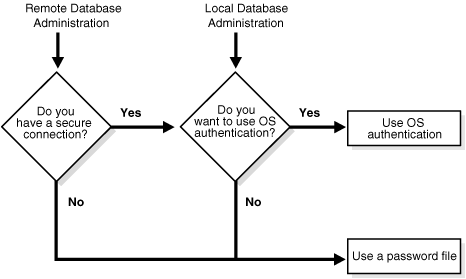
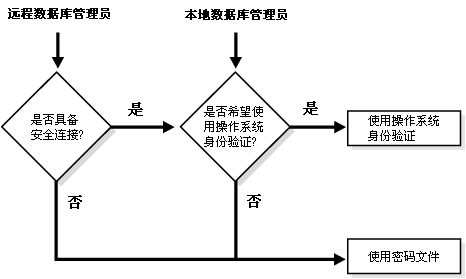
|
010 |
Each user has a security domain—a set of properties that
determine such things as:
- The actions (privileges and roles)
available to the user
- The tablespace quotas (available disk
space) for the user
- The system resource limits (for
example, CPU processing time) for the user
|
每个用户都有一个对应的安全域(security domain),所谓安全域实际上是一组属性,这组属性决定了:
- 用户可执行的操作(权限(privilege)或角色(role))
- 用户的表空间限额(tablespace quota)(即可用的磁盘空间)
- 用户的系统资源限制(例如,CPU 处理时间)
|
|
011 |
Each property that contributes to a user's security domain is discussed
in the following sections.
|
以下各节将分别介绍构成用户安全域的各个属性。
|
|
012 |
Privileges
|
20.1.2 权限
|
|
013 |
A privilege is a right to run a particular type of SQL statement.
Some examples of privileges include the right to:
- Connect to the database (create a
session)
- Create a table in your schema
- Select rows from someone else's table
- Run someone else's stored procedure
|
权限(privilege)即执行特定类型 SQL 语句的权利。以下为一些权限的例子:
- 连接到数据库(创建会话)
- 在用户方案(schema)下创建表
- 查询其他用户表中的数据
- 执行其他用户的存储过程
|
|
014 |
See Also:
"Introduction to Privileges"
|
另见:
“权限简介”
|
|
015 |
Roles
|
20.1.3 角色
|
|
016 |
Oracle provides for easy and controlled privilege management through
roles. Roles are named groups of related privileges that you
grant to users or other roles.
|
在 Oracle 中,可以通过角色(role)来实现更严格且更简单的权限管理。角色即一组命名的权限,可以授予用户或其他角色。
|
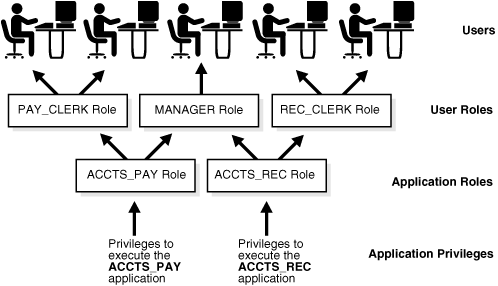
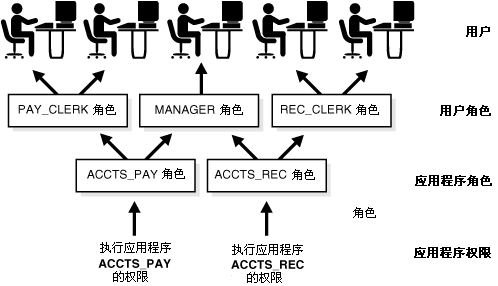
|
017 |
See Also:
"Introduction to Roles" information about role
properties
|
另见:
“角色简介”了解关于角色的信息
|
|
018 |
Storage Settings and Quotas
|
20.1.4 存储设置及限额
|
|
019 |
You can direct and limit the use of disk space allocated to the database
for each user, including default and temporary tablespaces and
tablespace quotas.
|
管理员可以对每个用户所能使用的数据库磁盘空间进行限制,限制的对象包括默认表空间,临时表空间,及表空间限额。
|
|
020 |
Default Tablespace
|
20.1.4.1 默认表空间
|
|
021 |
Each user is associated with a default tablespace. When a user
creates a table, index, or cluster and no tablespace is specified to
physically contain the schema object, the user's default tablespace is
used if the user has the privilege to create the schema object and a
quota in the specified default tablespace. The default tablespace
provides Oracle with information to direct space use in situations where
schema object's location is not specified.
|
每个数据库用户都具有一个默认表空间(default tablespace)。如果用户创建表,索引,或簇时没有设定物理上使用哪个表空间来存储方案对象,Oracle
将使用用户的默认表空间(用户必须具备创建方案对象的权限,且在默认表空间上具有足够的限额)。当用户没有为方案对象设定存储位置属性时,Oracle
就会使用默认表空间。
|
|
022 |
Temporary Tablespace
|
20.1.4.2 临时表空间
|
|
023 |
Each user has a temporary tablespace. When a user runs a SQL statement
that requires the creation of temporary segments (such as the creation
of an index), the user's temporary tablespace is used. By directing all
users' temporary segments to a separate tablespace, the temporary
tablespace can reduce I/O contention among temporary segments and other
types of segments.
|
每个用户需使用一个临时表空间(temporary tablespace)。当用户执行的 SQL 语句需要创建临时段(temporary
segment)时(例如在创建索引时),Oracle
将使用用户的临时表空间。将用户的所有临时段存储于相对独立的临时表空间中,有助于减少临时段和其他类型数据段(segment)间的 I/O
竞争(contention)。
|
|
024 |
Tablespace Quotas
|
20.1.4.3 表空间限额
|
|
025 |
Oracle can limit the collective amount of disk space available to the
objects in a schema. Quotas (space limits) can be set for each
tablespace available to a user. This permits selective control over the
amount of disk space that can be consumed by the objects of specific
schemas.
|
Oracle 可以限制方案内对象所占用的总磁盘空间。管理员可以为用户所使用的每个表空间设定一个限额(Quota)(即存储空间限制)。这使管理员可以为每个方案单独设定其可用于存储数对象的磁盘空间。
|
|
026 |
Profiles and Resource Limits
|
20.1.4.4 配置模版及资源限制
|
|
027 |
Each user is assigned a profile that specifies limitations on several
system resources available to the user, including the following:
- Number of concurrent sessions the user can establish
-
CPU processing time available for the user's session and a single call to Oracle made by a SQL statement
- Amount of logical I/O available for the user's session and a single call to Oracle made by a SQL statement
- Amount of idle time available for the user's session
- Amount of connect time available for the user's session
- Password restrictions:
- Account locking after multiple unsuccessful login attempts
- Password expiration and grace period
- Password reuse and complexity restrictions
|
每个用户都对应一套配置模版(profile),其中描述了用户使用多种系统资源时的限制,具体包括:
- 用户能够建立的并发会话(concurrent session)数
-
用户会话及 SQL 语句对 Oracle 进行一次调用时可用的 CPU
处理时间
- 用户会话及 SQL 语句对 Oracle 进行一次调用时可用的逻辑
I/O(logical I/O)量
- 用户会话的最大空闲时间(idle time)
- 用户会话的最大连接时间(connect time)
- 密码限制规则:
- 多次尝试登录均失败时对帐户加锁
- 密码过期时间(expiration period)及宽限期(grace
period)
- 密码重用(reuse)及复杂度(complexity)限制规则
|
|
028 |
See Also:
"Profiles"
|
另见:
“配置模版”
|
|
029 |
Overview of
Transparent Data Encryption
|
20.2 透明数据加密概述
|
|
030 |
The Oracle database provides security in the form of authentication,
authorization, and auditing. Authentication ensures that only
legitimate users gain access to the system. Authorization ensures
that those users only have access to resources they are permitted to
access. Auditing ensures accountability when users access protected
resources. Although these security mechanisms effectively protect
data in the database, they do not prevent access to the operating
system files where the data is stored. Transparent data encryption
enables encryption of sensitive data in database columns as it is
stored in the operating system files. In addition, it provides for
secure storage and management of encryption keys in a security
module external to the database.
|
Oracle
数据库通过身份验证(authentication),授权(authorization),及审计(auditing)实现数据库安全。身份验证用于确保只有合法用户才能访问数据库。授权
用于确保用户只能访问其有权访问的资源。审计用于确保用户对受保护资源的访问有据可查。上述安全机制可以有效地保护数据库数据,但
无法阻止非授权用户直接访问用于存储数据的操作系统文件。透明数据加密(transparent
data encryption)组件能够对存储于操作系统文件中的敏感数据进行加密。此外,此组件还能在数据库外部的安全模块(security
module)存储及管理密钥(encryption key),以保证密钥的安全。
|
|
031 |
Using an external security module separates ordinary program functions
from those that pertain to security, such as encryption. Consequently,
it is possible to divide administration duties between DBAs and security
administrators, a strategy that enhances security because no
administrator is granted comprehensive access to data. External security
modules generate encryption keys, perform encryption and decryption, and
securely store keys outside of the database.
|
使用外部安全模块,可以将用于安全管理的程序功能(例如加密)与其他常规数据库功能分开。因此得以将管理工作划分给 DBA
及安全管理员(security
administrator),任何一个管理员都不能完全地访问数据,从而增强了系统的安全性。外部安全模块可以生成用于执行加密工作的密钥,并在数据库外安全地存储密钥。
|
|
032 |
Transparent data encryption is a key-based access control system that
enforces authorization by encrypting data with a key that is kept
secret. There can be only one key for each database table that contains
encrypted columns regardless of the number of encrypted columns in a
given table. Each table's column encryption key is, in turn, encrypted
with the database server's master key. No keys are stored in the
database. Instead, they are stored in an Oracle wallet, which is part of
the external security module.
|
透明数据加密是一个基于密钥的访问控制系统,通过密钥对数据加密从而阻止未授权的访问。一个密钥可以用于对多个数据表进行加密,其中每个数据表又可以包含多个被加密的数据列。而这个密钥又
使用数据库的主密钥(master
key)被加密。所有的密钥都不存储在数据库中,而是存储在外部安全组件(例如 Oracle wallet)中。
|
|
033 |
Before you can encrypt any database columns, you must generate or set a
master key. This master key is used to encrypt the column encryption key
which is generated automatically when you issue a SQL command with the
ENCRYPT clause on a database column.
|
在用户对数据列进行加密前,必须生成或手工设置一个主密钥。如果用户执行的 SQL 语句中,在数据列上使用了
ENCRYPT 子句,Oracle
将为数据列生成一个密钥,并使用主密钥对此密钥进行加密。
|
|
034 |
See Also:
Oracle Database Advanced Security Administrator's Guide for
details about using transparent data encryption
|
另见:
Oracle Database Advanced Security Administrator's Guide
了解使用透明数据加密的详细信息
|
|
035 |
Overview of
Authentication Methods
|
20.3 身份验证方法概述
|
|
036 |
Authentication means verifying the identity of someone (a user, device,
or other entity) who wants to use data, resources, or applications.
Validating that identity establishes a trust relationship for further
interactions. Authentication also enables accountability by making it
possible to link access and actions to specific identities. After
authentication, authorization processes can allow or limit the levels of
access and action permitted to that entity.
|
身份验证(authentication)指验证需要使用数据,资源,及应用程序的用户(包括人员,设备,或其他实体)的身份。经过身份验证后即在用户与系统间建立了可信任的关系,以便于以后的交互操作。身份验证还能够将资源访问及操作执行与某一用户相联系,从而确保了数据库的可审计性(accountability)。经过身验认证后,授权系统
(authorization process)才能决定用户可以访问的资源,以及可以执行的操作。
|
|
037 |
For simplicity, the same authentication method is generally used for all
database users, but Oracle allows a single database instance to use any
or all methods. Oracle requires special authentication procedures for
database administrators, because they perform special database
operations. Oracle also encrypts passwords during transmission to ensure
the security of network authentication.
|
在实际应用中为了简化工作,通常所有数据库用户都使用相同的身份验证方法。但 Oracle
支持在同一数据库实例内使用多种身份验证方法。对于数据库管理员,Oracle
使用特殊的身份验证过程,因为管理员需要执行特殊的数据库操作。为了确保网络身份验证的安全性,Oracle 能够在传输过程中对密码加密。
|
|
038 |
To validate the identity of database users and prevent unauthorized use
of a database user name, you can authenticate using any combination of
the methods described in the following sections:
|
为了验证数据库用户身份,阻止非授权的用户访问系统,用户可以组合使用以下各节介绍的身份验证方式:
|
|
039 |
Authentication by the Operating System
|
20.3.1 操作系统身份验证
|
|
040 |
Some operating systems let Oracle use information they maintain to
authenticate users, with the following benefits:
- Once authenticated by the operating
system, users can connect to Oracle more conveniently, without
specifying a user name or password. For example, an
operating-system-authenticated user can invoke SQL*Plus and skip the
user name and password prompts by entering the following:
SQLPLUS /
- With control over user authentication
centralized in the operating system, Oracle need not store or manage
user passwords, though it still maintains user names in the
database.
-
Audit trails in the database and
operating system use the same user names.
|
在某些操作系统中,Oracle 可以利用操作系统维护的信息进行用户身份验证,这有以下好处:
- 经过操作系统的身份验证后,用户可以更便捷地连接到
Oracle,而无需提供用户名及密码。例如,经过操作系统验证的用户,按以下方式调用 SQL*Plus,即可跳过输入用户名及密码的步骤:
SQLPLUS /
- 在操作系统中集中地进行用户身份验证,Oracle
不必再存储及管理用户密码,但 Oracle 仍旧需要在数据库中维护用户名。
- 在数据库及操作系统中记录审计跟踪数据(audit
trail)时可以使用相同的用户名。
|
|
041 |
When an operating system is used to authenticate database users,
managing distributed database environments and database links requires
special care.
|
在使用操作系统进行数据库用户身份验证时,应注意其对分布式数据库系统及数据库链接(database link)的影响。
|
|
042 |
Authentication by the Network
|
20.3.2 网络身份验证
|
|
043 |
Oracle supports the following methods of authentication by the network:
|
Oracle 支持以下网络身份验证方式:
|
|
044 |
Note:
These methods require Oracle Database Enterprise Edition with the
Oracle Advanced Security option.
|
提示:
必须使用 Oracle Database Enterprise Edition (Oracle
数据库企业版)并购买
Oracle Advanced Security (Oracle 高级安全)选件,才能使用上述身份验证方式。
|
|
045 |
Third Party-Based Authentication
Technologies
|
20.3.2.1 基于第三方的身份验证技术
|
|
046 |
If network authentication services are available to you (such as DCE,
Kerberos, or SESAME), then Oracle can accept authentication from the
network service. If you use a network authentication service, then some
special considerations arise for network roles and database links.
|
如果系统中存在(DCE,Kerberos,或 SESAME 等)的网络身份验证服务(network authentication
service),Oracle 可以使用这些网络服务进行身份验证。在使用网络身份验证服务时,应注意其对网络角色(network
role)及数据库链接(database link)的影响。
|
|
047 |
Public-Key-Infrastructure-Based
Authentication
|
20.3.2.2 基于 PKI 的身份验证
|
|
048 |
Authentication systems based on public key cryptography issue digital
certificates to user clients, which use them to authenticate directly to
servers in the enterprise without directly involving an authentication
server. Oracle provides a public key infrastructure (PKI) for using
public keys and certificates, consisting of the following components:
- Authentication and secure session key
management using Secure Sockets Layer (SSL).
- Oracle Call Interface (OCI) and PL/SQL
functions to sign user-specified data using a private key and
certificate, and verify the signature on data using a trusted
certificate.
- Trusted certificates, identifying
third-party entities that are trusted as signers of user
certificates when an identity is being validated as the entity it
claims to be.
-
Oracle wallets, which are data
structures that contain a user private key, a user certificate, and
the user's set of trust points (trusted certificate authorities).
-
Oracle Wallet Manager, a standalone
Java application used to manage and edit the security credentials in
Oracle wallets.
-
X.509v3 certificates obtained from
(and signed by) a trusted entity, a certificate authority outside of
Oracle.
-
Oracle Internet Directory to manage
security attributes and privileges for users, including users
authenticated by X.509 certificates. It enforces attribute-level
access control and enables read, write, or update privileges on
specific attributes to be restricted to specific named users, such
as administrators.
-
Oracle Enterprise Security Manager,
provides centralized privilege management to make administration
easier and increase your level of security. This lets you store and
retrieve roles from Oracle Internet Directory.
-
Oracle Enterprise Login Assistant, a
Java-based tool to open and close a
user wallet to enable or disable
secure SSL-based communications for an application.
|
基于公共密钥加密(public key cryptography)的身份验证系统能够为用户客户端生成数字证书(digital
certificate),客户端使用此证书在业务服务器上进行身份验证,而不是直接和身份验证服务器交互(authentication
server)。Oracle 提供了支持公共密钥(public key)及数字证书的公共密钥基础结构(public key infrastructure,PKI),其中包含以下组件:
- 基于 SSL(Secure Sockets
Layer(安全套接字层))的身份验证及安全会话密钥(secure session key)管理。
- Oracle Call Interface 函数及 PL/SQL
函数,用于使用私有密钥(private key)及证书来保护用户指定的数据,或使用可信证书(trusted
certificate)验证数据上的签名(signature)。
- 可信证书,用于验证第三方实体的身份,确认其是否为可信的用户证书签署者。
- Oracle
wallet,用于储存用户私有密钥,用户证书,及用户信任点(trust point)(即可信的认证机构)集的数据结构。
- Oracle Wallet Manager,用于管理及编辑 Oracle
wallet 安全身份证明(security credentials)的单机 Java 应用程序。
-
由 Oracle 之外的认证机构签署并发布的 X.509v3 证书。
- Oracle Internet Directory,用于管理用户的权限及安全属性,包括通过
X.509 证书进行用户身份验证。OID
能够确保属性级(attribute-level)的访问控制,并使读,写,及更新等权限可以控制到具体的用户,例如管理员。
- Oracle Enterprise Security Manager,实现集中化的权限管理,从而简化管理员的工作,并提升系统的安全级别。用户可以通过此组件在
Oracle Internet Directory 中存储或提取角色信息。
- Oracle Enterprise Login Assistant
是一个基于 Java 的工具,用于打开或关闭用户的 wallet,从而控制应用程序是否采用基于 SSL 的安全通讯。
|
|
049 |
Remote Authentication
|
20.3.2.3 远程身份验证
|
|
050 |
Oracle supports remote authentication of users through Remote Dial-In
User Service (RADIUS), a standard lightweight protocol used for user
authentication, authorization, and
accounting.
|
Oracle 能够利用远程拨号用户服务(Remote Dial-In User Service,RADIUS)支持远程用户身份验证。RADIUS
是一个标准的轻量级协议,主要用于用户身份验证,授权,及审计(accounting)。
|
|
051 |
Authentication by the Oracle Database
|
20.3.3 Oracle 数据库身份验证
|
|
052 |
Oracle can authenticate users attempting to connect to a database by
using information stored in that database.
|
Oracle 能够利用存储在数据库内的信息对尝试连接数据库的用户进行身份验证。
|
|
053 |
To set up Oracle to use database authentication, create each user with
an associated password that must be supplied when the user attempts to
establish a connection. This prevents unauthorized use of the database,
since the connection will be denied if the user provides an incorrect
password. Oracle stores a user's password in the data dictionary in an
encrypted format to prevent unauthorized alteration, but a user can
change the password at any time.
|
如果采用数据库身份验证(database
authentication),在创建用户时必须同时设定一个密码,用户在连接数据库时需要提供此密码。如果用户提供的密码不正确,连接将被拒绝,从而阻止非授权的用户使用数据库。Oracle
将数据密码以加密的形式存储在数据字典中以防止非授权的修改,而授权用户可以随时修改此密码。
|
|
054 |
Database authentication includes the following facilities:
|
数据库身份验证包括以下功能
|
|
055 |
Password Encryption
|
20.3.3.1 密码加密
|
|
056 |
To protect password confidentiality, Oracle always encrypts passwords
before sending them over the network. Oracle encrypts the passwords
using a modified AES (Advanced Encryption Standard) algorithm.
|
为了确保密码的机密性,Oracle 在通过网络传输密码时会首先对密码进行加密。Oracle 使用改进的 AES(Advanced
Encryption Standard(高级加密标准))算法来加密密码。
|
|
057 |
Account Locking
|
20.3.3.2 帐户锁定
|
|
058 |
Oracle can lock a user's account after a specified number of consecutive
failed log-in attempts. You can configure the account to unlock
automatically after a specified time interval or to require database
administrator intervention to be unlocked. The database administrator
can also lock accounts manually, so that they must be unlocked
explicitly by the database administrator.
|
如果连续的失败登录次数超过了默认值,Oracle 将锁定用户帐户。用户可以设定一个时间间隔,使被锁定帐户自动解锁,也可以请求 DBA
执行解锁操作。DBA 也可以手工锁定数据库帐户,经过手工锁定数据库帐户必须由 DBA 显式地解锁。
|
|
059 |
Password Lifetime and Expiration
|
20.3.3.3 密码有效期及截至日期
|
|
060 |
The database administrator can specify a lifetime for passwords, after
which they expire and must be changed before account login is again
permitted. A grace period can be established, during which each attempt
to login to the database account receives a warning message to change
the password. If it is not changed by the end of that period, then the
account is locked. No further logins to that account are allowed without
assistance by the database administrator.
|
DBA 可以为密码设定有效期,在有效期后用户必须修改密码才能再次登录数据库。DBA 还可以设定密码宽限期(grace
period),在宽限期内用户每次登录数据库时都将收到需要修改密码的警告信息。如果在宽限期内仍未修改密码,帐户将被锁定。必须经过 DBA
处理后被锁定帐户才能解锁。
|
|
061 |
The database administrator can also set the password state to expired,
causing the user's account status to change to expired. The user or the
database administrator must then change the password before the user can
log in to the database.
|
DBA 也可以手工地将密码状态设定为过期,从而使用户帐户状态变为过期。用户或 DBA 需要重设密码,过期帐户才能再次登录。
|
|
062 |
The password history option checks each newly specified password to
ensure that a password is not reused for a specified amount of time or
for a specified number of password changes.
|
密码历史对比(password
history)选项能够检查新设定的密码,确保其不与之前一定时期内的密码重复,或不与之前一定时期内的密码过分相似。
|
|
063 |
Password Complexity Verification
|
20.3.3.4 密码复杂度验证
|
|
064 |
Complexity verification checks that each password is complex enough to
provide reasonable protection against intruders who try to break into
the system by guessing passwords.
|
复杂度验证(complexity verification)检查密码的复杂程度是否能提供足够的保护,防止入侵者通过猜测密码来闯入系统。
|
|
065 |
The Oracle default password complexity verification routine checks that
each password meet the following requirements:
- Be a minimum of four characters in
length
- Not equal the userid
-
Include at least one alphabet
character, one numeric character, and one punctuation mark
- Not match any word on an internal list
of simple words like welcome, account, database, user, and so on
- Differ from the previous password by
at least three characters
|
Oracle 默认的密码复杂度验证程序将检查密码是否满足以下要求:
- 长度超过 4 个字符
- 不与用户 ID 相同
- 至少包含一个字母字符,一个数字字符,及一个标点符号(punctuation mark)
- 不能与 Oracle 内部存储的简单词汇列表相匹配,例如 welcome,account,database,user 等词汇
- 与之前的密码相比至少有 3 个字符不相同
|
|
066 |
Multitier Authentication and Authorization
|
20.3.4 多层身份验证及授权
|
|
067 |
In a multitier environment, Oracle controls the security of middle-tier
applications by limiting their privileges, preserving client identities
through all tiers, and auditing actions taken on behalf of clients. In
applications that use a heavy middle tier, such as a transaction
processing monitor, the identity of the client connecting to the middle
tier must be preserved. Yet one advantage of a middle tier is
connection pooling, which allows multiple users to access a data
server without each of them needing a separate connection. In such
environments, you must be able to set up and break down connections very
quickly.
|
在多层系统(multitier environment)中,Oracle 能够限制中间层应用程序(middle-tier
application)的权限,能够保存用户在系统各层内的身份,还能够审计(audit)用户执行的各种操作,从而控制中间层应用的安全性。在应用层,采用重量级中间件(heavy
middle tier)(例如事务处理监视器(transaction processing
monitor))的系统一定会记录连接到中间件的用户的身份。在中间件层,中间件的一大优势在于使用连接池(connection pooling),
连接池的特点是为多个用户提供一个共享的连接来访问数据库服务器,但这将导致无法记录用户对数据库的访问情况。为了实现对使用共享连接的用户进行身份验证,数据库必须能够快速地建立(set
up)或结束(break down)用于身份验证的连接。
|
|
068 |
For these environments, Oracle database administrators can use the
Oracle Call Interface (OCI) to create lightweight sessions,
allowing database password authentication for each user. This preserves
the identity of the real user through the middle tier without the
overhead of a separate database connection for each user.
|
为满足上述要求,Oracle DBA 可以使用 Oracle Call Interface (OCI)创建轻量级会话(lightweight
session),对每个用户进行数据库身份验证(database password
authentication)。此方案既实现了在中间层内记录真实用户的身份,也无需为每个用户创建数据库连接。
|
|
069 |
You can create lightweight sessions with or without passwords. However,
if a middle tier is outside or on a firewall, then security is better
when each lightweight session has its own password. For an internal
application server, lightweight sessions without passwords might be
appropriate.
|
创建轻量级会话时不一定需要用户提供密码。但如果中间层在防火墙外,使用密码创建轻量级会话能够确保更好的安全性。而对于防火墙内部的应用服务器,创建轻量级会话时可以不提供密码。
|
|
070 |
Authentication by the Secure Socket Layer
Protocol
|
20.3.5 SSL 协议身份验证
|
|
071 |
The Secure Socket Layer (SSL) protocol is an application layer protocol.
Users identified either externally or globally (external or
global
users) can authenticate to a database through SSL.
|
安全套接字层(Secure Socket Layer,SSL)协议是一种应用层协议。外部用户(external
user)或全局用户(global user)可以通过 SSL 进行数据库身份验证。
|
|
072 |
Authentication of Database Administrators
|
20.3.6 数据库管理员的身份验证
|
|
073 |
Database administrators perform special operations (such as shutting
down or starting up a database) that should not be performed by normal
database users. Oracle provides a more secure authentication scheme for
database administrator user names.
|
数据库管理员能够执行普通数据库用户不该执行的特殊操作(例如启动或关闭数据库)。Oracle 为数据库管理员用户提供更为安全的身份验证方式。
|
|
074 |
You can choose between operating system authentication or password files
to authenticate database administrators.
Figure 20-1 illustrates the
choices you have for database administrator authentication schemes.
Different choices apply to administering your database locally (on the
computer where the database resides) and to administering many different
database computers from a single remote client.
|
可以选择采用操作系统或密码文件为数据库管理员进行身份验证(authentication)。图 20-1
显示了数据库管理员身份验证的可选方式。数据库管理员可以管理本地的数据库(在运行数据库的计算机上),也可以在一个远程客户端上管理多个数据库,在这两种情况下,身份验证方式有所不同。
|
|
075 |
Figure 20-1 Database
Administrator Authentication Methods
|
图 20-1 数据库管理员身份验证方式
|
|
076 |
|
|
|
077 |
The Figure 20-1 shows a flowchart of choices for
Remote Database Administration and Local Database Administration.
For Remote Database Administration: Do you have a secure connection?
If "No," then use a password file. If "Yes," do you want to use
operating system authentication? If "Yes," then use operating system
authentication. If "No," then use a password file.
For Local Database Administration: Do you want to use operating
system authentication? If "Yes," then use operating system
authentication. If "No," then use a password file.
|
图 20-1 展示了本地数据库管理员及远程数据库管理员的身份验证流程图。
对于远程数据库管理员:首先确定其是否具备安全连接。如果“否”,则使用密码文件进行身份验证。如果“是”,则可选择是否使用操作系统身份验证。如果“是”,则使用操作系统身份验证。如果“否”,则使用密码文件进行身份验证。
对于本地数据库管理员:选择是否使用操作系统身份验证。如果“是”,则使用操作系统身份验证。如果“否”,则使用密码文件进行身份验证。
|
|
078 |
Operating system authentication for a database administrator typically
involves placing his operating system user name in a special group or
giving it a special process right. (On UNIX systems, the group is the
dba group.)
|
通过操作系统对数据库管理员进行身份验证时,通常需要将操作系统用户名放入特殊的用户组,或赋予此用户特殊的权限(在 UNIX 系统上,用户组名为
dba)。
|
|
079 |
The database uses password files to keep track of database user names
that have been granted the SYSDBA and
SYSOPER privileges, enabling the following
operations:
- SYSOPER
lets database administrators perform STARTUP,
SHUTDOWN, ALTER
DATABASE OPEN/MOUNT, ALTER DATABASE
BACKUP, ARCHIVE LOG, and
RECOVER, and includes the
RESTRICTED SESSION privilege.
- SYSDBA
contains all system privileges with ADMIN
OPTION, and the SYSOPER system
privilege. Permits CREATE DATABASE and
time-based recovery.
|
Oracle 数据库在密码文件(password file)中记录被授予了 SYSDBA
及
SYSOPER 权限的数据库用户,这些权限能够执行以下操作:
- 具备 SYSOPER
权限的数据库管理员能够执行 STARTUP,SHUTDOWN,ALTER
DATABASE OPEN/MOUNT,ALTER DATABASE
BACKUP,ARCHIVE LOG,及
RECOVER 命令,并具备
RESTRICTED SESSION 权限。
- 具备 SYSDBA
权限的数据库管理员拥有所有系统权限(system privilege)及权限的 ADMIN
OPTION 选项,还拥有 SYSOPER
所拥有的全部系统权限。此外,能够执行 CREATE DATABASE
命令,并能够执行基于时间的恢复操作(time-based recovery)。
|
|
080 |
See Also:
|
另见:
|
|
081 |
Overview of
Authorization
|
20.4 授权概述
|
|
082 |
Authorization primarily includes two processes:
- Permitting only certain users to
access, process, or alter data
- Applying varying limitations on users'
access or actions. The limitations placed on (or removed from) users
can apply to objects, such as schemas, tables, or rows; or to
resources, such as time (CPU, connect, or idle times).
|
授权(authorization)主要包括两方面内容:
- 只允许特定的用户对数据进行访问,处理,及修改
-
对用户的访问及行为(action)进行各种限制。对用户的限制可以针对对象,例如方案(schema),表,或数据行;也可以针对资源,例如时间(包括
CPU 时间,连接时间,空闲时间等)。
|
|
083 |
This section introduces the basic concepts and mechanisms for placing or
removing such limitations on users, individually or in groups.
|
本节介绍为用户(单一用户或一组用户)添加或移除限制的基本概念及机制。
|
|
084 |
User Resource Limits and Profiles
|
20.4.1 用户资源限制及配置模版
|
|
085 |
You can set limits on the amount of various system resources available
to each user as part of a user's security domain. By doing so, you can
prevent the uncontrolled consumption of valuable system resources such
as CPU time.
|
管理员能够对用户可用的系统资源进行限制,此功能是用户安全管理的一部分。进行限制后,可以防止用户对重要系统资源(例如 CPU
时间)的不可控的消费。
|
|
086 |
This is very useful in large, multiuser systems, where system resources
are expensive. Excessive consumption of resources by one or more users
can detrimentally affect the other users of the database.
|
在大型多层应用系统中,系统资源使用量极大,因此资源限制功能极为重要。少数用户对系统资源的过度消费可能会严重影响其他用户使用数据库。
|
|
087 |
Manage a user's resource limits and password management preferences with
his or her profile—a named set of resource limits that you can assign to
that user. Each database can have an unlimited number of profiles. The
security administrator can enable or disable the enforcement of profile
resource limits universally.
|
管理员可以使用配置模版(profile)来设置用户的资源限制(resource limit)及密码管理参数选项(password
management preference)。在数据库内可以存储任意个配置模版。安全管理员(security
administrator)能够全局地设置系统是否采用配置模版来限制用户对资源的使用。
|
|
088 |
If you set resource limits, then a slight degradation in performance
occurs when users create sessions. This is because Oracle loads all
resource limit data for the user when a user connects to a database.
|
如果管理员设置了资源限制,将对用户创建会话的性能产生一定影响。因为 Oracle 需要在用户连接数据库时加载此用户的所有资源限制数据。
|
|
089 |
See Also:
Oracle Database Administrator's Guide for information about
security administrators
|
另见:
Oracle Database Administrator's Guide
了解更多关于安全管理员的信息
|
|
090 |
Resource limits and profiles are discussed in the following sections:
|
以下两节将讨论资源限制及配置模版:
|
|
091 |
Types of System Resources and Limits
|
20.4.1.1 系统资源类型及资源限制类型
|
|
092 |
Oracle can limit the use of several types of system resources, including
CPU time and logical reads. In general, you can control each of these
resources at the session level, the call level, or both.
|
Oracle 能够限制用户对多种系统资源的使用,其中包括 CPU 时间及逻辑读取(logical
read)。一般来说,用户可以在会话级(session level),调用级(call level),或同时对这些资源进行限制。
|
|
093 |
Session Level
|
20.4.1.1.1 会话级
|
|
094 |
Each time a user connects to a database, a session is created. Each
session consumes CPU time and memory on the computer that runs Oracle.
You can set several resource limits at the session level.
|
当用户连接到数据库时,Oracle 将创建一个会话(session)。每个会话都将消耗 Oracle 所在计算机的 CPU
时间及内存。用户可以在会话级(session level)设置多种资源限制(resource limit)。
|
|
095 |
If a user exceeds a session-level resource limit, then Oracle terminates
(rolls back) the current statement and returns a message indicating that
the session limit has been reached. At this point, all previous
statements in the current transaction are intact, and the only
operations the user can perform are COMMIT,
ROLLBACK, or disconnect (in this case, the
current transaction is committed). All other operations produce an
error. Even after the transaction is committed or rolled back, the user
can accomplish no more work during the current session.
|
如果用户超过了某一会话级资源限制,Oracle
将终止(回滚)当前执行的语句,并通知用户此会话超出资源限制。此时,当前会话内已经执行的语句不受资源限制的影响,而用户则只能执行 COMMIT,ROLLBACK,或断开连接(disconnect)(如断开连接,当前事务将被提交)。用户的其他所有操作都将导致报错。在事务被提交或回滚后,用户在当前会话内也不能执行其他任何操作。
|
|
096 |
Call Level
|
20.4.1.1.2 调用级
|
|
097 |
Each time a SQL statement is run, several steps are taken to process the
statement. During this processing, several calls are made to the
database as part of the different execution phases. To prevent any one
call from using the system excessively, Oracle lets you set several
resource limits at the call level.
|
SQL 语句每次运行时,Oracle
都将执行一系列操作来处理此语句。在处理过程中,不同的执行阶段需要向数据库发起不同的调用。为了防止某个调用过度地使用系统资源,Oracle
允许管理员在调用级(call level)设定多种资源限制(resource limit)。
|
|
098 |
If a user exceeds a call-level resource limit, then Oracle halts the
processing of the statement, rolls back the statement, and returns an
error. However, all previous statements of the current transaction
remain intact, and the user's session remains connected.
|
如果用户超过了调用级资源限制,Oracle
将停止执行语句,并进行回滚,之后向用户报错。此时,当前会话内已经执行的语句不受资源限制的影响,用户会话也将保持连接状态。
|
|
099 |
CPU Time
|
20.4.1.1.3 CPU 时间
|
|
100 |
When SQL statements and other types of calls are made to Oracle, an
amount of CPU time is necessary to process the call. Average calls
require a small amount of CPU time. However, a SQL statement involving a
large amount of data or a runaway query can potentially consume a large
amount of CPU time, reducing CPU time available for other processing.
|
当 Oracle 执行 SQL 语句或用户的其他各类调用(call)时,系统需要一定的 CPU 时间来处理此调用。普通的调用所需的 CPU
时间较少。但是需要处理大量数据的语句,或失控的查询(runaway query)可能占用大量的 CPU 时间,这减少了其他处理任务可用的 CPU
时间。
|
|
101 |
To prevent uncontrolled use of CPU time, limit the CPU time for each
call and the total amount of CPU time used for Oracle calls during a
session. Limits are set and measured in CPU one-hundredth seconds (0.01
seconds) used by a call or a session.
|
为了防止 CPU 时间被不受控地占用,管理员可以限制会话内每个调用使用的 CPU 时间,以及会话中所有 Oracle 调用的 CPU
时间之和。设置及衡量调用或会话可使用的 CPU 时间的单位为百分之一秒。
|
|
102 |
Logical Reads
|
20.4.1.1.4 逻辑读取
|
|
103 |
Input/output (I/O) is one of the most expensive operations in a database
system. SQL statements that are I/O intensive can monopolize memory and
disk use and cause other database operations to compete for these
resources.
|
输入/输出(Input/output,I/O)是数据库系统中开销最大的操作。I/O 操作密集的 SQL
语句可能会占用大量内存及硬盘,并与其他需要同样资源的数据库操作产生竞争。
|
|
104 |
To prevent single sources of excessive I/O, Oracle lets you limit the
logical data block reads for each call and for each session. Logical
data block reads include data block reads from both memory and disk. The
limits are set and measured in number of block reads performed by a call
or during a session.
|
为了防止 I/O 被独占,Oracle 可以限制调用及会话的逻辑数据块读取(logical data block
read)。逻辑数据块读取包含从内存及磁盘读取数据。设置及衡量调用或会话可使用的逻辑读取的单位为数据块数量。
|
|
105 |
Other Resources
|
20.4.1.1.5 其他资源
|
|
106 |
Oracle also provides for the limitation of several other resources at
the session level:
- You can limit the number of
concurrent sessions for each user. Each user can create only up
to a predefined number of concurrent sessions.
- You can limit the idle time for
a session. If the time between Oracle calls for a session reaches
the idle time limit, then the current transaction is rolled back,
the session is aborted, and the resources of the session are
returned to the system. The next call receives an error that
indicates the user is no longer connected to the instance. This
limit is set as a number of elapsed minutes.
Shortly after a session is aborted because it has exceeded an idle
time limit, the process monitor (PMON) background process cleans up
after the aborted session. Until PMON completes this process, the
aborted session is still counted in any session/user resource limit.
- You can limit the elapsed connect time
for each session. If a session's duration exceeds the elapsed time
limit, then the current transaction is rolled back, the session is
dropped, and the resources of the session are returned to the
system. This limit is set as a number of elapsed minutes.
- Oracle does not constantly monitor the
elapsed idle time or elapsed connection time. Doing so would reduce
system performance. Instead, it checks every few minutes. Therefore,
a session can exceed this limit slightly (for example, by five
minutes) before Oracle enforces the limit and aborts the session.
- You can limit the amount of private
SGA space (used for private SQL areas) for a session. This limit is
only important in systems that use the shared server configuration.
Otherwise, private SQL areas are located in the PGA. This limit is
set as a number of bytes of memory in an instance's SGA. Use the
characters K or M to specify kilobytes or megabytes.
|
Oracle 还在会话级(session level)支持以下类型的资源限制:
- 管理员可以限制用户并发会话数(concurrent sessions for each user)。每个用户的并发会话数不能超过预设值。
- 管理员可以限制一个会话的空闲时间(idle time)。如果会话内两次
Oracle
调用间的间隔时间达到了限制值,当前事务将被回滚,会话将被终止(aborted),会话所占用的资源将被系统回收。下次会话将得到报错信息,提示用户已经终止了与实例的连接。此限制的设置单位为分钟。
当会话由于超出空闲时间限制而被终止之后,进程监视器(process monitor,PMON)后台进程将对被终止的会话进行清理。在 PMON
完成此过程前,统计用户及会话资源使用时仍将包含被终止的会话。
-
管理员可以限制每个会话的连接持续时间。如果会话持续连接时间超出限制值,当前事务将被回滚,会话将被移除(dropped),会话所占用的资源将被系统回收。此限制的设置单位为分钟。
- Oracle
不会持续不断地监控会话的空闲时间及连接时间,因为这样做将降低系统性能。Oracle 的做法是每隔数分钟检查一次。因此,在 Oracle
依据资源限制终止会话前,会话有可能已经略微超出了限制时间(例如,超出 5 分钟)。
- Oracle 能够限制一个会话所使用的私有 SGA 空间(作为私有 SQL
区(private SQL area))。只有在共享服务模式(shared server
configuration)下此项资源限制才能发挥所用。而在专用服务模式(dedicated server
configuration)下,私有 SQL 区位于 PGA 内。此限制表示可供会话使用的实例 SGA
内存的字节数。在设定时可以使用字符 K 或 M 表示千字节(kilobytes)及兆字节(megabytes)。
|
|
107 |
See Also:
Oracle Database Administrator's Guide for instructions about
enabling and disabling resource limits
|
另见:
Oracle Database Administrator's Guide
了解如何开启或禁用资源限制
|
|
108 |
Profiles
|
20.4.1.2 配置模版
|
|
109 |
In the context of system resources, a profile is a named set of
specified resource limits that can be assigned to a valid user name in
an Oracle database. Profiles provide for easy management of resource
limits. Profiles are also the way in which you administer password
policy.
|
在系统资源管理的概念里,配制模版(profile)是一个命名的资源限制(resource limit)集合,可以授予 Oracle
数据库内的某个用户。配制模版有助于简化资源限制管理。管理员还可以使用配制模版来控制密码策略(password policy)。
|
|
110 |
Different profiles can be created and assigned individually to each user
of the database. A default profile is present for all users not
explicitly assigned a profile. The resource limit feature prevents
excessive consumption of global database system resources.
|
在数据库中可以创建多个配制模版,之后可以为每个数据库用户设定一个配制模版。如果没有显式地为用户设定配制模版,用户将使用 Oracle
默认的配制模版。配制模版内的资源限制信息将防止用户过度地使用数据库系统资源。
|
|
111 |
When to Use Profiles
|
20.4.1.2.1 何时使用配制模版
|
|
112 |
You need to create and manage user profiles only if resource limits are
a requirement of your database security policy. To use profiles, first
categorize the related types of users in a database. Just as roles are
used to manage the privileges of related users, profiles are used to
manage the resource limits of related users. Determine how many profiles
are needed to encompass all types of users in a database and then
determine appropriate resource limits for each profile.
|
如果数据库安全策略(database security policy)中需要包含资源限制(resource
limit),管理员就应创建并管理用户配制模版(profile)。在使用配制模版前,首先要对数据库内相关的用户进行归类。配制模版的作用是管理一组用户的资源限制,这就如同使用角色(role)来管理一组用户的权限(privilege)一样。管理员首先要确定共需要几种配制模版来覆盖数据库内的全部用户,其次再为每个配制模版设定适当的资源限制。
|
|
113 |
Determine Values for Resource Limits of a
Profile
|
20.4.1.2.2 确定配制模版内各资源限制值
|
|
114 |
Before creating profiles and setting the resource limits associated with
them, determine appropriate values for each resource limit. You can base
these values on the type of operations a typical user performs. Usually,
the best way to determine the appropriate resource limit values for a
given user profile is to gather historical information about each type
of resource usage.
|
在创建配制模版(profile)并设定资源限制(resource
limit)前,首先要确定适当的资源限制值。管理员可以依据典型用户所执行的各类操作来确定这些值。通常,为配制模版确定适当的资源限制值的最佳方式是收集用户各类资源使用的历史信息。
|
|
115 |
You can gather statistics for other limits using the Monitor feature of
Oracle Enterprise Manager (or SQL*Plus), specifically the Statistics
monitor.
|
管理员可以使用 Oracle Enterprise Manager(企业管理器)或 SQL*Plus
提供的各种监视器收集相关的统计信息,尤其可以使用统计信息监视器(Statistics monitor)。
|
|
116 |
Introduction to Privileges
|
20.4.2 权限简介
|
|
117 |
A privilege is a right to run a particular type of SQL statement
or to access another user's object.
|
权限(privilege)指运行特定 SQL 语句的权利,或访问其他用户对象的权利。
|
|
118 |
Grant privileges to users so that they can accomplish tasks required for
their job. Grant privileges only to users who absolutely require them.
Excessive granting of unnecessary privileges can compromise security. A
user can receive a privilege in two different ways:
- You can grant privileges to users
explicitly. For example, you can explicitly grant the privilege to
insert records into the employees table
to the user SCOTT.
- You can grant privileges to a role (a
named group of privileges), and then grant the role to one or more
users. For example, you can grant the privileges to select, insert,
update, and delete records from the employees
table to the role named clerk, which in
turn you can grant to the users scott
and brian.
|
只有为数据库用户授权(grant)后,用户才能执行其所需的数据库操作。管理员只应授予一个用户其工作所必需的权限。不必要地过度授权可能会导致严重的安全问题。管理员可以采用两种方式为用户授权:
- 管理员可以显式地为用户授权。例如,管理员可以显式地将向 employees
表插入数据的权限授予 SCOTT 用户。
-
管理员可以将一组权限授予一个角色(role)(即命名的一组权限),再将角色授予一个或多个用户。例如,管理员可以将 employees
表的查询,插入,更新,删除权限授予 clerk 角色,再将此角色授予用户 scott
及 brian。
|
|
119 |
Because roles allow for easier and better management of privileges, you
should generally grant privileges to roles and not to specific users.
|
由于角色能使权限管理更简单更规范,一般来说管理员应首先将权限赋予角色,而非直接赋予具体的用户。
|
|
120 |
There are two distinct categories of privileges:
|
Oracle 中包含两类权限:
|
|
121 |
See Also:
Oracle Database Administrator's Guide for a list of all system
and schema object privileges, as well as instructions for privilege
management
|
另见:
Oracle Database Administrator's Guide
查询所有系统权限及方案对象权限的列表,以及与权限管理相关的指导意见。
|
|
122 |
System Privileges
|
20.4.2.1 系统权限
|
|
123 |
A system privilege is the right to perform a particular action, or to
perform an action on any schema objects of a particular type. For
example, the privileges to create tablespaces and to delete the rows of
any table in a database are system privileges. There are over 100
distinct system privileges.
|
系统权限(system
privilege)是执行某一特定操作,或对某类方案对象执行操作的权利。例如,创建表空间的权限,或删除数据库中任意表数据的权限。Oracle
提供了超过 100 项系统权限。
|
|
124 |
Schema Object Privileges
|
20.4.2.2 方案对象权限
|
|
125 |
A schema object privilege is a privilege or right to perform a
particular action on a specific schema object:
|
方案对象权限(schema object privilege)是对某一方案对象执行特定操作的权利。
|
|
126 |
Different object privileges are available for different types of schema
objects. For example, the privilege to delete rows from the
departments table is an object privilege.
|
不同类型的方案对象具有不同的对象权限。例如,从
departments 表中删除数据的权限就是一种对象权限。
|
|
127 |
Some schema objects, such as clusters, indexes, triggers, and database
links, do not have associated object privileges. Their use is controlled
with system privileges. For example, to alter a cluster, a user must own
the cluster or have the ALTER ANY CLUSTER
system privilege.
|
簇(cluster),索引,触发器(trigger),及数据库链接(database
link)等方案对象没有相关的对象权限。对这些对象的使用是由系统权限(system privilege)控制的。例如,用户必须是簇的拥有者或具备 ALTER ANY CLUSTER
系统权限才能修改(alter)一个簇。
|
|
128 |
A schema object and its synonym are equivalent with respect to
privileges. That is, the object privileges granted for a table, view,
sequence, procedure, function, or package apply whether referencing the
base object by name or using a synonym.
|
对于权限来说,方案对象及其同义词(synonym)是完全相同的。将表,视图,序列,过程,函数,或包的对象权限授予用户时,既可以引用对象本身的名字,也可以使用对象的同义词。
|
|
129 |
Granting object privileges on a table, view, sequence, procedure,
function, or package to a synonym for the object has the same
effect as if no synonym were used. When a synonym is dropped, all grants
for the underlying schema object remain in effect, even if the
privileges were granted by specifying the dropped synonym.
|
使用同义词将表,视图,序列,过程,函数,或包的对象权限授予用户时,其本质是将同义词所对应的对象的权限授予用户。当同义词被移除后,即便授权时引用的是该同义词名称,相关底层方案对象的授权依然有效。
|
|
130 |
See Also:
Oracle Database Security Guide for more information about schema
object privileges
|
另见:
Oracle Database Security Guide
了解关于方案对象权限的更多信息
|
|
131 |
Introduction to Roles
|
20.4.3 角色简介
|
|
132 |
Managing and controlling privileges is made easier by using roles,
which are named groups of related privileges that you grant, as a group,
to users or other roles. Within a database, each role name must be
unique, different from all user names and all other role names. Unlike
schema objects, roles are not contained in any schema. Therefore, a user
who creates a role can be dropped with no effect on the role.
|
角色(role)是一组命名的相关权限(related
privilege),管理员可以将角色所代表的一组权限赋予用户或其他角色,从而简化权限的管理与控制。在一个数据库内,角色名必须唯一。与方案对象(schema
object)不同,角色不属于任何方案(schema)。因此,创建角色的用户可以被移除而不会对角色有所影响。
|
|
133 |
Roles ease the administration of end-user system and schema object
privileges. However, roles are not meant to be used by application
developers, because the privileges to access schema objects within
stored programmatic constructs must be granted directly.
|
使用角色有助于简化终端用户系统(end-user system)权限及方案对象权限的管理。但对应用开发者不应使用角色,因为存储程序结构(stored
programmatic construct)访问方案对象的权限必须被直接授予。
|
|
134 |
These following properties of roles enable easier privilege management
within a database:
|
角色的以下特点能使数据库权限管理更为简单:
|
|
135 |
|
| Property |
Description |
|
Reduced privilege administration
|
Rather than granting the same set
of privileges explicitly to several users, you can grant the
privileges for a group of related users to a role, and then only
the role needs to be granted to each member of the group.
|
Dynamic privilege management
|
If the privileges of a group must
change, then only the privileges of the role need to be
modified. The security domains of all users granted the group's
role automatically reflect the changes made to the role.
|
Selective availability of
privileges
|
You can selectively enable or
disable the roles granted to a user. This allows specific
control of a user's privileges in any given situation.
|
Application awareness
|
The data dictionary records which
roles exist, so you can design applications to query the
dictionary and automatically enable (or disable) selective roles
when a user attempts to run the application by way of a given
user name.
|
Application-specific security
|
You can protect role use with a
password. Applications can be created specifically to enable a
role when supplied the correct password. Users cannot enable the
role if they do not know the password.
|
|
|
| 特点 |
描述 |
|
减少权限管理工作
|
无需显式地将一组权限授予每个用户,而是将一组相关用户应有的权限授予一个角色,再将此角色授予用户。
|
动态权限管理
|
如果需要更改一组用户的权限,只需要修改相关角色的权限。当角色的权限改变后,属于此角色的所有用户权限也会自动改变。
|
设定权限的可用性
|
管理员可以有选择地启用或禁用授予用户的角色。因此管理员可以灵活地控制用户权限以适应各种需求。
|
通过应用程序自动管理
|
数据字典会记录所有角色。当应用程序利用某个数据库用户执行时,可以根据数据字典自动地为此用户启用或禁用角色。
|
应用程序管理的安全性
|
用户可以使用密码来保护角色。应用程序需要根据密码验证结果来决定是否授予数据库用户角色。如果应用程序用户不知道密码则无法使用相关的角色。
|
|
|
136 |
Database administrators often create roles for a database application.
The DBA grants a secure application role all privileges necessary to run
the application. The DBA then grants the secure application role to
other roles or users. An application can have several different roles,
each granted a different set of privileges that allow for more or less
data access while using the application.
|
通常,为数据库应用创建角色的任务应由 DBA 完成。DBA
应授予一个安全应用角色(secure application role)其所需的权限,再将此角色授予其他角色或用户。一个应用程序可以同时使用多个角色,其中每个角色包含一组相关的权限,从而灵活控制应用程序的数据访问。
|
|
137 |
The DBA can create a role with a password to prevent unauthorized use of
the privileges granted to the role. Typically, an application is
designed so that when it starts, it enables the proper role. As a
result, an application user does not need to know the password for an
application's role.
|
DBA
在创建角色时可以使用密码来防止未授权的用户使用此角色的权限。但在一般情况下,应用程序在启动时会负责启用相关的数据库角色,因此应用程序用户无需知道相关角色的密码。
|
|
138 |
See Also:
Oracle Database Application Developer's Guide - Fundamentals
for instructions for enabling roles from an application
|
另见:
Oracle Database Application Developer's Guide - Fundamentals
了解如何为应用程序启用角色
|
|
139 |
Common Uses for Roles
|
20.4.3.1 角色的一般用途
|
|
140 |
In general, you create a role to serve one of two purposes:
- To manage the privileges for a
database application
- To manage the privileges for a
user group
|
一般来说,创建角色的目的有以下两个:
|
|
141 |
Figure 20-2 and the sections that follow describe the two uses of roles.
|
图 20-2 及以下两节描述了角色的两种用途。
|
|
142 |
Figure 20-2 Common Uses for
Roles
|
图 20-2 角色的一般用途
|
|
143 |
|
|
|
144 |
Figure 20-2 shows four levels of Oracle security
facilities. From top to bottom, the levels are Users, User Roles,
Application Roles, and Application Privileges.
At the bottom level, Application Privileges, two privileges are
created: One privilege allows execution of the Accounts Payable
application; the other privilege allows execution of the Accounts
Receivable application.
At the next level up, Application Roles are created: An Accounts
Payable application role and an Accounts Receivable application
role. The corresponding application privileges are assigned to each
application role.
On the next level up are three User Roles: Pay Clerk, Manager, and
Receiving Clerk. The Pay Clerk user role is granted the Accounts
Payable application role, so she can execute the Accounts Payable
application. The Receiving Clerk user role is granted the Accounts
Receivable application role, so he can execute the Accounts
Receivable application. The Manager user role is granted both
application roles.
The final top level contains the individual users, who are granted
appropriate User Roles.
|
图 20-2 显示了 Oracle
安全管理的四个层次。从上至下依次为用户,用户角色,应用程序角色,及应用程序权限。
在最底层的应用程序权限层,定义了两个权限:第一个权限允许用户执行 Accounts Payable 应用程序;另一个权限允许用户执行
Accounts Receivable 应用程序。
之上一层创建了应用程序角色:Accounts Payable 应用程序角色和 Accounts Receivable
应用程序角色。这两个角色被授予了相应的应用程序权限。
再上一层为用户角色,其中包括:Pay Clerk,Manager,及 Receiving Clerk。Pay Clerk
用户角色被授予了 Accounts Payable 应用程序角色,此用户角色可以执行 Accounts Payable 应用程序。而
Receiving Clerk 用户角色被授予了 Accounts Receivable 应用程序角色,此用户角色可以执行
Accounts Receivable 应用程序。而 Manager 用户角色同时拥有两个应用程序角色。
最顶层为各个用户,分别被授予适当的用户角色。
|
|
145 |
Application Roles
|
20.4.3.1.1 应用程序角色
|
|
146 |
You grant an application role all privileges necessary to run a given
database application. Then, you grant the secure application role to
other roles or to specific users. An application can have several
different roles, with each role assigned a different set of privileges
that allow for more or less data access while using the application.
|
管理员可以为一个应用程序角色(application role)授予执行某些数据库应用程序所必须的权限。再将安全应用程序角色(secure
application
role)授予其他角色或特定用户。一个应用程序可以同时使用多个角色,其中每个角色包含一组相关的权限,从而灵活控制应用程序的数据访问。
|
|
147 |
User Roles
|
20.4.3.1.2 用户角色
|
|
148 |
You create a user role for a group of database users with common
privilege requirements. You manage user privileges by granting secure
application roles and privileges to the user role and then granting the
user role to appropriate users.
|
管理员可以为具备相同权限需求的一组数据库用户创建一个用户角色(user role)。管理员可以将安全应用角色(secure
application role)及其他权限授予用户角色,再将用户角色授予适当的用户,从而对用户权限进行管理。
|
|
149 |
Role Mechanisms
|
20.4.3.2 角色机制
|
|
150 |
Database roles have the following functionality:
- A role can be granted system or schema
object privileges.
- A role can be granted to other roles.
However, a role cannot be granted to itself and cannot be granted
circularly. For example, role A cannot
be granted to role B if role
B has previously been granted to role
A.
- Any role can be granted to any
database user.
- Each role granted to a user is, at a
given time, either enabled or disabled. A user's security domain
includes the privileges of all roles currently enabled for the user
and excludes the privileges of any roles currently disabled for the
user. Oracle allows database applications and users to enable and
disable roles to provide selective availability of privileges.
- An indirectly granted role is a role
granted to a role. It can be explicitly enabled or disabled for a
user. However, by enabling a role that contains other roles, you
implicitly enable all indirectly granted roles of the directly
granted role.
|
数据库角色具备以下功能:
- 角色可以被授予系统权限(system
privilege)或方案对象权限(schema object privilege)。
-
角色可以被授予其他角色。但是角色不能授予其自身,角色间也不能形成闭环。例如,当角色 B
已经被授予角色 A 时,角色 A
就不能再授予角色 B。
- 任意角色都可以被授予任意一个用户。
-
授予用户的某一角色在某一时间点或者为启用,或者为禁用。用户的安全域(security
domain)包括其所有启用角色所拥有的权限,但不包括禁用角色所拥有的权限。Oracle
数据库应用程序及用户均可启用或禁用角色,从而更灵活地管理用户权限。
-
如果将一个角色授予了另一个角色,那么将后者授予某个用户时,前者被称为非直接授予角色(indirectly granted
role)。管理员可以显式地为用户启用或禁用此类角色。当管理员为用户启用了一个包含其他角色的角色时,同时隐式的启用了此角色包含的所有非直接授予角色。
|
|
151 |
The Operating System and Roles
|
20.4.3.3 操作系统与角色
|
|
152 |
In some environments, you can administer database security using the
operating system. The operating system can be used to manage the
granting (and revoking) of database roles and to manage their password
authentication. This capability is not available on all operating
systems.
|
在某些系统中,管理员可以使用操作系统来管理数据库安全。操作系统可以用于管理数据库角色的授予与回收,及角色的密码验证。但此功能并不是在所有的操作系统上均可用。
|
|
153 |
Secure Application Roles
|
20.4.4 安全应用角色
|
|
154 |
Oracle provides secure application roles, which are roles that can only
be enabled by authorized PL/SQL packages. This mechanism restricts the
enabling of such roles to the invoking application.
|
在 Oracle 中可以定义安全应用角色(secure application role),此种角色只能通过授权的 PL/SQL
包启用。此功能对负责启用角色的应用程序进行了限制。
|
|
155 |
Security is strengthened when passwords are not embedded in application
source code or stored in a table. Instead, a secure application role can
be created, specifying which PL/SQL package is authorized to enable the
role. Package identity is used to determine whether privileges are
sufficient to enable the roles. Before enabling the role, the
application can perform authentication and customized authorization,
such as checking whether the user has connected through a proxy.
|
采用安全应用角色后,开发者无须将角色密码嵌入应用程序源代码或存储在数据库表中,而是授权一个指定的 PL/SQL 包用于启用安全应用角色。此
PL/SQL
包负责判断用户是否有足够的权限来启用角色。在启用角色前,应用程序可以执行身份验证,或进行自定义的检查,例如检查用户是否通过代理服务器连接到数据库。
|
|
156 |
Because of the restriction that users cannot change security domain
inside definer's right procedures, secure application roles can only be
enabled inside invoker's right procedures.
|
因为有一个限制,用户不能改变安全范围在定义者的有权管理的进程中,安全应用的原则不能在提出要求的权限进程中。(
此句是我媳妇胡翻的,大家不要看)
|
|
157 |
See Also:
|
另见:
|
|
158 |
Overview of
Access Restrictions on Tables, Views, Synonyms, or Rows
|
20.5 表,视图,同义词,及数据行的访问控制概述
|
|
159 |
This section describes restrictions associated not with users, but with
objects. The restrictions provide protection regardless of the entity
who seeks to access or alter them.
|
本节讲述的限制针对数据库对象而非用户。这些限制可以保护对象不被随意访问或修改。
|
|
160 |
You provide this protection by designing and using policies to restrict
access to specific tables, views, synonyms, or rows. These policies
invoke functions that you design to specify dynamic predicates
establishing the restrictions. You can also group established policies,
applying a policy group to a particular application.
|
DBA 可以设计并应用策略(policy)来限制对指定表,视图,同义词,或数据行的访问,从而为对象提供保护。这些策略可以调用 DBA
定义的函数动态生成谓词(predicate)来实现限制功能。DBA 还可以定义策略组(policy
group),并将策略组应用于指定的应用程序。
|
|
161 |
Having established such protections, you need to be notified when they
are threatened or breached. Given notification, you can strengthen your
defenses or deal with the consequences of inappropriate actions and the
entities who caused them.
|
在建立了策略后,当策略被威胁或违背时,DBA 将得到通知。DBA
得到通知后,可以加强对系统的保护,或找出导致问题的原因,并处理不正常操作导致的后果。
|
|
162 |
Fine-Grained Access Control
|
20.5.1 精细粒度访问控制
|
|
163 |
Fine-grained access control lets you use functions to implement security
policies and to associate those security policies with tables, views, or
synonyms. The database server automatically enforces your security
policies, no matter how the data is accessed (for example, by ad hoc
queries).
|
DBA 可以使用 Oracle 的精细粒度访问控制(fine-grained access
control)功能,以函数的形式实现安全策略(security
policy),并将安全策略与表,视图,或同义词关联。数据库服务器能够自动地执行 DBA
定义的安全策略,无论数据是被如何访问的(例如,数据可能以即席查询的形式被访问)。
|
|
164 |
You can:
- Use different policies for
SELECT, INSERT,
UPDATE, and
DELETE (and
INDEX, for row level
security policies).
- Use security policies only where you
need them (for example, on salary information).
- Use more than one policy for each
table, including building on top of base policies in packaged
applications.
- Distinguish policies between different
applications, by using policy groups. Each policy group is a set of
policies that belong to an application. The database administrator
designates an application context, called a driving context, to
indicate the policy group in effect. When tables, views, or synonyms
are accessed, the fine-grained access control engine looks up the
driving context to determine the policy group in effect and enforces
all the associated policies that belong to that policy group.
|
DBA 能够:
- 为
SELECT,INSERT,UPDATE,及
DELETE 命令(及用于底层安全策略的
INDEX
命令)定义不同的安全策略。
- 只对需要的对象应用安全策略(例如对薪水数据)。
- 对一个表应用多个安全策略,还利用打包应用程序(packaged
application)内的基础策略构建新策略。
- 使用策略组(policy
group),实现针对不同的应用程序使用不同的安全策略。每个策略组内包含针对应用程序的一个策略集合。DBA
需要定义应用程序上下文(application context)(也被称为驱动上下文(driving
context))来控制策略组何时生效。当表,视图,或同义词被访问时,精细粒度访问控制引擎(fine-grained access
control engine)能够检测当前的驱动上下文,从而确定应使用的策略组,并确保策略组内的所有策略都能得到遵守。
|
|
165 |
The PL/SQL package DBMS_RLS let you
administer your security policies. Using this package, you can add,
drop, enable, disable, and refresh the policies (or policy groups) you
create.
|
DBA 可以使用 DBMS_RLS PL/SQL
包来管理安全策略。通过此包,管理员可以添加,移除,启用,禁用,或刷新已创建的策略(或策略组)。
|
|
166 |
See Also:
|
另见:
|
|
167 |
Dynamic Predicates
|
20.5.1.1 动态谓词
|
|
168 |
Dynamic predicates are acquired at statement parse time, when the base
table or view is referenced in a DML statement, rather than having the
security rules embedded in views.
|
如果 DML 语句中引用了已应用安全策略的基表或视图,Oracle 将在语句解析(parse)阶段生成动态谓词(dynamic
predicate),而不是将安全规则嵌入到一个固定的视图中。
|
|
169 |
The function or package that implements the security policy you create
returns a predicate (a WHERE condition).
This predicate controls access according to the policy specifications.
Rewritten queries are fully optimized and shareable.
|
DBA 定义的用于实现安全规则的函数或包在执行时能够返回谓词(即 WHERE
条件)。这个谓词能够根据策略的定义实现访问控制。用户原始查询在添加了谓词后依然可以被优化(optimize)或共享(shareable)。
|
|
170 |
A dynamic predicate for a table, view, or synonym is generated by a
PL/SQL function, which is associated with a security policy through a
PL/SQL interface.
|
表,视图,或同义词的动态谓词由 PL/SQL 函数生成,此函数由安全策略的 PL/SQL 接口指定。
|
|
171 |
Application Context
|
20.5.2 应用程序上下文
|
|
172 |
Application context helps you apply fine-grained access control because
you can associate your function-based security policies with
applications.
|
由于基于函数的安全策略(function-based security policy)能够和应用程序关联,DBA
可以根据应用程序上下文(application context)应用精细粒度访问控制(fine-grained access control)。
|
|
173 |
Each application has its own application-specific context, which users
cannot arbitrarily change (for example, through SQL*Plus). Context
attributes are accessible to the functions implementing your security
policies. For example, context attributes for a human resources
application could include "position," "organizational unit," and
"country," whereas attributes for an order-entry control might be
"customer number" and "sales region".
|
每个应用程序都与一个上下文(context)相对应,用户不能随意修改此上下文(例如,使用 SQL*Plus
修改)。上下文的各种属性信息可以通过安全策略函数获取。例如,与人力资源应用程序对应的上下文应该包含“职位”,“组织单位”,“国家”等属性,而与订单管理应用程序对应的上下文可能包含“客户编号”及“销售区域”等属性。
|
|
174 |
Application contexts thus permit flexible, parameter-based access
control using attributes of interest to an application.
|
通过应用程序上下文,开发者可以根据应用程序的属性信息实现灵活的,基于参数的访问控制。
|
|
175 |
You can:
- Base predicates on context values
- Use context values within predicates,
as bind variables
- Set user attributes
- Access user attributes
|
开发者能够:
- 基于上下文属性值生成谓词(predicate)
- 在谓词内将上下文属性值作为绑定变量(bind variable)使用
- 设置用户属性
- 存取用户属性
|
|
176 |
See Also:
|
另见:
|
|
177 |
Dynamic Contexts
|
20.5.2.1 动态上下文
|
|
178 |
Your policies can identify run-time efficiencies by specifying whether a
policy is static, shared, context-sensitive, or dynamic.
|
DBA 可以选择安全策略(policy)的运行时生效方式(run-time
efficiency),可选方式包括静态(static),共享(shared),基于上下文(context-sensitive),或动态(dynamic)。
|
|
179 |
If it is static, producing the same predicate string for anyone
accessing the object, then it is run once and cached in SGA. Policies
for statements accessing the same object do not re-run the policy
function, but use the cached predicate instead.
|
如选择了静态方式,Oracle 将为访问数据库对象的所有用户生成相同的谓词字符串,此谓词只需生成一次并被缓存于 SGA 中。如果有
SQL 语句再次访问相同的数据库对象,相关策略无需重复执行策略函数,而是使用已缓存的谓词。
|
|
180 |
This is also true for shared-static policies, for which the server first
looks for a cached predicate generated by the same policy function of
the same policy type. Shared-static policies are ideal for data
partitions on hosting because almost all objects share the same function
and the policy is static.
|
如选择了静态共享(shared-static)方式,Oracle 将首先查找由同类型策略的相同策略函数生成的缓存谓词。数据分区(data
partition)适宜采用静态共享策略,因为所有数据对象可以共享相同的策略函数,且谓词是静止的。
|
|
181 |
If you label your policy context-sensitive, then the server always runs
the policy function on statement parsing; it does not cache the value
returned. The policy function is not re-evaluated at statement execution
time unless the server detects context changes since the last use of the
cursor. (For session pooling where multiple clients share a database
session, the middle tier must reset context during client switches.)
|
如果选择了基于上下文方式,Oracle
每次解析(parse)语句时都会运行安全策略函数,而不会将函数返回值缓存。在每次执行语句时策略函数不会重新检查上下文,除非 Oracle
检测到最后一次使用游标后上下文发生了变化。(如果系统使用会话池,多个客户共享同一个数据库会话,中间层必须负责在用户切换时重设上下文)。
|
|
182 |
When a context-sensitive policy is shared, the server first looks for a
cached predicate generated by the same policy function of the same
policy type within the same database session. If the predicate is found
in the session memory, then the policy function is not re-run and the
cached value is valid until session private application context changes
occur.
|
如果选择了基于上下文共享方式,Oracle
将首先查找同一数据库会话内由同类型策略的相同策略函数生成的缓存谓词。如果存在,则无需重复运行策略函数,除非会话私有上下文发生改变缓存值才会失效。
|
|
183 |
For dynamic policies, the server assumes the predicate may be affected
by any system or session environment at any time, and so always re-runs
the policy function on each statement parsing or execution.
|
如果选择了动态方式,Oracle 假设系统或会话的上下文可能随时会改变并对谓词产生影响,因此每次解析或执行语句时都会重新运行策略函数。
|
|
184 |
Fine-Grained Auditing
|
20.5.3 精细粒度审计
|
|
185 |
Fine-grained auditing allows the monitoring of data access based on
content. It provides granular auditing of queries, as well as
INSERT, UPDATE,
and DELETE operations. For example, a
central tax authority needs to track access to tax returns to guard
against employee snooping, with enough detail to determine what data was
accessed. It is not enough to know that SELECT
privilege was used by a specific user on a particular table.
Fine-grained auditing provides this deeper functionality.
|
精细粒度审计能够基于内容(content)监控数据访问。此功能可以对查询,INSERT,UPDATE,及 DELETE
操作进行精细粒度审计。例如,税务部门需要获得数据存取的详细信息来监控对退税数据的存取,以防止员工违规查询。在这种情况下,只审计某用户使用了某表上的 SELECT
权限是不够的。细粒度审计能够提供更深入的功能。
|
|
186 |
In general, fine-grained auditing policy is based on simple user-defined
SQL predicates on table objects as conditions for selective auditing.
During fetching, whenever policy conditions are met for a returning row,
the query is audited. Later, Oracle runs user-defined audit event
handlers using autonomous transactions to process the event.
|
一般来说,精细粒度审计策略基于用户定义在表对象上的 SQL 谓词作为审计选择条件(conditions for selective
auditing)。在获取(fetching)数据时,如果返回的数据行符合策略条件,此查询将被记录。之后,Oracle
将在自治事务(autonomous transaction)内运行用户定义的审计事件处理器(audit event
handlers)来处理此审计事件。
|
|
187 |
Fine-grained auditing can be implemented in user applications using the
DBMS_FGA package or by using database
triggers.
|
用户可以在应用程序中使用
DBMS_FGA 包或使用数据库触发器实现精细粒度审计。
|
|
188 |
See Also :
Oracle Database Application Developer's Guide - Fundamentals
|
另见:
Oracle Database Application Developer's Guide - Fundamentals
|
|
189 |
Overview of
Security Policies
|
20.6 安全策略概述
|
|
190 |
This section contains the following topics:
|
本节包含以下主题:
|
|
191 |
System Security Policy
|
20.6.1 系统安全策略
|
|
192 |
Each database has one or more administrators responsible for maintaining
all aspects of the security policy: the security administrators. If the
database system is small, then the database administrator might have the
responsibilities of the security administrator. However, if the database
system is large, then a special person or group of people might have
responsibilities limited to those of a security administrator.
|
每个数据库都须配备一个或多个管理员维护安全策略(security policy),这种角色被称为安全管理员(security
administrator)。如果数据库规模较小,数据库管理员必须兼负安全管理员的职责。如果数据库规模较大,则需要有专人或专门的工作组担负安全管理员的职责。
|
|
193 |
A security policy must be developed for every database. A security
policy should include several sub-policies, as explained in the
following sections.
|
每个数据库都应制订一套安全策略。一套安全策略中应该包含数个子策略(sub-policy),以下各节将分别予以介绍。
|
|
194 |
Database User Management
|
20.6.1.1 数据库用户管理
|
|
195 |
Depending on the size of a database system and the amount of work
required to manage database users, the security administrator might be
the only user with the privileges required to create, alter, or drop
database users. Or, there may be several administrators with privileges
to manage database users. Regardless, only trusted individuals should
have the powerful privileges to administer database users.
|
管理人员应依据数据库系统的规模及用户管理的工作量来决定是否指派专门人员作为安全管理员(security
administrator)。安全管理员可以有一个或多个,他们有权限创建,修改,及移除数据库用户。安全管理员责任重大,因此只有可信任的人员才能授予相关权限。
|
|
196 |
User Authentication
|
20.6.1.2 用户身份验证
|
|
197 |
Database users can be authenticated (verified as the correct
person) by Oracle using database passwords, the host operating system,
network services, or by Secure Sockets Layer (SSL).
|
Oracle 可以通过数据库密码,数据库所在操作系统,网络服务,或安全套接字层(Secure Sockets Layer,SSL)进行数据库用户身份验证(authenticate)(即验证使用者是否为有效用户)。
|
|
198 |
See Also:
"Overview of Authentication Methods"
|
另见:
“身份验证方法概述”
|
|
199 |
Operating System Security
|
20.6.1.3 操作系统安全
|
|
200 |
If applicable, the following security issues must also be considered for
the operating system environment executing Oracle and any database
applications:
- Database administrators must have the
operating system privileges to create and delete files.
- Typical database users should not have
the operating system privileges to create or delete files related to
the database.
- If the operating system identifies
database roles for users, then the security administrators must have
the operating system privileges to modify the security domain of
operating system accounts.
|
如果可行,在执行 Oracle 及数据库应用程序的操作系统中,还需考虑以下安全问题:
- DBA 应具备创建及删除文件的操作系统权限。
- 普通数据库用户不应具备创建及删除与数据库相关的文件的操作系统权限。
-
如果数据库系统通过操作系统为用户设定数据库角色,安全管理员应具备修改操作系统帐户安全域(security domain)的操作系统权限。
|
|
201 |
Data Security Policy
|
20.6.2 数据安全策略
|
|
202 |
Data security includes mechanisms that control access to and use
of the database at the object level. Your data security policy
determines which users have access to a specific schema object, and the
specific types of actions allowed for each user on the object. For
example, user scott can issue
SELECT and INSERT
statements but not DELETE statements using
the employees table. Your data security
policy should also define the actions, if any, that are audited for each
schema object.
|
数据安全(data security)指在对象级(object level)控制用户访问数据库的机制。DBA
需要在数据安全策略中决定哪些用户可以访问特定的方案对象(schema object),以及用户可以对方案对象执行何种操作。例如,用户 scott
可以对 employees 表执行
SELECT 和 INSERT
语句,但不能执行 DELETE 语句。DBA
还应在数据安全策略中定义针对方案对象的审计策略。
|
|
203 |
Your data security policy is determined primarily by the level of
security you want for the data in your database. For example, it might
be acceptable to have little data security in a database when you want
to allow any user to create any schema object, or grant access
privileges for their objects to any other user of the system.
Alternatively, it might be necessary for data security to be very
controlled when you want to make a database or security administrator
the only person with the privileges to create objects and grant access
privileges for objects to roles and users.
|
数据库的数据安全策略是依据数据所需的安全级别制订的。例如,如果数据所需的安全级别较低,则可以允许任意用户创建任意方案对象,或允许任意用户访问任意方案对象。与之相反,如果数据所需的安全级别较高,则可以只授予数据库管理员及安全管理员创建方案对象的权限,并限制用户及角色对方案对象的存取权限。
|
|
204 |
Overall data security should be based on the sensitivity of data. If
information is not sensitive, then the data security policy can be more
lax. However, if data is sensitive, then a security policy should be
developed to maintain tight control over access to objects.
|
总体上,数据的安全性是由其敏感性(sensitivity)决定的。如果信息并不敏感,则安全策略可以稍宽松。如果数据敏感,则要定义完善的安全策略,严格控制对数据库对象的访问。
|
|
205 |
Some means of implementing data security include system and object
privileges, and through roles. A role is a set of privileges grouped
together that can be granted to users. Views can also implement data
security because their definition can restrict access to table data.
They can exclude columns containing sensitive data.
|
管理员可以通过系统权限(system privilege),对象权限(object
privilege),及角色(role)等手段实现数据安全。角色是一个权限的集合,可以授予用户。此外,在视图的定义中可以限制对表数据的访问,因此管理员也可以通过视图实现数据安全,将包含敏感数据的数据列排除在视图之外。
|
|
206 |
Another means of implementing data security is through fine-grained
access control and use of an associated application context.
Fine-grained access control lets you implement security policies with
functions and associate those security policies with tables or views. In
effect, the security policy function generates a
WHERE condition that is appended to a SQL statement, thereby
restricting the users access to rows of data in the table or view. An
application context is a secure data cache for storing information used
to make access control decisions.
|
另一种实现数据安全的方式是使用精细粒度访问控制(fine-grained access
control)及与之关联的应用程序上下文(application
context)。在使用精细粒度访问控制时,管理员需要定义函数来实现安全策略,并将函数与表或视图关联。安全策略函数能够在 SQL
语句之后自动添加 WHERE
条件,从而限制用户访问表及视图内的数据行。应用程序上下文是一种安全数据缓存(secure data
cache),安全策略函数需要依据其中存储的数据执行。
|
|
207 |
See Also:
|
另见:
|
|
208 |
User Security Policy
|
20.6.3 用户安全策略
|
|
209 |
This section describes aspects of user security policy, and contains the
following topics:
|
本届讲述用户安全策略(user security policy),其中包含以下主题:
|
|
210 |
General User Security
|
20.6.3.1 常规用户安全
|
|
211 |
For all types of database users, consider password security and
privilege management.
|
对于各类数据库用户都需要考虑密码安全(password security)及权限管理(privilege management)。
|
|
212 |
If user authentication is managed by the database, then security
administrators should develop a password security policy to maintain
database access security. For example, database users must change their
passwords at regular intervals. By forcing a user to modify passwords,
unauthorized database access can be reduced. To better protect the
confidentiality of your password, Oracle can be configured to use
encrypted passwords for client/server and server/server connections.
|
如果用户身份验证(authentication)由数据库管理,则安全管理员(security
administrators)应设计密码策略(password
security)来保护数据库访问的安全。例如,数据库用户必须定期修改密码。强制用户修改密码能够显著减少未授权的数据库访问。为了确保用户密码的机密性,Oracle
可以在进行客户/服务连接或服务/服务连接时对密码加密。
|
|
213 |
Also consider issues related to privilege management for all types of
users. For example, a database with many users, applications, or
objects, would benefit from using roles to manage the privileges
available to users. Alternatively, in a database with a handful of user
names, it might be easier to grant privileges explicitly to users and
avoid the use of roles.
|
管理员还需考虑各类用户的权限管理问题。例如,在一个包含多用户,多应用,多对象的数据库中,采用角色(role)来管理用户可用的权限更为简便。而在用户较少的数据库中,不使用角色而是将权限显式地授予用户更为简便。
|
|
214 |
End-User Security
|
20.6.3.2 终端用户安全
|
|
215 |
Security administrators must define a policy for end-user security. If a
database has many users, then the security administrator can decide
which groups of users can be categorized into user groups, and then
create user roles for these groups. The security administrator can grant
the necessary privileges or application roles to each user role, and
assign the user roles to the users. To account for exceptions, the
security administrator must also decide what privileges must be
explicitly granted to individual users.
|
安全管理员需要为终端用户(end-user)定义安全策略。如果数据库中包含多个用户,安全管理员需要将用户划分为用户组,并为各组创建用户角色(user
role)。安全管理员可以将必要的权限及应用程序角色(application
role)授予用户角色,再将用户角色授予用户。对于特殊的用户,安全管理员还需显式地为其授予权限。
|
|
216 |
Roles are the easiest way to grant and manage the common privileges
needed by different groups of database users. You can also manage users
and their authorizations centrally, in a directory service, through the
enterprise user and enterprise role features of Oracle Advanced
Security.
|
角色是授予及管理数据库用户组公用权限的简便方法。管理员还可以集中的管理用户及用户授权,这需要利用 Oracle Advanced
Security(高级安全)的 enterprise user(企业用户)及 enterprise role(企业角色)功能。
|
|
217 |
Administrator Security
|
20.6.3.3 管理员安全
|
|
218 |
Security administrators should have a policy addressing database
administrator security. For example, when the database is large and
there are several types of database administrators, the security
administrator might decide to group related administrative privileges
into several administrative roles. The administrative roles can then be
granted to appropriate administrator users. Alternatively, when the
database is small and has only a few administrators, it might be more
convenient to create one administrative role and grant it to all
administrators.
|
安全管理员需要为数据库管理员(database administrator)定义安全策略。例如,如果数据库规模较大,由多个职责不同的 DBA
管理,安全管理员可以将相关的管理权限归为一组并授予管理角色,再将管理角色授予相应的管理用户。而如果数据库规模较小,管理员人数较少,则只需创建一个管理角色,再将其授予所有管理员。
|
|
219 |
Protection for Connections as SYS and
SYSTEM
|
20.6.3.3.1 作为 SYS 及 SYSTEM 连接时的保护措施
|
|
220 |
After database creation, and if you used the default passwords for
SYS and SYSTEM,
immediately change the passwords for the SYS
and SYSTEM administrative user names.
Connecting as SYS or
SYSTEM gives a user powerful privileges to modify a database.
|
如果在创建数据库时为
SYS 和 SYSTEM
用户使用了默认的密码,则创建后必须立即修改密码。作为 SYS 及
SYSTEM 连接将具备修改数据库的强大权限。
|
|
221 |
If you have installed options that have caused other administrative user
names to be created, then such user name accounts are initially created
locked.
|
如果在安装中选择创建了其他的管理用户,这样的用户在初始时是处于锁定状态的。
|
|
222 |
Protection for Administrator Connections
|
20.6.3.3.2 管理员连接的保护措施
|
|
223 |
Only database administrators should have the capability to connect to a
database with administrative privileges. For example:
CONNECT username/password AS SYSDBA/SYSOPER
|
只有数据库管理员能够以管理权限连接到数据库。例如:
CONNECT username/password AS SYSDBA/SYSOPER |
|
224 |
Connecting as SYSOPER gives a user the
ability to perform basic operational tasks (such as
STARTUP, SHUTDOWN,
and recovery operations). Connecting as SYSDBA
gives the user these abilities plus unrestricted privileges to do
anything to a database or the objects within a database (including,
CREATE, DROP,
and DELETE).
SYSDBA
puts a user in the
SYS schema, where they
can alter data dictionary tables.
|
作为 SYSOPER 连接使用户能够对数据库执行基本操作(例如
STARTUP,SHUTDOWN,及恢复操作)。作为
SYSDBA
连接使用户在具备上述权限的基础上,还具备无限的权利,可以对数据库及对象执行任意操作(包括,CREATE,DROP,及 DELETE)。SYSDBA
在
SYS 方案(schema)中添加了一个用户,因此可以修改数据字典表。
|
|
225 |
Application Developer Security
|
20.6.3.4 应用程序开发者安全
|
|
226 |
Security administrators must define a special security policy for the
application developers using a database. A security administrator could
grant the privileges to create necessary objects to application
developers. Or, alternatively, the privileges to create objects could be
granted only to a database administrator, who then receives requests for
object creation from developers.
|
安全管理员需要为数据库应用程序开发者(application
developer)定义特殊的安全策略。安全管理员可以授权应用程序开发者创建必要的数据库对象。也可以只将创建数据库对象的权限授予 DBA,由
DBA 根据应用程序开发者的要求创建数据库对象。
|
|
227 |
Application Developers and Their
Privileges
|
20.6.3.4.1 应用程序开发者及其权限
|
|
228 |
Database application developers are unique database users who require
special groups of privileges to accomplish their jobs. Unlike end users,
developers need system privileges, such as CREATE
TABLE, CREATE PROCEDURE, and so on.
However, only specific system privileges should be granted to developers
to restrict their overall capabilities in the database.
|
数据库应用程序开发者是一类特殊的用户,他们需要特殊的权限来完成其工作。与终端用户(end user)不同,应用程序开发者需要 CREATE
TABLE,CREATE PROCEDURE 等系统权限(system
privilege)。但对授予应用程序开发者的权限也要加以控制,以限制其对数据库的操作能力。
|
|
229 |
In many cases, application development is restricted to test databases
and is not allowed on production databases. This restriction ensures
that application developers do not compete with end users for database
resources, and that they cannot detrimentally affect a production
database. After an application has been thoroughly developed and tested,
it is permitted access to the production database and made available to
the appropriate end users of the production database.
|
在大多数情况下,应用程序开发应该在测试数据库(test database)上完成,而不能在生产数据库(production
database)上进行。这确保了应用程序开发者不会与终端用户竞争数据库资源,也不会对生产数据库产生破坏性影响。当应用程序完成开发并经过充分测试后,才能允许其访问生产数据库,
并供终端用户使用。
|
|
230 |
Security administrators can create roles to manage the privileges
required by the typical application developer.
|
安全管理员可以为典型的应用程序开发者创建角色以便管理其权限。
|
|
231 |
While application developers are typically given the privileges to
create objects as part of the development process, security
administrators must maintain limits on what and how much database space
can be used by each application developer. For example, the security
administrator should specifically set or restrict the following limits
for each application developer:
- The tablespaces in which the developer
can create tables or indexes
- The quota for each tablespace
accessible to the developer
|
如果应用程序开发者在开发过程中被授予了创建对象的权限,安全管理员必须限制应用程序开发者可创建对象的类型,及其创建对象所占用的磁盘空间。例如,安全管理员可以为应用程序开发者设定以下限制:
- 开发者可以在哪个表空间创建表及索引
- 开发者在某表空间内可使用的限额(quota)
|
|
232 |
Both limitations can be set by altering a developer's security domain.
|
上述限制均可以在应用程序开发者的安全域内设定。
|
|
233 |
Application Administrator Security
|
20.6.3.5 应用程序管理员安全
|
|
234 |
In large database systems with many database applications, consider
assigning application administrators responsible for the following types
of tasks:
- Creating roles for an application and
managing the privileges of each application role
- Creating and managing the objects used
by a database application
- Maintaining and updating the
application code and Oracle procedures and packages, as necessary
|
在一个运行了多个应用程序的大型数据库系统中因该配备应用程序管理员(application administrator),其职责为:
- 为应用程序创建角色,并管理每个应用程序角色的权限
- 创建并管理数据库应用程序所使用的对象
- 在需要时维护应用程序代码及 Oracle 存储过程及包
|
|
235 |
Often, an application administrator is also the application developer
who designed an application. However, an application administrator could
be any individual familiar with the database application.
|
通常,应用程序管理员是由应用程序开发者兼任的。但任何了解数据库应用程序的人员均可以担任应用程序管理员。
|
|
236 |
Password Management Policy
|
20.6.4 密码管理策略
|
|
237 |
Database security systems dependent on passwords require that passwords
be kept secret at all times. But, passwords are vulnerable to theft,
forgery, and misuse. To allow for greater control over database
security, Oracle's password management policy is controlled by DBAs and
security officers through user profiles.
|
如果数据库安全系统是基于密码的,管理员必须确保密码的有效性。通常,密码会因为盗窃,遗失,或误用而失效。为了更好地确保数据库安全,DBA
及安全管理员可以在用户的配置信息(profile)内设置密码管理策略。
|
|
238 |
See Also:
"Authentication by the Oracle
Database"
|
另见:
“Oracle 数据库身份验证”
|
|
239 |
Auditing Policy
|
20.6.5 审计策略
|
|
240 |
Security administrators should define a policy for the auditing
procedures of each database. You may decide to have database auditing
disabled unless questionable activities are suspected. When auditing is
required, decide what level of detail to audit the database; usually,
general system auditing is followed by more specific types of auditing
after the origins of suspicious activity are determined. Auditing is
discussed in the following section.
|
安全管理员(security administrator)需要为数据库的审计过程(auditing
procedure)指定策略。管理员可以设定只有在数据库出现可疑操作时才开启审计。在进行审计时,需要确定对数据库审计的详细程度。一般来说,首先可以通过一般系统审计(general
system auditing)确定可疑活动来源,再进行各类详细审计。以下章节将详细讨论审计问题。
|
|
241 |
Overview of
Database Auditing
|
20.7 数据库审计概述
|
|
242 |
Auditing is the monitoring and recording of selected user
database actions. It can be based on individual actions, such as the
type of SQL statement run, or on combinations of factors that can
include name, application, time, and so on. Security policies can cause
auditing when specified elements in an Oracle database are accessed or
altered, including content.
|
审计(auditing)是对数据库用户操作的监控与记录。审计可以是基于操作的(执行的 SQL
语句的类型),也可以基于多种因素的组合,如名称,应用程序,时间等。管理员可以在安全策略(security policy)中进行设定,当
Oracle 数据库对象及其内容被访问或修改时进行审计。
|
|
243 |
Auditing is generally used to:
- Enable future accountability for
current actions taken in a particular schema, table, or row, or
affecting specific content
- Investigate suspicious activity.
For
example, if an unauthorized user is deleting data from tables, then
the security administrator could audit all connections to the
database and all successful and unsuccessful deletions of rows from
all tables in the database.
- Monitor and gather data about specific
database activities. For example, the database administrator can
gather statistics about which tables are being updated, how many
logical I/Os are performed, or how many concurrent users connect at
peak times.
|
审计的主要用途是:
- 记录针对特定方案,表,数据行,或特定内容的操作,使之具备可审计性(accountability)(即在未来有据可查)。
-
调查可疑活动。例如,如果一个未授权用户正在从表中删除数据,那么安全管理员可以审计所有数据库连接,并审计所有从数据库表中(成功或未成功)删除数据的操作。
-
监控并收集特定数据库活动的信息。例如,数据库管理员可以收集所有被更新表的统计信息,逻辑 I/O 信息,及尖峰时刻并发连接用户数量信息。
|
|
244 |
You can use Enterprise Manager to view and configure audit-related
initialization parameters and administer audited objects for statement
auditing and schema object auditing. For example, Enterprise Manager
shows the properties for current audited statements, privileges, and
objects. You can view the properties of each object, and you can search
audited objects by their properties. You can also turn on and turn off
auditing on objects, statements, and privileges.
|
管理员可以使用企业管理器(Enterprise Manager)查看及配置与审计有关的初始化参数(initialization
parameter),并设定根据语句审计(statement auditing)或根据方案对象审计(schema object
auditing)。例如,企业管理器可以显示当前被审计的语句,权限,及对象的属性。管理员可以查看被审计对象的属性,也可以根据属性搜索被审计对象。管理员还可以开启或禁用针对对象,权限,及语句的审计。
|
|
245 |
Types and Records of Auditing
|
20.7.1 审计类型及审计记录
|
|
246 |
Oracle allows audit options to be focused or broad. You can audit:
- Successful statement executions,
unsuccessful statement executions, or both
-
Statement executions once in each user
session or once every time the statement is run
- Activities of all users or of a
specific user
|
管理员可以灵活设置
Oracle 的审计范围。例如,管理员可进行的审计包括:
- 执行成功的语句,执行不成功的语句,或均进行审计
-
当语句在不同用户会话中执行时审计一次,或语句每次执行时均进行审计
- 所有用户的活动,或特定用户的活动
|
|
247 |
Oracle auditing enables the use of several different mechanisms, with
the following features:
|
Oracle 审计有多种类型,以下介绍各类型审计的特点:
|
|
248 |
Table 20-1 Types of Auditing
|
表 20-1 审计类型
|
|
249 |
|
| Type of
Auditing |
Meaning/Description
|
|
Statement auditing
|
Audits SQL statements by type of
statement, not by the specific schema objects on which they
operate. Typically broad, statement auditing audits the use of
several types of related actions for each option. For example,
AUDIT TABLE tracks several DDL
statements regardless of the table on which they are issued. You
can also set statement auditing to audit selected users or every
user in the database.
|
Privilege auditing
|
Audits the use of powerful system
privileges enabling corresponding actions, such as
AUDIT CREATE TABLE. Privilege
auditing is more focused than statement auditing because it
audits only the use of the target privilege. You can set
privilege auditing to audit a selected user or every user in the
database.
|
Schema object auditing
|
Audits specific statements on a
particular schema object, such as AUDIT
SELECT ON employees. Schema object auditing is very
focused, auditing only a specific statement on a specific schema
object. Schema object auditing always applies to all users of
the database.
|
Fine-grained auditing
|
Audits data access and actions
based on content. Using DBMS_FGA,
the security administrator creates an audit policy on the target
table. If any rows returned from a DML statement block match the
audit condition, then an audit event entry is inserted into the
audit trail.
|
|
|
审计类型
|
含义/描述
|
|
语句审计(statement
auditing)
|
根据 SQL
语句的类型对语句进行审计,而不是针对语句所操作的方案对象。一般来说。语句审计针对与审计选项相关的多种操作。例如,AUDIT TABLE
针对多种 DDL
语句,而不关心这些语句所操作的对象。管理员可以设置针对选定用户或全部数据库用户进行语句审计。
|
权限审计(privilege
auditing)
|
审计对系统权限的使用,例如
AUDIT CREATE TABLE。权限审计只针对用户指定的权限,因此与语句审计相比目标更集中。管理员可以设置针对选定用户或全部数据库用户进行权限审计。
|
方案对象审计(schema object
auditing)
|
审计对指定对象执行的指定语句,例如 AUDIT
SELECT ON employees。方案对象审计得目标最集中,只审计对指定对象执行的指定语句。方案对象审计总是针对全部数据库用户。
|
精细粒度审计(fine-grained
auditing)
|
审计数据访问及基于内容的操作。利用
DBMS_FGA 包,安全管理员可以为目标表创建审计策略(audit
policy)。如果 DML 语句返回的数据行与审计条件相符,Oracle 将向审计跟踪库(audit
trail)中插入审计事件记录(audit event entry)。
|
|
|
250 |
Audit Records and the Audit Trails
|
20.7.1.1 审计记录及审计跟踪库
|
|
251 |
Audit records include information such as the operation that was
audited, the user performing the operation, and the date and time of the
operation. Audit records can be stored in either a data dictionary
table, called the database audit trail, or in operating system
files, called an operating system audit trail.
|
审计记录(audit record)中包括被审计的操作,执行操作的用户,执行操作的日期时间等信息。用于存储审计记录的数据字典表被称为数据库审计跟踪库(database audit trail),而存储内审计记录
的操作系统文件被称为操作系统审计跟踪库(operating
system audit trail)。
|
|
252 |
Database Audit Trail
|
20.7.1.1.1 数据库审计跟踪库
|
|
253 |
The database audit trail is a single table named
SYS.AUD$ in the SYS schema of each
Oracle database's data dictionary. Several predefined views are provided
to help you use the information in this table.
|
在 Oracle 数据库数据字典中,SYS 方案(schema)的
SYS.AUD$ 表用于存储数据库审计跟踪数据(database audit trail)。Oracle
还提供了数个预定义视图,辅助用户查询此表中的信息。
|
|
254 |
Audit trail records can contain different types of information,
depending on the events audited and the auditing options set.
The
following information is always included in each audit trail record, if
the information is meaningful to the particular audit action:
- User name
- Instance number
- Process identifier
- Session identifier
- Terminal identifier
- Name of the schema object accessed
- Operation performed or attempted
- Completion code of the operation
- Date and time stamp
- System privileges used
|
审计记录(audit trail record)可以包含不同种类的信息,这取决于被审计的事件及审计选项设置。但所有审计记录都包含以下信息:
- 用户名(user name)
- 实例编号(instance number)
- 进程标识(process identifier)
- 会话标识(session identifier)
- 终端标识(terminal identifier)
- 被访问方案对象(schema object)名称
- 以执行或试图执行的操作
- 操作结束代码(completion code)
- 日期及时间戳(time stamp)
- 使用的系统权限(system privilege)
|
|
255 |
Auditing in a Distributed Database
|
20.7.1.1.2 在分布式数据库中进行审计
|
|
256 |
Auditing is site autonomous. An instance audits only the statements
issued by directly connected users. A local Oracle node cannot audit
actions that take place in a remote database. Because remote connections
are established through the user account of a database link, statements
issued through the database link's connection are audited by the remote
Oracle node.
|
审计(auditing)只能针对节点自身。一个实例只能审计与其直接连接的用户提交的语句。本地 Oracle
节点不能审计发生在远程数据库中的操作。由于远程连接(remote connection)是通过数据库链接(database
link)所使用的用户帐户建立的,因此通过数据库链接提交的语句将由远程 Oracle 节点审计。
|
|
267 |
Operating System Audit Trail
|
20.7.1.1.3 操作系统审计跟踪库
|
|
258 |
Oracle allows audit trail records to be directed to an operating system
audit trail if the operating system makes such an audit trail available
to Oracle. If not, then audit records are written to a file outside the
database, with a format similar to other Oracle trace files.
|
如果操作系统允许 Oracle 存取其审计跟踪库(audit trail),Oracle 可以将审计记录(audit trail
record)存储到操作系统审计跟踪库中。反之,审计记录将被写入数据库外部的文件中,记录格式与 Oracle 跟踪文件(Oracle trace
file)类似。
|
|
259 |
Oracle allows certain actions that are always audited to continue, even
when the operating system audit trail (or the operating system file
containing audit records) is unable to record the audit record. The
usual cause of this is that the operating system audit trail or the file
system is full and unable to accept new records.
|
即便无法向操作系统审计跟踪库(或包含审计记录的操作系统文件)中添加审计记录,Oracle
也允许被审计的特定操作执行。造成无法添加审计记录的常见原因是操作系统审计跟踪库或文件系统没有足够的可用空间。
|
|
260 |
System administrators configuring operating system auditing should
ensure that the audit trail or the file system does not fill completely.
Most operating systems provide administrators with sufficient
information and warning to ensure this does not occur. Note, however,
that configuring auditing to use the database audit trail removes this
vulnerability, because the Oracle database server prevents audited
events from occurring if the audit trail is unable to accept the
database audit record for the statement.
|
配置操作系统审计功能的系统管理员必须确保操作系统审计跟踪库或文件系统有足够的可用空间。大多数操作系统都能为管理员提供足够的信息以及预警措施以确保不
出现空间短缺的情况。但是如果使用数据库审计跟踪库存储审计记录就不会因空间短缺而导致问题。因为
Oracle 数据库在无法向数据库审计跟踪库添加审计记录时将停止产生审计事件(audited event)。
|
|
261 |
Operating System Audit Records
|
20.7.1.1.4 操作系统审计记录
|
|
262 |
The operating system audit trail is encoded, but it is decoded in data
dictionary files and error messages.
- Action code describes the
operation performed or attempted. The
AUDIT_ACTIONS data dictionary table describes these codes.
- Privileges used describes any
system privileges used to perform the operation. The
SYSTEM_PRIVILEGE_MAP table describes
all of these codes.
- Completion code describes the
result of the attempted operation. Successful operations return a
value of zero, and unsuccessful operations return the Oracle error
code describing why the operation was unsuccessful.
|
操作系统审计跟踪数据(operating system audit trail)是经过编码的(encoded),但可以通过数据字典及错误消息(error
message)进行解码。
- 操作代码(action code)用于描述已执行或试图执行的操作。AUDIT_ACTIONS
数据字典表可用于解码操作代码。
- 使用权限代码(privileges used)用于描述用户执行操作所使用的系统权限。SYSTEM_PRIVILEGE_MAP
表可用于解码使用权限代码。
- 操作结束代码(Completion code)用于描述试图执行的操作的结果。成功操作的返回值为零,而失败操作将返回
Oracle 错误消息代码,用于解释操作失败的原因。
|
|
263 |
See Also:
|
另见:
|
|
264 |
Records Always in the Operating System
Audit Trail
|
20.7.1.1.5 总是写入操作系统审计跟踪库的审计记录
|
|
265 |
Some database-related actions are always recorded into the operating
system audit trail regardless of whether database auditing is enabled:
- At instance startup, an audit record
is generated that details the operating system user starting the
instance, the user's terminal identifier, the date and time stamp,
and whether database auditing was enabled or disabled. This
information is recorded into the operating system audit trail,
because the database audit trail is not available until after
startup has successfully completed. Recording the state of database
auditing at startup also acts as an auditing flag, inhibiting an
administrator from performing unaudited actions by restarting a
database with database auditing disabled.
- At instance shutdown, an audit record
is generated that details the operating system user shutting down
the instance, the user's terminal identifier, the date and time
stamp.
- During connections with administrator
privileges, an audit record is generated that details the operating
system user connecting to Oracle with administrator privileges. This
record provides accountability regarding users connected with
administrator privileges.
|
某些与数据库相关的操作总是会被记录到操作系统审计跟踪库(operating system audit
trail)中,无论数据库审计功能是否开启:
- 在实例启动时会生成一条审计记录(audit
record),其中的信息包括启动实例的操作系统用户名,用户终端标识(terminal identifier),日期及时间戳(time
stamp),以及数据库审计功能是否被启用。这些信息只能被写入操作系统审计跟踪库,因为数据库审计跟踪库(database audit
trail)在实例成功启动前不可用。在实例启动时记录数据库审计功能状态的作用是,防止管理员重新启动数据库并关闭数据库审计功能后执行无法被审计的操作。
-
在实例关闭时会生成一条审计记录,其中的信息包括关闭实例的操作系统用户名,用户终端标识,日期及时间戳。
-
在以管理员权限连接数据库时会生成一条审计记录,其中的信息包括以管理员权限连接数据库的操作系统用户名。此记录确保以管理员权限连接数据库的用户具备可审计性(accountability)(即在未来有据可查)。
|
|
266 |
On operating systems that do not make an audit trail accessible to
Oracle, these audit trail records are placed in an Oracle audit trail
file in the same directory as background process trace files.
|
如果操作系统不允许 Oracle 存取其审计跟踪库(audit trail),Oracle 将审计记录存储于 Oracle
审计跟踪文件中,此文件的目录与后台进程跟踪文件(background process trace file)的目录相同。
|
|
267 |
When Are Audit Records Created?
|
20.7.1.1.6 审计记录何时被创建
|
|
268 |
Any authorized database user can set his own audit options at any time,
but the recording of audit information is enabled or disabled by the
security administrator.
|
所有授权的数据库用户都可以设置其所需的审计,但安全管理员(security administrator)可以启用或禁用审计信息的记录程序。
|
|
269 |
When auditing is enabled in the database, an audit record is generated
during the execute phase of statement execution.
|
如果数据库启用了审计功能,在语句的执行阶段将产生审计记录(audit record)。
|
|
270 |
SQL statements inside PL/SQL program units are individually audited, as
necessary, when the program unit is run.
|
在 PL/SQL 程序运行时,(如有需要)其中的 SQL 语句
可以被逐一单独审计。
|
|
271 |
The generation and insertion of an audit trail record is independent of
a user's transaction being committed. That is, even if a user's
transaction is rolled back, the audit trail record remains committed.
|
审计记录的生成及插入与用户事务的提交是相互独立的。即便用户事务最终被回滚,审计记录仍将被提交。
|
|
272 |
Statement and privilege audit options in effect at the time a database
user connects to the database remain in effect for the duration of the
session. Setting or changing statement or privilege audit options in a
session does not cause effects in that session. The modified statement
or privilege audit options take effect only when the current session is
ended and a new session is created. In contrast, changes to schema
object audit options become effective for current sessions immediately.
|
数据库用户连接时有效的语句审计(statement audit)及权限审计(privilege
audit)选项,在会话期间始终保持有效。在会话期间设置或修改语句审计及权限审计选项,对此会话不会产生影响。对语句审计及权限审计选项的修改只有在当前会话结束,新会话创建时才会生效。与之相反,对方案对象审计(schema
object audit)选项的修改在当前会话内立即生效。
|
|
273 |
Operations by the SYS user and by users
connected through SYSDBA or
SYSOPER can be fully audited with the
AUDIT_SYS_OPERATIONS initialization
parameter. Successful SQL statements from
SYS
are audited indiscriminately. The audit records for sessions established
by the user SYS or connections with
administrative privileges are sent to an operating system location.
Sending them to a location separate from the usual database audit trail
in the SYS schema provides for greater
auditing security.
|
通过设置
AUDIT_SYS_OPERATIONS 初始化参数,SYS 用户及以 SYSDBA
或
SYSOPER 连接的用户所执行的操作可以被全面地审计。所有由
SYS 成功执行的 SQL 语句在被审计时都是无区别的。针对
SYS
用户及以管理权限连接的用户的审计记录都将被存储在操作系统中。将这样的审计数据存储于操作系统审计跟踪库而非
SYS
方案(schema)内的数据库审计跟踪库能够提供更高的审计安全性(auditing security.)。
|
|
274 |
See Also:
|
另见:
|