|
001 |
Backup and recovery procedures protect your database against data loss
and reconstruct the data, should loss occur. The reconstructing of data
is achieved through media recovery, which refers to the various
operations involved in restoring, rolling forward, and rolling back a
backup of database files. This chapter introduces concepts fundamental
to designing a backup and recovery strategy.
|
备份(backup)及恢复(recovery)过程能够保护数据库,防止数据丢失,并在需要时重建数据。重建数据通常是通过介质恢复(media
recovery)实现的,介质恢复是指利用备份的数据库文件所执行的复原(restoring),前滚(rolling
forward),及回滚(rolling back)等一系列操作。本章将介绍设计备份恢复策略时需要掌握的基本概念。
|
|
002 |
This chapter contains the following topics:
|
本章包含以下主题:
|
|
003 |
See Also:
|
另见:
|
|
004 |
Introduction to
Backup
|
15.1 备份简介
|
|
005 |
A backup is a copy of data. This copy can include important parts of the
database, such as the control file and datafiles. A backup is a
safeguard against unexpected data loss and application errors. If you
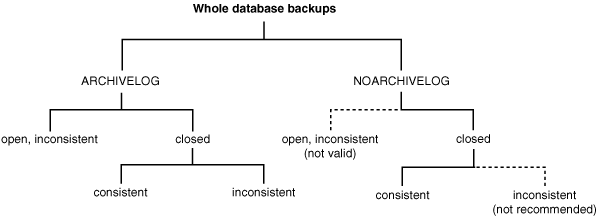
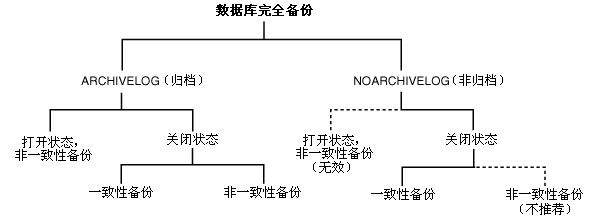
lose the original data, then you can reconstruct it by using a backup.
|
备份(backup)是数据的一个副本(copy of data)。这个副本中通常包含数据库的重要组成部分,例如控制文件(control
file)及数据文件(datafile)等。备份能够减少不可预见的数据丢失或应用程序错误造成的损失。如果原始数据丢失,用户可以使用备份重建数据。
|
|
006 |
Backups are divided into physical backups and logical backups. Physical
backups, which are the primary concern in a backup and recovery
strategy, are copies of physical database files. You can make physical
backups with either the Recovery Manager (RMAN) utility or operating
system utilities. In contrast, logical backups contain logical data (for
example, tables and stored procedures) extracted with an Oracle utility
and stored in a binary file. You can use logical backups to supplement
physical backups.
|
备份分为物理备份(physical backup)及逻辑备份(logical
backup)。物理备份指物理数据库文件的副本,物理备份是备份恢复策略的主体。用户可以使用 Recovery
Manager(RMAN)或操作系统工具进行物理备份。与物理备份相对的是逻辑备份,这种备份方式使用 Oracle
工具抽取逻辑数据(例如,表或存储过程)并保存在二进制文件中。逻辑备份可以作为物理备份的补充。
|
|
007 |
There are two ways to perform Oracle backup and recovery: Recovery
Manager and user-managed backup and recovery.
|
进行 Oracle 备份恢复的方式有两种:使用 Recovery Manager
进行备份恢复,或手工管理(user-managed)的备份恢复。
|
|
008 |
Recovery Manager (RMAN) is an Oracle utility that can
back up, restore, and recover database files. It is a feature of the
Oracle database server and does not require separate installation.
|
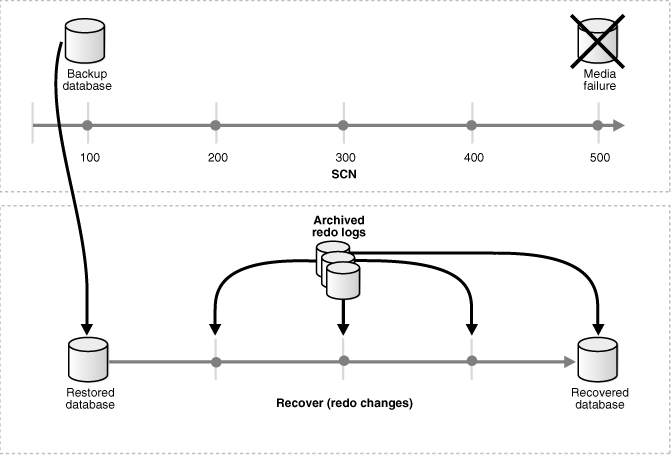
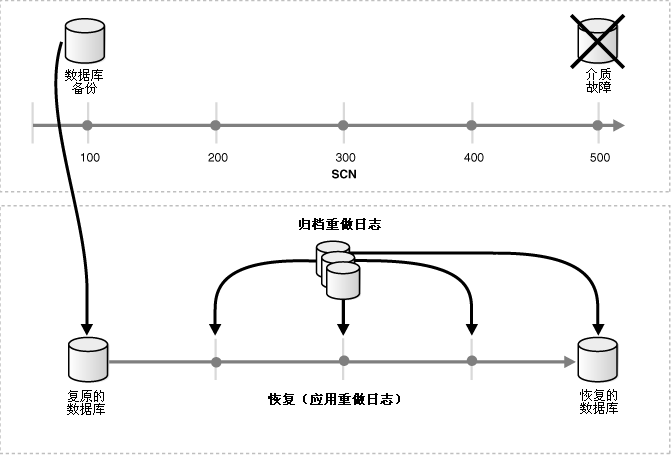
Recovery Manager (RMAN) 是用于备份(back
up),复原(restore),及恢复(recover)数据库文件的 Oracle 工具。RMAN 是 Oracle
数据库的内置工具,无须单独安装。
|
|
009 |
You can also use operating system commands for backups and SQL*Plus for
recovery. This method, also called user-managed backup and recovery, is
fully supported by Oracle, although use of RMAN is highly recommended
because it is more robust and greatly simplifies administration.
|
用户也可以使用操作系统命令进行备份,并使用 SQL*Plus 进行恢复。这种方式被称为手工管理的备份恢复。Oracle
同时支持上述两种方式,但强烈建议采用 RMAN,因为采用 RMAN 的备份恢复方式更为健壮,且能够极大地简化备份恢复的管理工作。
|
|
010 |
Whether you use RMAN or user-managed methods, you can supplement your
physical backups with logical backups of schema objects made using the
Export utility. The utility writes data from an Oracle database to
binary operating system files. You can later use Import to restore this
data into a database.
|
无论用户采用 RMAN 或手工管理的备份恢复,都可以使用 Export utility(导出工具)对方案对象(schema object)进行逻辑备份,作为物理备份的补充。Export 能够将 Oracle
数据库内的数据写入二进制的操作系统文件。用户可以使用 Import utility(导入工具)将数据恢复到数据库中。
|
|
011 |
This section contains the following topics:
|
本节包含以下主题:
|
|
012 |
See Also:
"When to Use Import/Export Utilities Recovery" for
information on logical backups
|
另加:
“何时采用 Import/Export 工具恢复”了解关于逻辑备份的信息
|
|
013 |
Consistent and Inconsistent Backups
|
15.1.1 一致性备份与非一致性备份
|
|
014 |
A consistent backup is one in which the files being backed up contain
all changes up to the same system change number (SCN). This means that
the files in the backup contain all the data taken from a same point in
time. Unlike an inconsistent backup, a consistent whole database backup
does not require recovery after it is restored.
|
一致性备份(consistent backup)的含义是,备份所包含的各个文件中的所有修改都具备相同的系统变化编号(system
change number,SCN)。也就是说,备份所包含的各个文件中的所有数据均来自同一时间点。与非一致性备份(inconsistent
backup)不同,使用一致性数据库完全备份(consistent whole database
backup)进行复原(restore)后,不需要执行恢复操作(recovery)。
|
|
015 |
An inconsistent backup is a backup of one or more database files that
you make while the database is open or after the database has shut down
abnormally.
|
非一致性备份指,在数据库处于打开(open)状态时,或数据库异常关闭(shut down
abnormally)后,对一个或多个数据库文件进行的备份。
|
|
016 |
Overview of Consistent Backups
|
15.1.1.1 一致性备份概述
|
|
017 |
A consistent backup of a database or part of a database is a backup in
which all read/write datafiles and control files are checkpointed with
the same SCN.
|
对数据库整体或部分进行的一致性备份(consistent backup)后,备份中所有数据文件(datafile)及控制文件(control
file)都经历过检查点(checkpoint),拥有相同的 SCN。
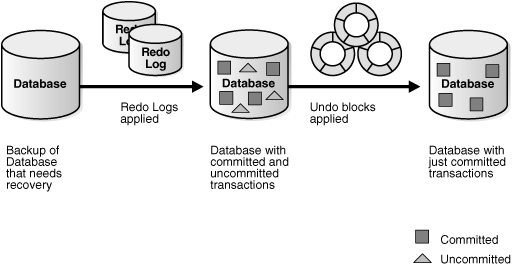
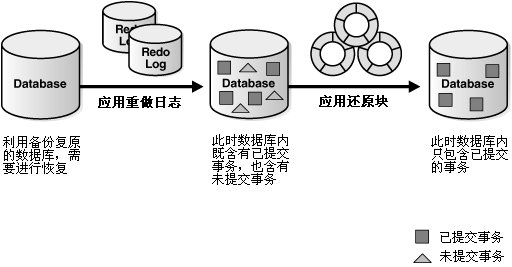
|
|
018 |
The only way to make a consistent whole database backup is to shut down
the database with the NORMAL,
IMMEDIATE, or
TRANSACTIONAL options and make the backup while the database is
closed. If a database is not shut down cleanly, for example, an instance
fails or you issue a SHUTDOWN ABORT
statement, then the database's datafiles are always inconsistent—unless
the database is a read-only database.
|
进行一致性数据库完全备份(consistent whole database backup)的唯一方法是:首先使用 NORMAL,IMMEDIATE,或
TRANSACTIONAL 选项关闭数据库,并在数据库处于关闭状态时进行备份。如果数据库没有完全关闭,例如出现实例故障,或用户使用了 SHUTDOWN ABORT
语句,此时数据库的数据文件是非一致性的,除非此数据库为只读数据库(read-only
database)。
|
|
019 |
Oracle makes the control files and datafiles consistent to the same SCN
during a database checkpoint. The only tablespaces in a
consistent backup that are allowed to have older SCNs are read-only and
offline normal tablespaces, which are still consistent with the other
datafiles in the backup because no changes have been made to them.
|
Oracle 通过数据库检查点操作使数据文件和控制文件拥有相同的
SCN,即具备一致性。在一致性备份中,只有只读表空间(read-only tablespace)及脱机表空间(offline
tablespace)的 SCN 可以比备份中其他文件的 SCN 滞后。这两种表空间内的数据不会被修改,因此她们也能满足一致性的要求。
|
|
020 |
The important point is that you can open the database after restoring a
consistent whole database backup without needing recovery because the
data is already consistent: no action is required to make the data in
the restored datafiles correct. Hence, you can restore a year-old
consistent backup of your database without performing media recovery and
without Oracle performing instance recovery. Of course, when you restore
a consistent whole database backup without applying redo, you lose all
transactions that were made since the backup was taken.
|
一致性数据库完全备份的重要特点是,使用此种备份复原(restore)的数据库无须恢复(recovery)即可打开(open),这是因为复原的数据库具备一致性:复原的数据文件内的数据是正确的,无须用户进行任何
处理。用户可以使用一年前的一致性备份复原数据库,而无须进行介质恢复(media
recovery),Oracle 也不必执行实例恢复(instance
recovery)。但是,如果使用一致性备份复原数据库而没有应用重做日志(applying redo),备份之后产生的事务将全部丢失。
|
|
021 |
A consistent whole database backup is the only valid backup option for
databases operating in NOARCHIVELOG mode,
because otherwise recovery is necessary for consistency. In
NOARCHIVELOG mode, Oracle does not archive
the redo logs, and so the required redo logs might not exist on disk. A
consistent whole backup is also a valid backup option for databases
operating in ARCHIVELOG mode. When this
type of backup is restored and archived logs are available, you have the
option of either opening the database immediately and losing
transactions that were made since the backup was taken, or applying the
archived logs to recover those transactions.
|
如果数据库运行在 NOARCHIVELOG(非归档)模式下,一致性数据库完全备份是唯一有效的备份方案,因为使用非一致性备份(inconsistent
backup)复原数据库后需要执行恢复操作来确保数据一致性。在 NOARCHIVELOG
模式下,Oracle 不会对重做日志进行归档,因此恢复所需的重做日志可能已经不存在了。而运行在 ARCHIVELOG(归档)模式下的数据库,可以采用一致性数据库完全备份。当使用此种备份复原数据库后,用户可以立即打开数据库,使备份后发生的事务全部丢失;如果归档的重做日志存在,用户也可以应用这些日志从而恢复备份后发生的事务。
|
|
022 |
Overview of Inconsistent Backups
|
15.1.1.2 非一致性备份概述
|
|
023 |
An inconsistent backup is a backup in which the files being backed up do
not contain all the changes made at all the SCNs. In other words, some
changes are missing. This means that the files in the backup contain
data taken from different points in time. This can occur because the
datafiles are being modified as backups are being taken. Oracle recovery
makes inconsistent backups consistent by reading all archived and online
redo logs, starting with the earliest SCN in any of the datafile
headers, and applying the changes from the logs back into the datafiles.
|
非一致性备份(inconsistent backup)的含义是,备份所包含的各个文件中的所有修改不具备相同的系统变化编号(system
change number,SCN)。换句话说,有些修改在备份中不存在。这意味着备份所包含的各个文件中的所有数据来自不同的时间点。如果数据文件在备份的同时也在被修改就会出现上述情况。Oracle
的恢复(recovery)操作能够比较所有数据文件头(datafile headers)中的 SCN,之后以最早的 SCN
为起点读取归档及联机重做日志文件,并将其中出的所有修改应用到复原的数据文件中。
|
|
024 |
If the database must be up and running 24 hours a day, seven days a
week, then you have no choice but to perform inconsistent backups of the
whole database. A backup of online datafiles is called an
online backup. This requires that you run your database in
ARCHIVELOG mode.
|
如果数据库必须 24*7 地工作,对这样的数据库只能进行非一致性数据库完全备份。联机数据文件的备份被称为联机备份(online
backup)。需要进行联机备份的数据库必须运行在 ARCHIVELOG(归档)模式下。
|
|
025 |
If you run the database in ARCHIVELOG mode,
then you do not have to back up the whole database at one time. For
example, if your database contains seven tablespaces, and if you back up
the control file as well as a different tablespace each night, then in a
week you will back up all tablespaces in the database as well as the
control file. You can consider this staggered backup as a whole database
backup. However, if such a staggered backup must be restored, then you
need to recover using all archived redo logs that were created since the
earliest backup was taken.
|
如果数据库运行在 ARCHIVELOG
模式下,用户不必每次都进行数据库完全备份。例如,如果数据库包含七个表空间,用户每晚都备份控制文件及一个不同的表空间,那么一周后用户就已经备份了数据库的全部表空间及控制文件。用户可以把这个交错的备份作为数据库完全备份。如果需要使用这个交错的备份
恢复数据库,除了复原数据之外,用户还需应用最早备份时间之后的产生所有归档重做日志。
|
|
026 |
Caution:
Oracle strongly recommends that you do not make inconsistent, closed
database backups in NOARCHIVELOG mode.
If such a backup is used to restore the database, then data
corruption might result.
|
警告:
Oracle 强烈建议,运行在 NOARCHIVELOG
模式下的数据库关闭后不要进行非一致性备份。如果用这样的备份复原数据库有可能造成数据损坏。
|
|
027 |
See Also:
Oracle Database Backup and Recovery Advanced User's Guide
|
另见:
Oracle Database Backup and Recovery Advanced User's Guide
|
|
028 |
Archiving Unarchived Redo Log Files
|
15.1.1.2.1 对未归档的重做日志文件进行归档
|
|
029 |
After an online backup or inconsistent closed backup,
always ensure that you have the redo necessary to recover the backup by
archiving the unarchived redo logs.
|
在进行联机备份(online
backup)后或关闭(close)数据库后进行非一致性备份(inconsistent
backup)后,一定要归档未归档的重做日志,以保存恢复(recover)所需的重做数据。
|
|
030 |
Backing Up the Archived Logs and the
Control File
|
15.1.1.2.2 备份归档日志文件及控制文件
|
|
031 |
After open or inconsistent closed backups, Oracle recommends backing up
all archived logs produced during the backup, and then backing up the
control file after the backup completes. If you do not have all archived
redo logs produced during the backup, then you cannot recover the backup
because you do not have all the redo records necessary to make it
consistent.
|
在进行了非一致性备份后(无论备份时数据库是打开(open)或关闭(close)状态),Oracle
建议首先对非一致性备份期间产生的归档重做日志进行备份,再对非一致性备份完成后的控制文件进行备份。如果用户没有备份非一致性备份期间产生的归档重做日志,将无法恢复使用非一致性备份还原的数据库,因为此种情况下可能缺少足够的重做日志来使数据保持一致性。
|
|
032 |
Whole Database and Partial Database Backups
|
15.1.2 数据库完全备份与数据库部分备份
|
|
033 |
This section contains the following topics:
|
本节讨论以下主题:
|
|
034 |
See Also:
Oracle Database Utilities for information about logical backups
|
另见:
Oracle Database Utilities
了解关于逻辑备份的信息
|
|
035 |
Whole Database Backups
|
15.1.2.1 数据库完全备份
|
|
036 |
A whole database backup is a backup of every datafile in
the database, plus the control file. Whole database backups are the most
common type of backup.
|
数据库完全备份(whole database
backup)是数据库内所有数据文件(datafile)及控制文件(control file)的备份。数据库完全备份是最常用的一种备份。
|
|
037 |
Whole database backups can be taken in either
ARCHIVELOG or NOARCHIVELOG mode.
Before performing whole database backups, however, be aware of the implications of backing up in
ARCHIVELOG
and
NOARCHIVELOG modes.
|
运行在
ARCHIVELOG(归档)及 NOARCHIVELOG(非归档)模式下的数据库都可以进行数据库完全备份。在
进行数据库完全备份前,应了解在 ARCHIVELOG
及 NOARCHIVELOG 模式下各种备份方案间的关系。
|
|
038 |
Figure 15-1 illustrates the
valid
configuration options given the type of backup that is performed.
|
图 15-1
显示了进行数据库完全备份时所有可能的备份方案。
|
|
039 |
Figure 15-1 Whole Database
Backup Options
|
图 15-1 数据库完全备份方案
|
|
040 |
|
|
|
041 |
A whole database backup is either a consistent backup or
an inconsistent backup. Whether a backup is consistent
determines whether you need to apply redo logs after restoring the
backup.
|
数据库完全备份既可以是一致性备份(consistent backup)或非一致性备份(inconsistent
backup)。备份的类型决定了使用备份复原(restore)数据库后是否需要应用重做日志(redo log)。
|
|
042 |
Tablespace Backups
|
15.1.2.2 表空间备份
|
|
043 |
A tablespace backup is a backup of the datafiles that constitute the
tablespace. For example, if tablespace users
contains datafiles 2, 3, and 4, then a backup of tablespace
users backs up these three datafiles.
|
表空间备份(tablespace backup)是构成表空间的数据文件(datafile)的备份。例如,如果
users 表空间包含数据文件 2,3,及 4,那么对
users 表空间进行备份时就应备份这三个数据文件。
|
|
044 |
Tablespace backups, whether online or offline, are valid only if the
database is operating in ARCHIVELOG mode.
The reason is that redo is required to make the restored tablespace
consistent with the other tablespaces in the database.
|
表空间备份可以是联机的(online)或脱机的(offline),但数据库必须运行在 ARCHIVELOG(归档)模式下表空间备份才是有效的。因为在使用表空间备份复原(restore)一个表空间后,必须应用重做日志(redo)才能使其与其他表空间保持一致性。
|
|
045 |
Datafile Backups
|
15.1.2.3 数据文件备份
|
|
046 |
A datafile backup is a backup of a single datafile. Datafile backups,
which are not as common as tablespace backups, are valid in
ARCHIVELOG databases. The only time a
datafile backup is valid for a database in
NOARCHIVELOG mode is if:
- Every datafile in a tablespace is
backed up. You cannot restore the database unless all datafiles are
backed up.
- The datafiles are read only or
offline-normal.
|
数据文件备份(datafile backup)是对单个数据文件(datafile)的备份。与表空间备份(tablespace
backup)相比,数据文件备份较少被使用。数据库运行在 ARCHIVELOG(归档)模式下时数据文件备份才有效。但有两种例外情况,数据库运行在
NOARCHIVELOG (非归档)模式下数据文件备份也有效:
- 构成表空间的所有数据文件都进行了备份。用户必须使用所有数据文件来复原数据库。
- 数据文件是只读的或脱机(offline-normal)的。
|
|
047 |
See Also:
Oracle Database Backup and Recovery Reference
|
另见:
Oracle Database Backup and Recovery Reference
|
|
048 |
Control File Backups
|
15.1.2.4 控制文件备份
|
|
049 |
Backing up the control file is a crucial aspect of backup and recovery.
Without a control file, you cannot mount or open the database.
|
备份控制文件(control
file)是备份与恢复(recovery)过程中的重要工作。没有控制文件,数据库将无法挂载(mount)或打开(open)。
|
|
050 |
You can instruct RMAN to automatically backup the control file whenever
you run backup jobs. The command is CONFIGURE
CONTROLFILE AUTOBACKUP. Because the autobackup uses a default
filename, RMAN can restore this backup even if the RMAN repository is
unavailable. Hence, this feature is extremely useful in a disaster
recovery scenario.
|
用户可以利用 RMAN 命令 CONFIGURE
CONTROLFILE AUTOBACKUP
来实现在运行备份作业时自动地备份控制文件。由于自动备份功能(autobackup)使用默认的文件名,即使 RMAN 资料库不可用 RMAN
也能使用备份复原(restore)数据库。因此,这个功能在灾难恢复(disaster recovery)工作中可以发挥重要作用。
|
|
051 |
You can make manual backups of the control file by using the following
methods:
-
The RMAN
BACKUP
CURRENT CONTROLFILE command makes a binary backup of the
control file, as either a backup set or an image copy.
- The SQL statement
ALTER DATABASE BACKUP CONTROLFILE makes
a binary backup of the control file.
- The SQL statement
ALTER DATABASE BACKUP CONTROLFILE TO TRACE
exports the control file contents to a SQL script file. You can use
the script to create a new control file.
Trace file backups have one
major disadvantage: they contain no records of archived redo logs,
and RMAN backups and copies. For this reason, binary backups are
preferable.
|
用户也可以采用以下方式手工备份控制文件:
- RMAN 的 BACKUP
CURRENT CONTROLFILE 命令能够以二进制的格式备份控制文件。备份可以存在于备份集(backup
set)或镜像副本(image copy)中。
- SQL 语句
ALTER DATABASE BACKUP CONTROLFILE
能够以二进制的格式备份控制文件。
- SQL 语句
ALTER DATABASE BACKUP CONTROLFILE TO TRACE
能够将控制文件的内容导出为 SQL 脚本文件。用户可以使用此脚本创建新的控制文件。但跟踪文件备份(trace file
backup)有一个重大缺点。跟踪文件无法备份归档重做日志(archived redo log)及 RMAN
备份与备份副本。因此采用二进制格式的备份更为适宜。
|
|
052 |
See Also:
|
另见:
|
|
053 |
Archived Redo Log Backups
|
15.1.2.5 归档重做日志备份
|
|
054 |
Archived redo logs are essential for recovering an inconsistent backup.
The only way to recover an inconsistent backup without archived logs is
to use RMAN incremental backups. To be able to recover a backup through
the most recent log, every log generated between these two points must
be available. In other words, you cannot recover from log 100 to log 200
if log 173 is missing. If log 173 is missing, then you must halt
recovery at log 172 and open the database with the
RESETLOGS option.
|
在恢复(recover)使用非一致性备份(inconsistent
backup)复原(restore)的数据库时,归档重做日志(archived redo log)必不可少。除非使用了 RMAN
的增量备份(incremental
backup)功能,否则必须利用归档重做日志对非一致性备份进行恢复。如需将一个备份恢复到最新日志点(recent
log),则必须使用从复原点到最新日志点间的所有重做日志。举例来说,如果 173 号重做日志丢失,用户就无法将数据库从 100 号日志点恢复到
200 号日志点。此时用户只能在 172 号日志点处停止恢复,并使用
RESETLOGS 选项打开(open)数据库。
|
|
055 |
Because archived redo logs are essential to recovery, you should back
them up regularly. If possible, then back them up regularly to tape.
|
由于归档重做日志在恢复中必不可少,用户应该周期性地对其进行备份。如条件允许,还应将备份复制到磁带上。
|
|
056 |
You can make backups of archived logs by using the following methods:
- The RMAN BACKUP
ARCHIVELOG command
- The RMAN BACKUP
... PLUS ARCHIVELOG command
- An operating system utility
|
用户可以采用以下方法对归档重做日志进行备份:
- RMAN BACKUP
ARCHIVELOG 命令
- RMAN BACKUP
... PLUS ARCHIVELOG 命令
- 操作系统工具
|
|
057 |
See Also:
|
另见:
|
|
058 |
RMAN and User-Managed Backups
|
15.1.3 RMAN 备份与手工管理备份
|
|
059 |
There are two types of backups: image copies and
backup sets. An image
copy is an exact duplicate of a datafile, control file, or archived log.
You can create image copies of physical files with operating system
utilities or RMAN, and you can restore them as-is without performing
additional processing by using either operating system utilities or
RMAN.
|
备份有两种类型(type):镜像副本(image copy)及备份集(backup
set)。镜像副本是与数据文件(datafile),控制文件(control file)或归档重做日志文件(archived
log)完全一致的副本。用户可以使用操作系统工具或 RMAN 创建镜像副本,也能够使用操作系统工具或 RMAN
直接利用镜像副本恢复数据库,而无须任何额外处理。
|
|
060 |
Note:
Unlike operating system copies, RMAN validates the blocks in the
file and records the copy in the repository.
|
提示:
RMAN 与 操作系统复制的区别在于,RMAN
能够验证备份文件内数据块的有效性,并在资料库中记录复制的情况。
|
|
061 |
A backup set is a backup in a proprietary format that consists of one or
more physical files called backup pieces. It differs from an image copy
in that it can contain more than one database file, and it can also be
backed up using special processing, such as compression or incremental
backup. You must use RMAN to restore a backup set.
|
备份集(backup set)是由被称为备份成员(backup piece)的一个或多个物理文件构成的,其格式为 RMAN
自有格式。备份集与镜像副本的区别在于,备份集内可以包含多个数据文件,且备份过程中可以进行特殊处理,例如压缩或增量备份(incremental
backup)等。备份集必须使用 RMAN 来恢复。
|
|
062 |
RMAN with Online Backups
|
15.1.3.1 使用 RMAN 进行联机备份
|
|
063 |
Because the database continues writing to the file during an online
backup, there is the possibility of backing up inconsistent data within
a block. For example, assume that either RMAN or an operating system
utility reads the block while database writer is in the middle of
updating the block. In this case, RMAN or the copy utility could read
the old data in the top half of the block and the new data in the bottom
top half of the block. The block is a
fractured block, meaning that the
data in this block is not consistent.
|
在联机备份(online
backup)期间数据库仍会向数据文件中写入数据,因此备份中可能存在含有非一致性(inconsistent)数据的数据块(data
block)。例如,RMAN 或操作系统工具在读取数据块的同时,数据库写进程可能会更新相同的数据块。此时,RMAN
或复制工具读取的数据块中既包含新数据,又包含旧数据。这样的数据块是无效块(fractured block),即块内的数据不具备一致性。
|
|
064 |
During an RMAN backup, the Oracle database server reads the datafiles,
not an operating system utility. The server reads each block and
determines whether the block is fractured. If the block is fractured,
then Oracle re-reads the block until it gets a consistent picture of the
data.
|
在使用 RMAN 进行备份时,是 Oracle
数据库服务器而非操作系统工具负责读取数据文件(datafile)。数据库服务器逐一读取数据块并判断其是否有效。如果数据块是无效的,Oracle
会再次读取直道获得了具备一致性的数据块为止。
|
|
065 |
When you back up an online datafile with an operating system utility
(rather than with RMAN), you must use a different method to handle
fractured blocks. You must first place the files in backup mode with the
ALTER TABLESPACE BEGIN BACKUP statement (to
back up an individual tablespace), or the ALTER
DATABASE BEGIN BACKUP statement (to back up the entire database).
After an online backup is completed, you must run the
ALTER TABLESPACE ... END BACKUP or
ALTER DATABASE END BACKUP statement to take
the tablespace out of backup mode.
|
如果用户使用操作系统工具(而非 RMAN)备份联机数据,则需采用另一种方式解决无效块的问题。用户需要首先使用
ALTER TABLESPACE BEGIN BACKUP 语句(备份单独的表空间)或 ALTER
DATABASE BEGIN BACKUP 语句(备份整个数据库)将数据文件置为备份模式(backup
mode)。在联机备份结束后,再使用
ALTER TABLESPACE ... END BACKUP 或
ALTER DATABASE END BACKUP 将相关的数据文件恢复原状态。
|
|
066 |
When updates are made to files in backup mode, additional redo data is
logged. This additional data is needed to repair fractured blocks that
might be backed up by the operating system utility.
|
当数据库对处于备份模式的文件进行修改操作时,系统会记录额外的重做数据(redo data)。这些数据用于修复操作系统工具备份中可能包含的无效块。
|
|
067 |
Introduction to
Recovery
|
15.2 恢复简介
|
|
068 |
To restore a physical backup of a datafile or control file is to
reconstruct it and make it available to the Oracle database server. To
recover a restored datafile is to update it by applying archived redo
logs and online redo logs, that is, records of changes made to the
database after the backup was taken. If you use RMAN, then you can also
recover datafiles with incremental backups, which are backups of a
datafile that contain only blocks that changed after a previous
incremental backup.
|
复原(restore)数据文件(datafile)或控制文件(control file)的物理备份是指利用备份重建这些文件并使其在 Oracle
数据库服务器中正常工作。而对复原的数据文件进行恢复(recover)是指利用归档重做日志(archived redo
log)及联机重做日志(online redo log)对其进行更新,即重做在数据库备份后发生的操作。如果使用了
RMAN,用户也可以使用增量备份(incremental
backup)来恢复数据文件,数据文件的增量备份中只包含其前一次增量备份后修改过的数据块。
|
|
069 |
After the necessary files are restored, media recovery must be initiated
by the user. Media recovery involves various operations to restore, roll
forward, and roll back a backup of database files.
|
当所有文件被复原后,用户还需执行介质恢复(media recovery)的剩余步骤。介质恢复过程包括了对备份数据库文件的复原,前滚(roll
forward)及回滚(roll back)等操作。
|
|
070 |
Media recovery applies archived redo logs and online redo logs to
recover the datafiles. Whenever a change is made to a datafile, the
change is first recorded in the online redo logs. Media recovery
selectively applies the changes recorded in the online and archived redo
logs to the restored datafile to roll it forward.
|
在介质恢复过程中将应用归档重做日志及联机重做日志恢复数据文件。Oracle 每次修改数据文件之前,都会首先将这些修改记录在联机重做日志中。介质恢复过程
就是将归档重做日志及联机重做日志中的相关修改操作记录应用到复原的数据文件中以实现前滚。
|
|
071 |
To correct problems caused by logical data corruptions or user errors,
you can use Oracle Flashback. Oracle Flashback Database and Oracle
Flashback Table let you quickly recover to a previous time.
|
如果用户需要修正逻辑数据错误(logical data corruption)或用户操作失误(user error),可以使用 Oracle
Flashback(回闪)技术。用户利用 Oracle Flashback Database(回闪数据库)及 Oracle Flashback
Table(回闪表)能够将数据迅速恢复到之前某个时间点的状态。
|
|
072 |
Figure 15-2 illustrates the basic
principle of backing up, restoring, and performing media recovery on a
database.
|
图 15-2
显示了数据库备份,复原,及介质恢复的基本原理。
|
|
073 |
Figure 15-2 Media Recovery
|
图 15-2 介质恢复
|
|
074 |
|
|
|
075 |
Figure 15-2 illustrates the concept of restoring
and recovering a database from a backup, following a media
failure. A backup of the database is taken at SCN 100. Media
failure occurs at SCN 600. Redo logs spanning the period from
SCN 100 to SCN 600 have been archived for use in recovery. The
backup from SCN 100 is restored, or copied onto new media. The
redo logs are used to recover the database, performing again
each database change that occurred between the backup and the
point of media failure.
|
图 15-2 显示了数据库介质故障后进行复原及恢复的基本概念。数据库在 SCN 为 100
时进行了备份,在 SCN 为 600 时发生了介质故障。SCN 在 100 至 600
之间的重做日志已经被归档以供恢复只用。用户首先使用 SCN 为 100
时制作的备份复原数据库(复原也可以在新介质上进行)。之后再使用重做日志恢复数据库,即重新执行从备份点到介质故障点之间的所有数据修改操作。
|
|
076 |
Unlike media recovery, Oracle performs
crash recovery and instance
recovery automatically after an instance failure. Crash and instance
recovery recover a database to its transaction-consistent state just
before instance failure. By definition, crash recovery is the recovery
of a database in a single-instance configuration or an Oracle Real
Application Clusters configuration in which all instances have crashed.
In contrast, instance recovery is the recovery of one failed instance by
a live instance in an Oracle Real Application Clusters configuration.
|
与介质恢复不同,Oracle 在实例故障(instance failure)之后能自动地执行崩溃恢复(crash
recovery)及实例恢复(instance
recovery)。崩溃恢复及实例恢复能够在实例故障发生后将数据库恢复到满足事务一致性(transaction-consistent)的状态。崩溃恢复的定义是:单实例系统发生崩溃或
Oracle RAC 系统中所有实例发生崩溃后对数据库进行的恢复。与之相对,实例恢复的定义是:Oracle RAC
系统中正常实例对故障实例进行的恢复。
|
|
077 |
This section contains the following topics:
|
本节包含以下主题:
|
|
078 |
See Also:
|
另见:
|
|
079 |
Overview of Media Recovery
|
15.2.1 介质恢复概述
|
|
080 |
The type of recovery that takes a backup and applies redo is called
media recovery. Media recovery updates a backup to either to the current
or to a specified prior time. Typically, the term "media recovery"
refers to recovery of datafiles. Block media recovery is a more
specialized operation that you use when just a few blocks in one or more
files have been corrupted. In any case, you always use a restored backup
to perform the recovery.
|
先利用备份复原(restore)数据再应用重做日志(redo log)的恢复(recovery)方式被称为介质恢复(media
recovery)。介质恢复能将一个复原的备份更新到当前时间点或之前某个指定的时间点。通常“介质恢复”这个术语专指对数据文件进行恢复的过程。而数据块介质恢复(block
media recovery)指数据文件中的个别数据块出现错误时进行的特殊恢复操作。无论进行哪种恢复,首先都需要使用备份复原数据。
|
|
081 |
This section contains the following topics:
|
本节包含以下主题:
|
|
082 |
Complete Recovery
|
15.2.1.1 完全恢复
|
|
083 |
Complete recovery involves using redo data or incremental backups
combined with a backup of a database, tablespace, or datafile to update
it to the most current point in time. It is called complete because
Oracle applies all of the redo changes contained in the archived and
online logs to the backup. Typically, you perform complete media
recovery after a media failure damages datafiles or the control file.
|
完全恢复(complete
recovery)包括两个步骤:首先使用数据库,表空间或数据文件(datafile)的备份进行复原,再使用重做数据(redo
data)或增量备份(incremental backup)将数据更新到当前时间点。之所以称这样的恢复为完全恢复,是因为 Oracle
将使用归档及联机重做日志(archived and online
log)中的所有重做信息进行恢复,即恢复到当前时间点。通常,当出现介质故障(media failure)导致数据文件或控制文件(control
file)损坏时,需要用户进行介质恢复。
|
|
084 |
You can perform complete recovery on a database, tablespace, or
datafile. If you are performing complete recovery on the whole database,
then you must:
- Mount the database
- Ensure that all datafiles you want to
recover are online
- Restore a backup of the whole database
or the files you want to recover
- Apply online or archived redo logs, or
a combination of the two
|
用户可以对数据库,表空间,数据文件执行完全恢复。用户对整个数据库进行完全恢复时必须满足以下条件:
- 挂载(mount)数据库
- 确保所有需要被恢复的数据文件处于联机(online)状态
- 复原数据库或需要恢复的数据文件
- 应用联机重做日志或/与归档重做日志
|
|
085 |
If you are performing complete recovery on a tablespace or datafile,
then you must:
- Take the tablespace or datafile to be
recovered offline if the database is open
- Restore a backup of the datafiles you
want to recover
- Apply online or archived redo logs, or
a combination of the two
|
用户对表空间及数据文件进行完全恢复时必须满足以下条件:
-
如果数据库处于打开状态,应将需要恢复的表空间或数据文件置为脱机(offline)状态
- 复原需要恢复的数据文件
- 应用联机重做日志或/与归档重做日志
|
|
086 |
Incomplete Recovery
|
15.2.1.2 不完全恢复
|
|
087 |
Incomplete recovery, or point-in-time recovery, uses a backup to produce
a noncurrent version of the database. In other words, you do not apply
all of the redo records generated after the most recent backup. You
usually perform incomplete recovery of the whole database in the
following situations:
- Media failure destroys some or all of
the online redo logs.
- A user error causes data loss, for
example, a user inadvertently drops a table.
- You cannot perform complete recovery
because an archived redo log is missing.
- You lose your current control file and
must use a backup control file to open the database.
|
不完全恢复(incomplete recovery),也被称为按时间点恢复(point-in-time
recovery),指没有将数据库恢复到当前时间点的恢复。换句话说,用户没有将最近一次备份之后产生的所有重做日志应用到复原的数据库上。用户通常在下列情况出现时对数据库进行不完全恢复:
- 介质故障(media failure)导致部分或全部联机重做日志(online
redo log)损坏。
- 用户操作失误(user
error)导致数据丢失,例如,用户由于疏忽而移除了表。
- 由于归档重做日志(archived redo
log)丢失而无法进行完全恢复(complete recovery)。
- 当前控制文件(control
file)丢失,必须使用备份的控制文件打开(open)数据库。
|
|
088 |
To perform incomplete media recovery, you must restore all datafiles
from backups created prior to the time to which you want to recover and
then open the database with the RESETLOGS
option when recovery completes. The
RESETLOGS
operation creates a new incarnation of the database—in other words, a
database with a new stream of log sequence numbers starting with log
sequence 1.
|
执行不完全介质恢复(incomplete media
recovery)时,用户需要使用指定恢复时间点之前的备份复原(restore)数据文件,并在恢复(recovery)结束打开(open)数据库时使用 RESETLOGS
选项。RESETLOGS
选项的含义是使当前的数据库及重做日志有效,即令数据库使用一套新的日志序列号(从 1 开始)。
|
|
089 |
Before using the OPEN RESETLOGS command to
open the database in read/write mode after an incomplete recovery, it is
a good idea to first open the database in read-only mode, and inspect
the data to make sure that the database was recovered to the correct
point. If the recovery was done to the wrong point, then it is easier to
re-run the recovery if no OPEN RESETLOGS
has been done. If you open the database read-only and discover that not
enough recovery was done, then just run the recovery again to the
desired time. If you discover that too much recovery was done, then you
must restore the database again and re-run the recovery.
|
在完成了不完全恢复后,建议不要直接使用 OPEN RESETLOGS
命令以读/写模式打开(open)数据库,而应先以只读模式打开数据库,并检查是否已将数据库恢复到正确的时间点。如果恢复的时间点有误,在没有使用 OPEN RESETLOGS
命令的情况下,重新执行恢复操作相对简单。如果恢复结果早于指定的时间点,只需重新执行恢复操作。如果恢复结果超过了指定的时间点,则应再次复原数据库并重新进行恢复。
|
|
090 |
Note:
Flashback Database is
another way to perform incomplete recovery.
|
提示:
Flashback Database(回闪数据库)也是一种进行不完全恢复的方法。
|
|
091 |
See Also:
"Overview of Oracle Flashback Database"
|
另见:
“Oracle Flashback Database 概述”
|
|
092 |
Tablespace Point-in-Time Recovery
|
15.2.1.2.1 表空间按时间点恢复
|
|
093 |
The tablespace point-in-time recovery (TSPITR) feature lets you recover
one or more tablespaces to a point in time that is different from the
rest of the database. TSPITR is most useful when you want to:
- Recover from an erroneous drop or
truncate table operation
- Recover a table that has become
logically corrupted
- Recover from an incorrect batch job or
other DML statement that has affected only a subset of the database
- Recover one independent schema to a
point different from the rest of a physical database (in cases where
there are multiple independent schemas in separate tablespaces of
one physical database)
- Recover a tablespace on a very large
database (VLDB) rather than restore the whole database from a backup
and perform a complete database roll-forward
|
用户使用表空间按时间点恢复(tablespace point-in-time recovery,TSPITR)功能可以将一个或多个表空间恢复到与数据库中其他表空间不同的时间点。TSPITR
对以下情况最为适用:
- 因错误地移除(drop)及清除(truncate)表而进行的恢复
- 恢复存在逻辑错误的表
- 由于不正确的批处理作业或其他 DML
语句导致数据库中部分数据有误,因而需要恢复
-
单独将某个方案(schema)恢复到与物理数据库中其他方案不同的时间点(假设数据库中不同的方案使用不同的表空间)
- 恢复大型数据库(very large database,VLDB)中的一个表空间,而不必先使用备份复原整个数据库再执行所有前滚(roll-forward)操作
|
|
094 |
TSPITR has the following limitations:
- You cannot use it on the
SYSTEM tablespace, an
UNDO tablespace, or any tablespace that
contains rollback segments.
- Tablespaces that contain
interdependent data must be recovered together. For example, if two
tables are in separate tablespaces and have a foreign key
relationship, then both tablespaces must be recovered at the same
time; you cannot recover just one of them. Oracle can enforce this
limitation when it detects data relationships that have been
explicitly declared with database constraints. There could be other
data relationships that are not declared with database constraints.
Oracle cannot detect these, and the DBA must be careful to always
restore a consistent set of tablespaces.
|
TSPITR 功能存在以下限制:
- SYSTEM
表空间,UNDO 表空间,或任何包含回滚段(rollback
segment)的表空间无法使用 TSPITR 功能。
-
如果几个表空间中存在相互依赖的数据,则她们必须同时进行恢复操作。例如,两个表位于不同的表空间中且存在外键关系(foreign key
relationship),那么这两个表空间必须同时恢复。如果 Oracle 发现了通过数据库约束(database
constraint)显式地声明的数据间关系,就将强制保证这种恢复的同时性。在数据库中,有些数据关系可能没有通过数据库约束显式地声明。Oracle
无法发现这样的关系,此时 DBA 必须确保相关表空间在恢复时满足一致性的要求。
|
|
095 |
See Also:
Oracle Database Backup and Recovery Advanced User's Guide and
Oracle Database Backup and Recovery Reference for more
information on TSPITR
|
另见:
Oracle Database Backup and Recovery Advanced User's Guide
及
Oracle Database Backup and Recovery Reference
了解关于 TSPITR 的详细信息
|
|
096 |
Incomplete Media Recovery Options
|
15.2.1.2.2 不完全介质恢复选项
|
|
097 |
Because you are not completely recovering the database to the most
current time, you must tell Oracle when to terminate recovery. You can
perform the following types of media recovery.
|
在不完全恢复(incomplete recovery)中,由于没有将数据库恢复到当前时间点,用户必须告知 Oracle
在何时终止恢复(recovery)。介质恢复有以下几种类型。
|
|
098 |
|
| Type of Recovery |
Function |
|
| Time-based recovery |
Recovers the data up to a specified point in
time.
|
| Cancel-based recovery |
Recovers until you issue the
CANCEL statement
(not available when using
Recovery Manager).
|
Change-based recovery
|
Recovers until the specified SCN. |
| Log sequence recovery |
Recovers until the specified log sequence
number (only available when using Recovery Manager).
|
|
|
恢复的类型
|
功能
|
|
基于时间的恢复(Time-based recovery)
|
将数据恢复到指定的时间点。
|
| 用户控制的恢复(Cancel-based recovery) |
当用户提交
CANCEL 语句后停止恢复操作(此选项在使用 Recovery Manager(恢复管理器)时无效).
|
基于 SCN 的恢复(Change-based recovery)
|
将数据恢复到指定的 SCN。 |
按重做日志序号恢复(Log sequence recovery)
|
将数据恢复到指定的重做日志序号 (此选项只在使用 Recovery Manager 时有效)。
|
|
|
099 |
Datafile Media Recovery
|
15.2.1.3 数据文件介质恢复
|
|
100 |
Datafile media recovery is used to recover from a lost or damaged
current datafile or control file. It is also used to recover changes
that were lost when a tablespace went offline without the
OFFLINE NORMAL option. Both datafile media
recovery and instance recovery must repair database integrity. However,
these types of recovery differ with respect to their additional
features. Media recovery has the following characteristics:
- Applies changes to restored backups of
damaged datafiles.
- Can use archived logs as well as
online logs.
- Requires explicit invocation by a
user.
- Does not detect media failure (that
is, the need to restore a backup) automatically. After a backup has
been restored, however, detection of the need to recover it through
media recovery is automatic.
- Has a recovery time governed solely by
user policy (for example, frequency of backups, parallel recovery
parameters, number of database transactions since the last backup)
rather than by Oracle internal mechanisms.
|
数据文件介质恢复(datafile media recovery)用于对丢失或损坏的数据文件(datafile)及控制文件(control
file)进行恢复(recover)。她也可恢复因没有使用
OFFLINE NORMAL
选项执行脱机操作而造成数据丢失的表空间。数据文件介质恢复及实例恢复(instance recovery)的作用都是修复数据库完整性(database
integrity)。但是这两种恢复各有所不同。数据文件介质恢复具有以下特点:
- 能够将数据修改应用到被复原(restore)的受损数据文件中。
- 能够使用归档重做日志(archived redo log)及联机重做日志(online
redo log)。
- 需要用户显式的执行。
- 不能自动地检测介质故障(media
failure)(即不能自动地执行复原操作)。但在使用备份进行复原后,能够自动地检测是否需要通过介质恢复(media
recovery)来恢复数据。
-
恢复所需时间完全由用户的备份恢复策略(例如,备份的频率,并行恢复参数,上次备份后数据库内的事务量)决定,而与 Oracle
内部机制无关。
|
|
101 |
The database cannot be opened if any of the online datafiles needs media
recovery, nor can a datafile that needs media recovery be brought online
until media recovery is complete. The following scenarios necessitate
media recovery:
- You restore a backup of a datafile.
- You restore a backup control file
(even if all datafiles are current).
- A datafile is taken offline (either by
you or automatically by Oracle) without the
OFFLINE NORMAL option.
|
如果数据库内存在需要介质恢复(media recovery)的联机数据文件(online
datafile),那么此数据库将无法打开(open),如果一个数据文件需要介质恢复,那么此文件将无法联机。在出现以下情况时需要进行介质恢复:
- 使用备份复原了一个数据文件。
- 使用备份复原了一个控制文件(即使此时所有数据文件都是最新的)。
- 将数据文件脱机(offline)时(无论是用户手动执行的,还是
Oracle 自动执行的)没有使用
OFFLINE NORMAL 选项。
|
|
102 |
Unless the database is not open by any instance, datafile media recovery
can only operate on offline datafiles. You can initiate datafile media
recovery before opening a database even when crash recovery would have
sufficed. If so, crash recovery still runs automatically at database
open.
|
如果数据库已经被一个实例打开,数据文件介质恢复将只能针对脱机数据文件。即便数据库只需进行崩溃恢复(crash
recovery),用户也可以在数据库打开前执行介质恢复。此时,崩溃恢复仍会在数据库打开时自动运行。
|
|
103 |
Note that when a file requires media recovery, you must perform media
recovery even if all necessary changes are contained in the online logs.
In other words, you must still run recovery even though the archived
logs are not needed. Media recovery could find nothing to do — and
signal the "no recovery required" error — if invoked for files that do
not need recovery.
|
需要注意的是,如果一个文件需要介质恢复,即使所有对此文件的修改都包含在联机重做日志文件中也必须进行介质恢复。也就是说,即使无需应用归档重做日志也必须进行介质恢复。如果对无需恢复的数据文件执行了介质恢复,那么介质恢复将发现自己无需进行任何处理,并发出“no
recovery required(无需恢复)”错误。
|
|
104 |
Block Media Recovery
|
15.2.1.4 数据块介质恢复
|
|
105 |
Block media recovery is a technique for restoring and recovering
individual data blocks while all database files remain online and
available. If corruption is limited to only a few blocks among a subset
of database files, then block media recovery might be preferable to
datafile recovery.
|
数据块介质恢复(block media
recovery)能够在所有数据文件联机且可用的情况下对个别的数据块进行复原(restore)及恢复(recover)。如果数据错误局限在某些数据文件的少量数据块中,此时适宜采用数据块介质恢复来对数据文件进行恢复。
|
|
106 |
The interface to block media recovery is provided by RMAN. If you do not
already use RMAN as your principal backup and recovery solution, then
you can still perform block media recovery by cataloging into the RMAN
repository the necessary user-managed datafile and archived redo log
backups.
|
数据块介质恢复是通过 RMAN 来执行的。如果用户没有使用 RMAN 作为数据库的备份方案,可以向 RMAN
资料库(repository)中添加相关的用户管理的数据文件(user-managed
datafile)信息及归档重做日志备份(archived redo log backup)信息,这样也能使用 RMAN 进行数据块介质恢复。
|
|
107 |
See Also:
Oracle Database Backup and Recovery Reference for information on
how to catalog user-managed datafile and archived log backups and to
perform block media recovery
|
另见:
Oracle Database Backup and Recovery Reference
了解如何向 RMAN 资料库中添加相关的用户管理的数据文件信息及归档重做日志备份信息,从而执行数据块介质恢复。
|
|
108 |
Overview of RMAN and User-Managed Restore and
Recovery
|
15.2.2 RMAN 与手工管理的复原及恢复概述
|
|
109 |
You have a choice between two basic methods for recovering physical
files. You can:
- Use the RMAN utility to restore and
recover the database
- Restore backups by means of operating
system utilities, and then recover by running the SQL*Plus
RECOVER command
|
用户在恢复(recover)物理文件时有两种选择:
- 使用 RMAN 来复原(restore)及恢复数据库
- 使用操作系统工具复原备份,并使用 SQL*Plus 的
RECOVER 命令进行恢复
|
|
110 |
Whichever method you choose, you can recover a database, tablespace, or
datafile. Before performing media recovery, you need to determine which
datafiles to recover. Often you can use the
fixed view
V$RECOVER_FILE. This view lists all files
that require recovery and explains the error that necessitates recovery.
|
上述两种方法均可以对数据库,表空间,或数据文件(datafile)进行恢复。在进行介质恢复(media
recovery)之前,用户应首先确定哪些数据文件需要被恢复。相关信息可以从固定视图(fixed view)V$RECOVER_FILE
中获得。此视图记录了所有需要被恢复的文件及导致问题的原因。
|
|
111 |
See Also:
Oracle Database Backup and Recovery Reference for more about
using V$ views in a recovery scenario
|
另见:
Oracle Database Backup and Recovery Reference
了解在执行恢复操作时如何使用 V$ 视图
|
|
112 |
RMAN Restore and Recovery
|
15.2.2.1 RMAN 复原及恢复
|
|
113 |
The basic RMAN recovery commands are RESTORE
and RECOVER. Use
RESTORE to restore datafiles from backup sets or from image
copies on disk, either to their current location or to a new location.
You can also restore backup sets containing archived redo logs, but this
is usually unnecessary, because RMAN automatically restores the archived
logs that are needed for recovery and deletes them after the recovery is
finished. Use the RMAN RECOVER command to
perform media recovery and apply archived logs or incremental backups.
|
RMAN 恢复中最基础的命令是 RESTORE
和 RECOVER。RESTORE
命令可以使用备份集(backup set)或镜像副本(image
copy)将数据文件复原(restore)到原始位置或新位置。用户可以复原备份集中的归档重做日志(archived redo
log),但通常无需手工执行此类操作,因为 RMAN
能根据恢复(recovery)的需要自动地复原归档重做日志,并在恢复结束后自动地删除。RMAN 的 RECOVER
命令用于执行介质恢复(media recovery),将归档重做日志或增量备份(incremental backup)应用到复原后的数据文件中。
|
|
114 |
RMAN automates the procedure for recovering and restoring your backups
and copies.
|
RMAN 使复原及恢复工作更加自动化。
|
|
115 |
See Also:
Oracle Database Backup and Recovery Reference for details about
how to restore and recover using RMAN
|
另见:
Oracle Database Backup and Recovery Reference
了解关于使用 RMAN 进行复原及恢复的详细信息
|
|
116 |
User-Managed Restore and Recovery
|
15.2.2.2 手工管理的复原及恢复
|
|
117 |
If you do not use RMAN, then you can restore backups with operating
system utilities and then run the SQL*Plus RECOVER
command to recover the database. You should follow these basic steps:
- After identifying which files are
damaged, place the database in the appropriate state for restore and
recovery. For example, if some but not all datafiles are damaged,
then take the affected tablespaces offline while the database is
open.
- Restore the files with an operating
system utility. If you do not have a backup, it is sometimes
possible to perform recovery if you have the necessary redo logs
dating from the time when the datafiles were first created and the
control file contains the name of the damaged file.
- If you cannot restore a datafile to
its original location, then relocate the restored datafile and
change the location in the control file.
Restore any necessary archived redo log files.
- Use the SQL*Plus
RECOVER command to recover the datafile backups.
|
如果没有采用 RMAN,可以使用操作系统工具复原(restore)备份并使用 SQL*Plus 的 RECOVER
命令恢复(recover)数据库。上述过程包含以下基本步骤:
-
首先确定哪些文件需要被恢复,之后将数据库置于适当的状态,以便进行复原及恢复操作。例如,数据库中只有部分数据文件损坏时,可以在打开(open)数据库时
令受影响的表空间脱机(offline)。
-
使用操作系统工具从备份中复原数据文件。在没有备份的情况下,如果能找到自数据文件创建起的所有重做日志(redo
log),以及包含受损数据文件名称的控制文件(control file),也有可能恢复数据。
-
如果无法将数据文件复原到其原始位置,那么可以在新位置复原数据文件,并在控制文件中做出相应的修改。
注意,还要复原相关的归档重做日志(archived redo log)文件。
- 使用 SQL*Plus 的
RECOVER 命令恢复复原后的数据文件。
|
|
118 |
See Also:
Oracle Database Backup and Recovery Advanced User's Guide for
details about how to restore and recover with operating system
utilities and SQL*Plus
|
另见:
Oracle Database Backup and Recovery Advanced User's Guide
了解如何使用操作系统工具及 SQL*Plus 进行复原及恢复
|
|
119 |
Recovery Using Oracle Flashback Technology
|
15.2.3 利用 Oracle Flashback 技术实现恢复
|
|
120 |
To correct problems caused by logical data corruptions or user errors,
you can use Oracle Flashback. Flashback Database and Flashback Table let
you quickly recover to a previous time.
|
用户需要修正逻辑数据错误(logical data corruption)或用户操作失误(user error)时可以使用 Oracle
Flashback(回闪)功能。 |
|
121 |
This section contains the following topics:
|
本节包含以下主题:
|
|
122 |
See Also:
"Overview of Oracle Flashback Features" for an
overview of all Oracle Flashback features
|
另见:
“Oracle Flashback 特性概述”了解关于 Oracle Flashback
特性的介绍
|
|
123 |
Overview of Oracle Flashback Database
|
15.2.3.1 Oracle Flashback Database 概述
|
|
124 |
Oracle Flashback Database lets you quickly recover an Oracle database to
a previous time to correct problems caused by logical data corruptions
or user errors.
|
Oracle Flashback
Database(数据库回闪)技术使用户能够迅速地将数据库恢复到之前的某个时间点,从而修正逻辑数据错误(logical
data corruption)或用户操作失误(user error)。
|
|
125 |
If an Oracle managed disk area, called a
flash recovery area is
configured, and if you have enabled the Flashback functionality, then
you can use the RMAN and SQL FLASHBACK DATABASE
commands to return the database to a prior time. Flashback Database is
not true media recovery, because it does not involve restoring physical
files. However, Flashback is preferable to using the
RESTORE and RECOVER
commands in some cases, because it is faster and easier, and does not
require restoring the whole database.
|
用户可以配置一个由 Oracle 管理的磁盘区域(此区域被称为Flash Recovery Area(回闪恢复区)),并开启数据库的
Flashback(回闪)功能,此时就可以通过 RMAN 或 FLASHBACK DATABASE
命令将数据库恢复到之前的某个时间点。Flashback Database 并不是真正的介质恢复(media
recovery),因为在此过程中并没有复原(restore)物理数据文件。但是,在某些情况下 Flashback Database 比
RESTORE 与 RECOVER
命令更适用,因为前者更加迅速更加简单,且无须对整个数据库进行复原操作。
|
|
126 |
See Also:
"Flash Recovery Area"
|
另见
“Flash Recovery Area”
|
|
127 |
To Flashback a database, Oracle uses past block images to back out
changes to the database. During normal database operation, Oracle
occasionally logs these block images in
Flashback logs. Flashback logs
are written sequentially, and they are not archived. Oracle
automatically creates, deletes, and resizes Flashback logs in the flash
recovery area. You only need to be aware of Flashback logs for
monitoring performance and deciding how much disk space to allocate to
the flash recovery area for Flashback logs.
|
在对数据库进行 Flashback(回闪)时,Oracle 使用数据块在过去时间的镜像来撤销对数据库的修改。在数据库正常操作期间,Oralce
不定期地将被修改的数据块的镜像记录在 Flashback log(回闪日志)中。Flashback log
的写入是顺序的,且不会被归档。Oracle 能自动地在 Flash Recovery Area 中创建,删除 Flashback
log,并自动地调整其容量。而用户只需关注 Flashback log 的性能,以及为 Flash Recovery Area
分配多少磁盘空间以存储 Flashback log。
|
|
128 |
The amount of time it takes to Flashback a database is proportional to
how far back you need to revert the database, rather than the time it
would take to restore and recover the whole database, which could be
much longer. The before images in the Flashback logs are only used to
restore the database to a point in the past, and forward recovery is
used to bring the database to a consistent state at some time in the
past. Oracle returns datafiles to the previous point-in-time, but not
auxiliary files, such as initialization parameter files.
|
对数据库进行 Flashback
所需的时间与对数据库进行回溯的时长是成比例的,而对整个数据库进行复原与恢复(recover)所需的时间通常要更长。Flashback log
中的数据块镜像的作用是将数据库还原到过去的某个时间点,而恢复(recovery)操作是向前的,她能确保数据库复原到过去的某个时间点后,依然保持一致性的状态。Oracle
只能将数据文件还原到过去的某一时间点,而不能还原其他文件(例如初始化参数文件(initialization parameter file))。
|
|
129 |
See Also:
|
另见:
|
|
130 |
Overview of Oracle Flashback Table
|
15.2.3.2 Oracle Flashback Table 概述
|
|
131 |
Oracle Flashback Table lets you recover tables to a specified point in
time with a single statement. You can restore table data along with
associated indexes, triggers, and constraints, while the database is
online, undoing changes to only the specified tables.
Flashback Table
does not address physical corruption; for example, bad disks or data
segment and index inconsistencies.
|
Oracle Flashback Table(表回闪)技术使用户能够通过一个 SQL
语句将表恢复到某一特定的时间点。用户能够在数据库处于联机状态时恢复特定表的数据,并同时恢复相关的索引,触发器,及约束。Flashback
Table 无法解决物理故障。例如,磁盘故障或数据段及索引非一致性问题。
|
|
132 |
Flashback Table works like a self-service repair tool. Suppose a user
accidentally deletes some important rows from a table and wants to
recover the deleted rows. You can restore the table to the time before
the deletion and see the missing rows in the table with the
FLASHBACK TABLE statement.
|
Flashback Table 像一个自助式的数据修复工具。假设用户意外删除了表内的部分数据,需要进行恢复。用户可以使用
FLASHBACK TABLE
语句将表还原到删除发生之前的某个时间点,从而恢复误删除的数据。
|
|
133 |
You can revert the table and its contents to a certain wall clock time
or user-specified system change number (SCN). Use Flashback Table with
Oracle Flashback Version query and
Flashback Transaction Query to find a
time to which the table should be restored back to.
|
用户可以将数据恢复到某个时间或某个特定的系统变化号(system change number,SCN)。用户可以通过 Flashback
Version Query(回闪版本查询)或 Flashback Transaction Query(回闪事务查询)来确定表恢复的准确时间点。
|
|
134 |
See Also:
|
另见:
|
|
135 |
For Flashback Table to succeed, the system must retain enough undo
information to satisfy the specified SCN or timestamp, and the integrity
constraints specified on the tables cannot be violated. Also,
row
movement must be enabled.
|
为了保证 Flashback Table 正常工作,首先,系统内保存的还原信息(undo information)必须满足用户指定的 SCN
或时间戳(timestamp)的需求;其次,还原的数据不能违背表上的完整性约束(integrity
constraint);最后,被还原的表应允许行移动(row movement)。
|
|
136 |
The point of time in the past that you use Flashback Table to go to is
controlled by the undo retention of the system. Oracle Database 10g
automatically tunes a parameter called the undo retention period. The
undo retention period indicates the amount of time that must pass before
old undo information—that is, undo information for committed
transactions—can be overwritten. The database collects usage statistics
and tunes the undo retention period based on these statistics and on
undo tablespace size.
|
用户使用 Flashback Table 能够将数据库还原到多久之前取决于系统的还原信息保留周期(undo retention)。Oracle
数据库能够自动地调整还原信息保留周期参数。这个参数的含义是旧的还原信息(已提交事务的还原信息)必须保留多长时间才能被覆盖。数据库能够收集系统运行信息,并根据这些信息及还原表空间(undo
tablespace)的容量调整还原信息保留周期参数。
|
|
137 |
Note:
Oracle strongly recommends that you run your database in automatic
undo management mode. In addition, set the undo retention to an
interval large enough to include the oldest data you anticipate
needing.
|
提示:
Oracle 强烈建议用户将数据库运行在自动还原管理模式(automatic undo
management mode)下。此外,应使还原信息保留周期参数足够大,以便保存能够满足恢复需要的还原信息。
|
|
138 |
See Also:
|
另见:
|
|
139 |
Other Types of Oracle Recovery
|
15.2.4 其他类型的 Oracle 恢复
|
|
140 |
This section contains the following topics:
|
本节包含以下主题:
|
|
141 |
Overview of Redo Application
|
15.2.4.1 重做执行概述
|
|
142 |
Database buffers in the buffer cache in the SGA are written to disk only
when necessary, using a least-recently-used (LRU) algorithm. Because of
the way that the database writer process uses this algorithm to write
database buffers to datafiles, datafiles could contain some data blocks
modified by uncommitted transactions and some data blocks missing
changes from committed transactions.
|
Oracle 只在必要时依据最近最少使用(least-recently-used,LRU)算法将 SGA 数据库缓存(buffer
cache)内的缓冲数据写入磁盘。由于数据库写进程(database writer process)将数据缓冲区(database
buffer)写入数据文件时遵照上述规则,被未提交事务修改过的数据块也有可能会被写入数据文件,而被已提交事务修改过的数据块则有可能不在数据文件中。
|
|
143 |
Two potential problems can result if an instance failure occurs:
- Data blocks modified by a transaction
might not be written to the datafiles at commit time and might only
appear in the redo log. Therefore, the redo log contains changes
that must be reapplied to the database during recovery.
- After the roll forward phase, the
datafiles could contain changes that had not been committed at the
time of the failure. These uncommitted changes must be rolled back
to ensure transactional consistency. These changes were either saved
to the datafiles before the failure, or introduced during the roll
forward phase.
|
发生实例故障(instance failure)时存在两种潜在的问题:
-
被某个事务修改过的数据块在事务提交时可能还没有被写入数据文件,修改信息只存在于重做日志(redo
log)中。因此,重做日志中的修改信息在恢复(recover)数据库时需要重新应用到数据文件中。
- 在执行了前滚(roll
forward)操作后,数据文件中可能会包含实例故障发生时还未提交的修改。这些未提交事务必须被回滚(roll
back)以保证事务一致性(transactional
consistency)。这些未提交事务可能是在实例故障发生前被写入数据文件的,也可能是在执行前滚被写入数据文件的。
|
|
144 |
To solve this dilemma, two separate steps are generally used by Oracle
for a successful recovery of a system failure: rolling forward with the
redo log (cache recovery) and rolling back with the rollback or undo
segments (transaction recovery).
|
为解决上述两个问题,Oracle 需要分两步对系统故障进行恢复。首先利用重做日志进行前滚操作,即缓存恢复(cache
recovery);之后利用回滚段(rollback segment)或还原段(undo
segment)进行回滚操作,即事务恢复(transaction recovery)。
|
|
145 |
Overview of Cache Recovery
|
15.2.4.1.1 缓存恢复概述
|
|
146 |
The online redo log is a set of operating system files
that record all changes made to any database block, including data,
index, and rollback segments, whether the changes are committed or
uncommitted. All changes to Oracle blocks are recorded in the online
log.
|
联机重做日志(online redo
log)是一组存在于操作系统中的文件,其作用是记录对所有数据块已提交或未提交的修改,包括对数据,索引,及回滚段等的修改。对 Oracle
数据块的所有修改都被记录在重做日志中。
|
|
147 |
The first step of recovery from an instance or disk failure is called
cache recovery or rolling forward, and
involves reapplying all of the changes recorded in the redo log to the
datafiles. Because rollback data is also recorded in the redo log,
rolling forward also regenerates the corresponding rollback segments.
|
对发生了实例故障(instance failure)或磁盘故障(disk failure)的数据库进行恢复(recovery)的第一步被称为缓存恢复(cache
recovery)或前滚(rolling
forward),此步骤将重做日志中的所有修改记录重新应用到数据文件上。对回滚数据的修改也会被记录到重做日志中,因此在前滚过程中还将重新生成相关的回滚段。
|
|
148 |
Rolling forward proceeds through as many redo log files as necessary to
bring the database forward in time. Rolling forward usually includes
online redo log files (instance recovery or media recovery) and could
include archived redo log files (media recovery only).
|
前滚过程将利用必要的重做日志文件把数据库前滚到某一时间点。前滚过程通常需要使用联机重做日志文件(在进行实例恢复(instance
recovery)及介质恢复(media recovery)时都需要),有时还需要使用归档重做日志文件(archived redo log
file)(只在进行介质恢复时需要)。
|
|
149 |
After rolling forward, the data blocks contain all committed changes.
They could also contain uncommitted changes that were either saved to
the datafiles before the failure, or were recorded in the redo log and
introduced during cache recovery.
|
前滚后,所有已提交的修改都将记录到数据文件内。但数据文件还有可能出现未提交的修改。这些修改可能是在故障前被写入数据文件的,也可能是记录在重做日志中并在缓存恢复时被写入数据文件的。
|
|
150 |
Overview of Transaction Recovery
|
15.2.4.1.2 事务恢复概述
|
|
151 |
You can run Oracle in either manual undo management mode
or automatic undo management mode. In manual mode, you
must create and manage rollback segments to record the
before-image of changes to the database. In automatic undo management
mode, you create one or more undo tablespaces. These undo tablespaces
contain undo segments similar to traditional rollback segments. The main
difference is that Oracle manages the undo for you.
|
Oracle 可以运行在手工还原管理模式(manual undo management mode)或自动还原管理模式(automatic
undo management mode)下。在手工模式下,用户需要手工管理用于记录数据修改前副本(before-image)的回滚段(rollback
segment)。而在自动管理模式下,用户需要创建一个或多个还原表空间(undo tablespace)。还原表空间内的还原段(undo
segment)与传统的回滚段类似。这两种模式的主要区别是,在自动还原管理模式下,还原信息由 Oracle 负责管理。
|
|
152 |
Undo blocks (whether in rollback segments or automatic undo tablespaces)
record database actions that should be undone during certain database
operations. In database recovery, the undo blocks roll back the effects
of uncommitted transactions previously applied by the rolling forward
phase.
|
无论是回滚段还是自动还原表空间,都使用还原块(undo block)来记录有可能被还原的数据库信息。在数据库恢复(recovery)中,需要利用还原块回滚(roll
back)在前滚(rolling forward)时被应用到数据文件的未提交事务。
|
|
153 |
After the roll forward, any changes that were not committed must be
undone. Oracle applies undo blocks to roll back uncommitted changes in
data blocks that were either written before the failure or introduced by
redo application during cache recovery. This process is called
rolling
back or transaction recovery.
|
在前滚后,所有未提交的修改必须被还原。Oracle
利用还原块来回滚数据块中未提交的修改,这些修改可能是在故障前被写入数据文件的,也可能是在缓存恢复(cache
recovery)时被写入数据文件的。上述过程被称为回滚(rolling back)或事务恢复(transaction
recovery)。
|
|
154 |
Figure 15-3 illustrates rolling forward and rolling back, the two steps
necessary to recover from any type of system failure.
|
图 15-3 展示了前滚及回滚过程,这两个过程是对所有系统故障(system
failure)进行恢复时的必要步骤。
|
|
155 |
Figure 15-3 Basic Recovery Steps: Rolling Forward
and Rolling Back
|
图 15-3
基本恢复步骤:前滚与回滚
|
|
156 |
|
|
|
157 |
Figure 15-3 shows a backup of a database that needs
recovery. First, redo logs are applied to the database with
committed and uncommitted transactions. Then undo blocks are applied
the database with committed transactions.
|
图 15-3
显示了一个利用备份复原的数据库,需要进行恢复。首先将重做日志中的已提交及未提交事务应用到数据库中。之后将还原块应用到数据库,还原未提交事务。
|
|
158 |
Oracle can roll back multiple transactions simultaneously as needed.
All transactions systemwide that were active at the time of failure are
marked as terminated. Instead
of waiting for SMON to roll back terminated transactions, new
transactions can recover blocking transactions themselves to get the row
locks they need.
|
Oracle 能够同时回滚多个事务。故障发生时,系统内所有活动(active)事务都将被标志为终止(terminated)。除了 SMON
能够回滚终止的事务之外,新事务也能恢复终止的事务,以便获得其所需的数据行上的锁。
|
|
159 |
Overview of Instance and Crash Recovery
|
15.2.4.2 实例恢复及崩溃恢复概述
|
|
160 |
Crash recovery is used to recover from a failure either when a
single-instance database fails or all instances of an Oracle Real
Application Clusters database fail. Instance recovery refers to the case
where a surviving instance recovers a failed instance in an Oracle Real
Application Clusters database.
|
当一个单实例数据库出现故障,或 RAC 数据库中的所有实例都出现故障时,需要对数据库进行崩溃恢复(crash recovery)。在 RAC
数据库中,利用正常实例对故障实例进行恢复被称为实例恢复(instance recovery)。
|
|
161 |
The goal of crash and instance recovery is to restore the data block
changes located in the cache of the terminated instance and to close the
redo thread that was left open. Instance and crash recovery use only
online redo log files and current online datafiles.
Oracle recovers the
redo threads of the terminated instances together.
|
实例恢复及崩溃恢复的作用有两个:其一是恢复异常终止实例(terminated
instance)被修改过但只存在于缓存内的数据块;其二是关闭实例终止时未结束的重做进程(redo
thread)。实例恢复及崩溃恢复只使用联机重做日志(online redo log)文件,且只针对联机数据文件。Oracle
在实例恢复及崩溃恢复时,还将恢复重做进程。
|
|
162 |
Crash and instance recovery involve two distinct operations: rolling
forward the current, online datafiles by applying both committed and
uncommitted transactions contained in online redo records, and then
rolling back changes made in uncommitted transactions to their original
state.
|
实例恢复及崩溃恢复过程包含两项独立的任务:首先利用联机重做日志内记录的已提交及未提交事务对当前联机数据文件进行前滚(rolling
forward);之后回滚(rolling back)未提交事务。
|
|
163 |
Crash and instance recovery have the following shared characteristics:
- Redo the changes using the current
online datafiles (as left on disk after the failure or
SHUTDOWN ABORT)
- Use only the online redo logs and
never require the use of the archived logs
- Have a recovery time governed by the
number of terminated instances, amount of redo generated in each
terminated redo thread since the last checkpoint, and by
user-configurable factors such as the number and size of redo log
files, checkpoint frequency, and the parallel recovery setting
|
实例恢复及崩溃恢复有以下共同之处:
- 对当前联机的数据文件进行重做 (即发生故障或提交了
SHUTDOWN ABORT 命令后保存在磁盘上的文件)。
- 只使用联机重做日志,而不会使用归档重做日志(archived log)。
-
恢复所需时间由以下几个因素决定:异常终止的实例数量;异常终止的重做进程在对后一次检查点(checkpoint)后产生的重做日志量;还有一些
由用户配置的参数,例如重做日志文件的数量及容量,检查点发生频率,以及并行恢复设置等。
|
|
164 |
Oracle performs this recovery automatically on two occasions:
- At the first database open after the
failure of a single-instance database or all instances of an Oracle
Real Applications Cluster database (crash recovery).
- When some but not all instances of an
Oracle Real Application Clusters configuration fail (instance
recovery). The recovery is performed automatically by a surviving
instance in the configuration.
|
Oracle 在以下两种情况下自动地进行实例恢复或崩溃恢复:
- 单实例数据库或 RAC
数据库的所有实例发生故障(此时进行的是崩溃恢复)后第一次打开(open)数据库时。
- 当 RAC
数据库的部分实例发生故障时(此时进行的是实例恢复)。恢复是由系统中未发生故障的实例执行的。
|
|
165 |
The important point is that in both crash and instance recovery, Oracle
applies the redo automatically: no user intervention is required to
supply redo logs. However, you can set parameters in the database server
that can tune the duration of instance and crash recovery performance.
Also, you can tune the rolling forward and rolling back phases of
instance recovery separately.
|
实例恢复及崩溃恢复的重要特点是 Oracle
自动地对数据文件应用重做数据,而无需用户手工提供重做日志。但是用户可以通过设置数据库服务器的参数来调整实例恢复及崩溃恢复的性能。此外,用户可以对恢复中的前滚及回滚两个阶段单独调整。
|
|
166 |
See Also:
Oracle Database Backup and Recovery Advanced User's Guide for a
discussion of instance recovery mechanics and instructions for
tuning instance and crash recovery
|
另见:
Oracle Database Backup and Recovery Advanced User's Guide
了解实例恢复的机制以及如何调整实例恢复及崩溃恢复的性能
|
|
167 |
Deciding Which
Recovery Technique to Use
|
15.3 如何选择适当的恢复方式
|
|
168 |
This section contains the following topics:
|
本节包含以下主题:
|
|
169 |
When to Use Media Recovery
|
15.3.1 何时采使用介质恢复
|
|
170 |
Use media recovery when one or more datafiles has been physically
damaged. This can happen due to hardware errors or user errors, such as
accidentally deleting a file. Complete media recovery is used with
individual datafiles, tablespaces, or the entire database.
|
当一个或多个数据文件发生物理损坏(physically damage)时需要进行介质恢复(media
recovery)。物理损坏的原因可能是硬件故障,也可能是用户操作失误(例如误删除了文件)。对数据文件,表空间,或整个数据库均可以进行完全介质恢复(complete
media recovery)。
|
|
171 |
Use incomplete media recovery when the database has been logically
damaged. This can happen due to application error or user error, such as
accidentally deleting a table or tablespace. Incomplete media recovery
is used only with the whole database, not with individual datafiles or
tablespaces. (If you do not want to do incomplete media recovery of the
entire database, you can do tablespace point-in-time recovery with
individual tablespaces.)
|
当数据库发生逻辑损坏(logically damage)时可以采用不完全介质恢复(incomplete media
recovery)。逻辑损坏主要是由于应用程序错误或用户操作失误(例如误删除了表或表空间)造成的。不完全介质恢复只能针对整个数据库,而不能针对单独的数据文件或表空间。(如果用户不希望对整个数据库进行不完全介质恢复,可以对单独的表空间进行表空间按时间点恢复(tablespace
point-in-time recovery))。
|
|
172 |
Use block media recovery when a small number of blocks in one or more
files have been physically damaged. This usually happens due to hardware
errors, such as a bad disk controller, or operating system I/O errors.
Block media recovery is used with individual data blocks, and the
remainder of the database remains online and available during the
recovery.
|
当一个或多个数据文件中的少量数据块(data block)发生物理损坏时可以采取数据块介质恢复(block media
recovery)。这样的错误通常是由硬件故障(例如磁盘控制器故障)或操作系统 I/O
错误导致的。数据块介质恢复只针对个别数据块,在恢复期间数据库的其他部分仍可以保持联机(online)。
|
|
173 |
When to Use Oracle Flashback
|
15.3.2 何时采用 Oracle Flashback
|
|
174 |
Flashback Table is a push button solution to restore the contents of a
table to a given point in time. An application on top of Flashback Query
can achieve this, but with less efficiency.
|
Flashback Table(回闪表)技术使用户能够十分便捷地将表数据还原到某个指定的时间点。基于 Flashback
Query(回闪查询)的应用也可以实现相同的功能,但效率稍差。
|
|
175 |
Flashback Database applies to the entire database. It requires
configuration and resources, but it provides a fast alternative to
performing incomplete database recovery.
|
Flashback Database(回闪数据库)的作用对象是整个数据库。使用 Flashback Database
功能前用户需要对系统进行配置,且此功能需要消耗一定的系统资源。但 Flashback Database
可以代替数据库不完全恢复(incomplete database recovery),且更为便捷。
|
|
176 |
Flashback Table uses information in the undo tablespace to restore the
table. This provides significant benefits over media recovery in terms
of ease of use, availability, and faster restoration.
|
Flashback Table 功能利用还原表空间(undo tablespace)内的信息来还原表数据。这与介质恢复(media
recovery)相比更为简单,可用性(availability)更高,且还原速度更快。
|
|
177 |
Flashback Database and Flashback Table differ in granularity,
performance, and restrictions. For a
primary database, consider using
Flashback Database rather than Flashback Table in the following
situations:
- There is a logical data corruption,
particularly undo corruption.
- A user error affected the whole
database.
- A user error affected a table or a
small set of tables, but the impact of reverting this set of tables
is not clear because of the logical relationships between tables.
- A user error affected a table or a
small set of tables, but using Flashback Table would fail because of
its DDL restrictions.
- Flashback Database works through all
DDL operations, whereas Flashback Table does not. Also, because
Flashback Database moves the entire database back in time,
constraints are not an issue, whereas they are with Flashback Table.
|
Flashback Database 与 Flashback Table
在粒度(granularity),性能,及限制条件上都有所不同。对于 primary database(主数据库),在以下情况时应考虑采用
Flashback Database 而非 Flashback Table:
- 系统中存在逻辑数据错误(logical data
corruption),尤其是还原数据逻辑错误(undo corruption)。
- 用户误操作影响了整个数据库。
-
用户误操作影响了一个表或一系列表,但是由于表间的逻辑关系较复杂,只恢复部分表对整个数据库的影响难以确定。
- 用户误操作影响了一个表或一系列表,但是用户操作中包含无法使用
Flashback Table 恢复的操作。
- Flashback Database 对所有
DDL 均能恢复,而 Flashback Table 对 DDL 操作的恢复有所限制。此外,Flashback Database
能够将整个数据库恢复到过去的某个时间点,恢复后数据库内的约束(constraint)不会被打破,而通过Flashback Table
进行恢复后则可能出现违反数据库约束的问题。
|
|
178 |
Flashback Table cannot be used on a
standby database.
|
Flashback Table 不能在 standby database(备用数据库)中使用。
|
|
179 |
See Also:
"Overview of Oracle Flashback
Database" and "Overview of
Oracle Flashback Table"
|
另见:
“Oracle Flashback Database 概述”与“Oracle Flashback Table 概述”
|
|
180 |
When to Use CREATE TABLE AS SELECT Recovery
|
15.3.3 何时采用 CREATE TABLE AS SELECT 恢复
|
|
181 |
To do an out of place restore of the data, perform a CTAS (CREATE
TABLE AS SELECT … AS OF …) using the Flashback Query SQL "AS OF
…" clause. For example, to create a copy of the table as of a specific
time:
|
如需在新位置(out of place)恢复一份数据的副本,可以使用 Flashback Query 的“AS OF”子句执行 CTAS(CREATE
TABLE AS SELECT … AS OF …)操作。例如,创建表在某个时间点的副本:
|
|
182 |
CREATE TABLE old_emp AS SELECT *
FROM employees AS OF TIMESTAMP '2002-02-05 14:15:00'
|
CREATE TABLE old_emp AS SELECT *
FROM employees AS OF TIMESTAMP '2002-02-05 14:15:00'
|
|
183 |
For out of place creation of the table, you only get data back.
Constraints, indexes, and so on are not restored. This could take
significantly more time and space than Flashback Table. However,
Flashback Table only restores rows in blocks that were modified after
the specified time, making it more efficient.
|
在新位置恢复表时,只能把数据恢复。约束,索引,及其他数据库对象不会被恢复。且利用 Flashback Query 进行恢复与使用
Flashback Table 相比将消耗更多的时间及空间。Flashback Table
只会恢复数据块内在指定时间后被修改过的数据,因此效率更高。
|
|
184 |
See Also:
Oracle Database SQL Reference
|
另见:
Oracle Database SQL Reference
|
|
185 |
When to Use Import/Export Utilities Recovery
|
15.3.4 何时采用 Import/Export 工具恢复
|
|
186 |
In contrast to physical backups, logical backups are
exports of schema objects, like tables and stored procedures, into a
binary file. Oracle utilities are used to move Oracle schema objects in
and out of Oracle. Export, or
Data Pump Export, writes data from an
Oracle database to binary operating system files.
Import, or
Data Pump
Import, reads export files and restores the corresponding data into an
existing database.
|
与物理备份(physical backup)不同,逻辑备份(logical
backup)能够将表,存储过程等方案对象(schema object)导出到二进制文件中。用户需要使用 Oracle 工具才能实现
Oracle 方案对象的导入导出。Export(导出工具)或 Data Pump Export(数据泵导出工具)能够将 Oracle
数据库对象写入二进制的操作系统文件。Import(导入工具)或 Data Pump
Import(数据泵导入工具)能够读取导出文件并将其中的数据恢复到数据库中。
|
|
187 |
Although import and export are designed for moving Oracle data, you can
also use them as a supplemental method of protecting data in an Oracle
database. You should not use Oracle import and export utilities as the
sole method of backing up your data.
|
导入导出工具主要用来在 Oracle 数据库间迁移数据,但用户也可以把这些工具作为保护 Oracle 数据库数据的补充方案。用户不应只采用
Oracle 导入导出工具对数据库进行备份。
|
|
188 |
Oracle import and export utilities work similarly to CTAS, but they
restore constraints, indexes, and so on. They effectively re-create the
whole table if an export was performed earlier corresponding to the
Flashback time. Flashback Table is more performance efficient than
import/export utilities, because it restores only the subset of rows
that got modified.
|
Oracle 导入导出工具工作时类似 CTAS(CREATE
TABLE AS SELECT … AS OF …),此外还能恢复数据库约束,索引等数据库对象。如果用户在期望的恢复点之前导出过数据,那么就能够在需要时迅速地重建整个表。Flashback
Table(回闪表)比导入导出工具的效率更高,因为 Flashback Table 只会恢复数据块内在指定时间后被修改过的数据。
|
|
189 |
See Also:
Oracle Database Utilities
|
另见:
Oracle Database Utilities
|
|
190 |
When to Use Tablespace Point-in-Time Recovery
|
15.3.5 何时采用表空间按时间点恢复
|
|
191 |
Use tablespace point-in-time recovery when one or more tablespaces have
been logically damaged, and you do not want to do incomplete media
recovery of the entire database. Tablespace point-in-time recovery is
used with individual tablespaces.
|
当一个或多个表空间发生逻辑损坏(logical damage),且用户不想对整个数据库进行不完全介质恢复(incomplete media
recovery)时,可以采用表空间按时间点恢复(tablespace point-in-time
recovery)。表空间按时间点恢复的对象是整个表空间。
|
|
192 |
See Also:
"Tablespace Point-in-Time
Recovery"
|
另见:
“表空间按时间点恢复”
|
|
193 |
Flash Recovery
Area
|
15.4 Flash Recovery
Area
|
|
194 |
The flash recovery area is an Oracle-managed directory, file system, or
Automatic Storage Management disk group that provides a centralized disk
location for backup and recovery files. Oracle creates archived logs in
the flash recovery area. RMAN can store its backups in the flash
recovery area, and it uses it when restoring files during media
recovery. The flash recovery area also acts as a disk cache for tape.
|
Flash Recovery Area(回闪恢复区)是一个 Oracle 管理的目录,文件系统,或自动存储管理磁盘组(ASM disk
group),其作用是为 Oracle 备份与恢复文件提供一个集中的存储位置。Oracle 在其中创建归档重做日志;RMAN
在其中存储备份文件,并在执行介质恢复时使用其中的备份;Flash Recovery Area 还可以作为磁带机的磁盘缓存。
|
|
195 |
Oracle recovery components interact with the flash recovery area
ensuring that the database is completely recoverable using files in
flash recovery area. All files necessary to recover the database
following a media failure are part of flash recovery area.
|
Oracle 恢复组件能够与
Flash Recovery Area 交互,从而确保
Flash Recovery Area
中的文件满足数据库恢复的要求。介质故障(media failure)后恢复数据库所需的所有文件都保存在
Flash Recovery Area
中。
|
|
196 |
Following is a list of recovery-related files in flash recovery area:
- Current control file
- Online logs
- Archived logs
- Flashback logs
- Control file autobackups
- Control file copies
- Datafile copies
- Backup pieces
|
以下列出了
Flash Recovery Area 中与恢复相关的文件:
- 当前的控制文件(control file)
- 联机重做日志(online log)
- 归档重做日志(archived log)
- 回闪日志(flashback log)
- 控制文件的自动备份(control file autobackup)
- 控制文件副本(control file copy)
- 数据文件副本(datafile copy)
- 备份成员(backup piece)
|
|
197 |
Flash Recovery Area Disk Limit
|
15.4.1 Flash Recovery Area 的磁盘限额
|
|
198 |
Oracle lets you define a disk limit, which is the amount of space that
Oracle can use in the flash recovery area. A disk limit lets you use the
remaining disk space for other purposes and not to dedicate a complete
disk for the flash recovery area. It does not include any overhead that
is not known to Oracle. For example, the flash recovery area disk limit
does not include the extra size of a file system that is compressed,
mirrored, or some other redundancy mechanism.
|
用户可以为 Flash Recovery Area 定义一个磁盘限额(disk limit),即 Oracle 可用的 Flash
Recovery Area 空间容量。定义了此限额后,Flash Recovery Area
不会占用全部磁盘空间,用户可以使用磁盘内剩余的空间。需要注意的是,磁盘限额不包含非 Oracle
管理的存储开销。例如,其中不包括文件系统进行压缩,镜像,或其他冗余机制所需的额外存储空间。
|
|
199 |
Oracle and RMAN create files in the flash recovery area until the space
used reaches the flash recovery area disk limit. Then, Oracle deletes
the minimum set of existing files from the flash recovery area that are
obsolete, redundant copies, or backed up to
tertiary storage. Oracle
warns the user when available disk space is less than 15%, but it
continues to fill the disk to 100% of the flash recovery area disk
limit.
|
Oracle 及 RMAN 能够在 Flash Recovery Area 中创建文件,直至已用空间达到磁盘限额。此时,Oracle
将自动地删除 Flash Recovery Area 中过时或冗余文件,或将这些文件备份到三级存储(tertiary
storage)中。Oracle 在可用的磁盘空间少于 15% 时会向用户发出告警,但仍会继续使用 Flash Recovery
Area,直至已用空间达到磁盘限额的 100%。
|
|
200 |
The bigger the flash recovery area, the more useful it becomes. The
recommended disk limit is the sum of the database size, the size of
incremental backups, and the size of all archive logs that have not been
copied to tape.
|
Flash Recovery Area 越大,其发挥的作用越大。Oracle
建议磁盘限额为数据库容量,增量备份容量,及还没有复制到磁带的全部归档重做日志容量之和。
|
|
201 |
If the flash recovery area is big enough to keep a copy of the
tablespaces, then those tablespaces do not need to access tertiary
storage. The minimum size of the flash recovery area should be at least
large enough to contain archive logs that have not been copied to tape.
For example, if an ASM disk group of size 100 GB is used with normal
redundancy for the flash recovery area, then the flash recovery area
disk limit must be set to 50 GB.
|
如果 Flash Recovery Area 的容量足够容纳所有表空间的副本,那么这些表空间就无需备份到三级存储中。Flash Recovery
Area 的最小容量至少应能容纳还没有复制到磁带的全部归档重做日志。例如,Flash Recovery Area 使用一个容量为 100 GB
且采用正常冗余(normal redundancy)的 ASM 磁盘组(disk group),那么其磁盘限额应设为 50 GB。
|
|
202 |
See Also:
|
另见:
|